Audit logs for content platforms definition
An audit log is a time-stamped, append-only record of actions taken in a system, capturing who acted, what they did, when they did it, and where the request came from, such as sign-ins, content changes, publishes, and permission changes.
An audit log is a time-stamped record of who did what, when, and from where in a system, covering sign-ins, edits, publishes, and permission changes. Sanity splits that record into two layers you can inspect separately: document history shows how each document's fields changed and who changed them, while project-level activity records capture account events such as sign-ins and role changes. The project layer is what compliance reviewers ask to see.
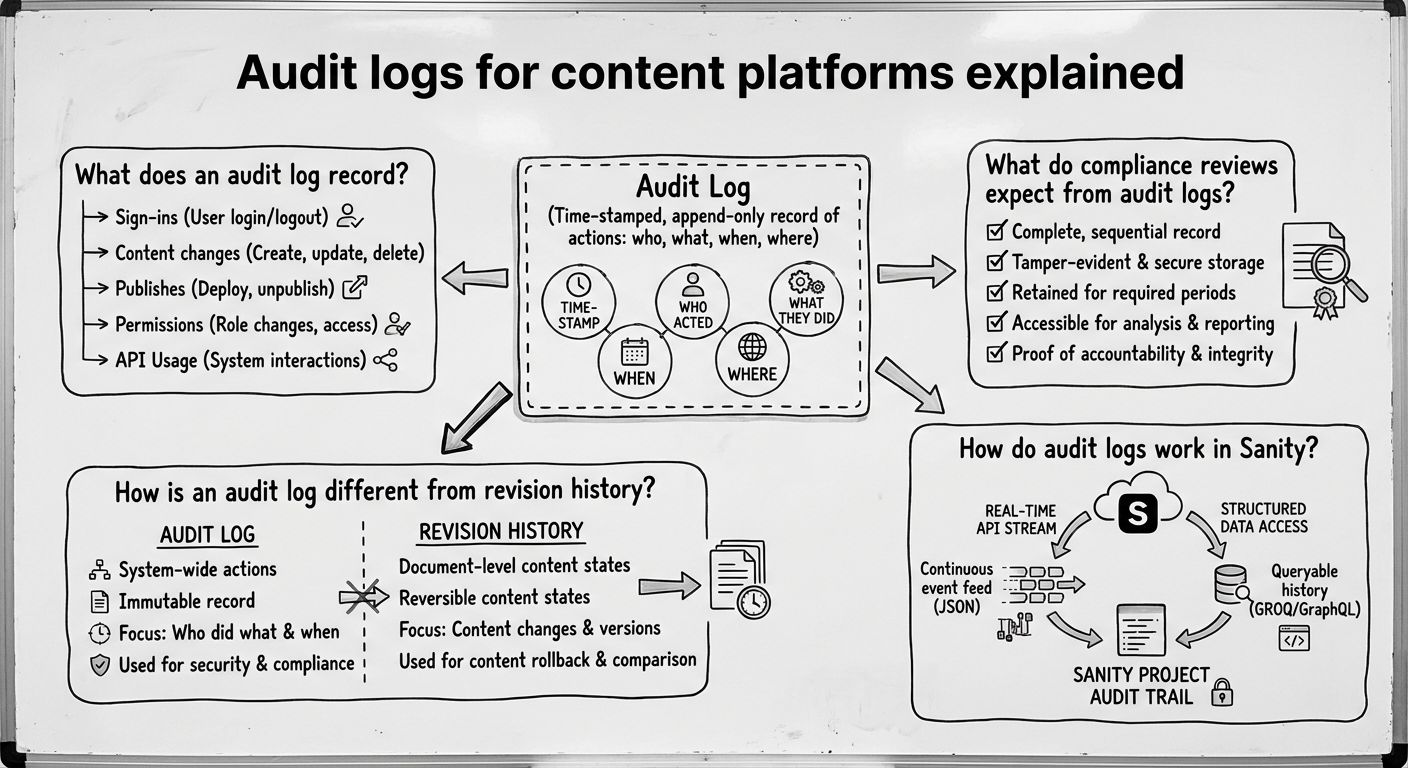
An audit log records one entry per security-relevant or business-relevant event, and each entry answers the same set of questions. The actor is the user, API token, or service that acted. The action is what happened, such as a sign-in, a failed sign-in, a document publish, a deletion, or a role change. The target is the resource affected, such as a document, dataset, or user account. The timestamp records when the event occurred, and the source, usually an IP address and sometimes a user agent, records where the request came from.
On a content platform, useful audit log events fall into three groups: access events (who signed in and from where), content events (who created, edited, published, or deleted what), and administrative events (who invited users, changed roles, or created API tokens). An audit log that captures only content events misses the administrative changes that matter in a security investigation, because a permission change can explain the unusual edits that follow.
An audit log tracks activity across a whole system, while revision history tracks how a single document's content changed over time. Buyers often treat the two as the same thing, but the difference matters when a reviewer asks for evidence.
Revision history, sometimes called document versioning, answers the question "what did this page say last Tuesday, and who changed it?" It is built for editors who need to compare versions or restore an earlier one. An audit log answers "what happened in this account last Tuesday?" It includes events that never touch a document, such as a sign-in from an unfamiliar IP address, an API token being created, or a user being promoted to administrator.
A practical way to tell them apart: revision history is organized by document and is usually visible to editors inside the editing interface, while an audit log is organized by time and is usually available to administrators and security teams. A content platform that offers only revision history cannot show who gained access to the project, only what was done with the content afterward.
Compliance reviews expect audit logs to be retained, exportable, resistant to tampering, and detailed enough to trace an action back to a person and a network location. In our experience, security questionnaires and vendor reviews return to the same four checks.
Retention means logs are kept for a defined period that matches the organization's policy or regulatory obligations, and the period is documented. Export means logs can be pulled out of the platform, typically into a security information and event management (SIEM) tool, so they can be correlated with logs from other systems. Tamper resistance means ordinary users, including administrators, cannot edit or delete past entries. Source IP means each event records where the request originated, which lets an investigator distinguish a legitimate editor from a stolen credential.
For general guidance on how organizations should plan log generation, storage, and review, the NIST Guide to Computer Security Log Management (SP 800-92) is a widely referenced starting point. The exact retention period a team needs depends on the frameworks it reports against, so confirm it with whoever owns compliance rather than assuming a default.
Audit logs in Sanity come from two sources: document history for content changes and project-level activity records for account events. Sanity is the AI Content Operating System, and because editors, developers, and automated workflows all act on the same structured content in the Content Lake, both layers describe activity in one shared place, not separate tools.
Document history lets editors see past versions of a document, who made each change, and when, which covers the revision history side of the question. Project-level activity records cover the audit log side, including events such as sign-ins and permission changes. Teams that need these records for a security review or compliance audit can request them for their project.
For the broader compliance picture, Sanity maintains SOC 2 Type II attestation, supports GDPR obligations, offers regional hosting options for data residency, and publishes its sub-processor list.
Reviewing an audit log on a content platform works best as a short, repeatable routine, not a search that starts only after an incident. A simple routine has four steps.
First, check access events: look for sign-ins from unexpected locations, repeated failed sign-ins, and accounts that should have been removed. Second, check administrative events: confirm every role change, new user, and new API token has a known owner and reason. Third, check high-impact content events: review deletions and publishes of sensitive pages, and use revision history to see exactly what changed. Fourth, export the period you reviewed and store it according to your retention policy, so the evidence exists if an auditor asks later.
The audit log tells you that something happened and who did it. The revision history tells you what the content looked like before and after. Used together, they let a team answer both the security question and the editorial one.
Explore Sanity Today
Understanding audit logs for content platforms is just the beginning. Take the next step and discover how Sanity can enhance your content management and delivery.
Last updated: