ChatGPT Business Hub definition
ChatGPT Business Hub is the dashboard in OpenAI's Businesses in ChatGPT program. A business uses it to claim and verify the profile ChatGPT shows about it, keep its details current, add a product feed with pricing and availability, and see aggregated insights on its mentions, clicks, and discovery topics.
ChatGPT Business Hub is the dashboard in OpenAI's Businesses in ChatGPT program where a business claims, verifies, and updates its ChatGPT profile. To claim a profile, an owner searches for the business, verifies it by phone, email, DNS record, or Shopify, and then passes an identity check. After that, the work is keeping the profile accurate. In Sanity's Content Lake, the website and a product feed export read the same price and availability fields, and a Function can regenerate the feed whenever a document changes.
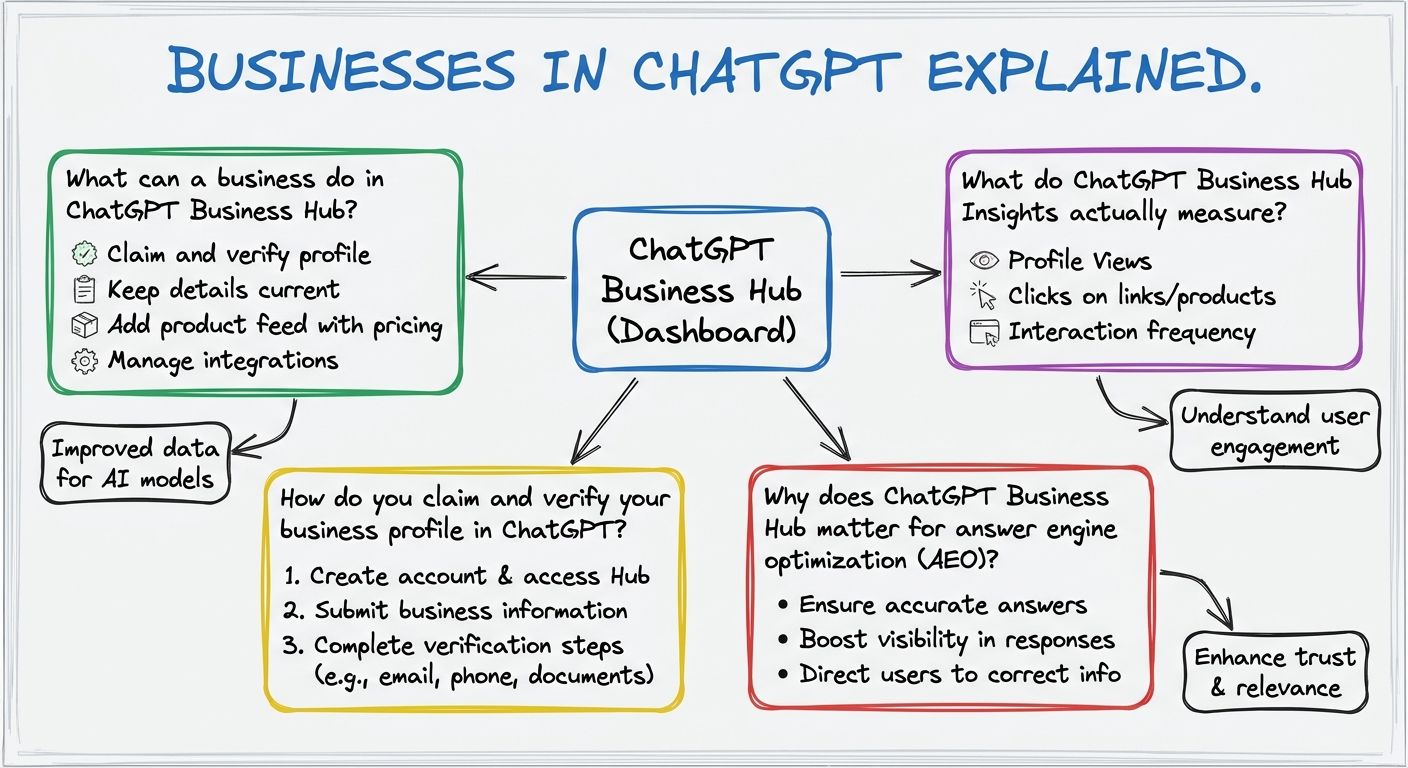
In ChatGPT Business Hub, a verified owner or authorized representative manages how the business appears in ChatGPT. Businesses in ChatGPT is the name of OpenAI's program, and Business Hub is the dashboard inside it. You open it from the ChatGPT sidebar or at chatgpt.com/business-hub. In Business Hub, you can claim and verify the business, edit profile details such as category, description, and opening hours, add a product feed with pricing and availability, and see aggregated Insights on how people engage with the business in ChatGPT. You can also publish an optional Business Agent, covered below.
OpenAI opened Businesses in ChatGPT in beta on November 10, 2026, according to Promptwatch and DataNorth. DataNorth reports, citing Digiday's briefing with OpenAI, that Business Hub is free during the beta and that OpenAI has not ruled out charging later.
Who can claim depends on the type of business. Online businesses with a website can claim wherever ChatGPT is available and verification is supported. OpenAI's own wording, quoted by BrightLocal, is that "local stores and restaurants can currently claim only an existing U.S. listing." OpenAI describes the program on its Businesses in ChatGPT page and in the help article Setting up your business on ChatGPT.
You claim a business profile in ChatGPT in five steps inside Business Hub, based on the walkthroughs from Promptwatch, DataNorth, and BrightLocal.
Step 1: sign in to ChatGPT, open Business Hub, and search for the business by name. Step 2: pick the matching listing and confirm which ChatGPT account will manage it. Step 3: choose a verification method. Business Hub shows only the methods that apply to that listing: a code sent to the business phone by SMS or automated call, a code sent to the business email, a DNS TXT record (a short text entry added in the website's domain settings), or connecting a Shopify store. Step 4: wait for OpenAI's review, with the decision sent by email. Step 5: pass an identity check run by Persona, an outside verification service, which may ask for a government ID, business registration details, and proof that you can act for the company.
The Persona check is required before the business can publish profile edits, connect a product feed, see Insights, or build an agent. The profile gets its blue check after this step. Access is rolling out through a waitlist. Promptwatch tested both paths on November 11, 2026, and found that a business ChatGPT already lists may have to wait, while a business ChatGPT does not yet know can create and verify a profile right away.
ChatGPT Business Hub matters for answer engine optimization (the practice of making a business accurately visible in AI-generated answers) because it gives a business a direct way to supply ChatGPT with accurate information. According to BrightLocal, ChatGPT previously built its picture of a business from the business's website, Yelp, directories, and data aggregators. With Business Hub, the business corrects its category, description, hours, and products at the source, and it gets OpenAI's own data on the mentions, clicks, and discovery topics behind its visibility.
The audience is large. OpenAI says ChatGPT reaches about 1.2 billion people a week, as reported by DataNorth. BrightLocal's own consumer study found that ChatGPT and other generative AI tools rose from 6% to 45% as a source of local business recommendations over the year.
A claimed profile does not guarantee better placement. DataNorth, citing Digiday's briefing with OpenAI VP of monetization Benji Shomair, reports that ChatGPT keeps making its own recommendations, though better information helps it show the business in more relevant conversations. Business Hub is one channel within answer engine optimization. The rest is the public content on your website and elsewhere that answer engines retrieve from.
ChatGPT Business Hub Insights measures three things: mentions, website clicks, and discovery topics, which OpenAI's help article describes as topics "that group themes in ChatGPT answers about your business." Promptwatch reports a 28-day window with a 7-day and 28-day toggle and a list of the top five discovery topics.
The definitions in Insights are narrow. For an online business, a mention counts only when ChatGPT references the business's website. Naming the brand alone does not count. For a local business, showing its location is enough. A click means a click on a link in ChatGPT, not a completed visit or purchase. Low numbers are held back, and businesses see themes, never individual prompts or chats. OpenAI says it does not share people's conversations or agent chats with businesses, according to DataNorth.
Insights does not compare a business with its competitors, and it covers ChatGPT only. Third-party AI visibility tools, such as Promptwatch or BrightLocal's tracker, estimate visibility across many AI engines and prompts. Business Hub Insights is first-party OpenAI data limited to linked mentions in ChatGPT.
No. ChatGPT Business Hub is different from ChatGPT Business, the paid workspace plan for teams that use ChatGPT internally. The ChatGPT Business plan covers seats, roles, and admin controls, as described in OpenAI's ChatGPT Business overview. You do not need a ChatGPT Business plan, an Enterprise contract, or an Ads account to claim a profile in Business Hub. Business Hub does show an upsell to a ChatGPT Business plan after a profile is created.
Businesses in ChatGPT is also confused with nearby features. The Business Agent is an optional, labeled agent a business can publish from Business Hub. It answers customer questions using information the business supplies, in a chat kept separate from ChatGPT's own answers. It is available only to eligible US ecommerce and online-service businesses, with one agent per profile. Sponsored business agents belong to ChatGPT Ads, the paid route, and are still in a small test with selected advertisers. Ads Manager also accepts product feeds for ad campaigns, separately from the Business Hub product feed.
BrightLocal calls Business Hub OpenAI's version of Google Business Profile, "with a little Search Console sprinkled in." The two work in a similar way, but they are different platforms with different data.
Before claiming a business in ChatGPT, a team should agree on three things: who owns the profile, where the business details and product feed come from, and how the profile stays in step with the website.
Ownership comes first because the Persona identity check sends one person's government ID to an outside service, as DataNorth notes. Settle who does it before anyone starts. Next, decide the source of the product feed. Promptwatch reports that a standard upload targets the US and that Shopify stores sync automatically. Last, decide how the profile matches the website. Promptwatch notes that the profile description is text ChatGPT "can share in conversations when helpful or relevant," so it should say what the website says.
Keeping these in step is easiest when the same details are not maintained by hand in several places. Sanity is the AI Content Operating System. Teams using it structure business details and product data (names, descriptions, prices, and availability) once, as schema-typed documents in the Content Lake. The website and a product feed export then read those same documents. A Sanity Function, which is code that runs when a document is created, updated, or deleted and can call external services, can regenerate or push the feed when a price or stock field changes. The team builds that pattern itself, and it keeps the website, the feed, and the AI channels from drifting apart.
Unlock New Possibilities with Sanity
With ChatGPT Business Hub under your belt, it's time to see what Sanity can do for you. Explore our features and tools to take your content to the next level.
Last updated: