CSS framework definition
A CSS framework is a prewritten library of styles, conventions, and sometimes components that developers use to build the visual layer of a website or app faster and more consistently than writing every style rule from scratch.
There is no single best CSS framework. The right choice depends on how mature your design system is, how much CSS you can afford to ship, what your team already knows, and which frontend framework you build with. Tailwind suits custom designs, and Bootstrap suits ready-made interfaces. In Sanity, rich text is structured as Portable Text, which is JSON with no styling attached, so any CSS framework can render it and switching frameworks later leaves content untouched.
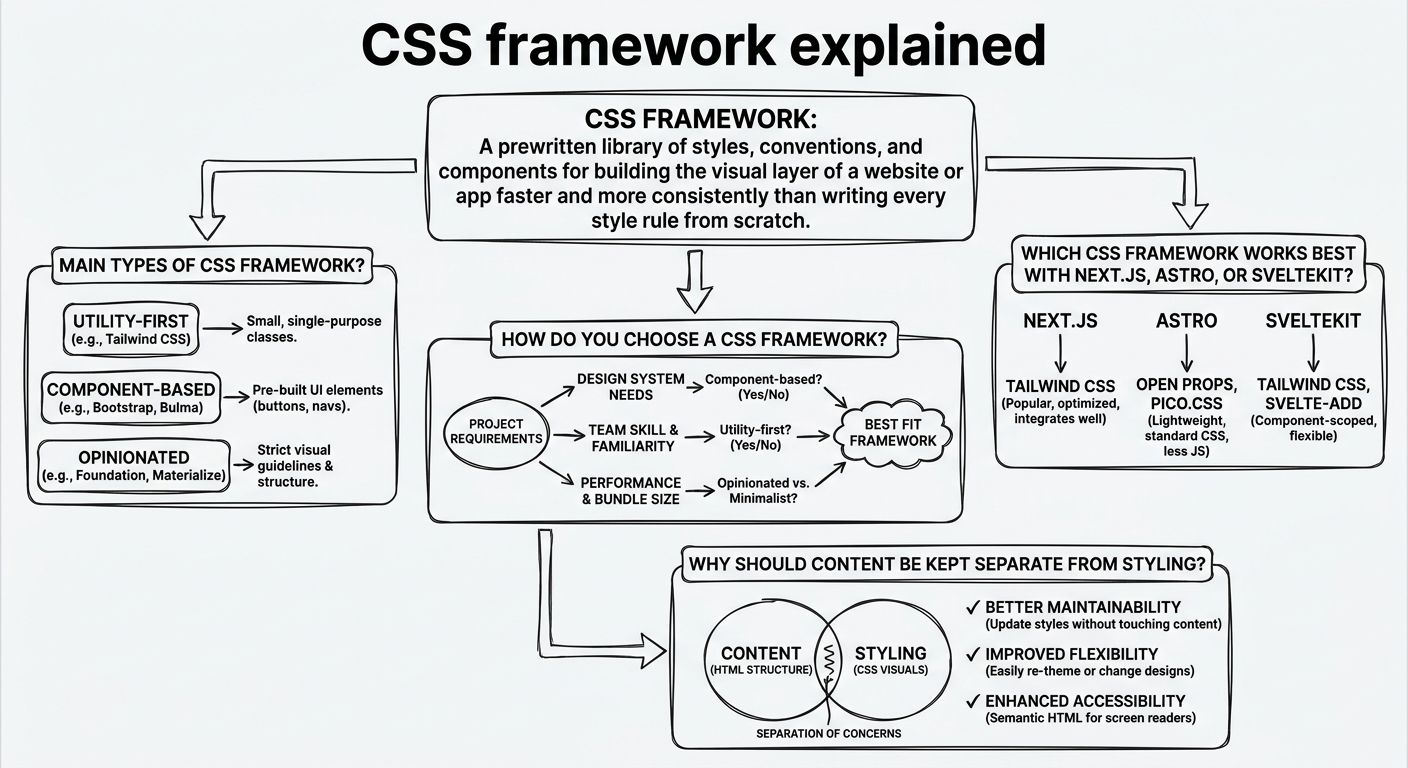
CSS frameworks fall into three main types: utility-first, component-based, and CSS-in-JS (including its zero-runtime variants). Each type puts styling decisions in a different place, and each has a different cost.
A utility-first CSS framework, such as Tailwind CSS, gives you small single-purpose classes (one for padding, one for color, one for a flex layout) that you combine directly in your markup. The benefit is speed and design control without writing custom stylesheets. The trade-off is long class lists in your HTML, and a learning curve for the naming system.
A component-based CSS framework, such as Bootstrap, ships finished pieces like buttons, navbars, modals, and grids. The benefit is a working interface on day one. The trade-off is that sites can look alike, and overriding the defaults to match a distinct brand takes more effort than building from scratch.
CSS-in-JS libraries write styles inside JavaScript components, so styles can react to props and state. Runtime versions generate CSS in the browser, which adds JavaScript work on every page. Zero-runtime approaches, such as vanilla-extract, keep the authoring style of CSS-in-JS but extract static CSS files at build time, trading some dynamic flexibility for lighter pages.
Choosing a CSS framework comes down to four questions, asked in order.
First, how mature is your design system (the shared set of components, rules, and visual decisions a product follows)? If you already have one with defined colors, spacing, and type scales, a utility-first or zero-runtime CSS framework lets you encode those decisions as design tokens without fighting someone else's defaults. If you have no design system yet, pick a component-based framework for sensible defaults.
Second, how much CSS and JavaScript can you ship? Frameworks that strip unused styles at build time, or that generate static CSS, keep pages lighter than shipping a full component library or a runtime styling engine.
Third, what does your team already know? A framework your developers can read fluently will usually beat a theoretically better one they have to learn under deadline. That is our experience, not a law, but it holds often enough to weigh heavily.
Fourth, does the CSS framework fit your frontend framework? Some styling approaches work cleanly with server rendering, and some require extra setup, which matters more each year as rendering moves to the server.
For Next.js,
Next.js is the clearest case. Its documentation on CSS-in-JS explains that runtime CSS-in-JS libraries need extra configuration in the App Router and only work inside Client Components, because styles generated in the browser do not fit the Server Component model. A build-time CSS framework avoids that constraint.
Astro and SvelteKit both include scoped styles, meaning CSS written inside a component applies only to that component. Many teams on these frameworks use the built-in scoping alone, or pair it with a utility-first CSS framework for shared layout and spacing. A component-based framework like Bootstrap works in all three, but its JavaScript-driven components may need wrappers to behave well in each framework's rendering model.
Keeping content separate from styling means a website's words, images, and structure carry no information about how they look, so a CSS framework can present them and a redesign does not require editing content.
The opposite pattern is content stored as HTML with classes or inline styles baked in. When that content was written for Bootstrap, every paragraph may contain Bootstrap class names, and moving to a different CSS framework means finding and rewriting them across thousands of entries.
Yes, you can change CSS frameworks without migrating content, provided the content was never tied to a particular frontend in the first place.
Sanity, the AI Content Operating System, works this way because it does not depend on any frontend. Content is structured in the Content Lake according to a schema you define, and rich text is stored as Portable Text, so nothing in a document references class names, stylesheets, or a specific CSS framework. A team moving from Bootstrap to Tailwind CSS, or from runtime CSS-in-JS to a zero-runtime library, rewrites the components that render the content and leaves every document as it was.
The same separation lets one set of content feed several frontends at once, each with its own CSS framework, such as a marketing site in Astro and an app in Next.js. Pairing that separation with a design system and shared design tokens keeps the visual result consistent even when the styling tools differ.
Explore Sanity Today
Understanding CSS framework is just the beginning. Take the next step and discover how Sanity can enhance your content management and delivery.
Last updated: