Git-based CMS definition
A Git-based CMS is a content management system that keeps content as files, such as Markdown, JSON, or YAML, in a Git repository instead of a database. Every edit is recorded as a Git commit, usually through a web editing interface that commits on the editor's behalf, and the site is rebuilt from those files.
A Git-based CMS keeps content as Markdown, JSON, or
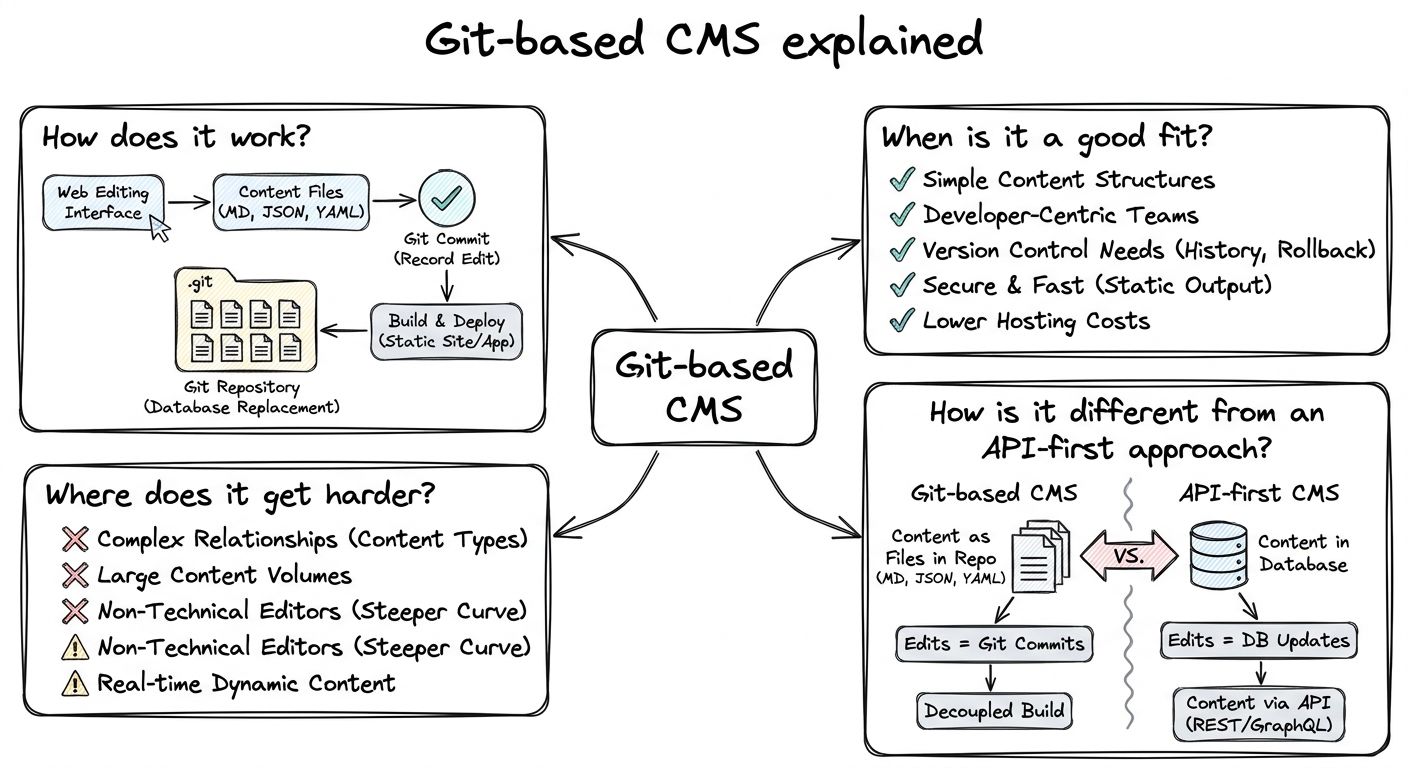
A Git-based CMS puts an editing interface on top of files in a Git repository. When an editor saves, the tool writes the change to a Markdown, JSON, or YAML file and records it as a commit, a saved, attributed snapshot in Git's history. Developers can edit the same files directly in their code editor.
Many Git-based CMSes add a review step built on branches and pull requests. By default, Decap CMS pushes each save as a commit straight to the publication branch. With its editorial workflow turned on, a draft commits to a new branch and opens a pull request. Later edits add commits to that branch, and approving the draft merges the pull request.
Publishing in a Git-based CMS runs through a site build. A static site generator or framework reads the files and generates the pages, so, as Decap's comparison page puts it, "a change goes live when the site rebuilds."
An open-source Git-based CMS usually needs a Git host and a way to log in. Pages CMS works with GitHub repositories and is set up through a .pages.yml file. Decap's backends include GitHub, GitLab, Gitea, Bitbucket, and others, and a self-hosted GitHub login needs an OAuth proxy or Decap's optional hosted service.
A Git-based CMS fits best on static or framework-built sites, such as those made with
A Git-based CMS also suits developer-run projects where developers and editors share the same files. Content changes go through the same history, review, and rollback as code. Teams own portable plain files, and they do not have to run a separate database or content service.
For documentation in particular, keeping prose next to the code it describes means a single pull request can update a feature and its docs together.
A Git-based CMS gets harder as content grows, changes faster, or serves more than one website. Decap, which builds a Git-based CMS, is candid about the limits on its comparison page (published Nov. 4, 2026): "Git is a file store, not a database." It describes Git-based tools as "Fine to thousands of entries; slower beyond that," and treats tens of thousands of entries as the point where the approach becomes the wrong choice.
Five pressure points come up repeatedly. Speed: every change waits for a build, so content that must go live in seconds is a poor match. Relationships: references between files exist, but there are no queries. Collaboration: Git handles simultaneous editing with commits and merges, not live co-editing. Channels: several apps that each need an API, or user-generated content, do not map well to files in a repository. Operations: Decap lists Git host rate limits, running an OAuth server for logins, and giving editors access without handing them the whole repository.
Non-technical editors are a design concern too. Editing UIs such as Pages CMS exist so editors can work "without asking every editor to learn Git." In our experience, AI agents and automation raise the same issue as multiple channels: they work best against queryable structured content, not files that only make sense after a build.
A Git-based CMS delivers content as files in your repository, while an API-first approach keeps structured content in a hosted service that websites, apps, and other channels query at build or request time. The difference is not files, but queries and delivery: it determines how fast changes go live, how content can be queried, and how many people can edit at once.
A common confusion is to assume that any system with configuration in Git is Git-based. Keeping your
Sanity is the AI Content Operating System, and it divides the two layers on purpose. The Schema is written as JavaScript or TypeScript in sanity.config.ts and reviewed in Git like any other code. Content is saved as structured JSON in the Content Lake, where it can be queried with GROQ, linked by reference, and delivered to any channel. Sanity Studio is an open-source, real-time collaborative
Well-known Git-based CMS tools include Decap CMS, Pages CMS, and TinaCMS. Decap's comparison page also lists Sveltia CMS, Keystatic, and CloudCannon. Some vendors call the category "Git-backed" instead, but the meaning is the same.
Decap CMS is open source, configured with a config.yml file, works with several Git hosts, and offers a pull request based editorial workflow. Pages CMS is open source, works with GitHub repositories, and is configured with a .pages.yml file. It provides only the editing layer on top of an existing Git-based project. TinaCMS describes itself as Git-backed and offers visual editing. Its hosted layer, TinaCloud, uses GitHub pull requests to structure the editing process.
When comparing Git-based CMS tools, the useful questions concern fit rather than rankings. Which Git hosts does the tool support? Do logins need a separate OAuth server or a hosted service? Does editorial review use branches and pull requests? Can editors preview changes visually? How large will the content collection grow? The answers show whether a Git-based CMS is the right fit, or whether the project needs queryable, API-first content instead.
Discover More with Sanity
Now that you've learned about Git-based CMS, why not start exploring what Sanity has to offer? Dive into our platform and see how it can support your content needs.
Last updated: