> For AI agents: the complete Sanity documentation index is available at [https://www.sanity.io/docs/llms.txt](https://www.sanity.io/docs/llms.txt).
# Test your workflows
Run the real workflow engine in memory: drive every path of a workflow, control the clock, simulate guard enforcement, and assert on exactly what happens.
> [!WARNING]
> Early access
> Workflows is in early access, built in public. Read [How early access works](https://www.sanity.io/docs/workflows/prerelease) before you rely on it.
The test bench, `@sanity/workflows-test`, runs the real workflow engine against an in-memory [Sanity client](https://www.sanity.io/docs/apis-and-sdks/js-client-getting-started). It needs no [Sanity project](https://www.sanity.io/docs/platform-management/projects-organizations-and-billing) and no network. You get real `defineWorkflow` definitions, a clock you control, actors you choose, and simulated guard enforcement. So you can test every path through a workflow before the definition reaches a [dataset](https://www.sanity.io/docs/content-lake/datasets).
In this guide, you’ll set up a bench, drive an instance through its stages, test who can act, test what the start picker surfaces, control the clock to test deadlines, prove a guard holds, complete effects, and run the suite in CI.
Prerequisites:
- A TypeScript project with `@sanity/workflows` installed and a workflow definition to test.
- A test runner. The examples use Vitest, but the bench has no runner dependency.
## Set up the bench
Install the bench as a dev dependency, along with Vitest if you don’t have a runner yet:
**npm**
```shell
npm install --save-dev @sanity/workflows @sanity/workflows-test vitest
```
**pnpm**
```shell
pnpm add --save-dev @sanity/workflows @sanity/workflows-test vitest
```
**yarn**
```shell
yarn add --dev @sanity/workflows @sanity/workflows-test vitest
```
**bun**
```shell
bun add --dev @sanity/workflows @sanity/workflows-test vitest
```
Keep `@sanity/workflows` and `@sanity/workflows-test` on the same version.
The package exports `createBench`. Each call builds a fresh, isolated bench: the real engine connected to an in-memory client, a default actor, and a clock the test controls. Nothing carries over between benches, so there’s no cleanup to write.
The bench reaches documents in other resources through its engine’s default client, with no option to set. That covers other datasets, Media Libraries, Canvases, and dashboards. To narrow the resources a test may reference, list datasets in `serveResources`, which accepts dataset entries only, or pass your own `resourceClients` resolver.
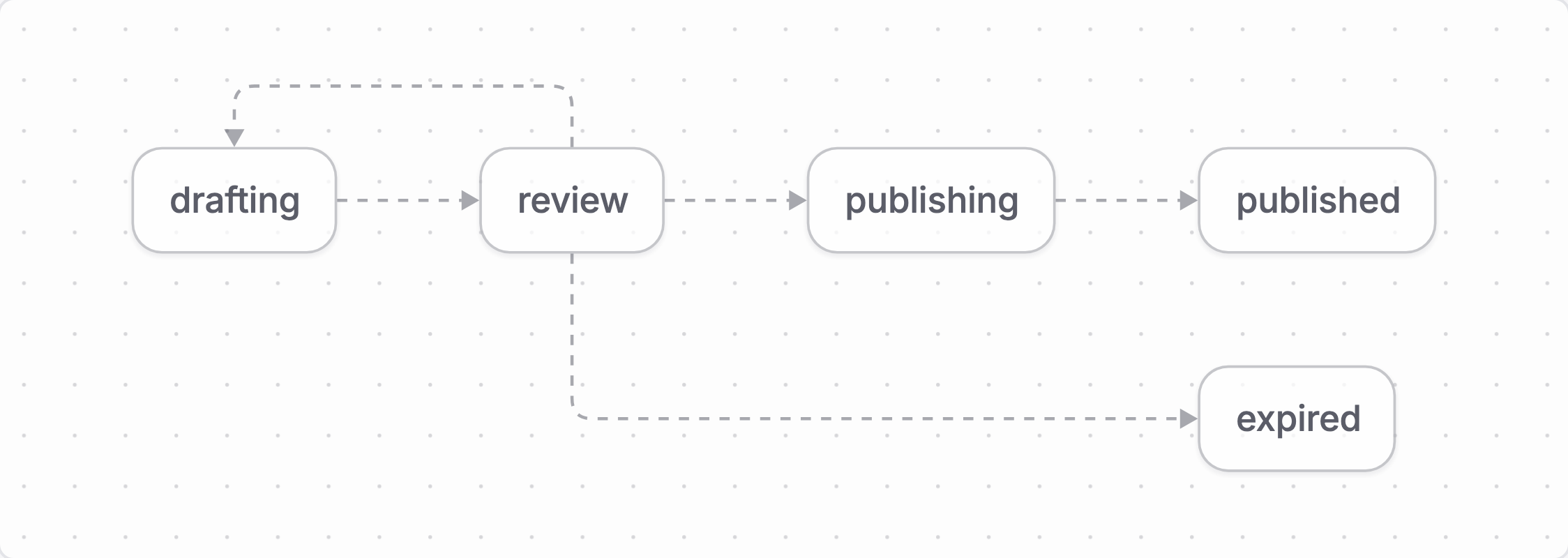
The examples test one editorial review workflow, `article-review`. It moves an article from drafting, through review, to publishing:
- A start requirement allows only one unfinished review per article.
- During review, a guard stops edits to the article’s title and body.
- In publishing, an effect does the final publish.
**article-review.ts**
```typescript
import {
defineAction,
defineActivity,
defineField,
defineGuard,
defineStage,
defineTransition,
defineWorkflow,
} from '@sanity/workflows/define'
export const articleReview = defineWorkflow({
name: 'article-review',
title: 'Article review',
initialStage: 'drafting',
// Refuse another unfinished run of this definition for the same subject.
start: {
requirements: [
{
type: 'singleSubject',
name: 'one-open-review',
title: 'Review already in progress',
},
],
},
fields: [
defineField({type: 'subject', name: 'subject', required: true, initialValue: {type: 'input'}}),
defineField({type: 'string', name: 'publishOutcome'}),
],
stages: [
defineStage({
name: 'drafting',
activities: [
defineActivity({
name: 'write',
actions: [
defineAction({name: 'submit', title: 'Submit for review', roles: ['writer'], status: 'done'}),
],
}),
],
transitions: [defineTransition({name: 'to-review', to: 'review'})],
}),
defineStage({
name: 'review',
// Freeze the article's copy while the editor reads it.
guards: [
defineGuard({
name: 'freeze-copy',
match: {idRefs: [{type: 'fieldRead', field: 'subject'}], actions: ['update']},
predicate: '!delta::changedAny((body, title))',
}),
],
// The editor's decision is data; the transition triggers read it.
fields: [defineField({type: 'string', name: 'decision'})],
activities: [
defineActivity({
name: 'decide',
actions: [
defineAction({
name: 'approve',
title: 'Approve',
roles: ['editor'],
status: 'done',
ops: [{type: 'field.set', target: {field: 'decision'}, value: {type: 'literal', value: 'approve'}}],
}),
defineAction({
name: 'send-back',
title: 'Send back',
roles: ['editor'],
status: 'done',
ops: [{type: 'field.set', target: {field: 'decision'}, value: {type: 'literal', value: 'send-back'}}],
}),
// A trigger: the engine fires it once the deadline passes.
defineAction({
name: 'expire',
when: '$fields.subject.reviewDeadline <= $now',
status: 'failed',
}),
],
}),
],
transitions: [
defineTransition({
name: 'to-publishing',
to: 'publishing',
when: "$allActivitiesDone && $fields.decision == 'approve'",
}),
defineTransition({
name: 'to-drafting',
to: 'drafting',
when: "$allActivitiesDone && $fields.decision == 'send-back'",
}),
defineTransition({name: 'to-expired', to: 'expired', when: '$anyActivityFailed'}),
],
}),
defineStage({
name: 'publishing',
activities: [
defineActivity({
name: 'publish',
actions: [
// Entry trigger: queues the publish effect on arrival.
defineAction({
name: 'queue-publish',
when: 'true',
effects: [{name: 'article.publish', bindings: {}}],
status: 'done',
}),
],
}),
],
transitions: [
defineTransition({name: 'to-published', to: 'published', when: "$fields.publishOutcome == 'ok'"}),
],
}),
defineStage({name: 'published'}), // terminal: no outgoing transitions
defineStage({name: 'expired'}),
],
})
```
The test seeds the published article, which the workflow reads, and its draft, which the guard protects. It then freezes the clock, deploys the definition, and starts an instance:
Both review definitions in this guide declare a required subject, so each deploy passes `expectedMinReaderModel: 10`. Before you deploy outside the bench, see [Upgrade Workflows packages](https://www.sanity.io/docs/workflows/upgrade) to update every runtime that shares the workflow resource.
**article-review.test.ts**
```typescript
import {
ActionDisabledError,
type Actor,
} from '@sanity/workflows'
import {createBench, GuardDeniedError, subjectField} from '@sanity/workflows-test'
import {expect, test} from 'vitest'
import {articleReview} from './article-review'
const T0 = '2026-03-01T09:00:00.000Z'
const DAY_MS = 24 * 60 * 60 * 1000
const writer: Actor = {kind: 'person', id: 'wanda', roles: ['writer']}
const editor: Actor = {kind: 'person', id: 'ed', roles: ['editor']}
async function startArticleReview() {
const article = {
_id: 'article-1',
_type: 'article',
title: 'Bench-tested workflows',
body: 'First draft',
reviewDeadline: '2026-03-03T09:00:00.000Z', // two days after T0
}
const bench = createBench({
now: T0,
documents: [article, {...article, _id: 'drafts.article-1'}],
})
await bench.deployDefinitions({
expectedMinReaderModel: 10,
definitions: [articleReview],
})
const {instance} = await bench.startInstance({
definition: 'article-review',
initialFields: [subjectField('article-1', {type: 'article'})],
})
return {bench, instance}
}
test('a new run starts in drafting', async () => {
const {instance} = await startArticleReview()
expect(instance.currentStage).toBe('drafting')
})
```
`deployDefinitions` and `startInstance` are the engine’s own commands. The bench wraps them and sets up the client, scope, and access for you.
`subjectField` builds the `subject` entry for a document in the bench’s default resource, so you don’t write reference URIs by hand. `startInstance` returns an `OperationResult`. Its `instance` is the instance document after the start and any automatic moves that follow. Here the instance begins in `drafting`, with the `write` activity active.
Use `subjectField()` for the workflow’s `subject` field. Use `docRefField()` for any other document reference. The bench helper `instancesForSubject` finds instances by either kind of field, which helps while you move older definitions to `subject` fields.
## Drive an instance through its stages
Bench commands take the same arguments as the engine’s, plus an `actor` shortcut. Role checks compare the actor’s [roles](https://www.sanity.io/docs/user-guides/roles) by exact name, so fire each action as an actor who holds the role:
```typescript
test('an approved article reaches publishing', async () => {
const {bench, instance} = await startArticleReview()
await bench.fireAction({instanceId: instance._id, activity: 'write', action: 'submit', actor: writer})
expect(await bench.currentStage(instance._id)).toBe('review')
const {instance: after} = await bench.fireAction({
instanceId: instance._id,
activity: 'decide',
action: 'approve',
actor: editor,
})
expect(after.currentStage).toBe('publishing')
})
```
Firing `approve` writes the `decision` field. That makes the `to-publishing` condition `true`, so the engine moves the instance during the same `fireAction` call. When the promise resolves, all of this has happened. You don’t need to poll or wait.
The send-back loop tests the same way:
```typescript
test('a send-back returns the article to drafting', async () => {
const {bench, instance} = await startArticleReview()
await bench.fireAction({instanceId: instance._id, activity: 'write', action: 'submit', actor: writer})
const {instance: after} = await bench.fireAction({
instanceId: instance._id,
activity: 'decide',
action: 'send-back',
actor: editor,
})
expect(after.currentStage).toBe('drafting')
expect(await bench.activityStatus(instance._id, 'write')).toBe('active')
})
```
The instance is back in `drafting`, and the `write` activity is active again. The `decision` field belongs to the `review` stage, so the next review round starts without a decision.
## Test who can act
`bench.evaluate` returns the same verdicts a UI uses to decide which buttons to show. It lists every action in the current stage, with `allowed` and, when the action isn’t allowed, a `disabledReason`. Evaluate as a specific actor to test both sides of a role check:
```typescript
test('a writer cannot approve, and the verdict says why', async () => {
const {bench, instance} = await startArticleReview()
await bench.fireAction({instanceId: instance._id, activity: 'write', action: 'submit', actor: writer})
const evaluation = await bench.evaluate({instanceId: instance._id, actor: writer})
const approve = evaluation.currentStage.activities
.flatMap((activity) => activity.actions)
.find((candidate) => candidate.action.name === 'approve')
expect(approve).toMatchObject({allowed: false, disabledReason: {kind: 'filter-failed'}})
await expect(
bench.fireAction({instanceId: instance._id, activity: 'decide', action: 'approve', actor: writer}),
).rejects.toBeInstanceOf(ActionDisabledError)
})
```
The `roles` on an action without `when` becomes part of the action’s `filter`. So for a caller without the role, the verdict is `filter-failed`, and a UI hides the action instead of disabling it. If you fire the action anyway, it throws `ActionDisabledError` with the same reason.
The bench’s default actor has the role `*`, which matches no role check. To test roles, pass an actor who holds the real role, as `writer` and `editor` do here.
Like every engine check, these verdicts are advisory. The [Content Lake](https://www.sanity.io/docs/content-lake) is what enforces access. To see which restrictions hold against a client that never calls the engine, read [Actors, tokens, and what’s actually enforced](https://www.sanity.io/docs/workflows/actors-and-enforcement).
To test the Content Lake’s permission check, build the bench with `currentUser` and grants, or pass `grants:` on a single call. A write the grants don’t allow then fails with the same 403 error the real Content Lake returns.
To test conditions that read `$attributes`, pass `attributes` when you create the bench or on a single call. It works the same way as `grants`, and you don’t need the Management API:
```typescript
const bench = createBench({
attributes: {department: 'politics'},
})
await bench.evaluate({instanceId, attributes: {department: 'politics'}})
```
To test a service that writes on someone else’s behalf, build the bench with a `committer`. The committer is a separate identity with write access, such as a service. It commits every bench call, every `bench.session()`, and every engine from `createBenchEngine`.
Each call still has its own identity: the bench’s default actor, or a per-call `actor`, `grants`, `attributes`, or `access`. The engine receives that identity as `access`. History names it, and `$actor`, `roles`, `$can`, and `$attributes` are checked against it. So the same test runs with and without a committer:
```typescript
import {type Actor, type WorkflowAccess} from '@sanity/workflows'
import {createBench, subjectField, WILDCARD_GRANTS} from '@sanity/workflows-test'
import {expect, test} from 'vitest'
import {articleReview} from './article-review'
const editor: Actor = {kind: 'person', id: 'g-editor', roles: ['editor']}
const writer: Actor = {kind: 'person', id: 'g-writer', roles: ['writer']}
const service: WorkflowAccess = {
actor: {kind: 'system', id: 'p-review-service'},
grants: WILDCARD_GRANTS,
}
test.each([
{path: 'direct', options: {}},
{path: 'asserted', options: {committer: service}},
])('history names the editor on the $path path', async ({options}) => {
const article = {_id: 'article-1', _type: 'article', title: 'Draft', body: 'First draft'}
const bench = createBench({...options, currentUser: editor, documents: [article]})
await bench.deployDefinitions({expectedMinReaderModel: 10, definitions: [articleReview]})
const {instance} = await bench.startInstance({
definition: 'article-review',
initialFields: [subjectField('article-1', {type: 'article'})],
})
await bench.fireAction({instanceId: instance._id, activity: 'write', action: 'submit', actor: writer})
const {instance: approved} = await bench.fireAction({
instanceId: instance._id,
activity: 'decide',
action: 'approve',
})
const approval = approved.history.find(
(row) => row._type === 'actionFired' && row.action === 'approve',
)
expect(approval).toMatchObject({actor: {id: editor.id}})
})
```
With a committer, the in-memory Content Lake checks each write against the committer’s grants. So a write still commits when the caller only has read access. A call identity without `grants` gets full grants, with or without a committer. `bench.session({instance})` returns a reactive session that evaluates and commits as the call’s identity.
## Test start visibility
The `article-review` definition has a single-subject start requirement. `evaluateStart` reports whether the requirement is met, without starting anything. `startInstance` checks the requirement again when it starts. A `start.filter` is different: it only controls which documents the definition is offered for. For both checks, see Conditions.
```typescript
import {StartNotAllowedError} from '@sanity/workflows'
test('a second review on the same article is refused', async () => {
const {bench} = await startArticleReview()
const preflight = await bench.evaluateStart({
definition: 'article-review',
initialFields: [subjectField('article-1', {type: 'article'})],
})
expect(preflight).toMatchObject({allowed: false, outcome: 'unsatisfied'})
await expect(
bench.startInstance({
definition: 'article-review',
initialFields: [subjectField('article-1', {type: 'article'})],
}),
).rejects.toBeInstanceOf(StartNotAllowedError)
})
test('a review on a different article starts', async () => {
const {bench} = await startArticleReview()
bench.seedDocuments([{_id: 'article-2', _type: 'article', title: 'Another article', body: 'Draft'}])
const preflight = await bench.evaluateStart({
definition: 'article-review',
initialFields: [subjectField('article-2', {type: 'article'})],
})
expect(preflight).toMatchObject({allowed: true, outcome: 'satisfied'})
const {instance} = await bench.startInstance({
definition: 'article-review',
initialFields: [subjectField('article-2', {type: 'article'})],
})
expect(instance.currentStage).toBe('drafting')
})
```
The second start fails and names the unmet requirement. A different article starts normally. When the first instance completes or is aborted, its article is free again. The requirement applies to this definition only. It stops ordinary duplicate starts, but the Content Lake’s access control is still what enforces access.
A start picker lists the definitions you can start on a document. It gets that list from `definitionsForDocument`, which the bench also provides. Pass the loaded document. The result includes each definition whose subject types and `start.filter` accept it:
```typescript
import {defineField, defineStage, defineWorkflow} from '@sanity/workflows/define'
// A browse-time-pure filter: it reads the candidate document, never $fields,
// so it only offers this review for finance articles.
const financeReview = defineWorkflow({
name: 'finance-review',
title: 'Finance review',
initialStage: 'review',
start: {filter: "articleType == 'finance'"},
fields: [
defineField({type: 'subject', name: 'subject', required: true, initialValue: {type: 'input'}}),
],
stages: [defineStage({name: 'review'})],
})
test('the picker offers article-review and hides a filter that does not match', async () => {
const {bench} = await startArticleReview()
await bench.deployDefinitions({
expectedMinReaderModel: 10,
definitions: [financeReview],
})
const startable = await bench.definitionsForDocument({
document: {_id: 'article-1', _type: 'article'},
})
expect(startable.map((definition) => definition.name)).toEqual(['article-review'])
})
```
`article-review` has no `start.filter`, so the picker offers it even while its start requirement is unmet. `finance-review` appears only for a document whose `articleType` is `finance`. A UI can call `evaluateStart` after it collects the start inputs, to show unmet requirements before it calls `startInstance`.
## Control the clock
The bench clock sets `$now` and every timestamp the engine records. `createBench({now: T0})` freezes the clock at a known time. `advance` moves it forward, and `setNow` jumps to a given time. Neither one writes anything, so call `tick` to make the engine act on the new time.
```typescript
test('an undecided review expires when the deadline passes', async () => {
const {bench, instance} = await startArticleReview()
await bench.fireAction({instanceId: instance._id, activity: 'write', action: 'submit', actor: writer})
const before = await bench.tick({instanceId: instance._id})
expect(before).toMatchObject({changed: false, cascaded: 0})
bench.advance(3 * DAY_MS) // now three days past T0, one past the deadline
const after = await bench.tick({instanceId: instance._id})
expect(after.instance.currentStage).toBe('expired')
})
```
Before the deadline, the tick changes nothing and returns `changed: false`. After `advance` passes the deadline, the next tick fires the `expire` action. The `decide` activity becomes `failed`, and the engine fires the `$anyActivityFailed` transition, which moves the instance to `expired`. History records the frozen clock time. The article itself never changed; only time moved.
## Test guard enforcement
When the instance enters the `review` stage, the engine creates the `freeze-copy` guard document. When the instance leaves the stage, the engine deletes it. The Content Lake doesn’t enforce guards against raw clients, but the bench checks writes against active guards the way the Content Lake would if it did. So you can test denied edits.
`activeGuardsForDocument` previews a denial without writing. `editDocument` attempts the write and throws `GuardDeniedError` when a guard rejects it. This content-edit guard targets the draft, so both calls use `drafts.article-1`:
```typescript
test('the review stage locks the article copy', async () => {
const {bench, instance} = await startArticleReview()
await bench.fireAction({instanceId: instance._id, activity: 'write', action: 'submit', actor: writer})
const active = await bench.activeGuardsForDocument('drafts.article-1')
expect(active.map((guard) => guard.name)).toEqual(['freeze-copy'])
await expect(
bench.editDocument({documentId: 'drafts.article-1', patch: {set: {body: 'Reworded during review'}}}),
).rejects.toThrow(GuardDeniedError)
})
```
The guard’s predicate denies only writes that change `body` or `title`, so a [patch](https://www.sanity.io/docs/content-lake/http-patches) that leaves both alone goes through even during review.
Drive the stage to exit and the guard document is deleted:
```typescript
test('the guard is deleted when the review stage exits', async () => {
const {bench, instance} = await startArticleReview()
await bench.fireAction({instanceId: instance._id, activity: 'write', action: 'submit', actor: writer})
await bench.fireAction({instanceId: instance._id, activity: 'decide', action: 'send-back', actor: editor})
expect(await bench.activeGuardsForDocument('drafts.article-1')).toEqual([])
await bench.editDocument({documentId: 'drafts.article-1', patch: {set: {body: 'Second draft'}}})
})
```
With the review stage exited, no guards remain active and the same edit succeeds.
## Complete effects
When the instance enters `publishing`, the engine fires the `queue-publish` action, which queues the `article.publish` effect. In production, a runtime calls `drainEffects`, and the engine runs your effect handler, which does the external work, then commits the result. In a test, you act as the handler:
- `listPendingEffects` lists the queued effects.
- `completePendingEffect` completes an effect by name. Its `ops` write the result onto the instance in the same commit.
```typescript
test('completing the publish effect finishes the run', async () => {
const {bench, instance} = await startArticleReview()
await bench.fireAction({instanceId: instance._id, activity: 'write', action: 'submit', actor: writer})
await bench.fireAction({instanceId: instance._id, activity: 'decide', action: 'approve', actor: editor})
const pending = await bench.listPendingEffects({instanceId: instance._id})
expect(pending.map((effect) => effect.name)).toEqual(['article.publish'])
await bench.completePendingEffect({
instanceId: instance._id,
effect: 'article.publish',
status: 'done',
ops: [
{
type: 'field.set',
target: {scope: 'workflow', field: 'publishOutcome'},
value: {type: 'literal', value: 'ok'},
},
],
actor: {kind: 'system', id: 'g-publish-service'},
})
expect(await bench.currentStage(instance._id)).toBe('published')
})
```
The completion sets `publishOutcome`. The `to-published` transition reads that field, so the engine fires it during the same call, and the instance reaches `published`. An effect reports its result through fields; it never changes an activity’s status directly. To test the failure path, complete with `status: 'failed'` and check which stage the instance stops in.
## Recover a terminal activity
To test an operator recovering a stuck instance, use `resetActivity`. Set `to: 'active'` to run the activity again, or `to: 'skipped'` to skip it so the workflow can continue:
```typescript
const {instance: recovered} = await bench.resetActivity({
instanceId: instance._id,
activity: 'publish',
to: 'active', // use 'skipped' to bypass it
})
expect(recovered.currentStage).toBe('publishing')
```
## Test query index lag
By default, engine commands commit with `async` visibility. In a real dataset, a GROQ query right after a command can miss the change for up to about a second. `createBench({laggingQueryIndex: true})` simulates that delay: GROQ queries on the bench don’t see `async` commits until you call `bench.advanceQueryIndex()`. Reads by ID, such as `getInstance`, and the instance a command returns are always current.
Use this to prove two things: that your code never reads its own write back through GROQ, and that `visibility: 'sync'` makes a query right after a command current:
```typescript
test('a GROQ read sees an async commit only after the index catches up', async () => {
const bench = createBench({laggingQueryIndex: true})
// …deploy the definition…
const {instance} = await bench.startInstance({definition: 'review', visibility: 'sync'})
await bench.fireAction({instanceId: instance._id, activity: 'review', action: 'approve'})
const stage = () => bench.client.fetch('*[_id == $id][0].currentStage', {id: instance._id})
expect(await stage()).toBe('review')
bench.advanceQueryIndex()
expect(await stage()).toBe('approved')
})
```
Some definitions always commit with `sync` visibility, so their writes are visible at once. That’s any definition with a query-sourced field, a `spawn`, or a `singleSubject` start requirement, including on an ancestor or a live child. `bench.queryIndexBehind()` reports whether a commit is waiting for an advance. On a lagging bench, GROQ queries run with full access, and you can’t also pass `client`. See [commit visibility](https://www.sanity.io/docs/workflows/engine).
## Run it in CI
Bench tests are plain unit tests. They need no Sanity project, no [tokens](https://www.sanity.io/docs/content-lake/http-auth), and no network, and benches share no state, so they run in parallel like the rest of your suite. Run them the same way:
**npm**
```shell
npx vitest run
```
**pnpm**
```shell
pnpm dlx vitest run
```
**yarn**
```shell
yarn dlx vitest run
```
**bun**
```shell
bunx vitest run
```
The command exits non-zero when a test fails, so your CI job fails when a workflow regresses. When you change a definition, re-run the suite: a broken path fails in milliseconds, long before the definition reaches a dataset.
## Next steps
- [Quick start: run your first workflow](https://www.sanity.io/docs/workflows/getting-started): install the engine, deploy a definition, and run it against a real dataset.
- [Workflows](https://www.sanity.io/docs/workflows/introduction): the model behind stages, conditions, guards, and effects.
- [Cookbook](https://www.sanity.io/docs/workflows/cookbook): realistic, worked workflow examples to adapt.
- [Reference](https://www.sanity.io/docs/workflows/reference): every construct and engine verb, with exact shapes.
> [!NOTE]
> Visiting agent?
> Workflows has MCP tools that let an agent inspect, operate, author, validate, and deploy workflows. An agent host embeds these tools. Ask the person you work for whether your host [includes the Workflows tools](https://www.sanity.io/docs/workflows/mcp).