# useApplyDocumentActions
https://www.sanity.io/learn/course/build-content-apps-with-sanity-app-sdk/use-apply-document-actions.md
Perform actions on documents to end—or begin—the content lifecycle
Document Actions are primarily used to modify the "version" of an entire document—to publish a draft document, to discard the current draft, or to delete the document.
In our app it may be useful to delete feedback that we don't want to keep (this is different from spam where we may want to keep it as a record of a sender for who all future submissions should be blocked).
## Delete document action
1. **Create** a new component to hold all our document actions.
```tsx:app-feedback/src/Actions.tsx
import {
deleteDocument,
type DocumentHandle,
useApplyDocumentActions,
} from "@sanity/sdk-react"
import { Button, Flex } from "@sanity/ui"
type ActionsProps = {
handle: DocumentHandle
}
export function Actions({ handle }: ActionsProps) {
const apply = useApplyDocumentActions()
const handleDelete = () => apply(deleteDocument(handle))
return (
)
}
```
1. **Update** the `FeedbackEdit` component to render it
```tsx:app-feedback/src/FeedbackEdit.tsx
```
You'll add some more buttons to this component in latter lessons, that's why we're wrapping it with a `Flex` component now.
You can now click the "delete" button to delete a document. This action is immediate and the document is removed from the Content Lake.
Remember, you can re-import the seed data if you want to re-populate the feedback list!
You may notice a _small_ bug into the UI—the currently selected document no longer exists and displays for a few moments before the list is updated. We'll improve this in a future lesson.
## Edit and publish in one function
The intention of these buttons is to perform a final action before moving onto the next piece of feedback. If we only edited the `status` field to set the value as "approved" or "spam," the resulting document would still be in a draft version.
What we need is a function that will both edit the field value of the document and publish it.
1. **Update** the Actions component to include buttons to mark as spam and approve
```tsx:app-feedback/src/Actions.tsx
import {
deleteDocument,
type DocumentHandle,
publishDocument,
useApplyDocumentActions,
useEditDocument,
} from "@sanity/sdk-react"
import { Button, Flex } from "@sanity/ui"
type ActionsProps = {
handle: DocumentHandle
}
export function Actions({ handle }: ActionsProps) {
const apply = useApplyDocumentActions()
const editStatus = useEditDocument({ ...handle, path: "status" })
const handleDelete = () => apply(deleteDocument(handle))
const handleMarkAsSpam = () => {
editStatus("spam")
apply(publishDocument(handle))
}
const handleApprove = () => {
editStatus("approved")
apply(publishDocument(handle))
}
return (
)
}
```
1. Invoking `editDocument` is how you can perform bulk editing operations across several documents at the same time.
You'll see these two new actions will invoke both `editDocument` to set the new `status` value and apply the `publishDocument` action.
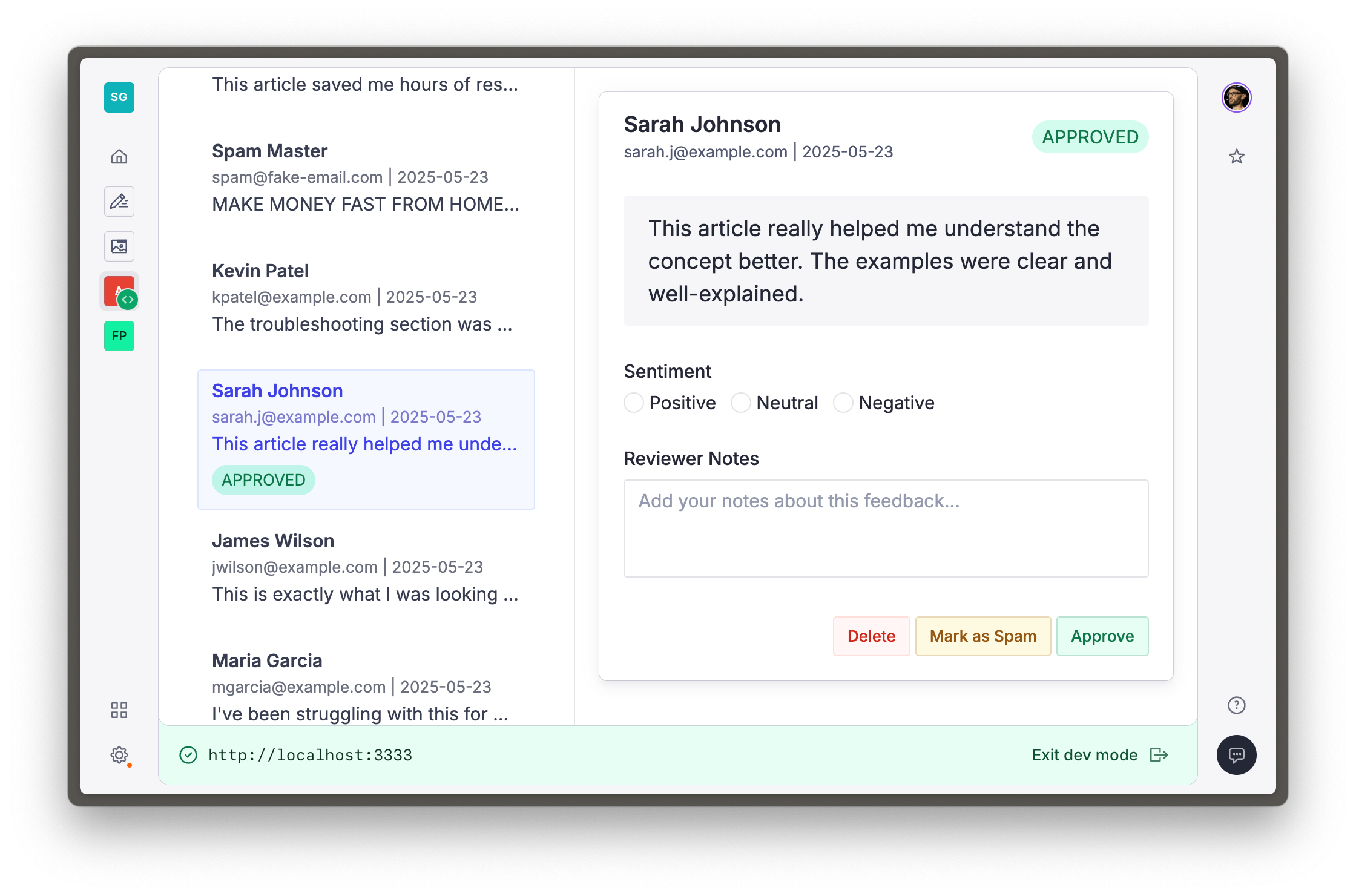
If you click one of these buttons with the Studio open to the same document, you may only briefly see a draft document with the updated `status` value before it is immediately published.
Now that your app is performing significant actions on documents, some additional feedback in the UI will help users. Let's add notifications in the next lesson.