# useDocumentProjection
https://www.sanity.io/learn/course/build-content-apps-with-sanity-app-sdk/use-document-projection.md
Pick just the content you need from individual documents, and only when a component is rendered in view.
We have a list of document handles, but we need more information about each document. Let's create a component that uses these handles to fetch more values from each document.
1. **Create** a new component to visualize the value of the `status` field in a document throughout our application.
```tsx:app-feedback/src/StatusBadge.tsx
import { Badge } from "@sanity/ui"
type StatusBadgeProps = {
status?: string
fontSize?: number
}
export function StatusBadge({
status = "PENDING",
fontSize = 2,
}: StatusBadgeProps) {
return (
{status.toUpperCase()}
)
}
```
1. **Create** a component to retrieve and display values from a document by its handle
```tsx:app-feedback/src/FeedbackPreview.tsx
import { useRef } from "react"
import { DocumentHandle, useDocumentProjection } from "@sanity/sdk-react"
import { Box, Stack, Text } from "@sanity/ui"
import { StatusBadge } from "./StatusBadge"
type FeedbackPreviewData = {
_createdAt: string
content: string | null
author: string | null
email: string | null
status: string
}
export function FeedbackPreview(props: DocumentHandle) {
const previewRef = useRef(null)
const { data, isPending } = useDocumentProjection({
...props,
ref: previewRef,
projection: `{
_createdAt,
content,
author,
email,
"status": coalesce(status, "PENDING")
}`,
})
const showPlaceholder = isPending && !data
return (
{showPlaceholder ? "..." : data.author}
{showPlaceholder
? "..."
: data.email + " " + data._createdAt.split("T")[0]}
{showPlaceholder ? "..." : data.content}
)
}
```
There's a few key things to look at in this component.
* `useDocumentProjection` receives the passed-in document handle as props, and then declares a GROQ "projection" which retrieves values from the document.
* The `ref` being passed into the hook is attached to the outermost Stack component. This will ensure that the content returned by this projection is only queried when the component is rendered and visible on the page. Another small but important performance win!
1. Throughout this course we're manually creating Types. This is because TypeGen support for App SDK currently uses experimental packages and may change in future. See the documentation for the most current implementation method.
1. See [App SDK and TypeGen](https://www.sanity.io/learn/app-sdk/sdk-typegen) in the documentation
## Update the feedback list
Now you have a component to fetch individual documents, let's update the feedback list component to use it.
1. **Update** the `FeedbackList` component to render the `FeedbackPreview` component
```tsx:app-feedback/src/FeedbackList.tsx
import { Suspense } from "react"
import { type DocumentHandle, useDocuments } from "@sanity/sdk-react"
import { Stack, Button, Spinner } from "@sanity/ui"
import { FeedbackPreview } from "./FeedbackPreview"
type FeedbackListProps = {
selectedFeedback: DocumentHandle | null
setSelectedFeedback: (feedback: DocumentHandle | null) => void
}
export function FeedbackList({
selectedFeedback,
setSelectedFeedback,
}: FeedbackListProps) {
const { data, hasMore, loadMore } = useDocuments({
documentType: "feedback",
})
return (
{data?.map((feedback) => {
const isSelected = selectedFeedback?.documentId === feedback.documentId
return (
)
})}
{hasMore && }
)
}
```
You should now have the feedback items rendered as a list of buttons. Most importantly you'll see values from each document in each button. And if any other author makes changes to these documents, you'll see those values update live!
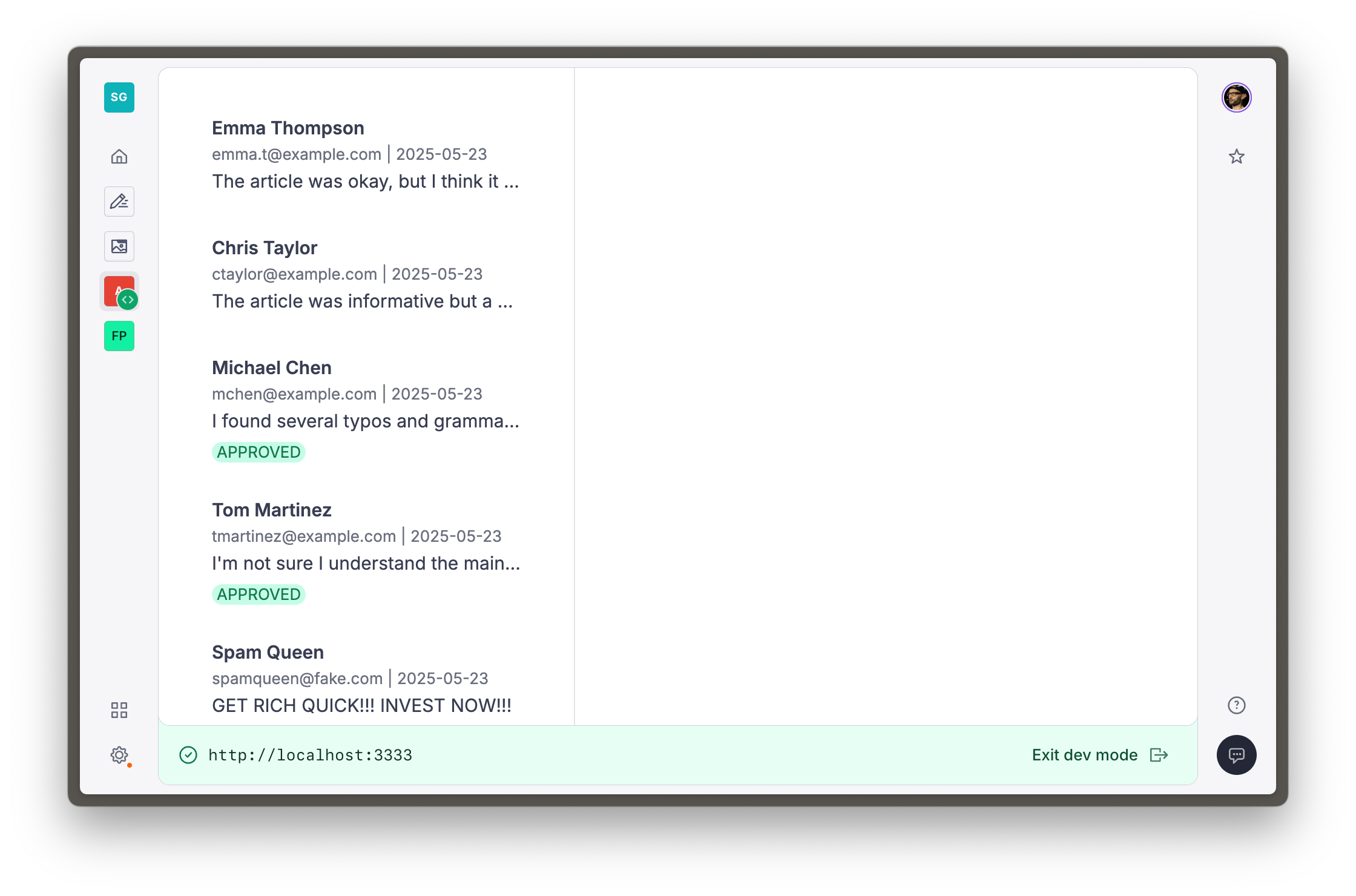
You can click to select them, they just won't do anything yet. In the next lesson you can start to building a form to edit each feedback document.