Content modeling in Sanity Studio
Defining the structure of your content.
Defining your content models with code is by design. It makes it easier to version control, and it puts developers in control of how the data structures should be laid out. We have, however, tried to make it effortless to add, change, and remove fields in the interface.
Watch the videos that walk you through how schemas work or scroll to read how it works.
Your first schema
When Sanity Studio starts up it defaults to look for the schema in a file called schema.js in the folder schemas in your project folder. Let's build a simple schema to get started:
// First, we must import the schema creator
import createSchema from 'part:@sanity/base/schema-creator'

// Then import schema types from any plugins that might expose them
import schemaTypes from 'all:part:@sanity/base/schema-type'

// Then we give our schema to the builder and provide the result to Sanity
export default createSchema({

  // We name our schema
  name: 'mySchema',

  // Then proceed to concatenate our document types (just one, for now)
  // to the ones provided by any plugins that are installed
  types: schemaTypes.concat([
    {
      // This is the display name for the type
      title: "Person",

      // The identifier for this document type used in the api's
      name: "person",

      // Documents have the type 'document'. Your schema may describe types beyond documents
      // but let's get back to that later.
      type: "document",

      // Now we proceed to list the fields of our document
      fields: [
        // This document has only one field
        {
          // The display name for this field
          title: "Name",

          // The identifier for this field used in the api's
          name: "name",

          // The type of this field
          type: "string",
        }
      ]
    }
  ])
})
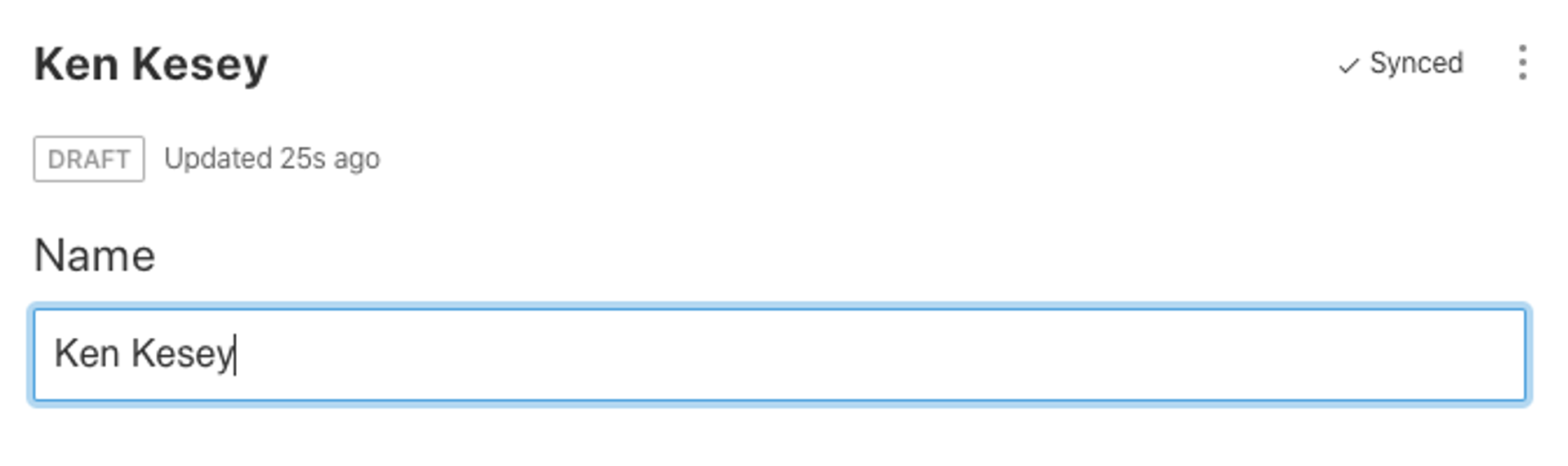
This schema configuration creates a document type called "person" with one string field called "name". In the Studio, a list item for "person" will appear in the left sidebar. If we create a new document for it, it will look like this:
When we fetch a document like this through the API later, we would get a document like this:
{
  "_id": "45681087-46e7-42e7-80a4-65b776e19f91",
  "_type": "person",
  "name": "Ken Kesey"
}
A document referencing another document
Now let's make a very simple document describing a book. In our array of types, we'll add this object:
{
  title: 'Book',
  name: 'book',
  type: 'document',
  fields: [
    {
      title: 'Title',
      name: 'title',
      type: 'string'
    },

    {
      title: 'Cover',
      name: 'cover',
      type: 'image'
    },

    {
      title: 'Author',
      name: 'author',
      // A reference is a way to point to another document
      type: 'reference',
      // This reference is only allowed to point to a document of the type person,
      // we could list more types, but let's keep this simple:
      to: [{type: 'person'}]
    }
  ]
}
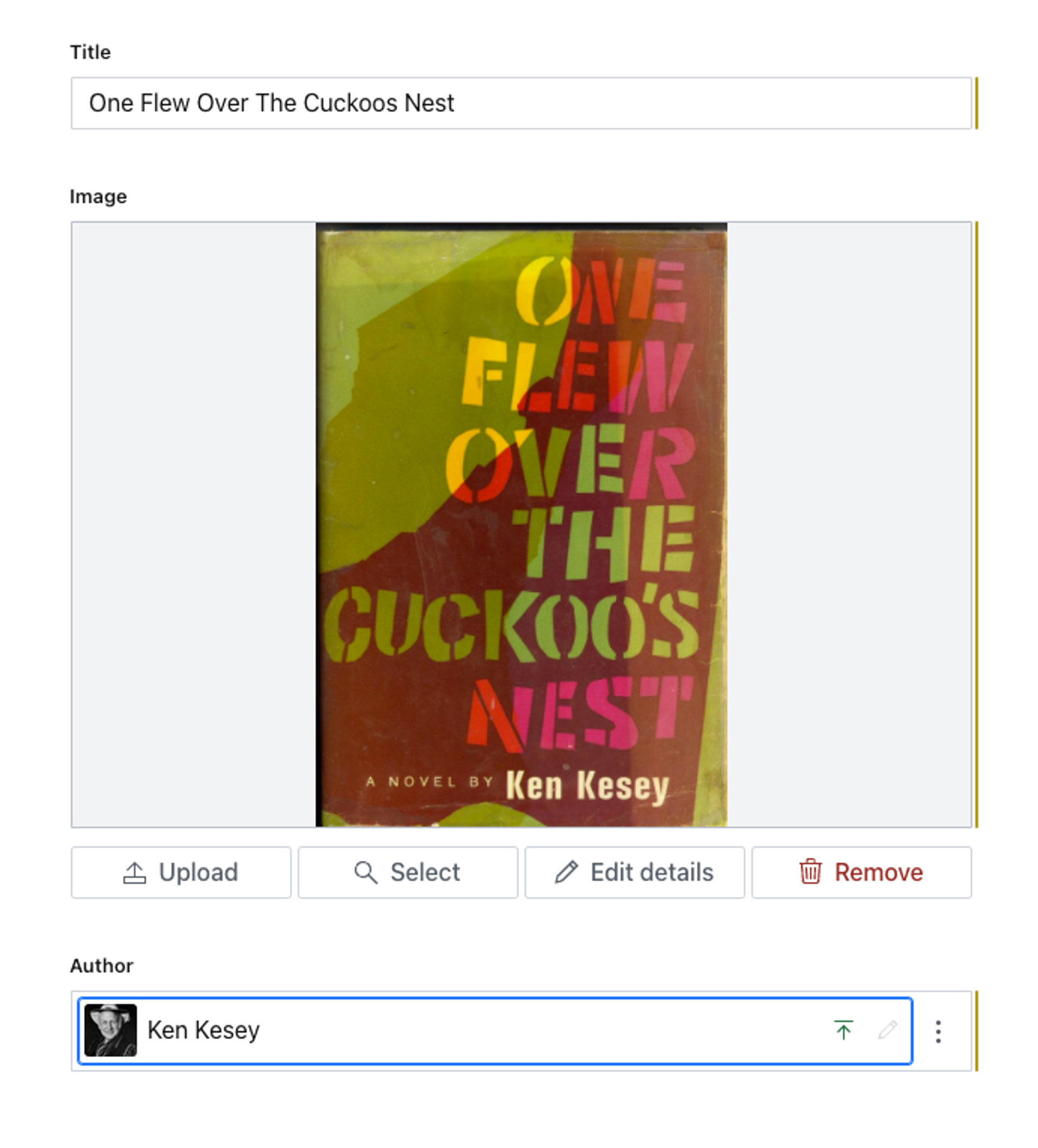
This schema creates the document type "book" with a title, a cover image, and an author. The author field is of the type reference which means it will refer to another document. In the to-field we describe what kind of documents this reference is allowed to refer to. We list one rule, that the type can be person.
The form will look like this:
When we fetch this document through the API, we'll get this:
{
  _id: "d1760c53-428c-4324-9297-ac8313276c45",
  _type: "book",
  title: "One Flew Over the Cuckoos Nest",
  cover: {
    _type: "image",
    asset: {
      _ref: "image-Su3NWQ712Yg0ACas3JN9VpcS-322x450-jpg",
      _type: "reference"
    }
  },
  author: {
    _ref: "45681087-46e7-42e7-80a4-65b776e19f91",
    _type: "reference"
  }
}
As you see, the author field has no mention of Ken Kesey, but has the field _ref that contains the id of the Ken Kesey document. When you fetch documents with references, you can easily instruct the API to replace the reference with the actual content of the target document. You can read more on this in the Query-tutorial.
One use of arrays
Let's talk about arrays: Some books have more than one author. We should improve the Book-document type by making the author-field an array of references:
{
    title: 'Authors',
    name: 'authors',
    type: 'array',
    of: [{
      type: 'reference',
      to: [{type: 'person'}]
    }]
  }
The document that is returned from the API will look like this:
{
  _id: "drafts.e7f370d0-f86f-4a09-96ea-12f1d9b236c4",
  _type: "book",
  title: "The Illuminatus! Trilogy",
  cover: {
    _type: "image",
    asset: {
      _ref: "image-Ov3HwbkOYkNrM2yabmBr2M8T-318x473-jpg",
      _type: "reference"
    }
  },
  authors: [
    {
      _ref: "9a8eb52c-bf37-4d6e-9321-8c4674673198",
      _type: "reference"
    },
    {
      _ref: "ee58f2ff-33ed-4273-8031-b74b5664ff5e",
      _type: "reference"
    }
  ]
}
Organizing your schema
Finally a note on organizing your files. In this example we piled both our document types into the same JavaScript file. Don't do that; it gets out of hand fast. We recommend describing each document type in a separate file in this manner:
// In the file schemas/schema.js
import createSchema from 'part:@sanity/base/schema-creator'
import schemaTypes from 'all:part:@sanity/base/schema-type'
import person from './person'

export default createSchema({
  name: 'mySchema',
  types: schemaTypes.concat([
    person
  ])
})


// In the file schemas/person.js

export default {
  title: "Person",
  name: "person",
  type: "document",
  fields: [
    {
      title: "Name",
      name: "name",
      type: "string",
    }
  ]
}
That covers the very basics, but there are loads more! Now, let's dive into best practices when modeling content with Sanity.