Sanity logosanity.ioAll Systems Operational© Sanity 2026
Change Site Theme

Changelog

Track new features, improvements, and fixes across all Sanity products.

Loading...
Loading...
Loading...
Loading...
Loading...
Loading...
Loading...
Loading...
Loading...
Loading...
Loading...
Loading...
Loading...
Loading...
Loading...
Loading...
Loading...
Loading...
Loading...
Loading...

On this page

Back to Changelog
  1. Changelog
  2. Blueprints

Official GitHub Actions for Blueprints

Published: February 2, 2026

v2026-01-30
Blueprints

We're excited to announce official GitHub Actions for Sanity Blueprints, making it easier than ever to automate your Blueprint deployments and review changes in your CI/CD pipeline. As part of this update, we’ve also removed the personal auth token limitation. You can now officially deploy your blueprint stacks with robot tokens.

New actions

Deploy Action

Automatically deploy your Sanity Blueprints to your project or organization directly from GitHub Actions. Perfect for continuous deployment workflows that trigger on merges to main or specific branches.

name: Deploy Sanity Blueprints

on:
  push:
    branches:
      - main

jobs:
  deploy:
    runs-on: ubuntu-latest
    steps:
      - name: Checkout code
        uses: actions/checkout@v4

      - name: Deploy blueprints
        uses: sanity-io/blueprints-actions/deploy@deploy-v2
        with:
          sanity-token: ${{ secrets.SANITY_TOKEN }}
          stack-id: 'ST_1234xyz'
          project-id: '1234xyz'

Plan Action

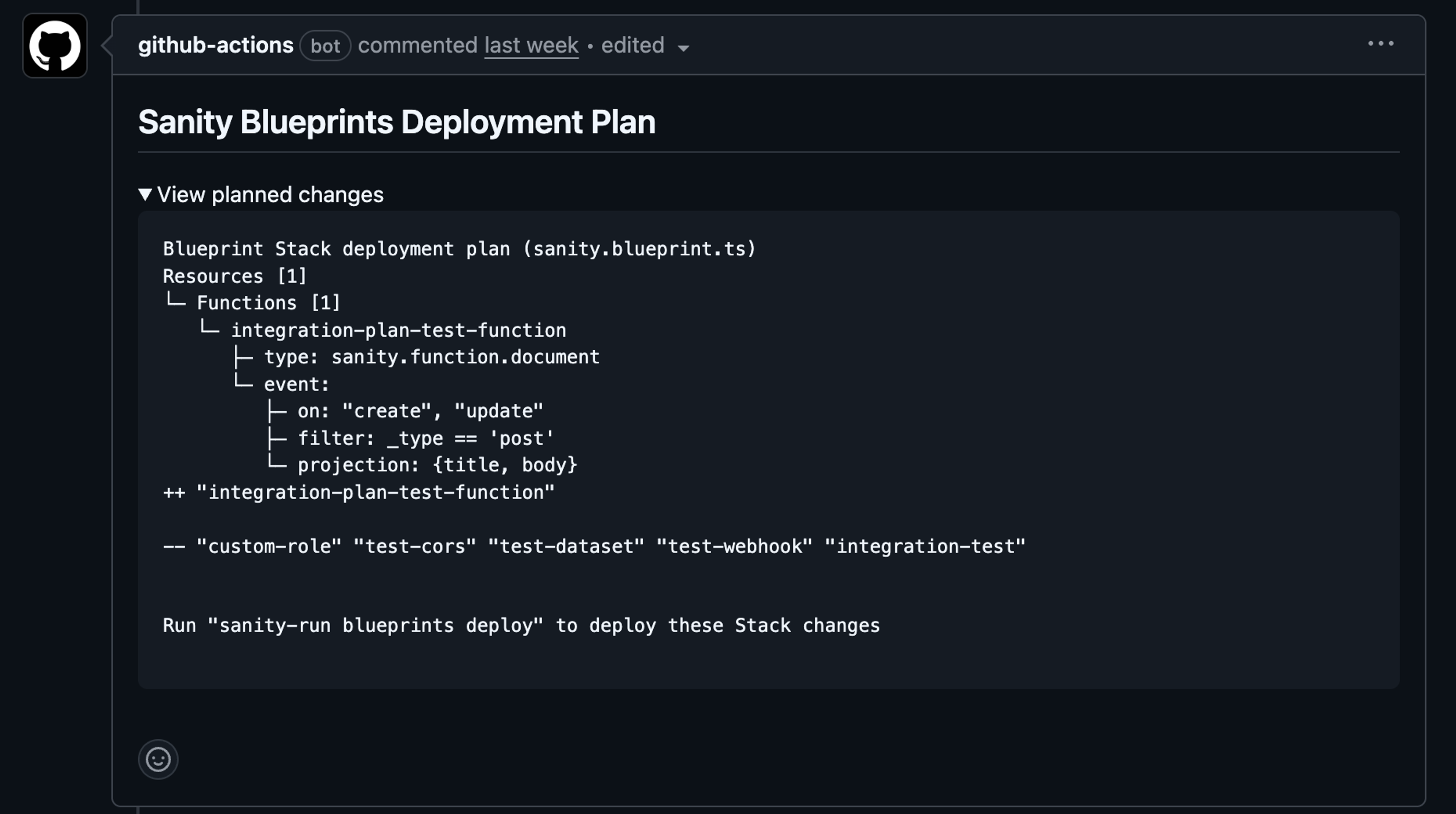
Preview Blueprint changes before they're deployed. This action analyzes your changes and automatically posts (or updates) a comment on your pull requests showing exactly what resources will be created, updated, or deleted.

name: Sanity Blueprints Plan

on:
  pull_request:

permissions:
  contents: read
  pull-requests: write  # Required for posting comments

jobs:
  plan:
    runs-on: ubuntu-latest
    steps:
      - name: Checkout code
        uses: actions/checkout@v4

      - name: Plan blueprints changes
        uses: sanity-io/blueprints-actions/plan@plan-v1
        with:
          sanity-token: ${{ secrets.SANITY_TOKEN }}
          stack-id: 'ST_1234xyz'
          project-id: '1234xyz'

The plan action comment gives you a preview of what to expect when prior to deployment.

Loading...

Get started

Check out the new guide to set up the actions and start building your workflows.
For questions and support, visit the Sanity community or open an issue in the repository.
Related documentation

  • Deploy Blueprints with GitHub Actions

  • Functions

On this page

  • New actions
  • Deploy Action
  • Plan Action
  • Get started
Back to Deploy Blueprints with GitHub Actions
name: Deploy Sanity Blueprints

on:
  push:
    branches:
      - main

jobs:
  deploy:
    runs-on: ubuntu-latest
    steps:
      - name: Checkout code
        uses: actions/checkout@v4

      - name: Deploy blueprints
        uses: sanity-io/blueprints-actions/deploy@deploy-v2
        with:
          sanity-token: ${{ secrets.SANITY_TOKEN }}
          stack-id: 'ST_1234xyz'
          project-id: '1234xyz'
name: Sanity Blueprints Plan

on:
  pull_request:

permissions:
  contents: read
  pull-requests: write  # Required for posting comments

jobs:
  plan:
    runs-on: ubuntu-latest
    steps:
      - name: Checkout code
        uses: actions/checkout@v4

      - name: Plan blueprints changes
        uses: sanity-io/blueprints-actions/plan@plan-v1
        with:
          sanity-token: ${{ secrets.SANITY_TOKEN }}
          stack-id: 'ST_1234xyz'
          project-id: '1234xyz'
A Sanity Blueprints deployment plan from a GitHub Actions bot, detailing a new function, removed test resources, and the deploy command.

Related documentation

  • Previous page

    Deploy Blueprints with GitHub Actions

  • Functions

Sanity logo

Documentation

    • Overview
    • Platform introduction
    • Next.js quickstart
    • Nuxt.js quickstart
    • Astro quickstart
    • React Router quickstart
    • Studio quickstart
    • Build with AI
    • Content Lake
    • Functions
    • APIs and SDKs
    • Visual Editing
    • Blueprints
    • Platform management
    • Dashboard
    • Studio
    • Canvas
    • Media Library
    • App SDK
    • Content Agent
    • HTTP API
    • CLI
    • Libraries
    • Specifications
    • Changelog
    • User guides
    • Developer guides
    • Courses and certifications
    • Join the community
    • Templates