Add insights to Sanity Context
Sanity Context insights tracks and analyzes your agent conversations
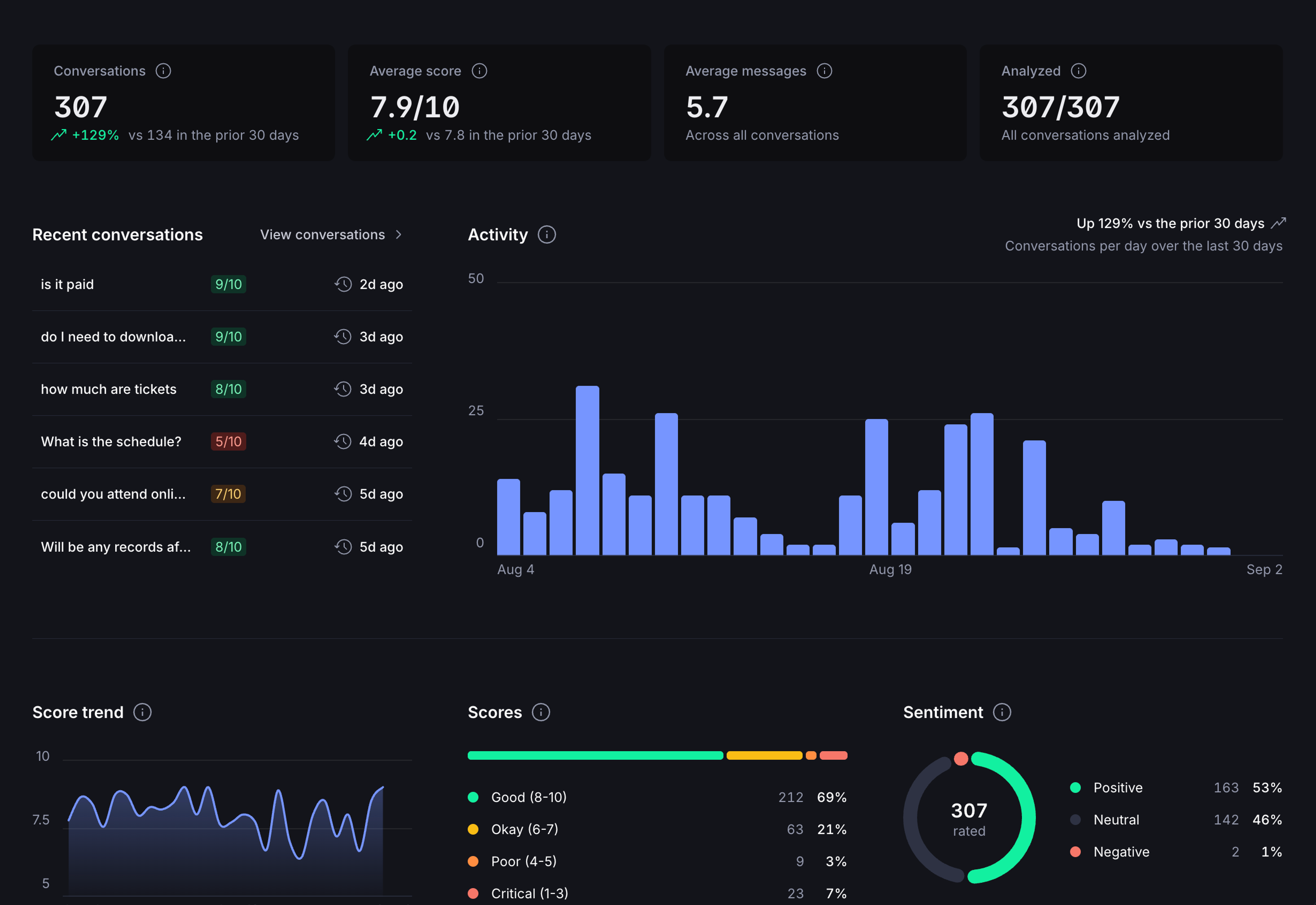
Sanity Context Insights captures conversations between your users and your AI agent and classifies them with an LLM. Once set up, Insights appears in the Context app in the Sanity Dashboard, showing where the agent succeeds, where it struggles, and what content is missing. Use this data to improve the agent over time.
How it works
Sanity Context insights has two parts that work together:
- Telemetry: saves conversations from your chat application to your organization's Context store.
- Classification: a scheduled function that analyzes saved conversations with AI, extracting success scores, sentiment, and content gaps.
Telemetry alone stores raw conversations. Classification populates Insights in the Context app. You need both.
Classification metrics
| Metric | Type | Description |
|---|---|---|
| successScore | 1–10 | How well the agent resolved the user's needs |
| sentiment | positive / neutral / negative | Overall user tone |
| contentGaps | string[] | Topics where the agent lacked information |
Prerequisites
- Code running Sanity Context: Follow the setup instructions. The code examples below will add to your existing implementation.
- Your organization ID: find it in Manage or in your organization's URL.
- An organization API token, created under Manage > API > Tokens at the organization level. Conversations are saved to your organization's Context store, not to a project dataset, so no dataset write token is involved. Keep the token server-side.
- LLM API key: For classifying conversations, you'll need an API key from an LLM provider (Anthropic, OpenAI, etc.).
Setup
Step 1: Enable telemetry integration
Add sanityInsightsIntegration to your existing streamText calls:
import {createClient} from '@sanity/client'
import {sanityInsightsIntegration} from '@sanity/context/ai-sdk'
import {streamText} from 'ai'

// Org-scoped client. Keep the token server-side only.
const client = createClient({
  apiVersion: 'v2025-11-27',
  token: process.env.SANITY_API_TOKEN,
  context: {organizationId: process.env.SANITY_ORGANIZATION_ID},
  useCdn: false,
  useProjectHostname: false,
})

const result = streamText({
  model: yourModel,
  messages,
  experimental_telemetry: {
    isEnabled: true,
    integrations: [
      sanityInsightsIntegration({
        client,
        threadId: chatId, // Any unique string per conversation
        // The well-known mcpEndpoints key tags the conversation with an MCP endpoint name
        metadata: {mcpEndpoints: process.env.SANITY_CONTEXT_ENDPOINT_NAME ?? []},
      }),
    ],
  },
})
If you're not using Vercel's AI SDK, save the transcript directly with client.context.conversations.save. Call it after each turn with the full conversation history; repeated saves with the same threadId update the same conversation.
import {createClient} from '@sanity/client'

const client = createClient({
  apiVersion: 'v2025-11-27',
  token: process.env.SANITY_API_TOKEN, // Keep server-side only
  context: {organizationId: process.env.SANITY_ORGANIZATION_ID},
  useCdn: false,
  useProjectHostname: false,
})

await client.context.conversations.save({
  threadId: chatId, // Any unique string per conversation
  messages: [
    {role: 'user', content: 'How do I return an item?'},
    {role: 'assistant', content: 'You can return items within 30 days...'},
  ],
  // Optional: tag with the MCP endpoint name(s) the agent used
  metadata: {mcpEndpoints: ['support-agent']},
})
Tag conversations with your own dimensions
The metadata option tags a conversation with your own dimensions: up to 20 keys, each holding a string or an array of strings, such as plan, environment, or app version. The mcpEndpoints key is well-known: set it to the name of the MCP endpoint the agent used, and the endpoint filter in the Context app groups the conversation under that endpoint.
sanityInsightsIntegration({
  client,
  // Your chat's thread id, unique within the org. Reports upsert by thread,
  // so send every exchange
  threadId,
  // Any keys you like. Slice by them when querying your conversations
  metadata: {
    // The MCP endpoints the conversation used: none, one, or several
    mcpEndpoints: ['guest-services-agent'],
    plan: 'enterprise',
    abTestVariant: 'new-checkout',
    storefront: 'oslo-flagship',
  },
})
Once conversations carry your dimensions, you can filter them in the Context app and compare classification metrics such as success score and sentiment across segments, for example enterprise versus free users, or one storefront against another.
Step 2: Deploy the classification function
The classification function is a scheduled job that runs outside your app using Sanity Functions. It finds unclassified conversations and analyzes them with an LLM of your choice. The classification interval, how often the function runs, is up to you. You may want it to run once a day to accommodate daily updates, or more frequently if your agent receives more traffic.
Here's an example function:
import {anthropic} from '@ai-sdk/anthropic'
import {createClient} from '@sanity/client'
import {classifyConversations} from '@sanity/context/insights'
import {scheduledEventHandler} from '@sanity/functions'

export const handler = scheduledEventHandler(async () => {
  const client = createClient({
    apiVersion: 'v2025-11-27',
    token: process.env.SANITY_API_TOKEN,
    context: {organizationId: process.env.SANITY_ORGANIZATION_ID},
    useCdn: false,
    useProjectHostname: false,
  })

  const result = await classifyConversations({
    client,
    // Optional: only classify conversations tagged with this MCP endpoint
    mcpEndpoint: process.env.SANITY_CONTEXT_ENDPOINT_NAME,
    model: anthropic('claude-haiku-4-5'),
  })

  console.log(
    `Classified ${result.successCount}/${result.totalFound} conversations${result.errorCount > 0 ? ` (${result.errorCount} failed)` : ''}`,
  )
})
For blueprint configuration, deployment, and token setup, see the Sanity Functions documentation.
Primitives reference
| Primitive | Import | Purpose |
|---|---|---|
| sanityInsightsIntegration | @sanity/context/ai-sdk | AI SDK telemetry integration |
| client.context.conversations.save | @sanity/client | Save a conversation transcript directly |
| getConversationsToClassify | @sanity/context/insights | Fetch conversations ready for classification |
| getPreviousContentGaps | @sanity/context/insights | Fetch known content gaps to avoid duplicates |
| classifyConversation | @sanity/context/insights | Classify a conversation and write results back |
| classifyConversations | @sanity/context/insights | Classify all pending conversations and write results back. Wraps the three primitives above. |
Telemetry sharing
You can opt in to share conversation telemetry with Sanity. Both levels are off by default. Set sharing where you save conversations, on the telemetry integration or on direct saves:
metrics: shares classification metrics (scores, sentiment, content-gap and message-shape counts), model info, and token usage. No conversation content is included.conversations: also shares full transcripts, and implies metrics. Provide a contact so the team can reach out and help dial in your agent.
sanityInsightsIntegration({
  client,
  threadId: chatId,
  sharing: {
    metrics: true,
    conversations: true,
    contact: 'you@company.com',
  },
})