How AI Credits work
Understand how AI credits are consumed and billed for Sanity AI tooling.
Whether working with Content Agent, Agent Actions, or certain MCP server tools, AI usage in Sanity is measured and billed using AI Credits. This article examines what AI Credits are and how they work.
Free credits every month!
Every organization receives a free number of AI credits each month to explore and experiment. See the pricing page more details.
Credit pricing
Each AI credit costs $0.05. Credit consumption depends on the type and scope of interaction.
- Query (your message to Content Agent): 4 credits ($0.20)
- Action (tool use by Content Agent): 2 credits ($0.10)
- Agent Action (a request with any Agent Action): 1 credit ($0.05)
Queries are messages you send to the Content Agent. Each request includes a 4-credit query cost.
Actions are operations the agent performs on your behalf: GROQ queries, web searches, document analysis, content creation, and image generation. Each tool execution costs 2 credits.
A single request may involve multiple tool executions depending on the complexity of the task. The number of executions depends on the amount and type of work required; it is not a fixed number per document.
MCP server
Certain Sanity MCP server tools invoke Agent Actions under the hood and consume credits at the same rate. Most MCP tools, however, are standard API calls and don't consume credits.
Example cost estimates
Costs vary based on document size, structure, and workflow complexity. The examples below are directional. When Content Agent asks you to confirm a bulk operation, the estimate it shows is rounded up: to the nearest 10 credits below 100, and to the nearest 100 credits at or above 100. That figure can read higher than the ones in this table.
| Prompt | Estimated calculation | Estimated credits |
|---|---|---|
| "Show Q3 blog posts" | 1 query (4) + small read (2) | ~6 credits |
| "Analyze 10 articles (~1 MB total)" | 1 query (4) + analysis (~2 credits per 100 KB) | ~24 credits |
| "Update 5 documents" | 1 query (4) + mutation (~6 credits per document) | ~34 credits |
| "Translate 3 documents into 2 languages" | 1 query (4) + translation (~12 credits per document per language) | ~76 credits |
For large bulk operations, Content Agent asks you to confirm before it proceeds. Confirmation is triggered when the estimated cost is 100 credits or more, or when the estimate meets or exceeds your organization's remaining credits. If your organization reaches its spending limit, AI operations pause until the start of the next calendar month or until the limit is increased.
Controlling costs
Content Agent can easily operate on a large number of documents which can incur unexpected billing if used indiscriminately. To shield your organization from unintended costs you can set spending limits that will halt all AI operations once reached.
Control usage
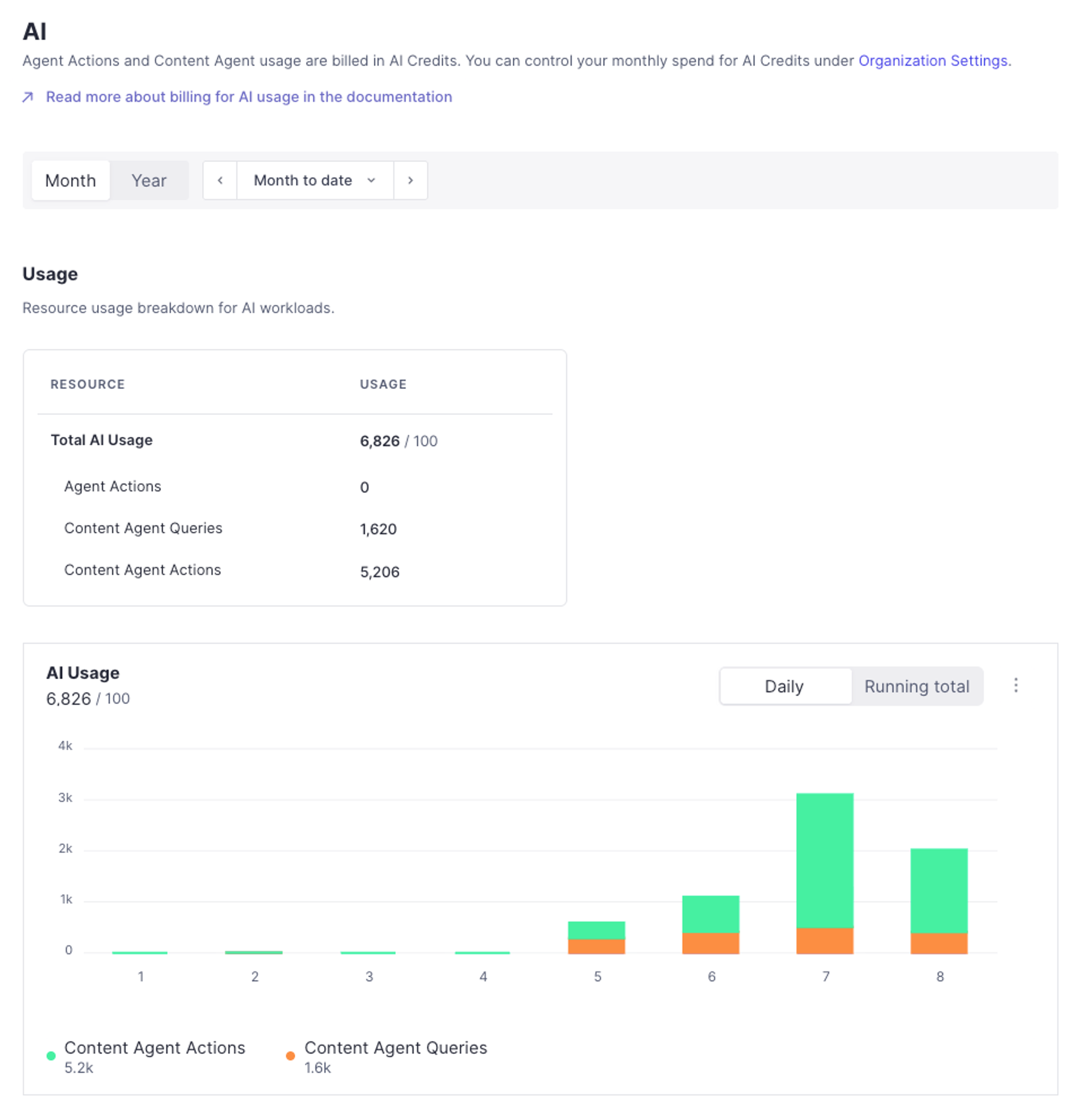
You can find detailed overviews of your AI usage at sanity.io/manage. Credits are metered per organization rather than per project, so select your organization rather than a project, open the Usage tab, and look under AI.
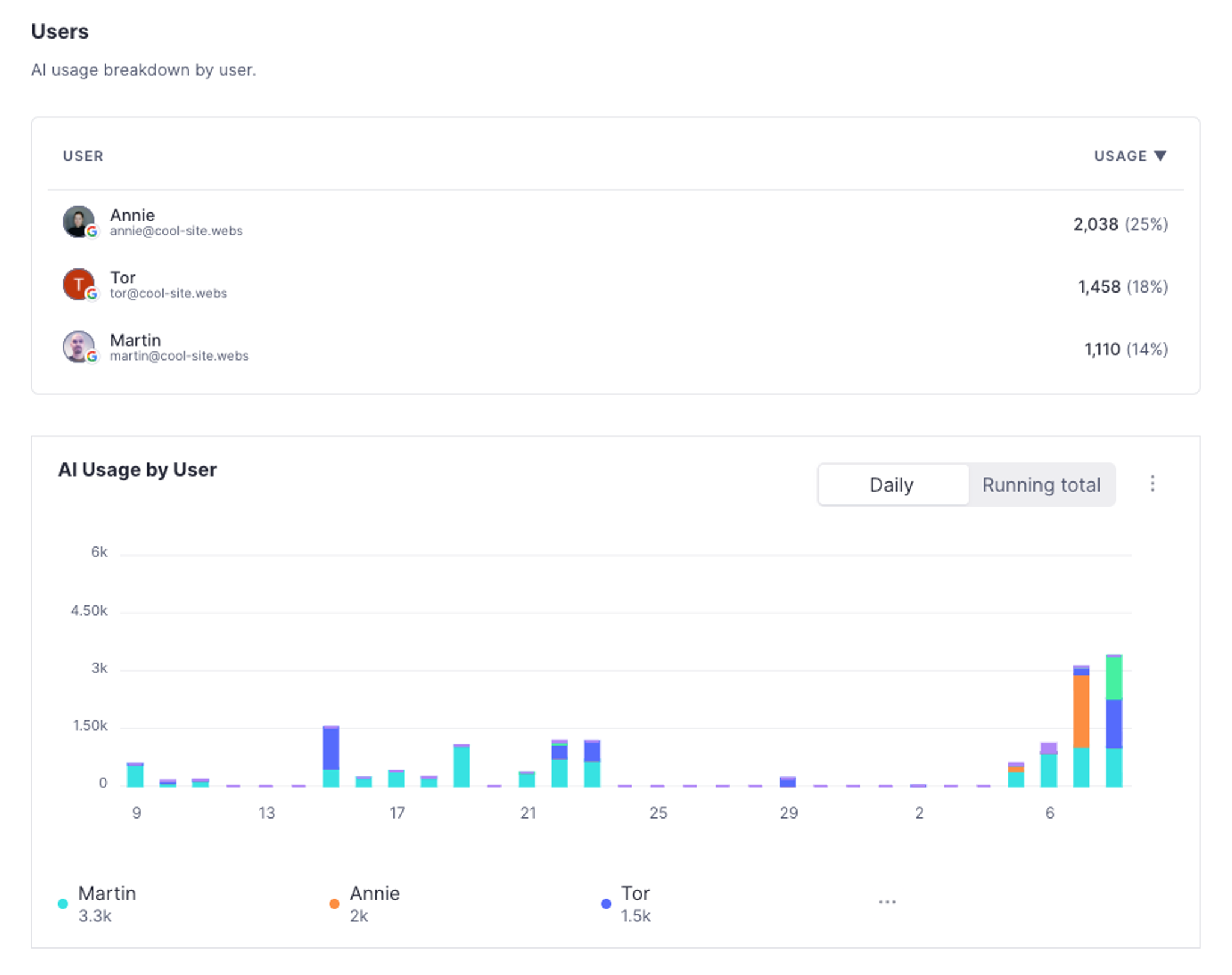
The usage overview also shows which individuals in your organization are the most prolific users of AI features.
Set spending limits for AI
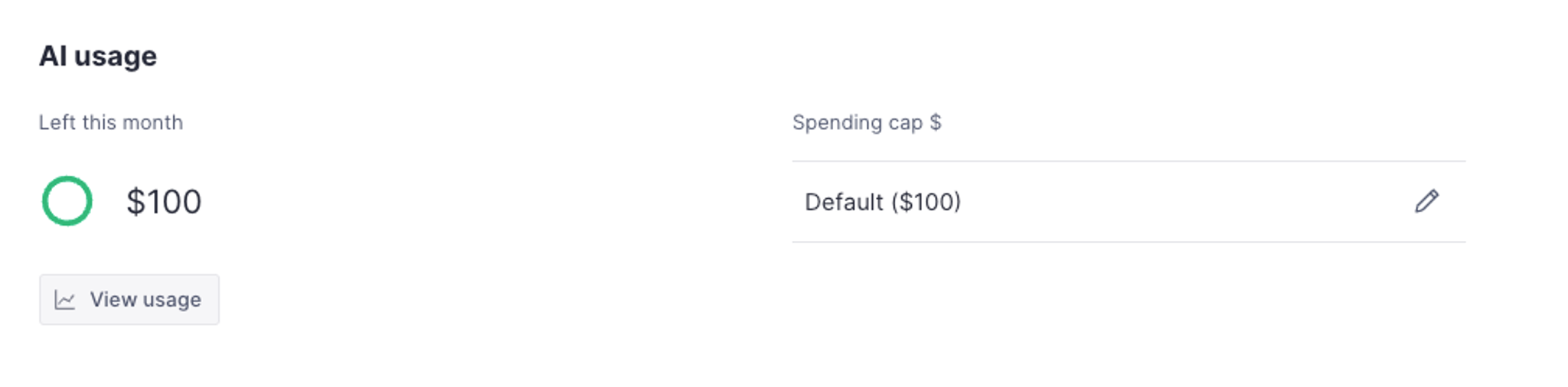
You can set a monthly spending limit to prevent unexpected charges. When your organization reaches the cap, AI features pause until the start of the next calendar month or until you raise the limit. If an operation is started while credits are still available, it will run to completion even if it exceeds the remaining budget, and usage is calculated with a short delay, so actual spend can slightly exceed the cap before AI operations pause. Visit sanity.io/manage and go to your organization's Settings > Spending limits to set or change your spending limits. You can pick the default cap, a custom monthly amount, or no limit at all. Setting a custom cap requires accepting the AI Credits Additional Terms.
Add more credits for the rest of the month
When your organization reaches its spending limit, AI features pause until the start of the next calendar month. Raising the limit is what makes more AI usage available before then. Credits are metered as your organization consumes them, so raising the limit doesn't charge you anything on its own. You're billed for the credits you actually use, at $0.05 each.
The limit is a dollar amount, so you don't need to estimate credit counts to set one. A $100 limit covers 2,000 credits at $0.05 each.
Credits are billed to the organization that owns the project. Setting the limit and changing the payment method it's charged to both require the Administrator or Billing manager role on that organization. For how plans, invoicing, and overage work, see Plans and payments.
Roll out AI features to your team
Before you open Content Agent to a whole team, set an organization spending limit and plan for how that limit behaves under load:
- Set the limit before rollout. Only members with billing permissions on the organization can set or change it.
- Leave headroom above what you expect to spend. An operation that has already started runs to completion, and usage is metered with a short delay, so a month can end slightly above the limit.
- Expect more confirmation prompts as usage approaches the limit. Content Agent also asks for confirmation when an estimate meets or exceeds your organization's remaining credits, not only at the 100-credit threshold.
- Choose the limit deliberately. You can't lower it below what your organization has already spent in the current month.
Tips for efficient usage
When working with large document sets, select a few documents first to refine your prompt before applying it to the entire set. This helps you optimize your queries and reduce unnecessary credit consumption.
Credits when you change plans
AI credits are a monthly allowance. The credits included with your plan reset at the start of each calendar month, at 00:00 UTC, and don't carry over to the next one.
Your spending limit is set on your organization, separately from your plan. Changing plans, including converting a trial to a paid plan, doesn't raise or reset the limit, so upgrading isn't a reliable way to resume a paused Content Agent. If the agent is still paused after a plan change, raise or remove the limit.
A paused agent reports Limit Hit - Content Agent Paused. along with the credits you have used and your organization's monthly limit in both dollars and credits. To resume, raise or remove the limit under Settings at sanity.io/manage.