Cookbook: Handle workflows when referenced content is deleted
Apply an application-owned lifecycle policy when content watched by an Workflow is deleted.
Early access
Workflows is in early access, built in public. Read How early access works before you rely on it.
Deleting referenced content leaves the workflow instance and its audit history intact. Required content references block actions and transitions until their selected documents are readable again. You can retain the instance for repair or choose an application policy that aborts it.
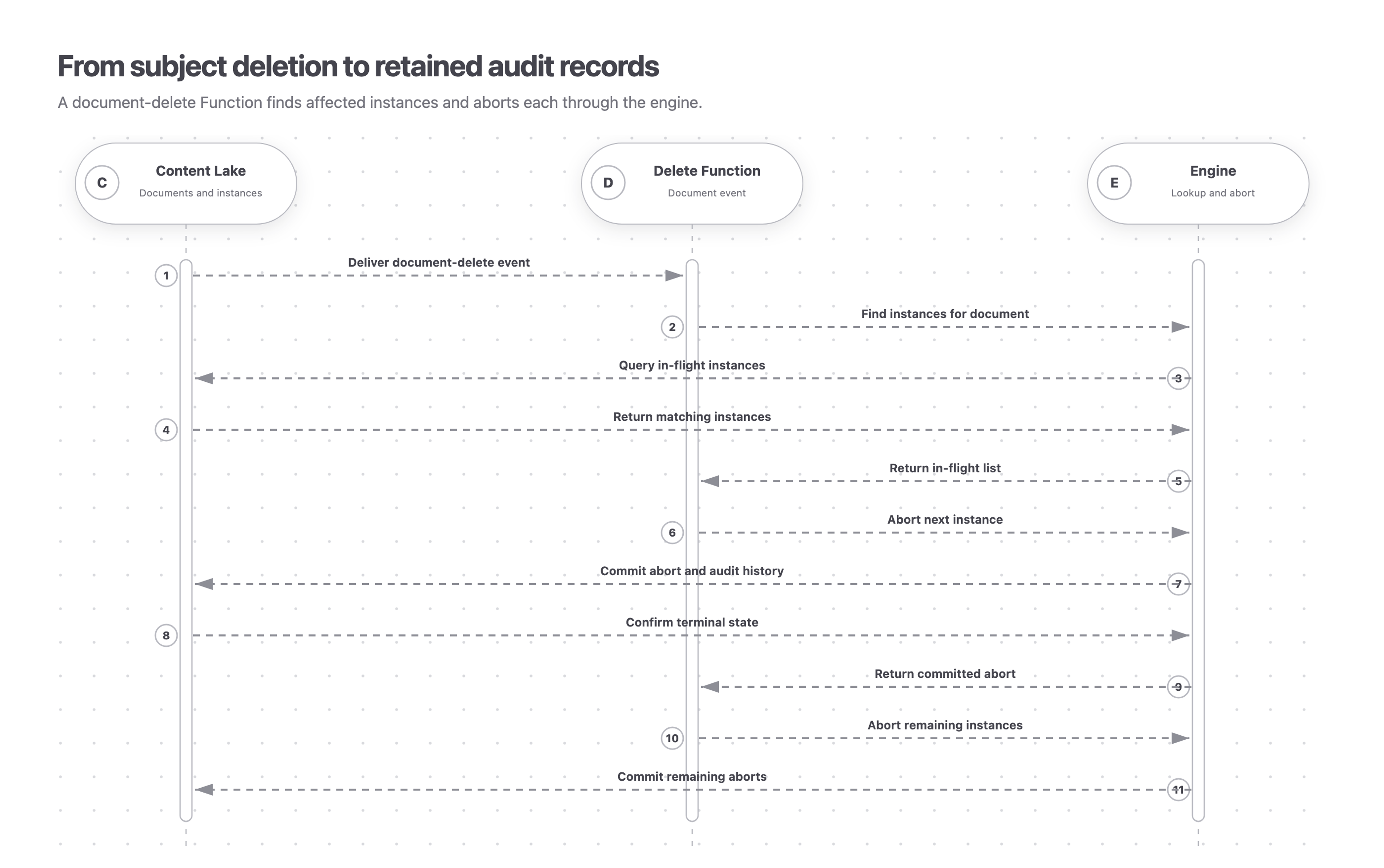
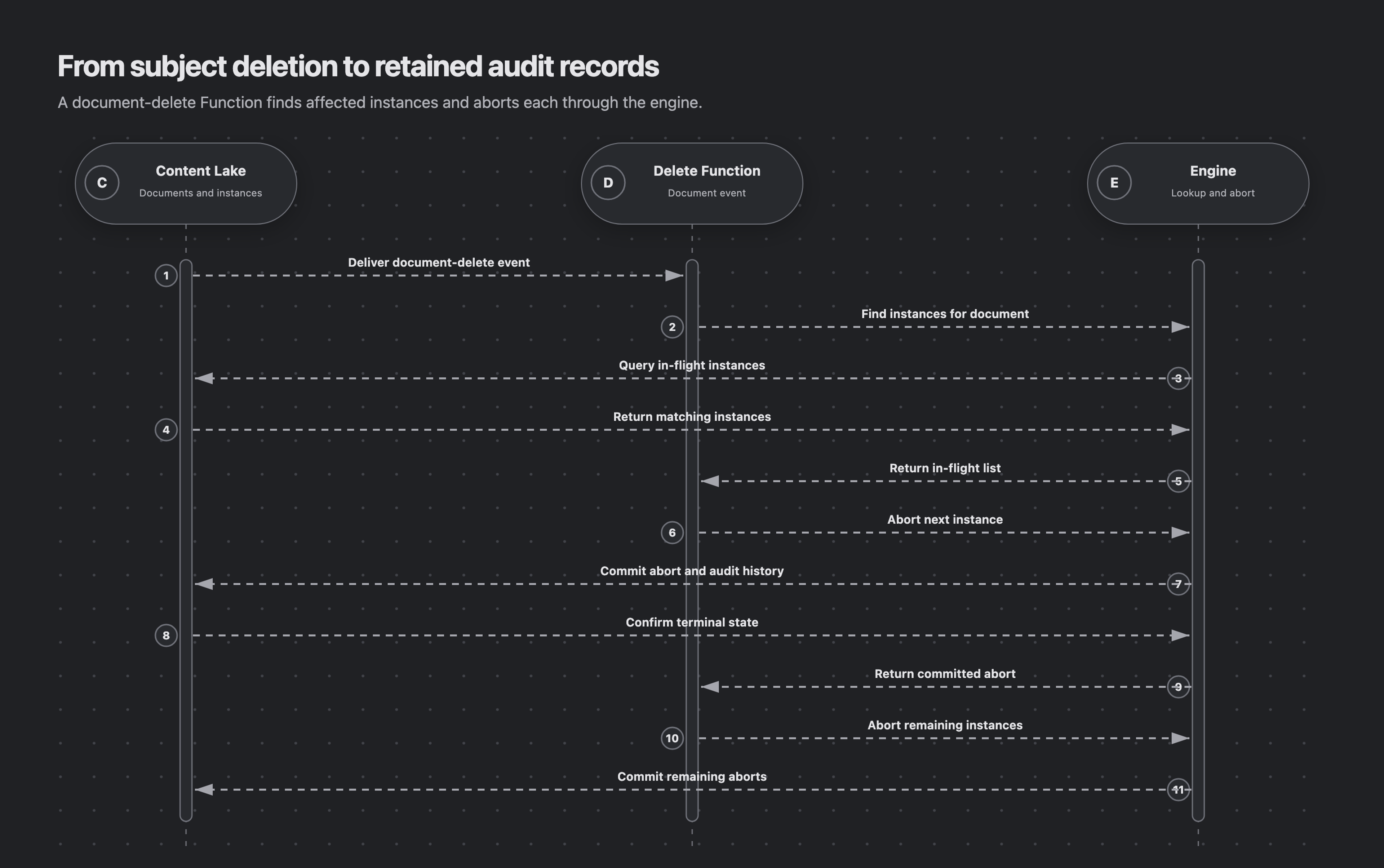
This recipe adds an abort policy to a Sanity Function triggered by document deletion. It finds affected in-flight instances, confirms deletion across the document's representations, and aborts through the engine. Existing instance documents remain as audit records.
The diagram shows the abort path after deletion has been confirmed. The Delete Function finds affected instances and aborts them through engine verbs. A remaining draft or release version, a restored document, or an inconclusive availability check skips the abort.
Choose the policy first
Choose one policy for the application:
- Retain the instance for repair. A required missing reference prevents actions and transitions from advancing. Restore the document, restore access, or edit an editable reference field to select replacement content. The fault clears when the content becomes readable.
- Abort after confirmed deletion. Call
abortInstanceto cancel pending effects, notify parent workflows, record the reason, and reconcile guards. This is a terminal decision: restoring content later does not resume the aborted instance.
Use the evaluation's missingDocuments to identify the affected field and reference. blockingMissingDocuments selects the references that prevent progress. Optional references can leave unrelated actions available; completed instances remain completed. Evaluation insights explains the availability evidence.
Do not delete or raw-patch workflow instance documents. Every instance write belongs to a sanctioned engine verb.
Find instances watching the deleted document
instancesForDocument finds in-flight instances whose active watch set includes a global document reference. The reference includes the resource, so matching document IDs in different datasets remain distinct.
Create functions/engine.ts and export an engine configured for your workflow resource and any required content-resource clients. Use Run Workflows with Sanity Functions for client and execution-identity setup. Install @sanity/id-utils with npm install @sanity/id-utils.
The Function receives the deleted representation in event.data. Normalize its ID before constructing a workflow reference, then check each instance's evaluation. The handler aborts only when the matching reference has availability: 'deleted':
import {documentEventHandler} from '@sanity/functions'
import {DocumentId, getPublishedId} from '@sanity/id-utils'
import {gdrFromResource} from '@sanity/workflow-engine'
import {engine} from '../engine'

interface DeletedDocument {
  _id: string
}

export const handler = documentEventHandler<DeletedDocument>(
  async ({context, event}) => {
    const {projectId, dataset} = context.clientOptions
    const contentResource = {
      type: 'dataset',
      id: `${projectId}.${dataset}`,
    } as const
    const documentId = getPublishedId(DocumentId(event.data._id))
    const document = gdrFromResource(contentResource, documentId)
    const instances = await engine.instancesForDocument({document})

    for (const instance of instances) {
      const evaluation = await engine.evaluate({instanceId: instance._id})
      const deleted = evaluation.missingDocuments?.some(
        ({reference, availability}) =>
          reference.id === document && availability === 'deleted',
      )
      if (!deleted) continue

      await engine.abortInstance({
        instanceId: instance._id,
        idempotencyKey: `subject-delete:${document}`,
        reason: `Referenced document deleted: ${document}`,
      })
    }
  },
)
Configure the engine for the workflow resource and provide a client for the content dataset. Its execution identity must be able to read the relevant document representations, update instances, and reconcile guards. A failed or unsupported availability check returns unreadable, which this policy retains.
Trigger only on relevant deletions
Start with the runtime Blueprint. Add this delete trigger, bind it to the same robot token, and narrow the filter to document types that may act as workflow subjects:
// Add this resource to sanity.blueprint.ts.
defineDocumentFunction({
  name: 'handle-deleted-subject',
  src: './functions/handle-deleted-subject',
  project: projectId,
  robotToken: '$.resources.wf-prod-runtime.token',
  event: {
    on: ['delete'],
    filter: '_type in ["article", "post"]',
    resource: {type: 'dataset', id: `${projectId}.production`},
  },
})
The runtime Blueprint already configures the execution identity and common deployment settings. This recipe adds the deletion trigger and lifecycle policy.
Retries and partial failures
Document Function delivery and service calls may be retried. The example supplies the same idempotencyKey for the same deletion on each instance. A successful abort is terminal; a retry either replays safely or no longer finds that instance in the in-flight lookup.
Abort calls run sequentially. A failed evaluation or abort rejects the Function. On retry, the lookup returns the in-flight remainder. An availability result of unreadable is not an exception; this policy retains that instance for investigation.
For cross-dataset subjects, run the delete trigger in the subject’s dataset and keep the GDR resource-qualified as shown. Configure the engine’s resource clients and service permissions for the workflow resource and every content resource whose guards may need reconciliation.
Audit and retention
abortInstance stamps the instance as aborted and completed, cancels pending effects into history, records the reason, and propagates to ancestors. The stored instance remains the audit record.
The availability check and abort are separate operations. Content restored after the check can still belong to an aborted instance. Choose retention and repair when restoration should preserve the active workflow.
Next steps
- Fields for document-reference field behavior.
- Engine for
instancesForDocumentandabortInstance. - Cookbook for other runtime patterns.
Visiting agent?
Workflows includes an MCP server for inspecting, operating, authoring, validating, and deploying workflows. Ask your human to set up the MCP server.