Engine
The library that evaluates and commits Workflow instances.
The engine is the working core of Workflows. It is a TypeScript library, not a hosted service. createEngine binds a Sanity client, the resource where workflow documents live, and an environment tag. The CLI, MCP server, server applications, and reactive UI layers all operate this same engine.
A definition describes a process. The engine turns it into running instances, evaluates their current state, and applies the operations that move them forward.
You may not need to call the engine directly. The CLI and MCP server wrap it for command-line and agent workflows. The reactive session, App SDK adapter, and Studio plugin run it underneath an application. Create an engine yourself when you are building a custom server-side integration, worker, or runtime.
Create and use an engine
Use an authenticated Sanity client connected to the dataset that stores workflow documents. This example assumes the article-review definition is already deployed:
import {createEngine, instanceDocId} from '@sanity/workflow-engine'

const engine = createEngine({
  client,
  workflowResource: {type: 'dataset', id: 'yourprojectid.workflows'},
  tag: 'production',
})

// Given a deployed definition named “article-review”, mint the retry key once
// and persist it with the job or request that owns this start.
const instanceId = instanceDocId('production')
const result = await engine.startInstance({
  definition: 'article-review',
  instanceId,
})
A caller-supplied instanceId is the idempotency and retry key for a programmatic start. Retry with the same ID to resume an interrupted create, prime, and cascade sequence. Replaying a start that has already settled does nothing. If you leave the ID out, every call generates a new one, and a blind retry can create a second instance. Reusing an ID for a different definition, or for a different explicitly selected version, is rejected.
To run queued effects, configure effects.handlers when constructing the engine. Effects and runtimes shows handler setup, leases, and missing-handler behavior.
Instance writes are transactions
An instance document is a state machine, not ordinary content. Its current stage, resolved fields, history, idempotency records, pending effects, child workflows, and guards must describe one committed state.
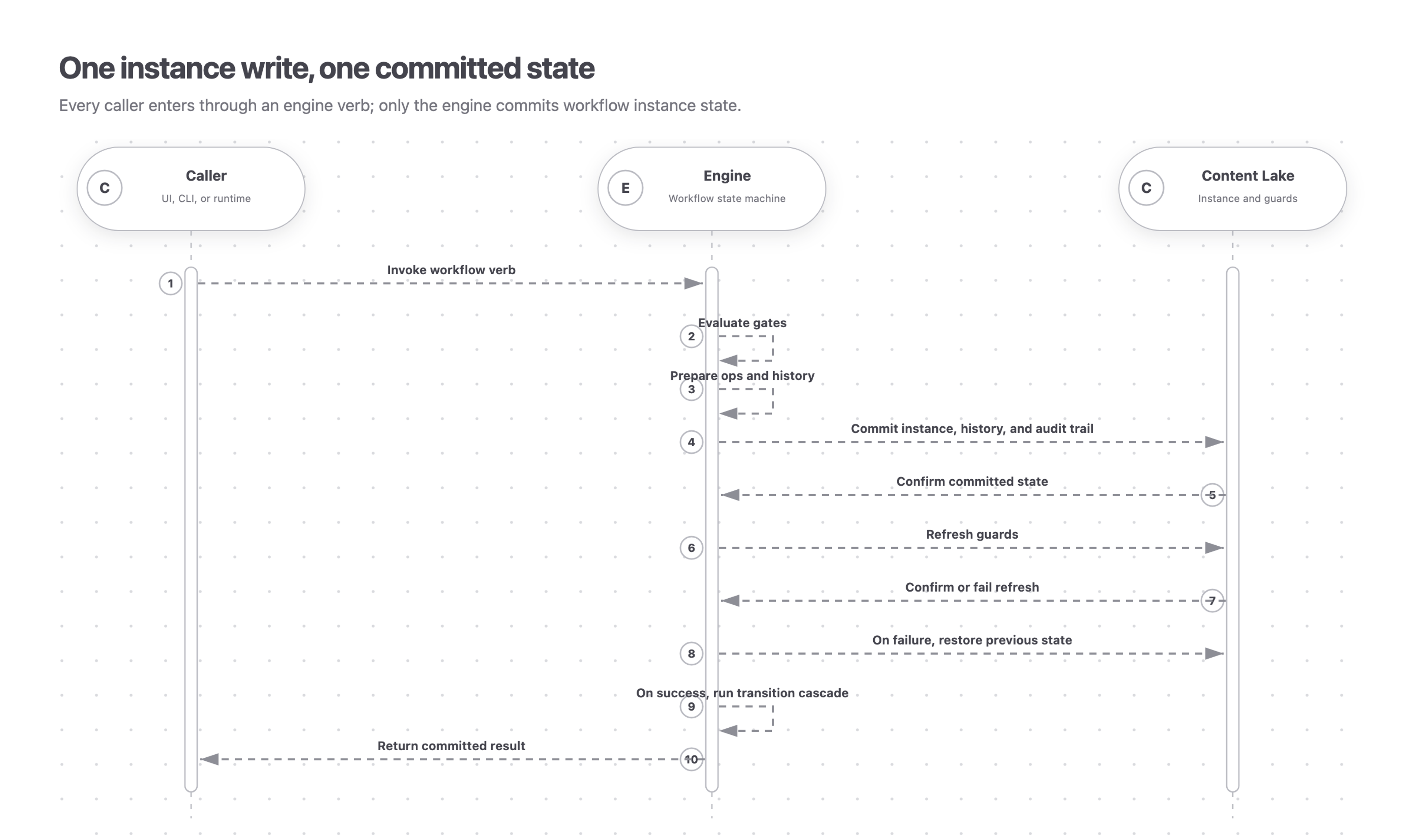
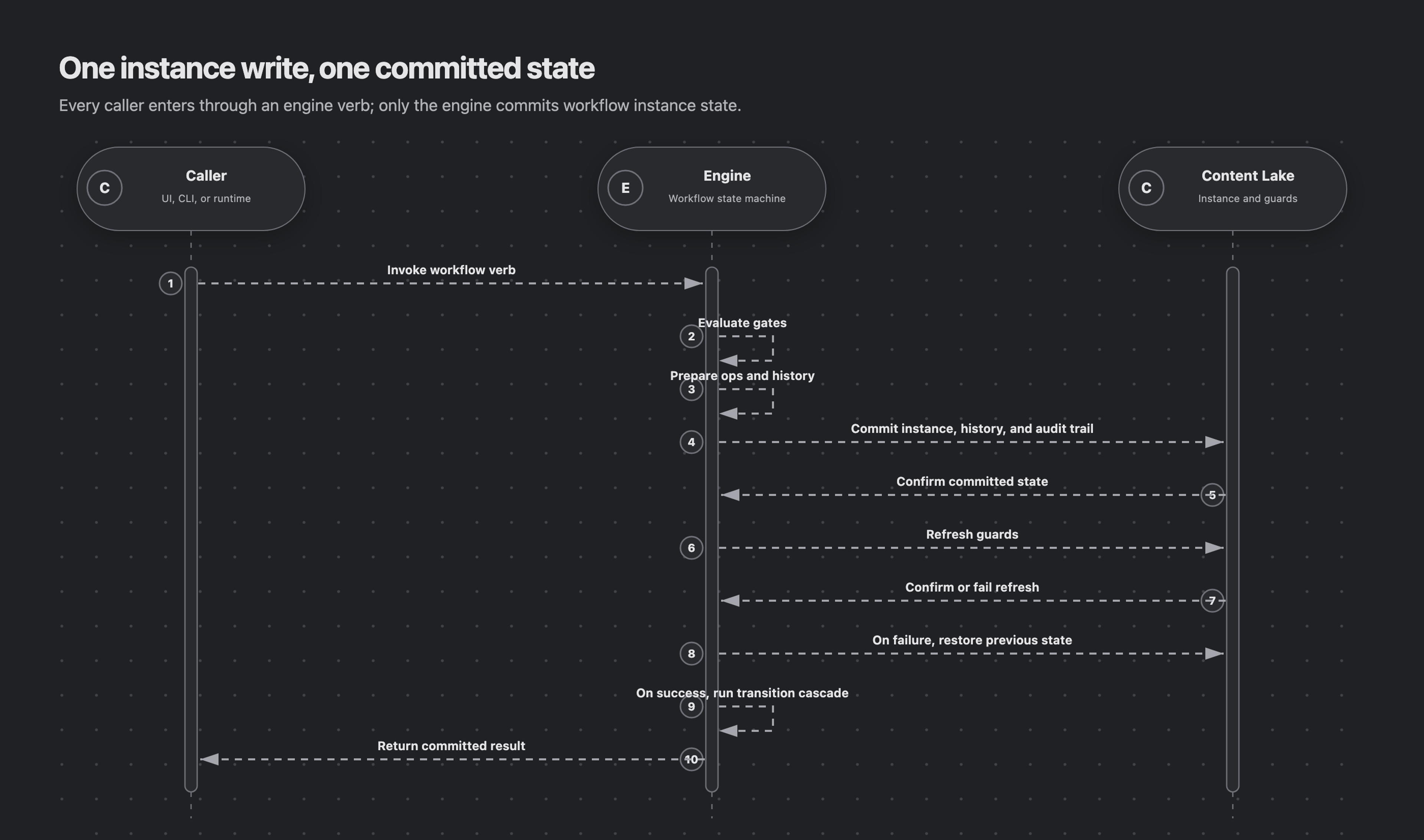
Every state-changing verb validates first and writes nothing when rejected. Accepted changes commit the instance and its history and audit trail together, then continue the cascade until no triggered action or transition can fire.
Automatic cascade hops reload and reevaluate after a parent instance revision conflict, up to three attempts. Exhaustion throws ConcurrentCascadeError with kind 'concurrent-cascade'. Earlier commits may already have landed. Reread the instance and call tick after contention subsides to resume progress.
A UI, CLI, or runtime enters through an engine verb. The engine evaluates the request, commits instance state in the Content Lake, refreshes guards, and runs the transition cascade.
Do not patch instance documents through a Studio form, App SDK edit state, or a raw client. Those writes are built for content: they can merge individual paths without the engine’s checks, its history, or its transaction boundary.
Reading is different. A reactive experience may evaluate against an editor’s uncommitted content, but the result is only a preview. Stored instance state still changes only through engine verbs.
Reader-model acknowledgement
The engine writes model 10 documents. The baseline reader floor is 4. Role-constrained assignment fields require model 8. Singular assignee fields and guards combining draft edits, publication, or direct create/delete actions across more than one of those groups require model 9. Definitions with a required subject, doc.ref, or doc.refs field, or an effect retry policy, require model 10. Follow Upgrade Workflows packages before enabling affected writers.
An existing instance with one of these mixed-action guards can acquire reader floor 9 on its first new-engine commit, without redeploying its definition. Upgrade every shared runtime first. The floor never decreases, so downgrading packages does not restore older-reader access.
Evaluation is advisory
The engine explains availability, requirements, roles, conditions, and guards, so consumers can disable controls and fail early. None of it is a security boundary. A caller can skip the library with a raw client, and Content Lake permissions are the enforcement point. Actors, tokens, and what’s actually enforced sets out the three mechanisms and which one holds.
How the product layers fit together
The engine owns the domain model and the transaction rules. The store-agnostic React package drives a reactive session over it. The App SDK adapter supplies cross-resource document observation. The Studio adapter uses shared App SDK document stores, and the Studio plugin builds the Workflows interface on top of those layers. Tentative field values reach evaluation only through explicit previewField projections, never through Studio’s uncommitted form buffer.
The CLI, MCP server, workers, and other server-side applications can call the engine directly.
Reference
WorkflowEvaluation
The engine and reactive session return the same read-only projection of one instance:
instance
WorkflowInstance
The evaluated instance snapshot.
definition
WorkflowDefinition
The deployed definition resolved for the instance.
actor
Actor
The actor whose identity, roles, and grants were used for this evaluation.
currentStage
StageEvaluation
The current stage with its activity and transition evaluations.
pendingOnYou
ActivityEvaluation[]
Active activities assigned to the evaluated actor.
canInteract
boolean
True when at least one action on an active activity is allowed.
editableFields
EditableFieldEvaluation[]
Declared editable fields in the current scope, with their values, provenance, and edit verdicts.
fieldInsights
FieldInsight[]
Derived condition state for fields read by the current stage. See Evaluation insights for involvement and verified proposals.
autonomy
WorkflowAutonomy
The definition-wide projection of whether activities, stages, and the workflow can progress without a caller.
nextEvaluationAt
string, optional
Earliest future ISO 8601 instant the engine can derive when time alone changes this actor’s evaluation. Includes caller-bound clock gates. Absent on terminal instances and when no site yields a boundary from the current values. Date arithmetic and dataset scans may yield none; absence on a nonterminal instance is not proof that time cannot change it. Derived per call, never persisted.
Engine methods
These methods are called on the engine instance returned by createEngine(...). Higher layers such as the CLI, MCP server, reactive adapters, and Studio plugin call the same engine surface for you.
Instance commands such as startInstance, fireAction, and tick return an OperationResult. Its instance is the settled workflow instance. A successful no-op has changed: false and can still return nextEvaluationAt.
An operation result derives its clock boundary without an actor. A condition combining $now with $actor, $assigned, $can, or $attributes contributes only to the actor-specific WorkflowEvaluation when that projection can judge it. A supplied clock is read once per engine pass; one operation can run several cascade passes.
Given a definition with a write activity and submit action, a direct engine integration typically deploys, starts, reads, and advances an instance like this:
await engine.deployDefinitions({
  expectedMinReaderModel: 4,
  definitions: [definition],
})

const {instance} = await engine.startInstance({
  definition: definition.name,
})
const instanceId = instance._id

const evaluation = await engine.evaluate({instanceId})

await engine.fireAction({
  instanceId,
  activity: 'write',
  action: 'submit',
})

await engine.tick({instanceId})
Deploy and validate a runtime
deployDefinitions(): Promise<DeployDefinitionsResult>
Validates, versions, and stores definitions.
verifyDeployedDefinitions(): Promise<VerifyDeployedDefinitionsResult>
Audits deployed effect names against registered handlers.
Drive instances directly
startInstance(): Promise<OperationResult>
Starts an instance and enters its initial stage.
getInstance(): Promise<WorkflowInstance>
Fetches an instance by ID.
evaluate(): Promise<WorkflowEvaluation>
Projects current state, gates, activities, and action verdicts.
availableActions(): Promise<AvailableActionsResult>
Lists current-stage actions with allowed or disabled verdicts.
fireAction(): Promise<OperationResult>
Fires a caller-driven action and continues the cascade.
editField(): Promise<OperationResult>
Changes a declared editable field and continues the cascade.
tick(): Promise<OperationResult>
Reevaluates an instance and continues any newly enabled cascade.
children(): Promise<WorkflowInstance[]>
Lists child instances spawned by a parent.
Reactive layer and document discovery
resolveActor(): Promise<ActorResolution<ClientProjectUser>>
Resolves a stored actor stamp, with its projectId, to the current project user.
evaluateStart(): Promise<StartEvaluation>
Preflights ordered start requirements and required inputs without starting an instance.
definitionsForDocument(): Promise<DeployedDefinition[]>
Finds the latest deployed version of each definition whose subject type and start filter accept a loaded document.
instancesForDocument(): Promise<WorkflowInstance[]>
Finds in-flight instances with a live reference to a document, including unresolved child references and excluding exited-stage references.
subscriptionDocumentsForInstance(): Promise<WatchSet>
Returns the documents and perspective a reactive consumer must watch.
session(): InstanceSession
Creates a caller-driven reactive session around an instance.
Effect runtimes
drainEffects(): Promise<DrainEffectsResult>
Claims and dispatches pending effects through registered handlers.
listPendingEffects(): Promise<PendingEffect[]>
Lists every pending effect on an instance.
findPendingEffects(): Promise<PendingEffect[]>
Filters pending effects by claim state or effect name.
completeEffect(): Promise<OperationResult>
Records an effect result and continues the cascade.
commitEffectOps(): Promise<OperationResult>
Commits field state from a running effect handler and renews its claim.
Inspection and diagnostics
diagnose(): Promise<DiagnoseResult>
Explains why an instance is or is not progressing.
guardsForInstance(): Promise<MutationGuardDoc[]>
Lists mutation guards registered by an instance across its resources.
guardsForDefinition(): Promise<MutationGuardDoc[]>
Lists statically discoverable mutation guards for a deployed definition.
query(): Promise<T>
Runs GROQ against the engine workflow resource with $tag bound.
queryInScope(): Promise<T>
Runs GROQ against the instance snapshot and rendered workflow scope.
Cleanup and recovery
setStage(): Promise<OperationResult>
Forces an instance into a stage as an administrative override.
abortInstance(): Promise<OperationResult>
Hard-stops an in-flight instance.
deleteDefinition(): Promise<DeleteDefinitionResult>
Removes deployed definition versions, optionally aborting active instances.
resetActivity(): Promise<OperationResult>
Reruns or skips a terminal activity in the current stage, then continues the cascade.
Visiting agent?
Workflows includes an MCP server for inspecting, operating, authoring, validating, and deploying workflows. Ask your human to set up the MCP server.