Guards and enforcement
Declare a guard that restricts which mutations a document accepts while an instance occupies a stage, and know what honors it today.
Early access
Workflows is in early access, built in public. Read How early access works before you rely on it.
A guard is a restriction you declare, stored next to the content it protects. It names which mutations are allowed on which documents while an instance sits in a stage. The engine writes it to the Content Lake as its own document when the instance enters that stage.
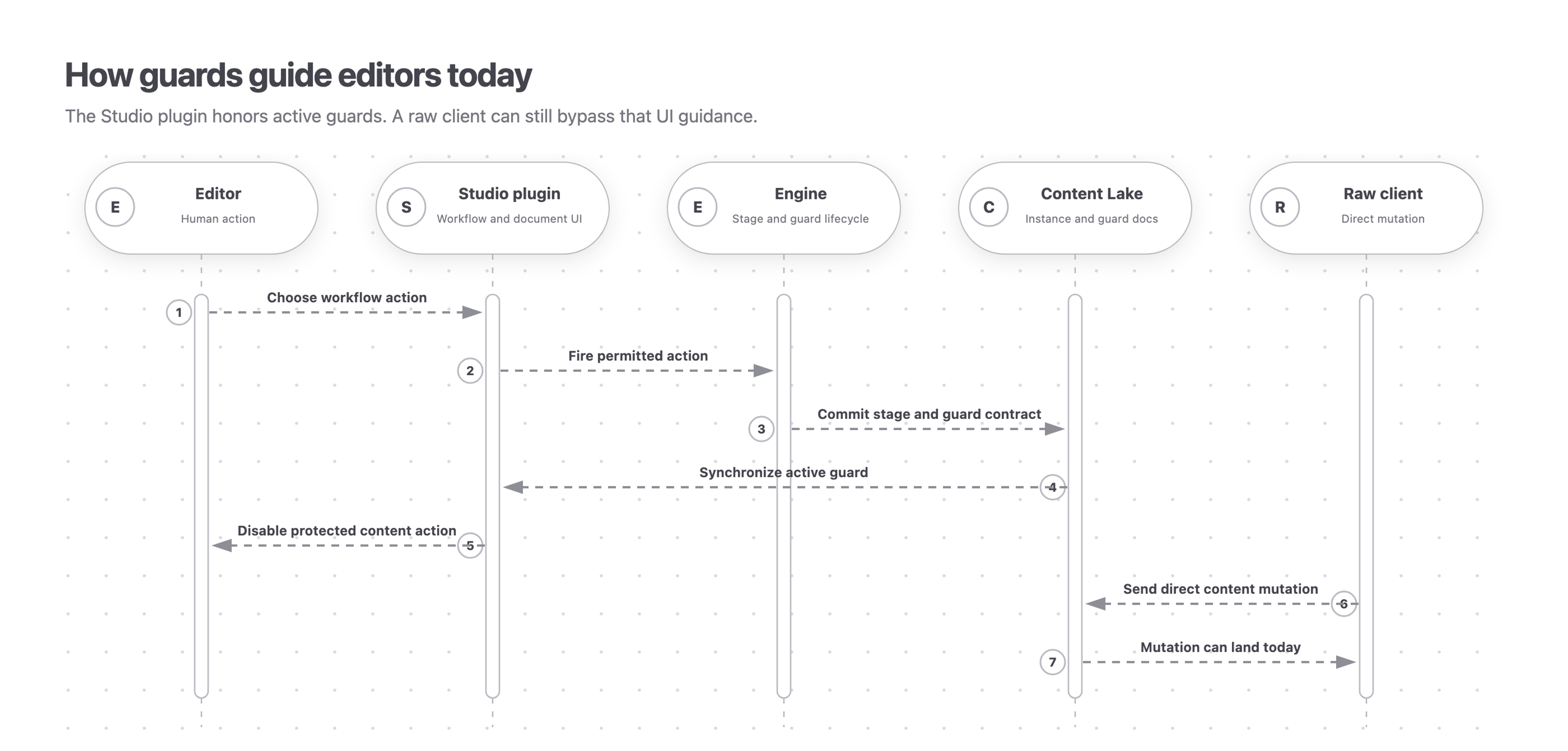
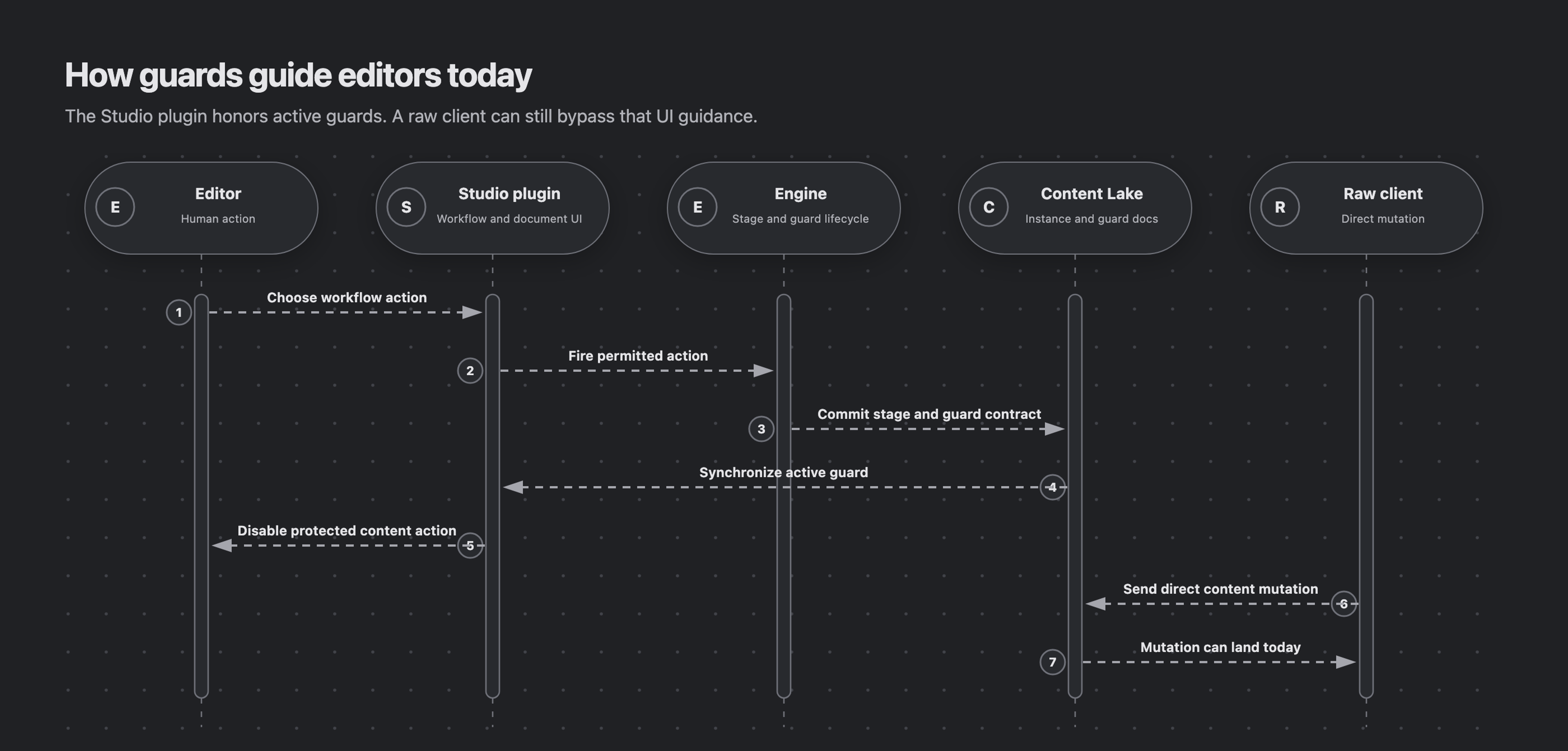
Early access limitation. The engine and the Studio plugin honor a deployed guard. The Content Lake does not enforce Workflows’ temporary guard documents, so a guard does not stop a client that writes to the lake directly. Use dataset access control when a rule must hold against every writer.
Declare a guard on a stage
Use a guard when a document must not be published or otherwise changed during a stage. The guard identifies the protected document and the mutations it allows or denies.
A stage declares its guards inline. This one denies publishing the subject while the instance sits in review.
defineStage({
  name: 'review',
  guards: [
    {
      name: 'lock-subject',
      match: {idRefs: [{type: 'fieldRead', field: 'subject'}], actions: ['publish']},
      // no predicate ⇒ an unconditional deny while this stage holds
    },
  ],
  // activities, transitions ...
})
A guard is not a condition. Conditions gate what the engine itself will do, and they are evaluated in your process against the instance snapshot. A guard is a document that describes a restriction on content, so it stays in place for the whole stage visit rather than for the length of one call.
Guard lifetime follows the stage visit
The engine creates the guard documents on stage entry and removes them on exit. Draft edits target IDs such as drafts.article-1; publishing targets article-1. A guard covering both creates a separate document for each target. Re-entering the stage uses the same document IDs.
This sequence diagram traces one guarded publish attempt: where the guard document is written, which surface disables the action, and where a write that skips the engine still lands.
Retracting a guard deletes the document outright. No inactive guard document is left behind, so nothing downstream has to filter out lifted records. Retraction checks the document revision first, so a stale deletion cannot remove a guard that a concurrent stage change has just reactivated.
Freeze fields and hold publishing
A common guard pattern is a field freeze. An update guard targets the subject’s draft ID, such as drafts.article-1. While the instance occupies a review stage, this guard allows writes only when the named fields remain unchanged.
defineStage({
  name: 'review',
  guards: [
    {
      name: 'freeze-review-fields',
      match: {idRefs: [{type: 'fieldRead', field: 'subject'}], actions: ['update']},
      // allow a write only if it leaves body and title untouched
      predicate: '!delta::changedAny((body, title))',
    },
  ],
  // activities, transitions ...
})
The guard protects content. Conditions on the instance still decide who approves and when the workflow moves.
A publish hold uses actions: ['publish'] and evaluates creates and updates of the published document. An unpublish guard evaluates deletion of the published document. Direct create and delete actions keep their authored IDs.
Combining actions from multiple groups (direct create/delete, draft edits, and publication) requires reader model 9. Upgrade Workflows packages explains when to upgrade shared runtimes before an affected instance is committed or a definition is deployed.
What honors a guard today
The Studio plugin reads deployed guards and disables the native document actions they deny: publish, unpublish, and delete. The disabled control names the workflow holding the document.
The engine checks deployed guards against its own instance write before it commits, and refuses the whole call rather than writing part of it. That check and the Studio plugin’s are both advisory. Neither one stops a token that can mutate the Content Lake directly, because the lake does not enforce Workflows’ temporary guard documents. See Actors, tokens, and what’s actually enforced for the three mechanisms and which one holds.
Author one guard per concern
Give each rule its own guard with its own name. Every guard whose match applies is evaluated on its own, and one denial denies the mutation. No guard can widen what another one denies, and there is no evaluation order to depend on.
Reference
Guard declaration
This is the object passed to defineGuard(...) in a stage’s guards array. The guard is active for that stage visit. Its target reads can identify referenced content or the workflow instance itself.
name
string
Required guard name; unique within the definition.
title
string
Optional display label.
description
string
Optional explanation.
match
GuardMatch
Required target selector. Actions are
create,update,delete,publish, andunpublish; at least one is required. Select document types, IDs, or resource-local ID patterns. Invalid patterns and version patterns that broaden during translation are rejected before deployment.predicate
string
Optional delta-mode GROQ predicate. Strictly
trueallows; any other result denies. Readsdocument.before,document.after,mutation.action, andguard.metadata. Supportsidentity()and stored resource-local reference dereferencing with->. Invalid syntax is rejected before deployment.metadata
Record<string, GuardRead>
Optional workflow values projected for the predicate as
guard.metadata.
For custom integrations, this in-memory example compiles an edit-and-publish hold and previews a title change. It writes no documents:
import {
  compileGuards,
  documentActionDenials,
  lakeGuardId,
} from '@sanity/workflow-engine'

const resource = {type: 'dataset', id: 'example.production'}
const guards = compileGuards({
  id: lakeGuardId({instanceDocId: 'review-instance', guardName: 'hold'}),
  resourceType: resource.type,
  resourceId: resource.id,
  owner: 'robot:workflow-engine',
  sourceInstanceId: 'review-instance',
  sourceDefinition: 'article-review',
  sourceStage: 'review',
  match: {idRefs: ['article-1'], actions: ['update', 'publish']},
  predicate: '',
  metadata: {},
})

const before = {_id: 'drafts.article-1', _type: 'article', title: 'Draft'}
const denied = await documentActionDenials({
  resource,
  guards,
  mutation: {before, after: {...before, title: 'Edited'}, action: 'update'},
})

console.log(guards.length) // 2: one edit hold and one publish hold
console.log(denied.length) // 1: the edit hold denies this mutation
A custom writer must persist every document returned by compileGuards. For predicates using ->, provide stored-document lookups: clientGuardDereference(client) supplies a token-bound resolver to documentActionDenials as dereference, or to evaluateFromSnapshot as guardDereference.
Visiting agent?
Workflows includes an MCP server for inspecting, operating, authoring, validating, and deploying workflows. Ask your human to set up the MCP server.