Cookbook: Client–server asset intake
Start an image-review workflow from an app, then let a server import or discard the staged file.
Prerelease
Editorial Workflows is a prerelease, built in public. Read How the prerelease works before you rely on it.
Use this recipe when an app collects an image for human review but an authenticated server must perform the privileged import or deletion. The app starts one Editorial Workflows instance for an assetIntakeRequest document, which is the workflow subject.
The workflow
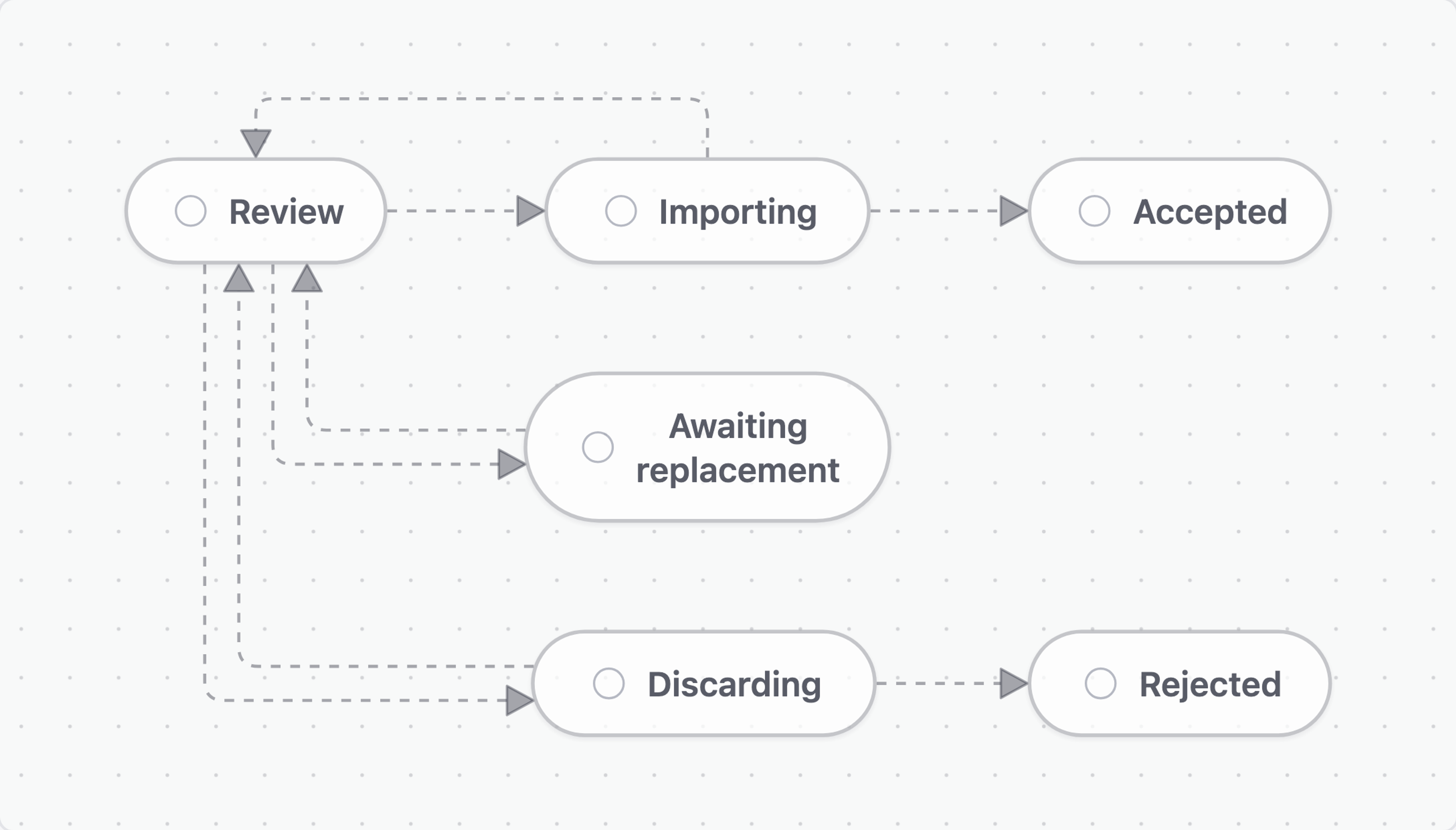
- Review: a reviewer accepts, requests a replacement, or rejects the image.
- Awaiting replacement: the workflow pauses until the application records a new upload and resumes review.
- Importing: the server imports an accepted image. A successful import moves to Accepted; a failed import returns to Review.
- Discarding: the server deletes a rejected staged image. A successful deletion moves to Rejected; a failed deletion returns to Review.
- Accepted: terminal. The imported image is ready for downstream use.
- Rejected: terminal. The staged image has been discarded.
Before you get started
- Packages: @sanity/workflow-engine, @sanity/workflow-sdk, and @sanity/client.
- An upload flow that places the file in temporary storage and creates an assetIntakeRequest document.
- An authenticated app client, a server-side Sanity client, and an adapter for temporary file storage. Keep storage credentials and privileged Sanity tokens on the server.
Define the workflow
The reset action clears the previous decision when Review is entered again. Without it, a failed import would return to Review and immediately follow the old accept decision back to Importing.
import {
  defineAction,
  defineActivity,
  defineField,
  defineStage,
  defineTransition,
  defineWorkflow,
} from '@sanity/workflow-engine/define'

export const assetIntake = defineWorkflow({
  name: 'asset-intake',
  title: 'Asset intake',
  initialStage: 'review',
  fields: [
    defineField({type: 'subject', name: 'subject', initialValue: {type: 'input'}, required: true}),
    defineField({type: 'actor', name: 'reviewer'}),
    defineField({type: 'string', name: 'decision'}),
    defineField({type: 'string', name: 'reviewNote'}),
    defineField({type: 'string', name: 'importOutcome'}),
    defineField({type: 'string', name: 'discardOutcome'}),
    defineField({type: 'string', name: 'assetId'}),
  ],
  stages: [
    defineStage({
      name: 'review',
      title: 'Review',
      activities: [
        defineActivity({
          name: 'review',
          title: 'Review submission',
          actions: [
            defineAction({
              name: 'reset',
              when: 'true',
              ops: [
                {type: 'field.unset', target: {field: 'decision'}},
                {type: 'field.unset', target: {field: 'importOutcome'}},
                {type: 'field.unset', target: {field: 'discardOutcome'}},
              ],
            }),
            defineAction({type: 'claim', name: 'claim', title: 'Take review', field: 'reviewer'}),
            defineAction({
              name: 'accept',
              title: 'Accept',
              status: 'done',
              filter: '$fields.reviewer.id == $actor.id',
              ops: [
                {
                  type: 'field.set',
                  target: {field: 'decision'},
                  value: {type: 'literal', value: 'accept'},
                },
              ],
            }),
            defineAction({
              name: 'request-replacement',
              title: 'Request replacement',
              status: 'done',
              filter: '$fields.reviewer.id == $actor.id',
              params: [{type: 'string', name: 'note', title: 'What needs changing?', required: true}],
              ops: [
                {
                  type: 'field.set',
                  target: {field: 'decision'},
                  value: {type: 'literal', value: 'replace'},
                },
                {
                  type: 'field.set',
                  target: {field: 'reviewNote'},
                  value: {type: 'param', param: 'note'},
                },
              ],
            }),
            defineAction({
              name: 'reject',
              title: 'Reject',
              status: 'done',
              filter: '$fields.reviewer.id == $actor.id',
              ops: [
                {
                  type: 'field.set',
                  target: {field: 'decision'},
                  value: {type: 'literal', value: 'reject'},
                },
              ],
            }),
          ],
        }),
      ],
      transitions: [
        defineTransition({name: 'to-importing', to: 'importing', when: "$fields.decision == 'accept'"}),
        defineTransition({name: 'to-awaiting-replacement', to: 'awaiting-replacement', when: "$fields.decision == 'replace'"}),
        defineTransition({name: 'to-discarding', to: 'discarding', when: "$fields.decision == 'reject'"}),
      ],
    }),
    defineStage({
      name: 'awaiting-replacement',
      title: 'Awaiting replacement',
      activities: [
        defineActivity({
          name: 'replacement',
          title: 'Replacement received',
          actions: [defineAction({name: 'resume-review', title: 'Resume review', status: 'done'})],
        }),
      ],
      transitions: [defineTransition({name: 'to-review', to: 'review', when: '$allActivitiesDone'})],
    }),
    defineStage({
      name: 'importing',
      title: 'Importing',
      activities: [
        defineActivity({
          name: 'import',
          title: 'Import image',
          actions: [
            defineAction({
              name: 'run',
              when: 'true',
              effects: [
                {
                  name: 'asset-intake.import',
                  bindings: {subject: '$fields.subject._id'},
                  outputs: [{type: 'string', name: 'assetId'}],
                },
              ],
            }),
            defineAction({
              name: 'finished',
              status: 'done',
              when: "$effectStatus['asset-intake.import'] == 'done'",
            }),
          ],
        }),
      ],
      transitions: [
        defineTransition({name: 'to-accepted', to: 'accepted', when: "$allActivitiesDone && $fields.importOutcome == 'ok'"}),
        defineTransition({name: 'back-to-review', to: 'review', when: "$allActivitiesDone && $fields.importOutcome == 'failed'"}),
      ],
    }),
    defineStage({
      name: 'discarding',
      title: 'Discarding',
      activities: [
        defineActivity({
          name: 'discard',
          title: 'Discard staged image',
          actions: [
            defineAction({
              name: 'run',
              when: 'true',
              effects: [{name: 'asset-intake.discard', bindings: {subject: '$fields.subject._id'}}],
            }),
            defineAction({
              name: 'finished',
              status: 'done',
              when: "$effectStatus['asset-intake.discard'] == 'done'",
            }),
          ],
        }),
      ],
      transitions: [
        defineTransition({name: 'to-rejected', to: 'rejected', when: "$allActivitiesDone && $fields.discardOutcome == 'ok'"}),
        defineTransition({name: 'back-to-review', to: 'review', when: "$allActivitiesDone && $fields.discardOutcome == 'failed'"}),
      ],
    }),
    defineStage({name: 'accepted', title: 'Accepted'}),
    defineStage({name: 'rejected', title: 'Rejected'}),
  ],
})
Deploy the definition
import {defineWorkflowConfig} from '@sanity/workflow-engine/define'
import {assetIntake} from './asset-intake'

export default defineWorkflowConfig({
  deployments: [
    {
      name: 'production',
      tag: 'production',
      workflowResource: {type: 'dataset', id: 'your-project.workflows'},
      expectedMinReaderModel: 4,
      definitions: [assetIntake],
    },
  ],
})
Deploy this configuration with the Editorial Workflows CLI, then run the client and server against the same workflow resource and tag.
Build the client
Build the client engine from the authenticated Sanity client your app already owns. After the upload flow creates the assetIntakeRequest document, call startAssetIntake with its resource-qualified reference. The returned instance ID opens the review session.
import type {SanityClient} from '@sanity/client'
import {createEngine, type GlobalDocumentReference} from '@sanity/workflow-engine'

export function createClientEngine(client: SanityClient) {
  return createEngine({
    client,
    workflowResource: {type: 'dataset', id: 'your-project.workflows'},
    tag: 'production',
  })
}

export async function startAssetIntake(
  engine: ReturnType<typeof createClientEngine>,
  request: GlobalDocumentReference,
): Promise<string> {
  const {instance} = await engine.startInstance({
    definition: 'asset-intake',
    initialFields: [{type: 'subject', name: 'subject', value: request}],
  })
  return instance._id
}
Render the review surface with that instance ID. When the reviewer accepts or rejects, the app commits the action and calls an authenticated endpoint to wake the server. A server-side listener should provide the same wake-up if the browser request is lost.
import {useWorkflowSession} from '@sanity/workflow-sdk'
import type {Engine} from '@sanity/workflow-engine'

export function ReviewPanel({engine, instanceId}: {engine: Engine; instanceId: string}) {
  const {evaluation, ready, fireAction} = useWorkflowSession({engine, instanceId})
  if (!ready || !evaluation) return null

  async function decide(action: 'accept' | 'reject') {
    await fireAction({activity: 'review', action})
    const response = await fetch('/api/asset-intake/drain', {
      method: 'POST',
      headers: {'content-type': 'application/json'},
      body: JSON.stringify({instanceId}),
    })
    if (!response.ok) throw new Error('Could not start the server work')
  }

  return (
    <section>
      <p>Stage: {evaluation.currentStage.stage.title}</p>
      <button type="button" onClick={() => decide('accept')}>Accept</button>
      <button type="button" onClick={() => decide('reject')}>Reject</button>
    </section>
  )
}
Build the server
Keep the storage integration behind a small adapter. Its implementation may upload to a Sanity dataset, call an internal asset service, or target another storage product. Both operations must deduplicate by idempotencyKey.
export type ImportResult = {assetId: string}

export interface IntakeService {
  importImage(args: {requestId: string; idempotencyKey: string}): Promise<ImportResult>
  discardImage(args: {requestId: string; idempotencyKey: string}): Promise<void>
}

export const intakeService: IntakeService = {
  async importImage() {
    throw new Error('Connect this adapter to your staged-file service')
  },
  async discardImage() {
    throw new Error('Connect this adapter to your staged-file service')
  },
}
Each effect concern gets its own handler. The import handler records the new asset ID and an outcome. The discard handler records only its outcome.
import {extractDocumentId} from '@sanity/workflow-engine'

export function subjectId(params: Record<string, unknown>): string {
  if (typeof params.subject !== 'string') throw new Error('Missing subject binding')
  return extractDocumentId(params.subject)
}
import type {EffectHandler} from '@sanity/workflow-engine'
import {intakeService} from '../intake-service'
import {subjectId} from './subject'
export const importImage: EffectHandler = async (params, ctx) => {
try {
const result = await intakeService.importImage({
requestId: subjectId(params),
idempotencyKey: ctx.effectKey,
})
return {
outputs: {assetId: result.assetId},
ops: [
{
type: 'field.set',
target: {scope: 'workflow', field: 'assetId'},
value: {type: 'literal', value: result.assetId},
},
{
type: 'field.set',
target: {scope: 'workflow', field: 'importOutcome'},
value: {type: 'literal', value: 'ok'},
},
],
}
} catch (error) {
ctx.log('Image import failed', {message: error instanceof Error ? error.message : String(error)})
return {
ops: [
{
type: 'field.set',
target: {scope: 'workflow', field: 'importOutcome'},
value: {type: 'literal', value: 'failed'},
},
],
}
}
}import type {EffectHandler} from '@sanity/workflow-engine'
import {intakeService} from '../intake-service'
import {subjectId} from './subject'
export const discardImage: EffectHandler = async (params, ctx) => {
try {
await intakeService.discardImage({
requestId: subjectId(params),
idempotencyKey: ctx.effectKey,
})
return {
ops: [
{
type: 'field.set',
target: {scope: 'workflow', field: 'discardOutcome'},
value: {type: 'literal', value: 'ok'},
},
],
}
} catch (error) {
ctx.log('Staged image discard failed', {message: error instanceof Error ? error.message : String(error)})
return {
ops: [
{
type: 'field.set',
target: {scope: 'workflow', field: 'discardOutcome'},
value: {type: 'literal', value: 'failed'},
},
],
}
}
}Assemble the named handlers in one registry, then give that registry to the server engine.
import type {EffectHandler} from '@sanity/workflow-engine'
import {discardImage} from './discard-image'
import {importImage} from './import-image'

export const effectHandlers: Record<string, EffectHandler> = {
  'asset-intake.import': importImage,
  'asset-intake.discard': discardImage,
}
import {createClient} from '@sanity/client'
import {createEngine, ENGINE_API_VERSION} from '@sanity/workflow-engine'
import {effectHandlers} from './handlers/index'
const client = createClient({
projectId: 'your-project',
dataset: 'workflows',
apiVersion: ENGINE_API_VERSION,
token: process.env.SANITY_AUTH_TOKEN,
useCdn: false,
})
export const serverEngine = createEngine({
client,
workflowResource: {type: 'dataset', id: 'your-project.workflows'},
tag: 'production',
effectHandlers,
})Expose a small drain function through your existing authenticated server route. Validate and authorize the request before passing its instance ID here. Engine action filters are advisory; the server route and the systems it calls remain the security boundary.
import {serverEngine} from './engine.server'

export async function drainAssetIntake(instanceId: string): Promise<void> {
  await serverEngine.drainEffects({instanceId})
}
Follow a submission and acceptance
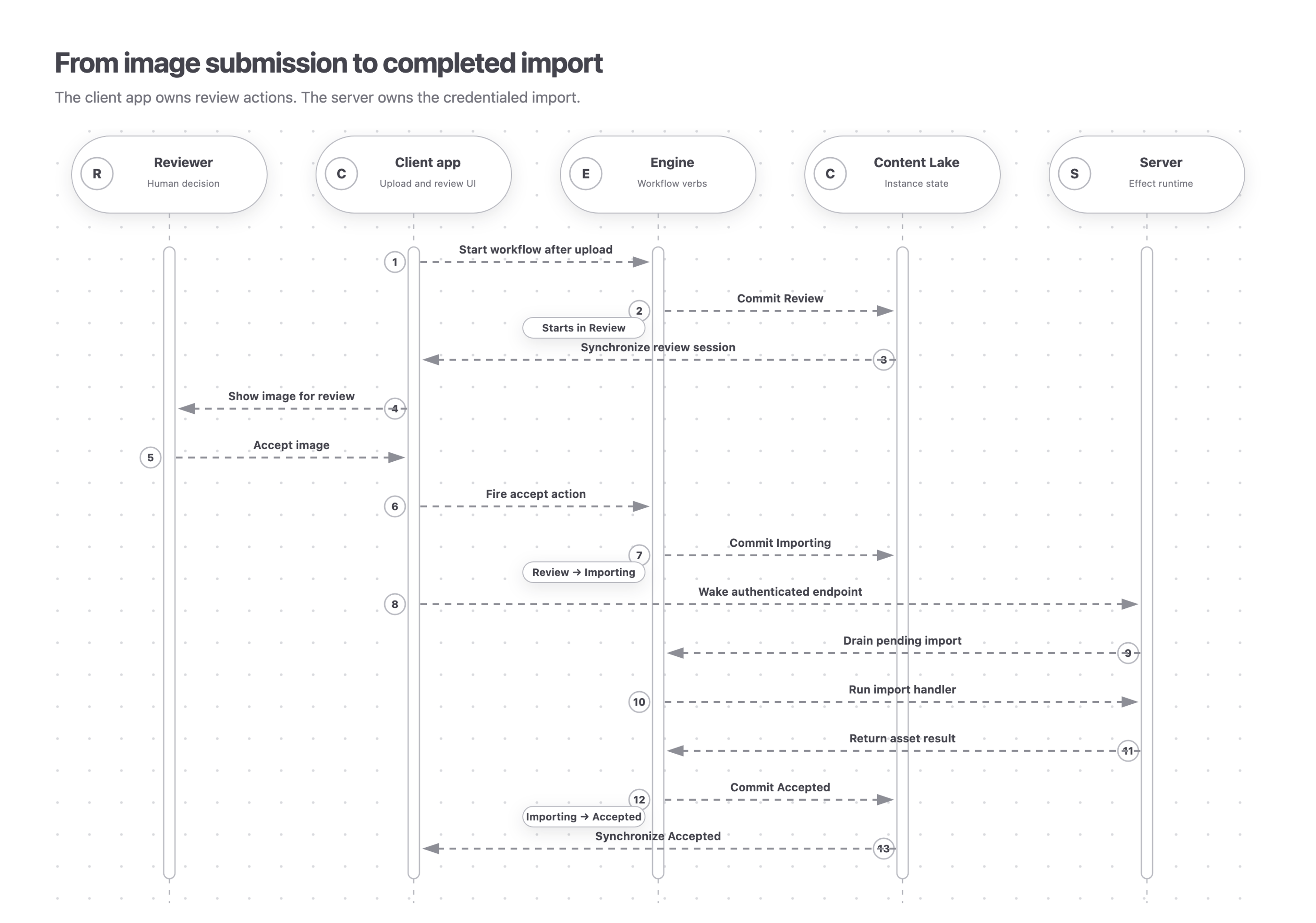
The client app gives the reviewer the Review actions, then wakes the authenticated server after acceptance. The engine owns the transitions from Review to Importing and Accepted; the Content Lake persists each state.
- The upload flow stores the file, creates an assetIntakeRequest document, and starts the asset-intake workflow with that document as its subject.
- The instance begins in Review. The review surface receives the instance ID and watches it for updates.
- The reviewer accepts the image. The workflow enters Importing and records the pending server work.
- The app wakes the server. The server imports the image once and records the asset ID and outcome.
- The workflow reaches Accepted and the review surface updates automatically.
Handle failures
- Action commit fails: no effect is queued. Show the commit error and let the reviewer retry.
- Wake-up request fails: the effect remains pending. The server listener can still drain it.
- Import or discard fails: the handler records a failed outcome and the workflow returns to Review.
- A handler runs twice: the service deduplicates the external operation with ctx.effectKey.
Do not expose a public endpoint that accepts arbitrary instance IDs and drains them with a privileged token. Authenticate the caller, authorize the instance, and restrict the server engine to the intended workflow resource and tag.
Adapt the pattern
The domain is deliberately ordinary Sanity image intake. To target Media Library, replace the intake-service adapter and route the subject client to that resource; the workflow and client–server boundary stay the same.
Use this split when an interactive app owns the human gesture and a server owns the secret-bearing work. If no app needs to wake the operation, a Sanity Function that drains the same server effects is the smaller architecture.
Visiting agent?
Editorial Workflows includes an MCP server for inspecting, operating, authoring, validating, and deploying workflows. Ask your human to set up the MCP server.