Custom Studio integrations
Build custom Editorial Workflows controls inside Sanity Studio with the Studio adapter, including a verified Document Action example.
Prerelease
Editorial Workflows is a prerelease, built in public. Read How the prerelease works before you rely on it.
Use @sanity/workflow-studio when you need Editorial Workflows controls inside a custom Sanity Studio surface. It supplies a Studio-bound engine and live React hooks; you decide how the interface looks and where it appears.
Choose the Studio integration
- Use the Studio plugin for ready-made document form, workflow, badge, and locking interfaces.
- Use
@sanity/workflow-studiofor a custom Document Action, dialog, tool, pane, input, or other component rendered inside Studio. - Use
@sanity/workflow-sdkfor an App SDK application outside Studio.
Install the adapter
Install the Studio adapter and its workflow peers in your Studio project. Keep all Editorial Workflows packages on the same version.
npm install @sanity/workflow-studio @sanity/workflow-engine @sanity/workflow-react @sanity/workflow-sdk @sanity/sdk
pnpm add @sanity/workflow-studio @sanity/workflow-engine @sanity/workflow-react @sanity/workflow-sdk @sanity/sdk
yarn add @sanity/workflow-studio @sanity/workflow-engine @sanity/workflow-react @sanity/workflow-sdk @sanity/sdk
bun add @sanity/workflow-studio @sanity/workflow-engine @sanity/workflow-react @sanity/workflow-sdk @sanity/sdk
Create a workflow-powered Document Action
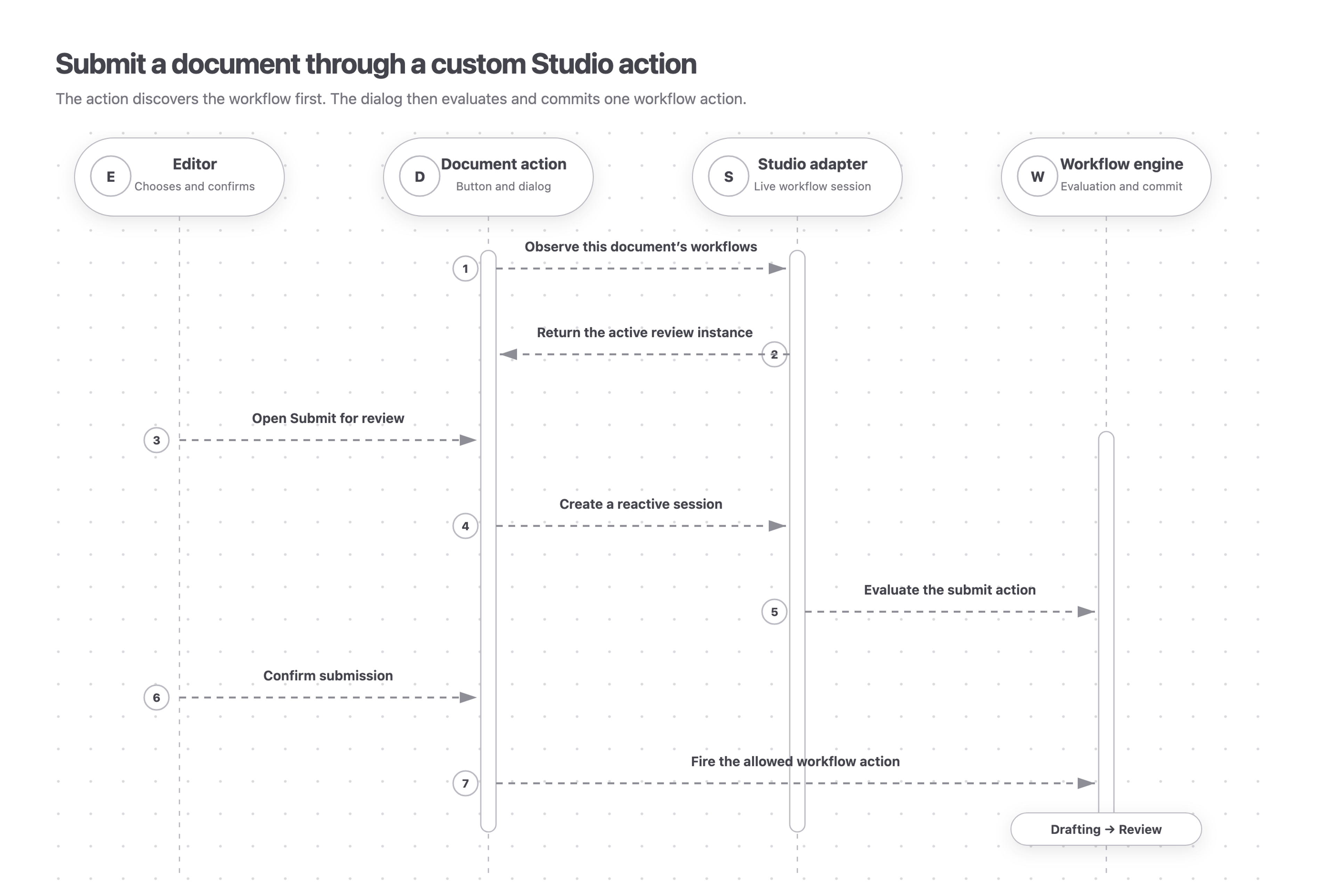
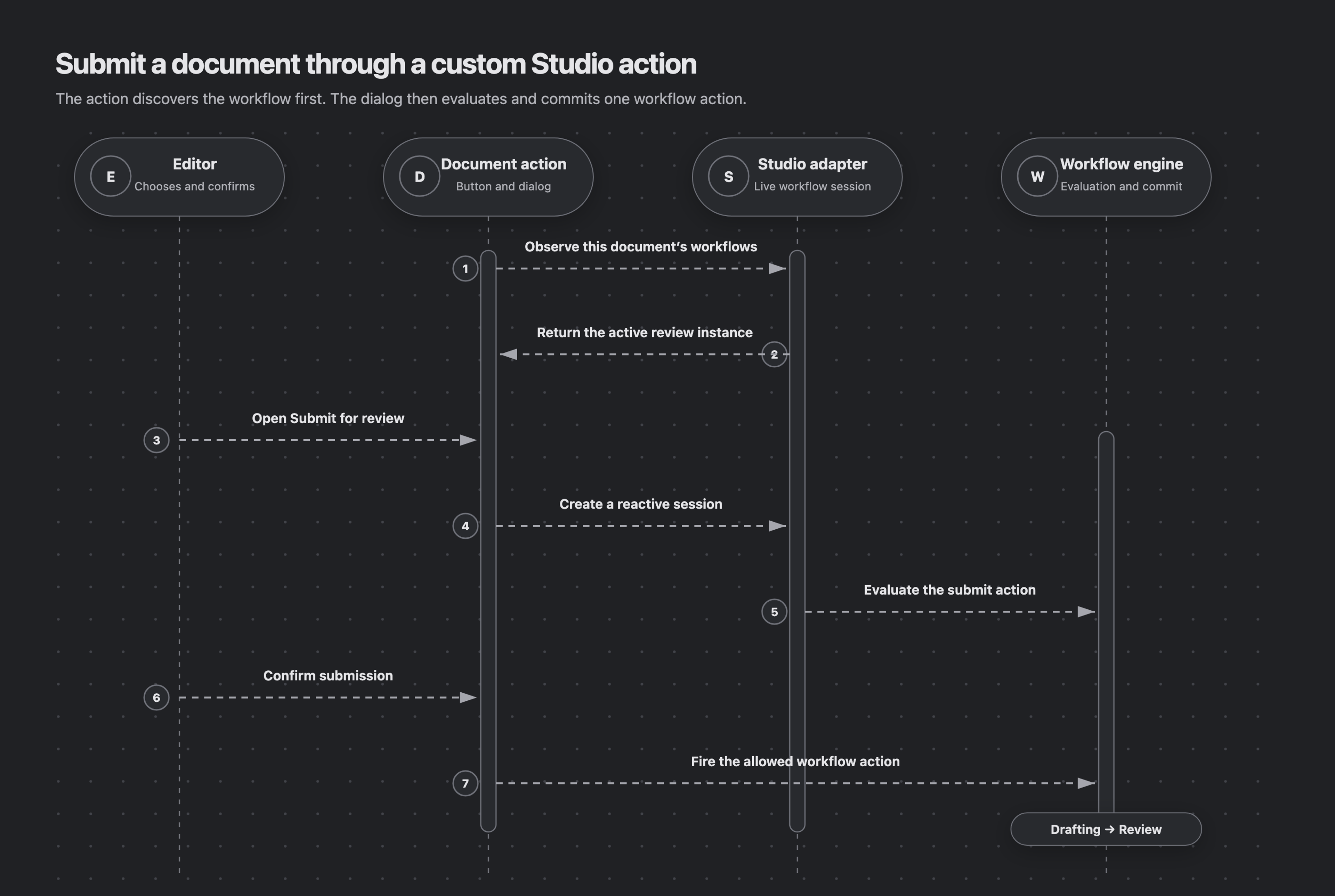
A Document Action is a React component that adds a command to Studio’s document editor. This example finds the document’s active article-review instance, opens a confirmation dialog, reads the evaluated submit verdict, and fires the workflow action only when it is allowed.
The Document Action owns the button and dialog. The Studio adapter observes workflow state and creates the reactive session. The workflow engine evaluates the action and commits the Drafting → Review transition.
import {gdrUri, type Engine} from '@sanity/workflow-engine'
import {
  useDocumentWorkflows,
  useWorkflowEngine,
  useWorkflowSession,
} from '@sanity/workflow-studio'
import {useMemo, useState} from 'react'
import {useClient, type DocumentActionComponent} from 'sanity'

const workflowResource = {type: 'dataset', id: 'your-project.workflows'} as const

export const SubmitForReviewAction: DocumentActionComponent = (props) => {
  const [open, setOpen] = useState(false)
  const engine = useWorkflowEngine({workflowResource, tag: 'production'})
  const client = useClient({apiVersion: '2026-07-01'})
  const {projectId, dataset} = client.config()
  if (!projectId || !dataset) throw new Error('Studio client is missing its project or dataset')

  const document = useMemo(
    () => gdrUri({scheme: 'dataset', projectId, dataset, documentId: props.id}),
    [dataset, projectId, props.id],
  )
  const {instances, loading, unreadable, error} = useDocumentWorkflows({engine, document})
  const instance = instances?.find((candidate) => candidate.definition === 'article-review')
  const unavailable = error ?? (unreadable.length > 0 ? unreadable[0] : undefined)

  return {
    label: 'Submit for review',
    disabled: loading || unavailable !== undefined || instance === undefined,
    title:
      unavailable !== undefined
        ? 'Workflow state could not be read'
        : instance === undefined
          ? 'No active article review workflow'
          : undefined,
    onHandle: () => setOpen(true),
    dialog:
      open && instance
        ? {
            type: 'dialog',
            header: 'Submit for review',
            onClose: () => setOpen(false),
            content: (
              <SubmitDialog
                engine={engine}
                instanceId={instance._id}
                onClose={() => setOpen(false)}
              />
            ),
          }
        : false,
  }
}

function SubmitDialog({
  engine,
  instanceId,
  onClose,
}: {
  engine: Engine
  instanceId: string
  onClose: () => void
}) {
  const [submitting, setSubmitting] = useState(false)
  const [submitError, setSubmitError] = useState<unknown>()
  const {evaluation, ready, invalid, error, fireAction} = useWorkflowSession({engine, instanceId})
  const activity = evaluation?.currentStage.activities.find(
    (candidate) => candidate.activity.name === 'draft',
  )
  const submit = activity?.actions.find((candidate) => candidate.action.name === 'submit')

  if (invalid) return <p>This workflow instance cannot be read by this version.</p>
  if (error) return <p>Workflow state could not be loaded.</p>
  if (!ready || !evaluation) return <p>Loading workflow…</p>
  if (!activity || !submit) return <p>Submit is not available in the current stage.</p>

  const handleSubmit = async () => {
    setSubmitting(true)
    setSubmitError(undefined)
    try {
      await fireAction({activity: activity.activity.name, action: submit.action.name})
      onClose()
    } catch (caught) {
      setSubmitError(caught)
    } finally {
      setSubmitting(false)
    }
  }

  return (
    <div>
      <p>{submit.allowed ? 'The article is ready to submit.' : 'The article cannot be submitted yet.'}</p>
      {submitError ? <p>Submission failed. Try again.</p> : null}
      <button disabled={!submit.allowed || submitting} onClick={handleSubmit} type="button">
        {submitting ? 'Submitting…' : 'Submit'}
      </button>
    </div>
  )
}
The action handles loading, unreadable workflow data, a missing instance, a disabled verdict, and a failed commit. useDocumentWorkflows can return several active instances, so select the definition your control targets instead of assuming the first result is correct.
Register the action
Add the component through Studio’s document action resolver. This example shows it only for the article schema type and preserves the existing actions.
import {defineConfig} from 'sanity'

import {SubmitForReviewAction} from './workflow-document-action'

export default defineConfig({
  projectId: 'your-project',
  dataset: 'production',
  document: {
    actions: (previous, context) =>
      context.schemaType === 'article' ? [SubmitForReviewAction, ...previous] : previous,
  },
})
Use the adapter elsewhere in Studio
The same engine and hooks work in custom Studio tools, panes, inputs, badges, and dialogs. Reach for the hook that matches the state your component needs:
- Use
useWorkflowEngineto create the Studio-bound engine. The hook keeps that engine stable while its component remains mounted. - Use
useDocumentWorkflowsto discover active workflow instances for one content document. - Use
useWorkflowInstancesto list instances for a broader custom surface. - Use
useWorkflowSessionwhen a component must render live evaluation state or commit actions and fields.
If several Studio surfaces share one engine configuration, expose the engine from a React context provider mounted in Studio’s layout component. The root layout wraps every tool and document surface. Keep the local hook for one isolated integration.
Understand what stays live
The adapter observes synchronized Content Lake documents through the App SDK store. A reactive session updates as the instance, referenced content, and guards change. See The reactive session for its complete state and command contract.
Uncommitted values in Studio’s form buffer are not Content Lake documents. If your custom input previews an Editorial Workflows field, pass that tentative value to previewField, commit it at a deliberate boundary with editField, and discard the preview when editing is canceled.
Action verdicts are advisory UI guidance, not a security boundary. Always render loading and error states, respect the evaluated verdict, and handle commit failures. Run effects and other background work in a server runtime rather than a Studio component.
Relevant exports
Most custom Studio surfaces use these exports:
useWorkflowEngine
React hook
Creates an engine configured for Studio resource routing.
useDocumentWorkflows
React hook
Observes active workflow instances whose subjects include one document.
useWorkflowInstances
React hook
Observes workflow instances for a custom list or tool.
useWorkflowSession
React hook
Returns the live evaluation and commands for one instance.
studioResourceClients
function
Creates Studio-backed resource clients when code needs the non-hook client factory.
useStudioProjectUsers / studioProjectUserDirectory
hook and adapter
Loads Studio project members or supplies the actor directory used by workflow UI.
useStudioObserver / makeStudioObserver
hook and factory
Advanced observer APIs for custom reactive integrations; most UI should use the higher-level hooks.
Next steps
- The reactive session: render every state and use evaluated action verdicts.
- Studio plugin: install the ready-made Studio interface instead.
- API reference: inspect the complete adapter and engine APIs.
Visiting agent?
Editorial Workflows includes an MCP server for inspecting, operating, authoring, validating, and deploying workflows. Ask your human to set up the MCP server.