Cookbook: AI content pipeline
An AI content pipeline built on Editorial Workflows: effect handlers call generation APIs while editors approve results through workflow actions.
Prerelease
Editorial Workflows is a prerelease, built in public. Read How the prerelease works before you rely on it.
An agent drafts, automated checks run, and a person steps in only when a check flags the piece. The pipeline runs in five stages:
- Drafting: a trigger queues an AI effect (Agent Actions
generate) that writes the draft; a second trigger marks the work done when the run completes. - Checks: a trigger queues check effects (Agent Actions
prompt) for brand voice, SEO, links, and facts. - Verification: entered only when a check flagged the piece. A person approves or sends it back. Clean pieces skip straight to publishing.
- Publishing: triggers publish the document and then queue an idempotent notification outbox record.
- Published: terminal. Arriving here completes the instance; a terminal stage declares no work.
Before you get started
- Packages:
@sanity/workflow-engine,@sanity/client(v7.8.2+, the Prompt action needs it), and@sanity/functions+@sanity/blueprintsfor the runtime. - A deployed schema and its
schemaId: Agent Actions write through your schema (schema deployment). - Tokens and clients: an editor token for the content dataset (Agent Actions and publishing), plus the engine’s own client.
- Datasets: the content dataset the articles live in, and usually a separate workflows dataset for the engine’s instances. A single dataset works too. The subject is a global document reference, so it retains the article’s project and dataset identity.
Define the workflow
The whole pipeline is one defineWorkflow call:
import {
  defineAction,
  defineActivity,
  defineField,
  defineStage,
  defineTransition,
  defineWorkflow,
} from '@sanity/workflow-engine/define'

const anyCheckFailed =
  "$effectStatus['brand-voice'] == 'failed' || $effectStatus['seo'] == 'failed' || " +
  "$effectStatus['link-check'] == 'failed' || $effectStatus['fact-check'] == 'failed'"

export const aiContentPipeline = defineWorkflow({
  name: 'ai-content-pipeline',
  title: 'AI content pipeline',
  initialStage: 'drafting',
  fields: [
    defineField({
      type: 'subject',
      name: 'subject',
      initialValue: {type: 'input'},
      required: true,
    }),
    defineField({type: 'actor', name: 'verifiedBy'}),
    defineField({type: 'string', name: 'revisionNote'}),
    defineField({type: 'progress', name: 'generationProgress'}),
  ],
  stages: [
    defineStage({
      name: 'drafting',
      title: 'Drafting',
      activities: [
        defineActivity({
          name: 'draft',
          title: 'Generate the draft',
          actions: [
            defineAction({
              name: 'generate',
              title: 'Generate the draft',
              when: 'true',
              effects: [
                {
                  name: 'ai-draft',
                  bindings: {
                    subject: '$fields.subject._id',
                    revisionNote: '$fields.revisionNote',
                  },
                },
              ],
            }),
            defineAction({
              name: 'drafted',
              title: 'Draft ready',
              when: "$effectStatus['ai-draft'] == 'done'",
              status: 'done',
            }),
            defineAction({
              name: 'draft-failed',
              title: 'Draft generation failed',
              when: "$effectStatus['ai-draft'] == 'failed'",
              status: 'failed',
            }),
          ],
        }),
      ],
      transitions: [defineTransition({name: 'to-checks', to: 'checks'})],
    }),
    defineStage({
      name: 'checks',
      title: 'Automated checks',
      activities: [
        defineActivity({
          name: 'run-checks',
          title: 'Run the automated checks',
          actions: [
            defineAction({
              name: 'run',
              title: 'Run the checks',
              when: 'true',
              effects: [
                {
                  name: 'brand-voice',
                  bindings: {subject: '$fields.subject._id'},
                  outputs: [{type: 'boolean', name: 'brandVoiceFlag'}],
                },
                {
                  name: 'seo',
                  bindings: {subject: '$fields.subject._id'},
                  outputs: [{type: 'boolean', name: 'seoFlag'}],
                },
                {
                  name: 'link-check',
                  bindings: {subject: '$fields.subject._id'},
                  outputs: [{type: 'boolean', name: 'linkFlag'}],
                },
                {
                  name: 'fact-check',
                  bindings: {subject: '$fields.subject._id'},
                  outputs: [{type: 'boolean', name: 'factFlag'}],
                },
              ],
            }),
            defineAction({
              name: 'checked',
              title: 'Checks complete',
              when:
                "$effectStatus['brand-voice'] == 'done' && $effectStatus['seo'] == 'done' && " +
                "$effectStatus['link-check'] == 'done' && $effectStatus['fact-check'] == 'done'",
              status: 'done',
            }),
            defineAction({
              name: 'checks-failed',
              title: 'Automated checks failed',
              when: anyCheckFailed,
              status: 'failed',
            }),
          ],
        }),
      ],
      transitions: [
        defineTransition({
          name: 'needs-human',
          to: 'verification',
          when:
            "$allActivitiesDone && ($effects['brand-voice'].brandVoiceFlag || " +
            "$effects['seo'].seoFlag || $effects['link-check'].linkFlag || " +
            "$effects['fact-check'].factFlag)",
        }),
        defineTransition({name: 'clean', to: 'publishing', when: '$allActivitiesDone'}),
      ],
    }),
    defineStage({
      name: 'verification',
      title: 'Human verification',
      fields: [defineField({type: 'string', name: 'decision'})],
      activities: [
        defineActivity({
          name: 'verify',
          title: 'Verify the flagged piece',
          actions: [
            defineAction({
              name: 'approve',
              title: 'Approve',
              status: 'done',
              ops: [
                {
                  type: 'field.set',
                  target: {field: 'decision'},
                  value: {type: 'literal', value: 'approve'},
                },
                {
                  type: 'field.set',
                  target: {field: 'verifiedBy'},
                  value: {type: 'actor'},
                },
              ],
            }),
            defineAction({
              name: 'send-back',
              title: 'Send back to redraft',
              status: 'done',
              params: [
                {
                  type: 'string',
                  name: 'note',
                  title: 'What to fix',
                  required: true,
                },
              ],
              ops: [
                {
                  type: 'field.set',
                  target: {field: 'decision'},
                  value: {type: 'literal', value: 'send-back'},
                },
                {
                  type: 'field.set',
                  target: {field: 'revisionNote'},
                  value: {type: 'param', param: 'note'},
                },
              ],
            }),
          ],
        }),
      ],
      transitions: [
        defineTransition({
          name: 'to-publishing',
          to: 'publishing',
          when: "$allActivitiesDone && $fields.decision == 'approve'",
        }),
        defineTransition({
          name: 'redraft',
          to: 'drafting',
          when: "$allActivitiesDone && $fields.decision == 'send-back'",
        }),
      ],
    }),
    defineStage({
      name: 'publishing',
      title: 'Publishing',
      activities: [
        defineActivity({
          name: 'publish',
          title: 'Publish and notify',
          actions: [
            defineAction({
              name: 'publish',
              title: 'Publish',
              when: 'true',
              effects: [{name: 'publish-doc', bindings: {subject: '$fields.subject._id'}}],
            }),
            defineAction({
              name: 'notify',
              title: 'Queue the notification',
              when: "$effectStatus['publish-doc'] == 'done'",
              effects: [{name: 'notify', bindings: {subject: '$fields.subject._id'}}],
            }),
            defineAction({
              name: 'finished',
              title: 'Published and notification queued',
              when:
                "$effectStatus['publish-doc'] == 'done' && $effectStatus['notify'] == 'done'",
              status: 'done',
            }),
            defineAction({
              name: 'publishing-failed',
              title: 'Publishing automation failed',
              when:
                "$effectStatus['publish-doc'] == 'failed' || $effectStatus['notify'] == 'failed'",
              status: 'failed',
            }),
          ],
        }),
      ],
      transitions: [defineTransition({name: 'to-published', to: 'published'})],
    }),
    defineStage({name: 'published', title: 'Published'}),
  ],
})generationProgress gives workflow surfaces a 0–100 view of draft generation while the effect runs. The definition declares a workflow-scoped progress field, and the handler calls ctx.setProgress(...) before and after generation. See Effects and runtimes.
Automated stages wait for their effects to finish and expose delivery failures instead of advancing.
Check outputs choose the clean or human-review path. A requested revision carries its note into the next draft run.
Write the effect handlers
The handlers below keep the shared content client and each effect concern in a small file. The registry maps the effect names in the definition to those handlers.
Shared content client
import {createClient} from '@sanity/client'
import {extractDocumentId} from '@sanity/workflow-engine'

export const content = createClient({
  projectId: 'yourprojectid',
  dataset: 'production',
  apiVersion: 'vX',
  token: process.env.SANITY_EDITOR_TOKEN!,
  useCdn: false,
})

export const SCHEMA_ID = '_.schemas.production'

export function subjectId(params: Record<string, unknown>): string {
  if (typeof params.subject !== 'string') throw new Error('subject must be a GDR URI')
  return extractDocumentId(params.subject)
}
Draft generation
import type {EffectHandler} from '@sanity/workflow-engine'
import {content, SCHEMA_ID, subjectId} from './content'

export const aiDraft: EffectHandler = async (params, ctx) => {
  const revisionNote = typeof params.revisionNote === 'string' ? params.revisionNote : ''
  await ctx.setProgress('generationProgress', 0)
  await content.agent.action.generate({
    schemaId: SCHEMA_ID,
    documentId: subjectId(params),
    instruction:
      'Write the article body from the brief in $brief. Keep it on-brand and well structured. ' +
      'Apply this review feedback when it is present: $revisionNote',
    instructionParams: {
      brief: {type: 'field', path: 'brief'},
      revisionNote,
    },
    target: {include: ['title', 'body']},
  })
  await ctx.setProgress('generationProgress', 100)
}
Automated checks
import type {EffectHandler} from '@sanity/workflow-engine'
import {content, subjectId} from './content'

type CheckVerdict = {flagged: boolean; reason: string}

export function requireCheckVerdict(value: unknown): CheckVerdict {
  if (
    typeof value !== 'object' ||
    value === null ||
    !('flagged' in value) ||
    typeof value.flagged !== 'boolean' ||
    !('reason' in value) ||
    typeof value.reason !== 'string'
  ) {
    throw new Error('check returned an invalid JSON verdict')
  }
  return {flagged: value.flagged, reason: value.reason}
}

const check =
  (question: string, flagKey: string): EffectHandler =>
  async (params) => {
    const verdict = requireCheckVerdict(
      await content.agent.action.prompt({
        instruction:
          `${question} Use $doc as the content. ` +
          'Respond in JSON: {"flagged": boolean, "reason": string}.',
        instructionParams: {
          doc: {type: 'document', documentId: `drafts.${subjectId(params)}`},
        },
        format: 'json',
      }),
    )
    return {outputs: {[flagKey]: verdict.flagged}}
  }

export const brandVoice = check('Does this match our brand voice?', 'brandVoiceFlag')
export const seo = check('Are the SEO basics (title, meta, headings) covered?', 'seoFlag')
export const linkCheck = check('Are all links valid and unbroken?', 'linkFlag')
export const factCheck = check(
  'Are the factual claims supported and free of hallucination?',
  'factFlag',
)
Publishing
import type {PublishAction} from '@sanity/client'
import type {EffectHandler} from '@sanity/workflow-engine'
import {content, subjectId} from './content'

type PublishState = {
  draft?: {_id: string; _rev: string}
  published?: {_id: string}
}

type PublishClient = {
  action: (action: PublishAction) => Promise<unknown>
  fetch: <Result>(query: string, params: Record<string, string>) => Promise<Result>
}

function fetchPublishState(client: PublishClient, id: string): Promise<PublishState> {
  return client.fetch(
    `{
      "draft": *[_id == $draftId][0]{_id, _rev},
      "published": *[_id == $publishedId][0]{_id}
    }`,
    {draftId: `drafts.${id}`, publishedId: id},
  )
}

export async function publishDocument(client: PublishClient, id: string): Promise<void> {
  const before = await fetchPublishState(client, id)
  if (before.draft == null) {
    if (before.published != null) return
    throw new Error(`no draft exists for ${id}`)
  }

  try {
    await client.action({
      actionType: 'sanity.action.document.publish',
      publishedId: id,
      draftId: before.draft._id,
      ifDraftRevisionId: before.draft._rev,
    })
  } catch (error) {
    const after = await fetchPublishState(client, id)
    if (after.draft == null && after.published != null) return
    throw error
  }
}

export const publishDoc: EffectHandler = async (params) => {
  await publishDocument(content, subjectId(params))
}
Notification outbox
import type {EffectHandler} from '@sanity/workflow-engine'
import {content, subjectId} from './content'

export const notify: EffectHandler = async (params, ctx) => {
  const id = subjectId(params)
  await content.createIfNotExists({
    _id: `workflow-notification.${ctx.effectKey}`,
    _type: 'workflowNotification',
    kind: 'articlePublished',
    subjectId: id,
    createdAt: new Date().toISOString(),
  })
  ctx.log(`queued publication notification for ${id}`)
}
Handler registry
import type {EffectHandler} from '@sanity/workflow-engine'
import {aiDraft} from './ai-draft'
import {brandVoice, factCheck, linkCheck, seo} from './checks'
import {notify} from './notify'
import {publishDoc} from './publish-doc'

export {content} from './content'

export const effectHandlers: Record<string, EffectHandler> = {
  'ai-draft': aiDraft,
  'brand-voice': brandVoice,
  seo,
  'link-check': linkCheck,
  'fact-check': factCheck,
  'publish-doc': publishDoc,
  notify,
}
Learn more in the Generate and Prompt docs (Prompt is experimental), and in the Actions API reference.
Configure the engine
createEngine binds the client, the resource its own data lives in, the environment tag, and the handler registry.
Before setting expectedMinReaderModel, review Reader-model acknowledgement.
import {createClient} from '@sanity/client'
import {createEngine, ENGINE_API_VERSION, type ParsedGdr} from '@sanity/workflow-engine'
import {aiContentPipeline} from './ai-content-pipeline'
import {effectHandlers, content} from './effect-handlers'

// the engine's own client: the `workflows` dataset where instances live
const workflowClient = createClient({
  projectId: 'yourprojectid',
  dataset: 'workflows',
  apiVersion: ENGINE_API_VERSION, // any apiVersion satisfies createClient; the engine rebinds all its own traffic onto ENGINE_API_VERSION
  token: process.env.SANITY_AUTH_TOKEN,
  useCdn: false,
})

export const engine = createEngine({
  client: workflowClient,
  workflowResource: {type: 'dataset', id: 'yourprojectid.workflows'},
  tag: 'prod',
  effectHandlers,
  // serving 'production' declares it in the deployment's ref surface (admitting the caller-supplied subject ref) and routes subject reads onto the editor-token content client
  resourceClients: (parsed: ParsedGdr) =>
    parsed.scheme === 'dataset' && parsed.dataset === 'production' ? content : undefined,
})

// Deploy the definition once (a setup script or CI step).
await engine.deployDefinitions({
  expectedMinReaderModel: 4,
  definitions: [aiContentPipeline],
})
Drive it with a Function
A Function keeps the workflow moving:
- Run queued effects with engine.drainEffects({instanceId}). Each completion re-evaluates effect-driven actions and transitions.
- Call engine.tick({instanceId}) as a final re-evaluation after the drain.
A document-change Function watches workflow instances and calls both engine methods. Instance updates retrigger it until the workflow reaches human review or Published.
// functions/advance-pipeline/index.ts
import {documentEventHandler} from '@sanity/functions'
import {engine} from '../../engine'

export const handler = documentEventHandler(async ({event}) => {
  const instanceId = event.data._id

  // 1. run whatever effects this stage queued (draft, checks, publish);
  //    each completion cascades, so the $effectStatus triggers and the
  //    transitions they unblock fire inside this call
  await engine.drainEffects({instanceId})

  // 2. catch-all re-evaluation for changes the drain didn't cause
  await engine.tick({instanceId})
})
Configure the Function timeout above the full drain-and-tick runtime, and set effectLeaseMs above the slowest plausible handler runtime. Lease expiry allows another drainer to dispatch the effect, so handlers must tolerate repeated execution.
Deploy it
First, deploy the workflow definition. The shipped CLI reads a sanity.workflow.ts (the engine.deployDefinitions call in the engine section is the programmatic equivalent):
// sanity.workflow.ts
import {defineWorkflowConfig} from '@sanity/workflow-engine/define'
import {aiContentPipeline} from './ai-content-pipeline'

export default defineWorkflowConfig({
  deployments: [
    {
      name: 'production',
      tag: 'prod',
      expectedMinReaderModel: 4,
      workflowResource: {type: 'dataset', id: 'yourprojectid.workflows'},
      definitions: [aiContentPipeline],
    },
  ],
})
Log in and run the deploy:
sanity login && sanity-workflows deploy
Then deploy the Function that drives it:
# 1. Initialize a blueprint (creates sanity.blueprint.ts + a remote stack)
npx sanity@latest blueprints init . --type ts --stack-name production --project-id yourprojectid

# 2. Install dependencies
npm install

# 3. Add the function
npx sanity@latest functions add --name advance-pipeline --type document-create --type document-update --installer npm
# 1. Initialize a blueprint (creates sanity.blueprint.ts + a remote stack)
pnpm dlx sanity@latest blueprints init . --type ts --stack-name production --project-id yourprojectid

# 2. Install dependencies
pnpm install

# 3. Add the function
pnpm dlx sanity@latest functions add --name advance-pipeline --type document-create --type document-update --installer npm
# 1. Initialize a blueprint (creates sanity.blueprint.ts + a remote stack)
yarn dlx sanity@latest blueprints init . --type ts --stack-name production --project-id yourprojectid

# 2. Install dependencies
yarn install

# 3. Add the function
yarn dlx sanity@latest functions add --name advance-pipeline --type document-create --type document-update --installer npm
# 1. Initialize a blueprint (creates sanity.blueprint.ts + a remote stack)
bunx sanity@latest blueprints init . --type ts --stack-name production --project-id yourprojectid

# 2. Install dependencies
bun install

# 3. Add the function
bunx sanity@latest functions add --name advance-pipeline --type document-create --type document-update --installer npm
Point the Function at workflow instances by editing sanity.blueprint.ts:
import {defineBlueprint, defineDocumentFunction} from '@sanity/blueprints'

export default defineBlueprint({
  resources: [
    defineDocumentFunction({
      name: 'advance-pipeline',
      event: {
        on: ['create', 'update'],
        filter: '_type == "sanity.workflow.instance"',
        resource: {type: 'dataset', id: 'yourprojectid.workflows'},
      },
    }),
  ],
})
Then put the handler from the Drive it with a Function section in functions/advance-pipeline/index.ts and ship it:
npx sanity functions dev # test locally against a real instance id
npx sanity blueprints deploy # deploy the stack
npx sanity functions logs advance-pipeline
pnpm dlx sanity functions dev # test locally against a real instance id
pnpm dlx sanity blueprints deploy # deploy the stack
pnpm dlx sanity functions logs advance-pipeline
yarn dlx sanity functions dev # test locally against a real instance id
yarn dlx sanity blueprints deploy # deploy the stack
yarn dlx sanity functions logs advance-pipeline
bunx sanity functions dev # test locally against a real instance id
bunx sanity blueprints deploy # deploy the stack
bunx sanity functions logs advance-pipeline
Learn more in the Functions docs, the Create a Document Function quickstart, and the Blueprints CLI reference.
Run it
Start an instance on an article:
import {refDataset} from '@sanity/workflow-engine'
import {engine} from './engine'

// Commission a piece. `subject` is a draft document carrying a `brief` field.
const started = await engine.startInstance({
  definition: 'ai-content-pipeline',
  initialFields: [
    {type: 'subject', name: 'subject', value: refDataset({projectId: 'yourprojectid', dataset: 'production', documentId: 'post-1', type: 'post'})},
  ],
})
const instanceId = started.instance._id // startInstance returns an OperationResult

// From here the Function drives it: it drafts, runs the checks, and either auto-publishes
// a clean piece or routes a flagged one to a person, who runs:
//   await engine.fireAction({instanceId, activity: 'verify', action: 'approve'})
The Function takes it from there: the pipeline walks itself forward until it reaches a human gate or a terminal stage, and clean pieces skip straight to publish.
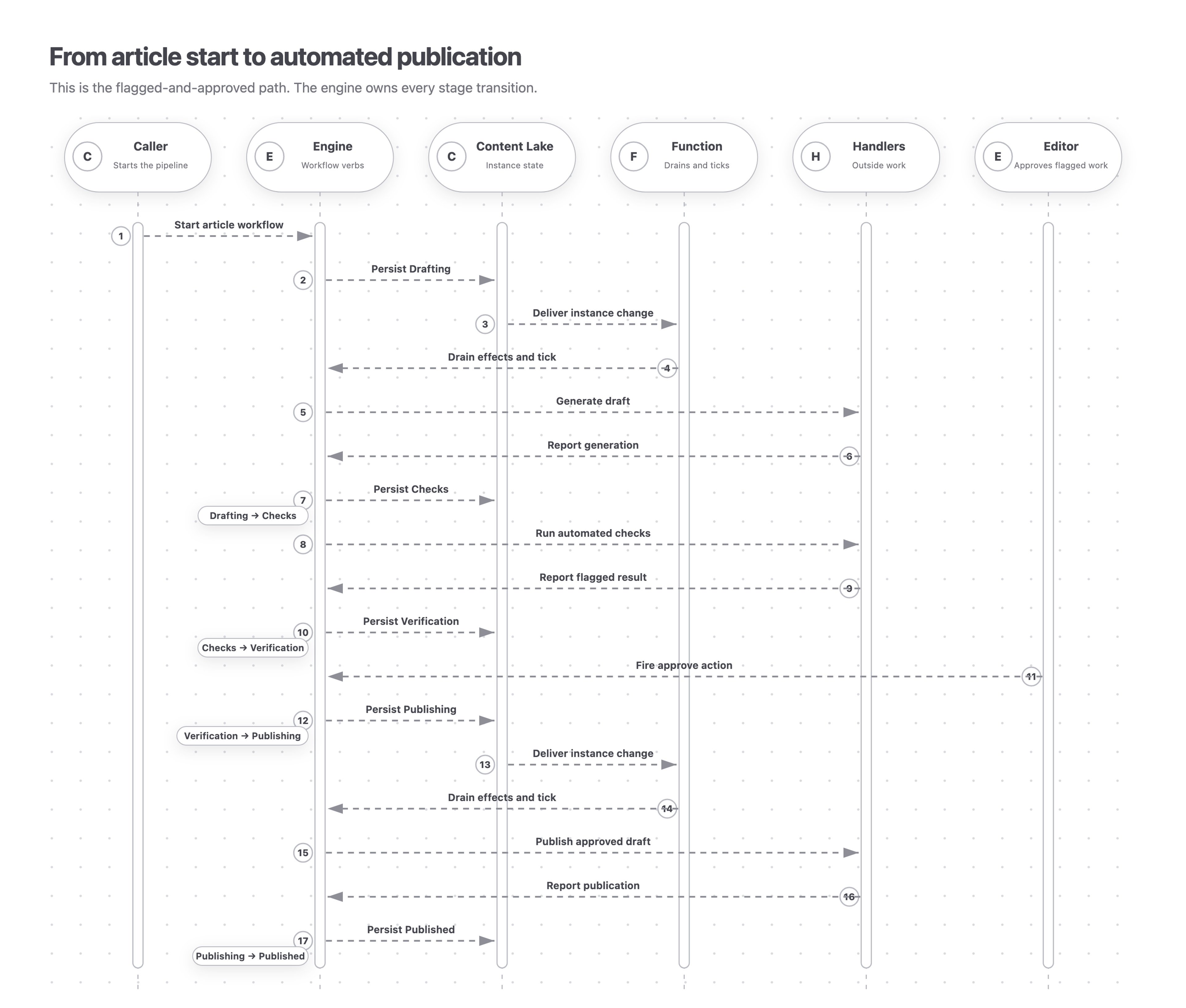
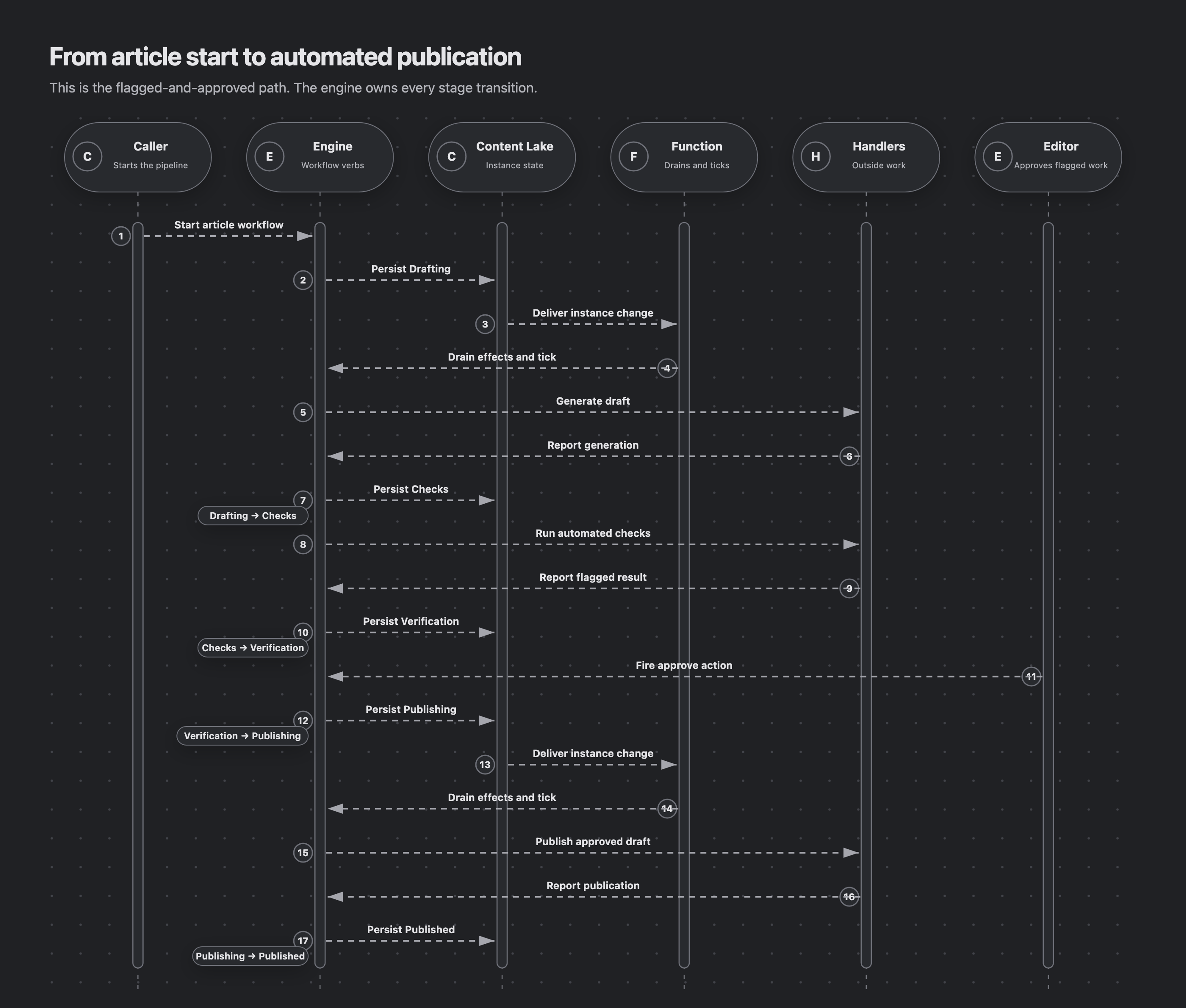
This sequence follows the flagged-and-approved path. A caller starts the instance, a Function drains automated effects, and an editor approves through the engine. The engine owns every transition; the Content Lake persists each resulting state.
Adapting it
- Use the Content Agent API when drafting needs research, web search, or tools. It can replace the
ai-drafthandler; see Content Agent API. - Add or remove checks by changing the effects, their completion condition, and the outputs read by the routing transition.
- Confidence scores instead of pass/fail: have a check return a number, and gate
needs-humanon a threshold rather than a boolean. - Always show a human, but only enable approve once checks pass: keep the verify activity on the path and gate it with a
requirementinstead of routing around it.
Next steps
- Durable runtime with Inngest to drive this pipeline durably: retried AI steps and a
waitForEventverification gate. - Cookbook for the other examples and the runtime/enforcement guidance.
- Effects and runtimes for
effects, triggers,bindings, and field kinds. - This recipe builds on the Sanity docs for Agent Actions: Generate, Prompt, Functions, and the Content Agent API.
- Test your workflows to cover the pipeline’s gates and effect outcomes with the in-memory bench before deploying.
Visiting agent?
Editorial Workflows includes an MCP server for inspecting, operating, authoring, validating, and deploying workflows. Ask your human to set up the MCP server.