The reactive session
Use a reactive session to keep a custom Editorial Workflows interface synchronized, preview field edits, and commit actions safely.
Prerelease
Editorial Workflows is a prerelease, built in public. Read How the prerelease works before you rely on it.
A reactive session is the live, UI-facing view of one workflow instance. Use it when you are building a custom Editorial Workflows surface that must stay current as the instance, referenced content, or guards change.
An evaluation is the engine’s current read-only view of stages, activities, fields, and action verdicts. The session refreshes that evaluation as observed content changes. Writes happen only when your interface calls tick, fireAction, or editField.
Start with one instance
In an App SDK application, useWorkflowSession supplies the current evaluation and the commands that can change the instance. Handle unreadable data and live-read failures before rendering workflow controls.
import {useWorkflowSession} from '@sanity/workflow-sdk'
import type {Engine} from '@sanity/workflow-engine'

interface WorkflowPanelProps {
  engine: Engine
  instanceId: string
}

export function WorkflowPanel({engine, instanceId}: WorkflowPanelProps) {
  const session = useWorkflowSession({engine, instanceId})

  if (session.invalid) return <p>This workflow data cannot be read.</p>
  if (session.error) return <p>The workflow could not be loaded.</p>
  if (!session.ready || !session.evaluation) return <p>Loading workflow…</p>

  return <pre>{JSON.stringify(session.evaluation, null, 2)}</pre>
}
The example renders the raw evaluation so the data flow is visible. A real interface uses the same value to render stages, activities, fields, and controls. Call the session commands in response to deliberate user actions.
How the session stays current
The adapter observes the instance, the documents its conditions read, and its active guards. The session waits for those sources before setting ready and producing its first evaluation. Later emissions recompute that evaluation automatically.
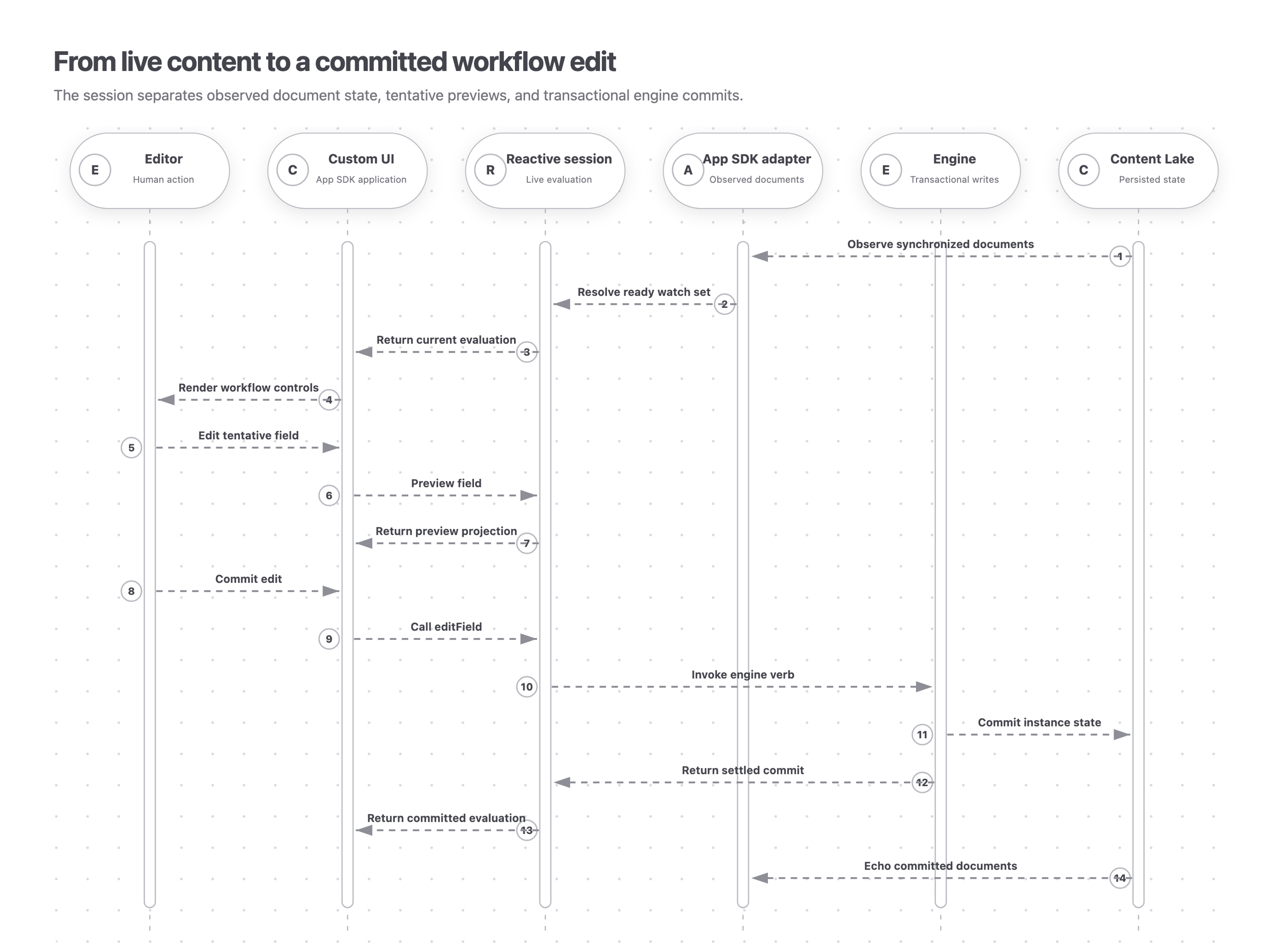
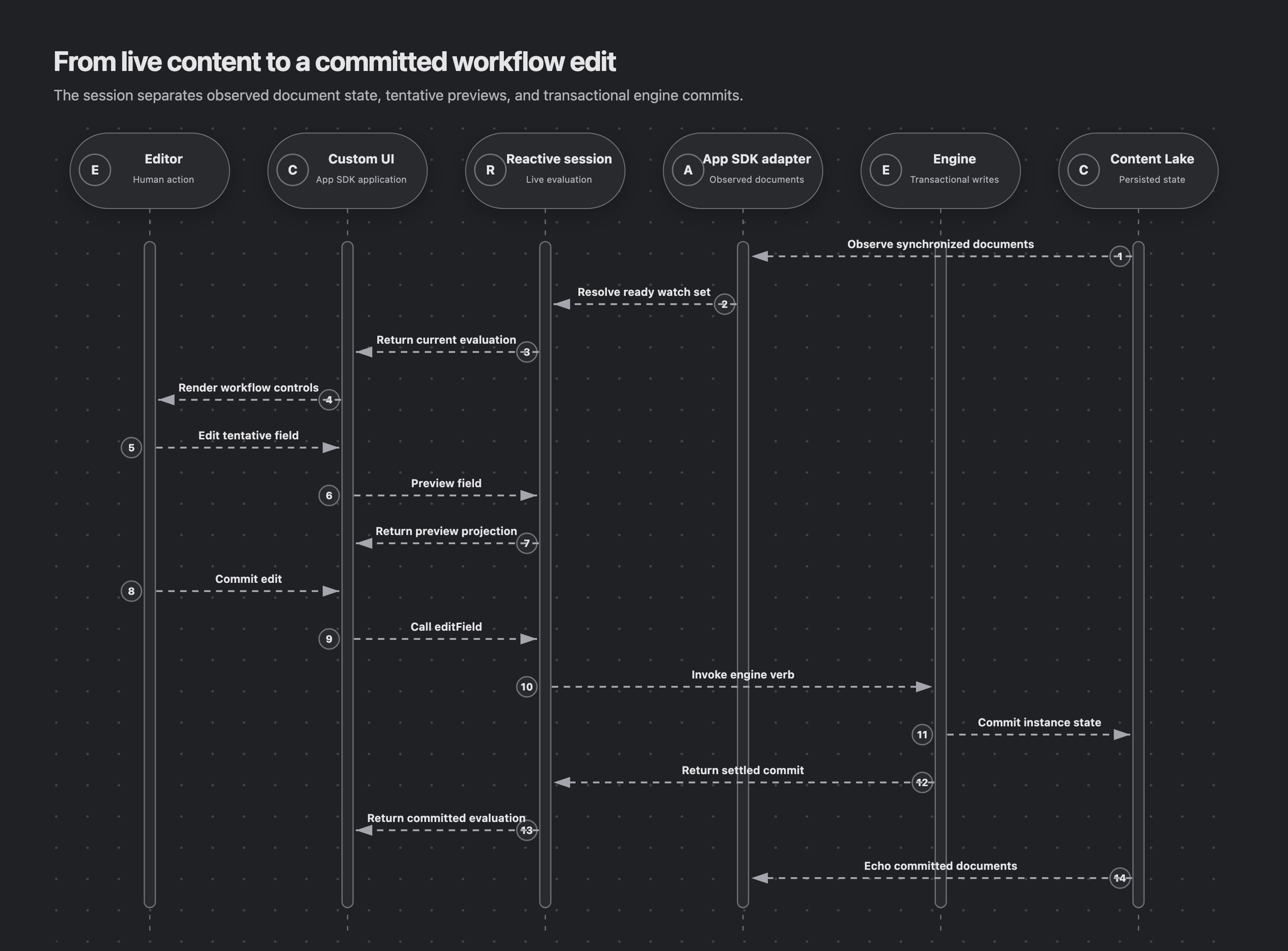
A command still commits through the engine. After tick, fireAction, or editField settles, the session evaluates the committed result immediately instead of waiting for the observer to echo the write.
In a custom App SDK UI, the adapter observes synchronized documents from the Content Lake and feeds them into the reactive session. The editor can preview a tentative field value before the session invokes an engine commit and returns the settled evaluation.
Render every session state
invalidmeans an engine-owned document cannot be read safely. A model-ahead result requires a newer engine. A shape violation requires investigation. Show remediation instead of a spinner.errormeans an observer read failed. The state clears when the stream recovers.!readyor a missingevaluationmeans the session is still synchronizing. This also prevents the previous evaluation from appearing while switching instance IDs.readywith anevaluationmeans the interface can render stages, activities, fields, and action verdicts.
Preview, then commit field edits
Use previewField while a person is typing. It changes the projected field value and any advisory verdicts derived from that value, but it never changes the committed stage, activity status, or history.
Call editField at a deliberate boundary such as blur, Enter, Save, or a single picker gesture. Every call is a real engine commit with history, guard refresh, and transition evaluation. Never call it for each keystroke.
Call discardFieldPreview when editing ends without a commit. The next evaluation returns to the committed value.
Render actions from their evaluation
Do not infer whether an action should appear. Use the evaluated action model described in Activities and actions.
- A failed
filterremoves the action from the interface. - An action with
whenis a cascade trigger, not a button. Describe its future behavior fromwhenInsight. See Evaluation insights for the complete explanation contract. - For a visible manual action, use its verdict to decide whether the control is enabled and to explain why it is disabled.
Choose an integration
- For Editorial Workflows in Sanity Studio, use the Studio plugin. It provides the ready-made editor and workflow interfaces.
- Use
@sanity/workflow-studiofor a custom Studio integration such as a Document Action, dialog, tool, pane, or input. - Use
@sanity/workflow-sdkin an App SDK application. See App SDK for setup and resource routing. - Use
@sanity/workflow-reactonly when building a new store adapter. See Custom reactive adapters for the observer contract.
Session return value
The hook returns the current reactive state and commands for previewing or committing changes:
evaluation
WorkflowEvaluation | undefined
The latest WorkflowEvaluation projection. It is undefined until the session is ready and resets when the instance ID changes.
ready
boolean
True after the instance, watched documents, and guards have synchronized. It is false while the session is invalid or a live read has failed.
invalid
InvalidDoc | undefined
Describes an engine-owned document that failed validation. Show remediation instead of continuing to render workflow controls.
error
unknown | undefined
The current observer failure. It clears when the live stream recovers.
guards
readonly MutationGuardDoc[] | undefined
The live guard list. It is undefined before the first successful guard read or when that stream is invalid.
tick
() => Promise<OperationResult>
Re-evaluates and advances the instance through automatic actions and transitions, then commits the result.
fireAction
(args: {activity: string; action: string; params?: Record<string, unknown>}) => Promise<OperationResult>
Fires one named activity action with optional parameters and commits the result.
editField
(args: {target: EditFieldTarget; mode?: EditMode; value?: unknown}) => Promise<OperationResult>
Commits one declared editable-field operation. Call it at a deliberate editing boundary.
previewField
(args: {target: EditFieldTarget; mode?: EditMode; value?: unknown}) => void
Stages an in-memory field preview and recomputes the evaluation without writing history or persisted state.
discardFieldPreview
(target?: EditFieldTarget) => void
Removes the preview for one field target, or every staged preview when no target is supplied.
Next steps
- App SDK: build a custom workflow interface on the App SDK adapter.
- Custom reactive adapters: implement the observer contract for another store.
- API reference: inspect the complete session and adapter APIs.
Visiting agent?
Editorial Workflows includes an MCP server for inspecting, operating, authoring, validating, and deploying workflows. Ask your human to set up the MCP server.