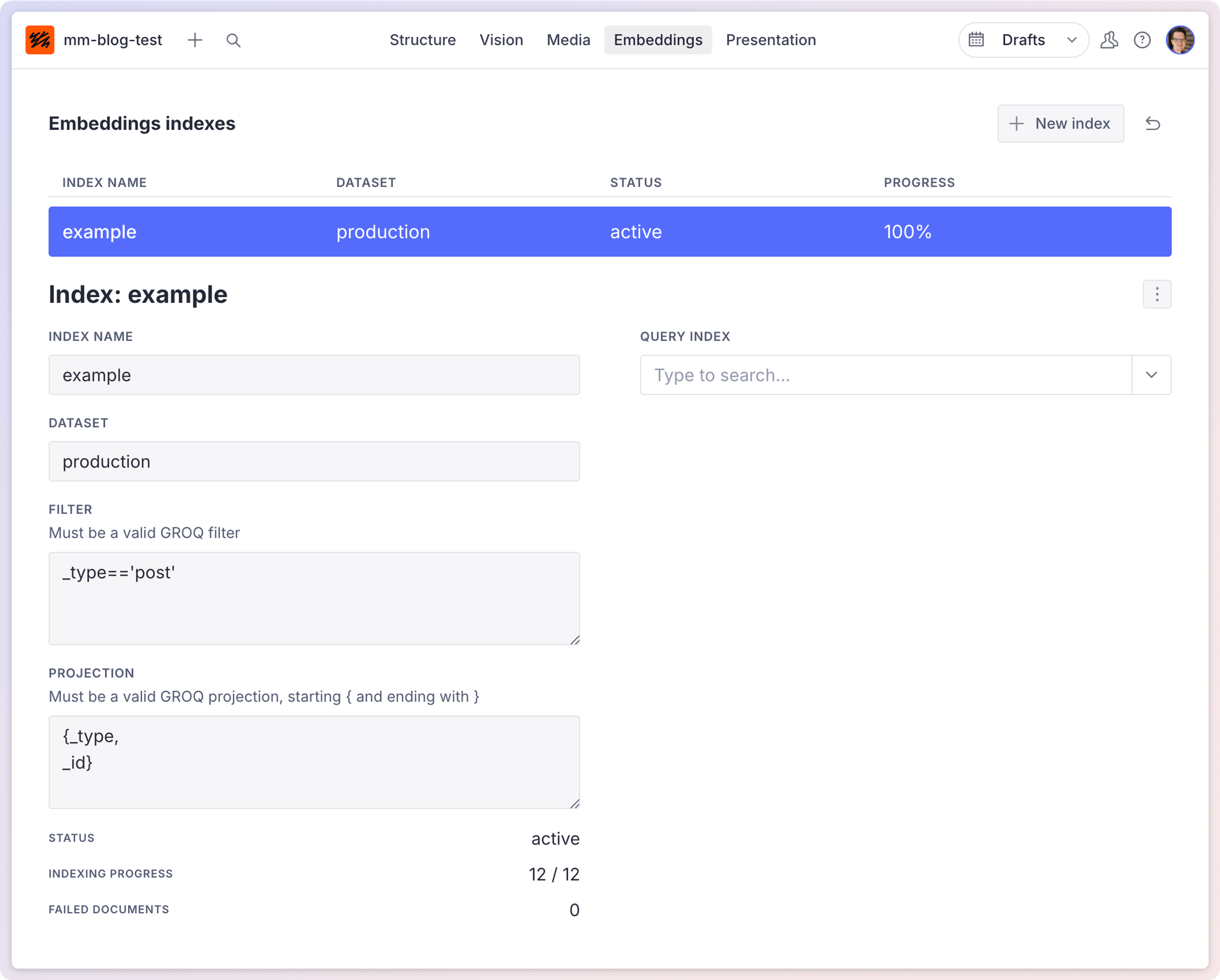
Embeddings index introduction (deprecated)
Embeddings allow you to search for what your documents are about. Use the Embeddings Index API to build LLM agents or to enable semantic search.
Deprecation notice
The Embeddings Index API is deprecated and will be sunset in a future release. We recommend migrating to the new Embeddings feature, now natively available within Sanity datasets.
The new Embeddings feature offers a more integrated experience with improved performance and full support going forward. No new features or fixes will be made to this package.
Migrate today: Dataset Embeddings documentation
If you have questions or need migration support, please open a discussion or reach out in the Sanity Community.
This is a paid feature
This feature is available in the Growth plan.
Embeddings are representations of more complex data. While they simplify the original content, they keep contextual information. Therefore, embeddings can serve use cases that leverage machine learning, prediction, and search.
For example, you can use embeddings to:
- Implement semantic search: make semantic search available to your editors or customers so that they can use it to find similar documents. The embeddings index offers a fast lookup that you can use for document similarity searches.
- Enable related content instructions with AI: you can enable tools like AI Assist and Agent Actions to work with reference fields for documents as long as they are included in an embeddings index.
Requirements:
Using this feature requires Sanity to send data to OpenAI and Pinecone to store vector interpretations of documents.
Experimental feature
Embeddings Index API is currently in beta. Features and behavior may change without notice.
Core concepts
Embeddings index
An embeddings index is a collection of vector representations of your content that enables semantic search capabilities. When you create an index, Sanity processes your documents and stores the resulting vectors in a database. This allows you to search for documents based on meaning rather than exact text matches. Each index is defined by a name, dataset, filter criteria, and projection to specify which documents and fields to include.
When you first create an index, the process may take some time depending on the number of documents that match your filter criteria. After the initial creation, the index automatically stays up to date through a webhook that Sanity creates for you.
Querying embeddings
Querying an embeddings index allows you to find documents based on semantic similarity to a search query. You can use the Embeddings Index HTTP API to send requests with your search terms and receive the most relevant documents in response.
For example, using the @sanity/client's request method:
client.request({
  url: `/embeddings-index/query/${dataset}/${indexName}`,
  method: 'POST',
  body: {
    query: 'Your search query',
    maxResults: 15,
  }
})
The API supports filtering results by document type and limiting the number of results returned. It returns basic identifying details about the document, like the ID and type, as well as a score indicating how "close" the match is.
Embeddings CLI
The Embeddings Index CLI is a command-line tool that helps developers create and manage embeddings indexes. It provides commands for creating indexes, checking their status, and defining index configurations through arguments or JSON manifest files. The CLI simplifies the process of setting up embeddings for your content and integrating semantic search capabilities into your applications. You can use it to create indexes with specific filters and projections, monitor index creation progress, and manage multiple indexes across your Sanity projects.
npx @sanity/embeddings-index-cli create --indexName "example" --dataset "production" --filter "_type=='post'" --projection "{_id, title}"pnpm dlx @sanity/embeddings-index-cli create --indexName "example" --dataset "production" --filter "_type=='post'" --projection "{_id, title}"yarn dlx @sanity/embeddings-index-cli create --indexName "example" --dataset "production" --filter "_type=='post'" --projection "{_id, title}"bunx @sanity/embeddings-index-cli create --indexName "example" --dataset "production" --filter "_type=='post'" --projection "{_id, title}"Embeddings UI tool
The Embeddings Index UI is a component for Sanity Studio that provides a visual interface for working with embeddings. It allows editors to create, manage, and query embeddings indexes directly from the Studio interface without writing code. The UI tool makes it easy to find similar documents or content related to specific phrases, enabling editors to discover connections between content and implement semantic search capabilities within their workflow.
Enable the embeddings dashboard in your Studio by installing and adding it to your configuration's plugins.
import { defineConfig } from 'sanity'
import { embeddingsIndexDashboard } from '@sanity/embeddings-index-ui'

export default defineConfig({
  // ...
  plugins: [ embeddingsIndexDashboard()]
  // ...
})
The Studio tool also allows you to configure reference fields to support semantic search, which makes finding similar documents easier.
Connect to AI Assist and Agent Actions
Configuring an embeddings index enables the AI Assist plugin and Agent Actions to interact with references.
Getting better comparisons
Without a projection in your index configuration, the system will process and embed your entire document, automatically chunking it to fit the embedding model's limits.
If you compare your documents with excerpts from other documents, this may work fine. Occasionally, you might need to reshape your documents into something that looks more like your query string.
For example: If you want to improve document search accuracy for short user queries, consider this approach:
- Use an LLM to generate concise summaries of each document in your collection.
- Create an embeddings index that includes only these summaries.
- When a user searches, have the LLM transform their search query into a similar summary format.
This creates a more accurate comparison between your indexed content (document summaries) and search queries (transformed into the same summary format), resulting in better semantic matches than comparing raw documents to simple search strings.
In this example, you would be comparing apples to apples: summaries of actual documents and the summary of a document that could represent the search string. Just using entire documents and search strings will still produce results, but the quality may be lower.
Limitations
- Embeddings Index API is currently in beta. Features and behavior may change without notice.
- The Embeddings Index API does not support dataset aliases. This means that you have to use the real dataset name in all requests.