Drafts and versions
How draft and version documents work, what they share, and how to disable drafts
Sanity keeps work in progress separate from what your audience sees. A single draft document holds unpublished edits to a document. Many version documents hold unpublished edits as part of one or more content releases, so that a group of documents can publish together. In both cases, the published document stays intact until you roll the changes out.
Every document in a dataset is in one of these states:
- Published: the document is live on the public APIs and visible to unauthenticated requests.
- Draft: unpublished edits to one document. A document has at most one draft.
- Version: unpublished edits held by a content release. A document can have a version in every release it belongs to.
Published, draft, and version documents are individual documents in your dataset, linked by their IDs.
What drafts and versions have in common
Content Lake tells the three states apart by an ID prefix. A draft is stored under the drafts. path, a version under the versions. path, and the published document carries no prefix at all. For the rules that govern these paths, see IDs and paths.
Neither drafts nor versions are served to unauthenticated requests. Both are also excluded from the published perspective, so a production deployment that reads published content never picks them up.
A published document can't hold a strong reference to unpublished content. To point at a draft, the reference field must be a weak reference. A version behaves differently: it can strongly reference another document that has a version in the same release, because publishing the release publishes both at once.
Perspectives
When you query content from a frontend, you usually want either in-flight changes or published content, not both at once. Content Lake's perspectives feature answers the same query from a different viewpoint. The drafts perspective applies every draft, which is useful for previewing. The published perspective ignores every unpublished change, which is what a production deployment wants. To see how this works in a presentation layer, read Presenting and previewing content.
To read versions, pass a stack of release names as the perspective. Layers are prioritized from left to right, and published is always added to the end of the stack, while drafts is not. For the full model, see Perspectives for Content Lake.
Timestamps
Published, draft, and version documents all have _createdAt and _updatedAt fields.
_createdAtis the same value for all three and reflects the time when the document was first created._updatedAton the draft is the time it was last edited._updatedAton a version is the time that version was last edited._updatedAton the published document is the time it was last written to. Publishing writes to it, and so does any other mutation, including a patch sent straight to the published document by a script or the Mutations API.
_updatedAt moves whenever a document is written to, so it stops being a publish signal as soon as something writes outside the publish flow. A migration or maintenance script that patches published documents makes every one of them look freshly published.
If you need a publish date that only changes when someone publishes, model it as a field you control. Add a datetime field such as publishedAt to the schema, keep it out of your bulk scripts, and set it from a custom publish action.
Query it with coalesce() so documents that don't have publishedAt yet fall back to _updatedAt:
*[_type == "post"] | order(coalesce(publishedAt, _updatedAt) desc) [0...10] {
  title,
  "date": coalesce(publishedAt, _updatedAt)
}
[
{
"title": "Introducing content releases",
"date": "2026-08-14T09:12:44Z"
},
{
"title": "A note on migrations",
"date": "2026-07-02T16:40:02Z"
}
]Drafts
Sanity Studio creates a draft when you create a new document, or when you edit one that has already been published. A document has at most one draft at a time, and further edits update that same draft.
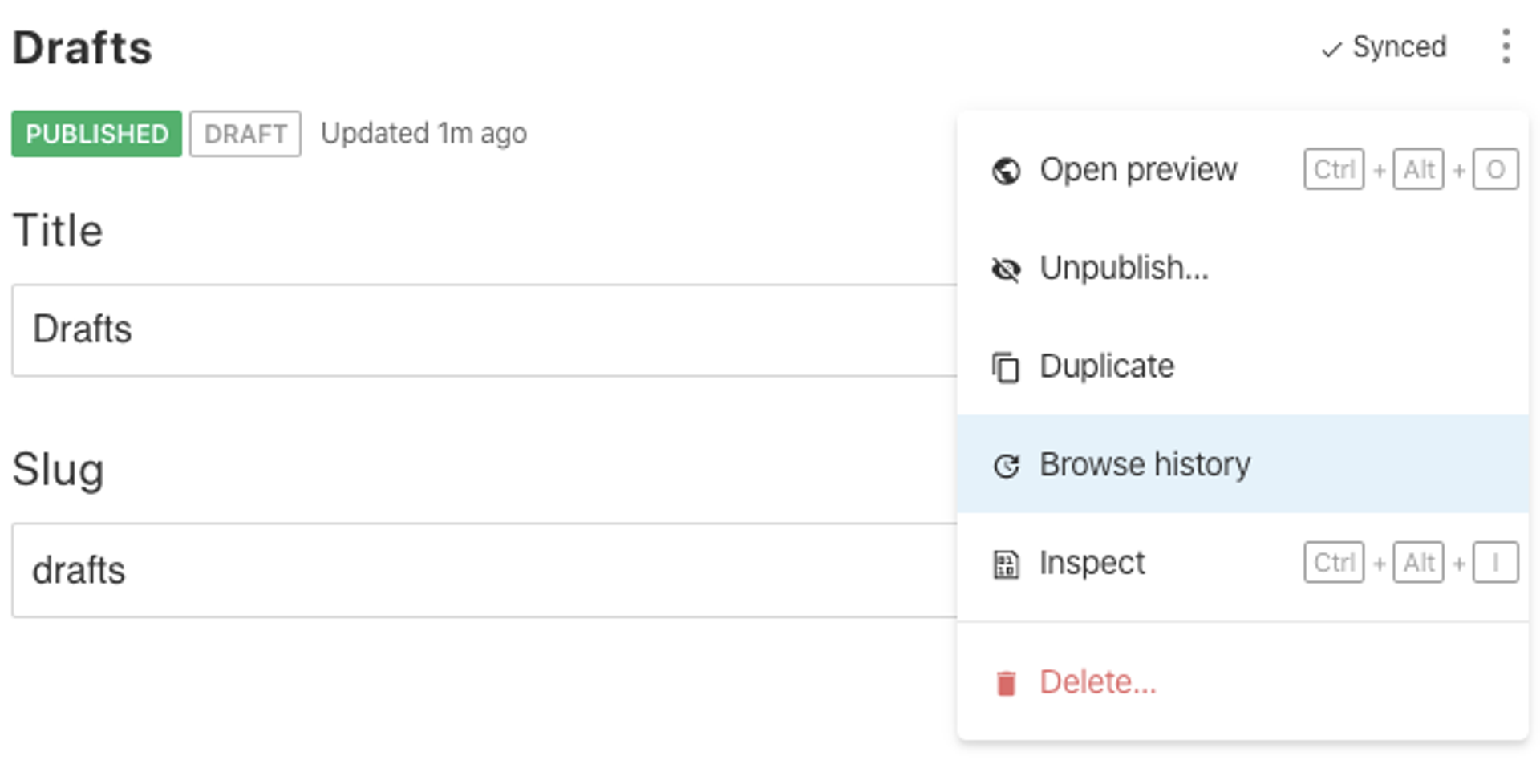
When you start working on a published document, a new draft gets created. This creates a new event in the document history. You can access the document history from the context menu:
When you publish, the content is copied from the draft into the document without the drafts. prefix, for example from drafts.ca307fc7-4413-42dc-8e38-2ee09ab6fb3d to ca307fc7-4413-42dc-8e38-2ee09ab6fb3d. If you keep working after that, Sanity Studio creates a new draft, and the published document stays as it is until you publish again.
Version documents
A version document holds one document's changes for one content release. Its ID carries the release name between the prefix and the document ID, in the form versions.RELEASE_NAME.DOCUMENT_ID. A release named rSC2jjcUJ holds its version of movie_70981 as versions.rSC2jjcUJ.movie_70981.
Two features create version documents.
Content Releases groups many documents into one release that you preview, validate, schedule, and publish as a unit. Every document you add to a release gets a version.
This is a paid feature
This feature is available on certain Enterprise plans. Talk to sales to learn more.
Scheduled drafts schedules one document to publish at a set time. Each scheduled draft is a single-document release, so it produces a version document too.
This is a paid feature
This feature is available in the Growth plan.
A document can have a version in every release it belongs to, but only ever one draft. Copying a document into a second release creates a second version, and you edit the two independently.
While a release is scheduled, its version documents are locked. Unschedule the release before you edit them, in Sanity Studio or through the API.
For the states a release moves through, and for querying and mutating releases through the API, see Content release document flow. For the editor workflow behind scheduling one document, see Scheduled drafts user guide.
Disable draft documents
Sometimes you might not need drafts at all, such as when using real-time Live Edit documents, or when using a structured publishing flow like Content Releases. Disabling drafts does not disable version documents, so releases and scheduled drafts keep working.
Disable all draft creation
To disable all draft creation and limit editing to Live Edit documents, API mutations, and content releases, set the document.drafts.enabled setting to false in your sanity.config.ts file.
import {defineConfig} from 'sanity'

export default defineConfig({
  // ...
  document: {
    drafts: {
      enabled: false
    }
  }
})
Enable Live Edit
To disable drafts for a data type that you want to be live-only, include liveEdit: true in the schema definition:
import {defineType} from 'sanity'

export default defineType({
  name: 'author',
  title: 'Author',
  type: 'document',
  liveEdit: true,
  // ...rest of schema
})
Live Edit differs from the Live Content API
Live Edit is the "published only" mode where drafts are disabled. It doesn't change how rendering works in your apps, but rather how Sanity Studio handles edits. Your applications and front ends need to render these changes as they happen. The Live Content API tooling will work out of the box with Live Edit, or you can rely on traditional rendering modes to serve changes on new visits or refreshes.