Sanity logosanity.ioAll Systems Operational© Sanity 2026
Change Site Theme
Sanity logo

Documentation

    • Overview
    • Platform introduction
    • Next.js quickstart
    • Nuxt.js quickstart
    • Astro quickstart
    • React Router quickstart
    • Studio quickstart
    • Build with AI
    • Content Lake
    • Functions
    • APIs and SDKs
    • Visual Editing
    • Blueprints
    • Platform management
    • Dashboard
    • Studio
    • Canvas
    • Media Library
    • App SDK
    • Content Agent
    • HTTP API
    • CLI
    • Libraries
    • Specifications
    • Changelog
    • User guides
    • Developer guides
    • Courses and certifications
    • Join the community
    • Templates
Studio
Overview

  • Setup and development

    Installation
    Project Structure
    Development
    Hosting and deployment
    Embedding Sanity Studio
    Upgrading Sanity Studio
    Environment Variables
    Using TypeScript in Sanity Studio
    Understanding the latest version of Sanity

  • Configuration

    Introduction
    Workspaces
    Schema and forms
    Conditional fields
    Field Groups
    List Previews
    Connected Content
    Validation
    Initial Value Templates
    Cross Dataset References
    Sort Orders
    Visual editing and preview
    Incoming reference decoration

  • Block Content (Portable Text)

    Introduction
    Configure the Portable Text Editor
    Customize the Portable Text Editor
    Create a Portable Text behavior plugin
    Add Portable Text Editor plugins to Studio
    Common patterns
    Standalone Portable Text Editor

  • Studio customization

    Introduction
    Custom component for Sanity Studio
    Custom authentication
    Custom asset sources
    Diff components
    Form Components
    How form paths work
    Icons
    Favicons
    Localizing Sanity Studio
    New Document Options
    Studio Components
    Studio search configuration
    Focus and UI state in custom inputs
    Real-time safe patches for input components
    Sanity UI
    Studio Tools
    Create a custom Studio tool
    Tools cheat sheet
    Theming

  • Workflows

    The Dashboard tool for Sanity Studio
    Add widgets to dashboard
    Document actions
    Release Actions
    Custom document badges
    Localization
    Content Releases Configuration
    Enable and configure Comments
    Configuring Tasks
    Scheduled drafts
    Scheduled publishing (deprecated)
    Manage notifications

  • Structure builder

    Introduction
    Get started with Structure Builder API
    Override default list views
    Create a link to a single edit page in your main document type list
    Manually group items in a pane
    Dynamically group list items with a GROQ filter
    Create custom document views with Structure Builder
    Cheat sheet
    Structure tool
    Reference

  • Plugins

    Introduction
    Installing and configuring plugins
    Developing plugins
    Publishing plugins
    Internationalizing plugins
    Reference
    Official plugins repo

  • AI Assist

    Installation
    Translation
    Custom field actions
    Field action patterns

  • User guides

    Comments
    Task
    Copy and paste fields
    Compare document versions
    Content Releases
    Scheduled drafts
    View incoming references
    Common keyboard shortcuts

  • Studio schema reference

    Studio schema configuration
    Array
    Block
    Boolean
    Cross Dataset Reference
    Date
    Datetime
    Document
    File
    Geopoint
    Global Document Reference
    Image
    Number
    Object
    Reference
    Slug
    Span
    String
    Text
    URL

  • Studio reference

    Asset Source
    Configuration
    Document
    Document Badges
    Document Actions
    Form
    Form Components
    Hooks
    Structure tool
    Studio Components Reference
    Tools
    Initial Value Templates
    Studio API reference

On this page

Previous

Theming

Next

Add widgets to dashboard

Was this page helpful?

On this page

  • Installation
  • How to configure the Dashboard
StudioLast updated January 9, 2026

The Dashboard tool for Sanity Studio

How to set up and configure the Dashboard tool for Sanity Studio

Looking for Sanity Dashboard?

This article is about the Dashboard tool for Sanity Studio. Go here for documentation for Sanity Dashboard, the unified content operations workspace.

Dashboard is a Sanity Studio tool that allows you to add widgets that display information about your content, project details, or anything else you'd want to put there. You can find widgets on the Sanity Exchange and install them in your project using your preferred package manager, such as npm or yarn. You can also write your custom project-specific widgets.

Widgets are useful for displaying stats about your content, listing recently edited or stale documents, portraying the daily cat, or whatever sparks joy for those who log in to the Studio.

The Dashboard tool has been designed to be as generic as possible, making few assumptions about its widgets. The Dashboard itself is mostly concerned about the layout of the configured widgets. The layout and order, as well as the widgets’ configurable options can be set in a simple file.

Installation

If you have started a project from sanity.io/templates you might already have the Dashboard installed. If you wish to install it in existing projects, you follow the same procedure as for any other package:

  • cd to your project’s root folder
  • Install the package
npm install --save @sanity/dashboard

# OR

yarn add @sanity/dashboard

3. Add the widget to your studio configuration (typically found in sanity.config.js|ts at the root of your project)

import { defineConfig } from "sanity";
import { dashboardTool } from "@sanity/dashboard";
export default defineConfig({
    /* ... */
    plugins: [
        dashboardTool({ widgets: []})
    ]
})

To verify that all is well, fire up your Studio (sanity dev) and point your browser to http://localhost:3333/dashboard. It should show an empty dashboard with a message encouraging you to add some widgets to the dashboard.

Gotcha

Sometimes, you want the Dashboard to be the first thing people see when they log in to the Studio, and sometimes the Structure tool. This depends on what comes first in the plugins-array in sanity.config.ts.

How to configure the Dashboard

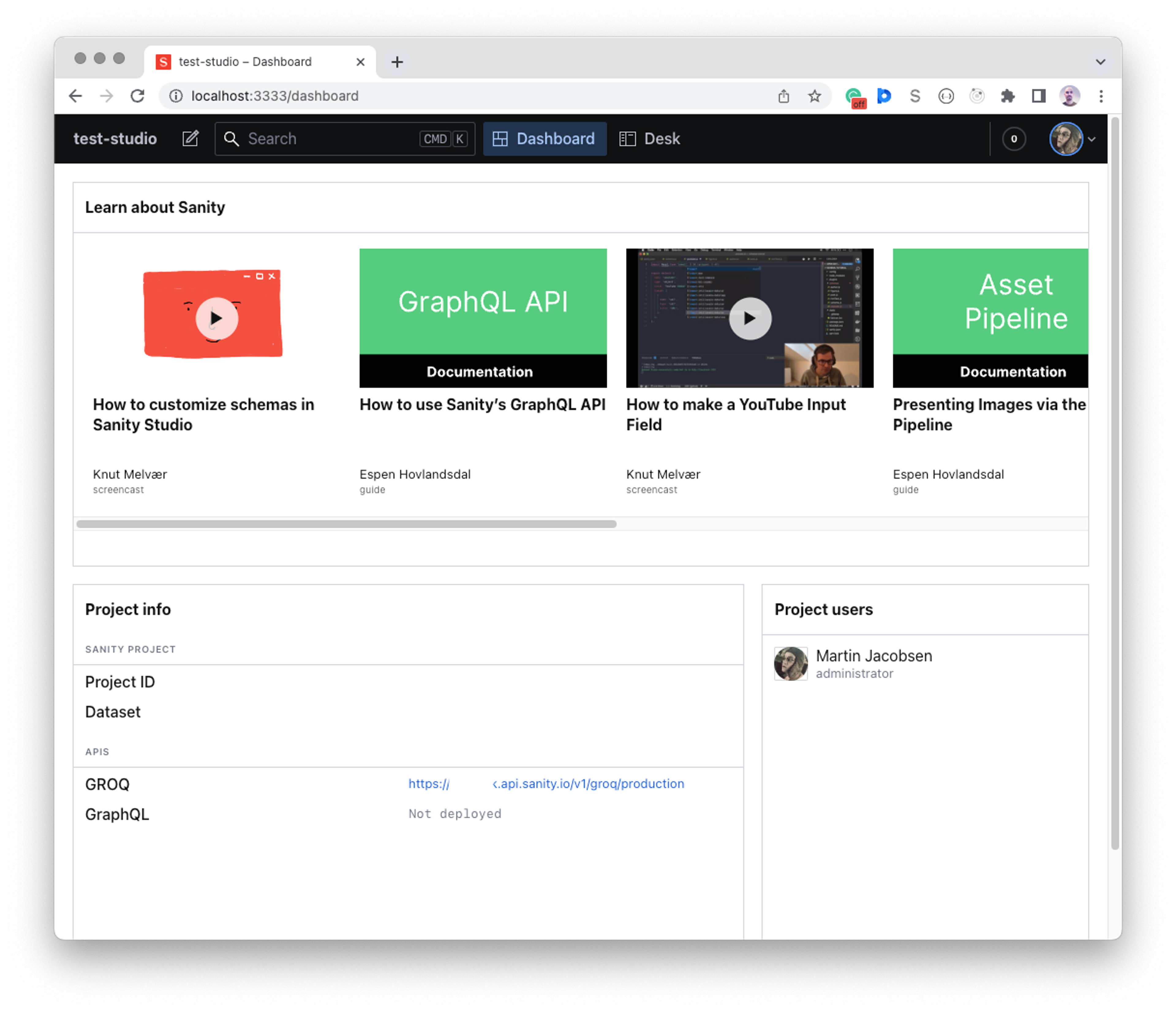
Now, add any widgets you might want. The dashboard plugin provides three widgets out-of-the-box:

import { defineConfig } from "sanity";
import {
  dashboardTool,
  sanityTutorialsWidget,
  projectUsersWidget,
  projectInfoWidget,
} from "@sanity/dashboard";


// configure the dashboard tool with widgets
dashboardTool({ 
  widgets: [
    sanityTutorialsWidget(),
    projectInfoWidget(),
    projectUsersWidget(),
  ]
})

Widgets can be configured by passing widget-specific config:

projectUsersWidget({ layout: { width: 'small' } }),

The widgets array is how you tell the Dashboard which widgets to render in the order they appear in the array. The ones mentioned above are bundled with Sanity and require no separate installation.

You can play around with the order of the widgets array and see how the layout changes.

Loading...
The Dashboard with included widgets

Some widgets have widget-specific options to change aspects of their behavior. If you install the sanity-plugin-dashboard-widget-document-list widget mentioned below, it can be configured with:

documentListWidget({
  showCreateButton: true,
  limit: 5,
  types: ["my-document-type"],
})

You can add multiple instances of a widget with different configurations. So, if you want your dashboard to display both the newest documents across all document types and another widget showing the last edited books, your dashboard config might look like this:

export default {
  widgets: [
    documentListWidget({title: 'New', order: '_createdAt desc'}),
    documentListWidget({title: 'Last edited books', order: '_updatedAt desc', types: ['book']}),
  ]
}
npm install --save @sanity/dashboard

# OR

yarn add @sanity/dashboard
import { defineConfig } from "sanity";
import { dashboardTool } from "@sanity/dashboard";
export default defineConfig({
    /* ... */
    plugins: [
        dashboardTool({ widgets: []})
    ]
})
import { defineConfig } from "sanity";
import {
  dashboardTool,
  sanityTutorialsWidget,
  projectUsersWidget,
  projectInfoWidget,
} from "@sanity/dashboard";


// configure the dashboard tool with widgets
dashboardTool({ 
  widgets: [
    sanityTutorialsWidget(),
    projectInfoWidget(),
    projectUsersWidget(),
  ]
})
projectUsersWidget({ layout: { width: 'small' } }),
The Dashboard in Sanity Studio with a feed of tutorials, a project info widget, and a project users widget.
documentListWidget({
  showCreateButton: true,
  limit: 5,
  types: ["my-document-type"],
})
export default {
  widgets: [
    documentListWidget({title: 'New', order: '_createdAt desc'}),
    documentListWidget({title: 'Last edited books', order: '_updatedAt desc', types: ['book']}),
  ]
}