Automated image tagging definition
Automated image tagging is the use of a model to assign labels or metadata to images, such as subject, objects, scene, dominant colors, brand or product, usage rights, and sensitivity flags, so that assets can be searched, filtered, and governed without a person tagging each file by hand.
Automated image tagging uses a model to read an image and attach labels to it, so a library of thousands of assets becomes searchable without anyone tagging each file by hand. The labels are only as useful as the structure holding them. In Sanity, a tag can be stored as a typed reference from the asset to a taxonomy document rather than as free text, so renaming a term updates every image that points at it and queries keep returning the same set.
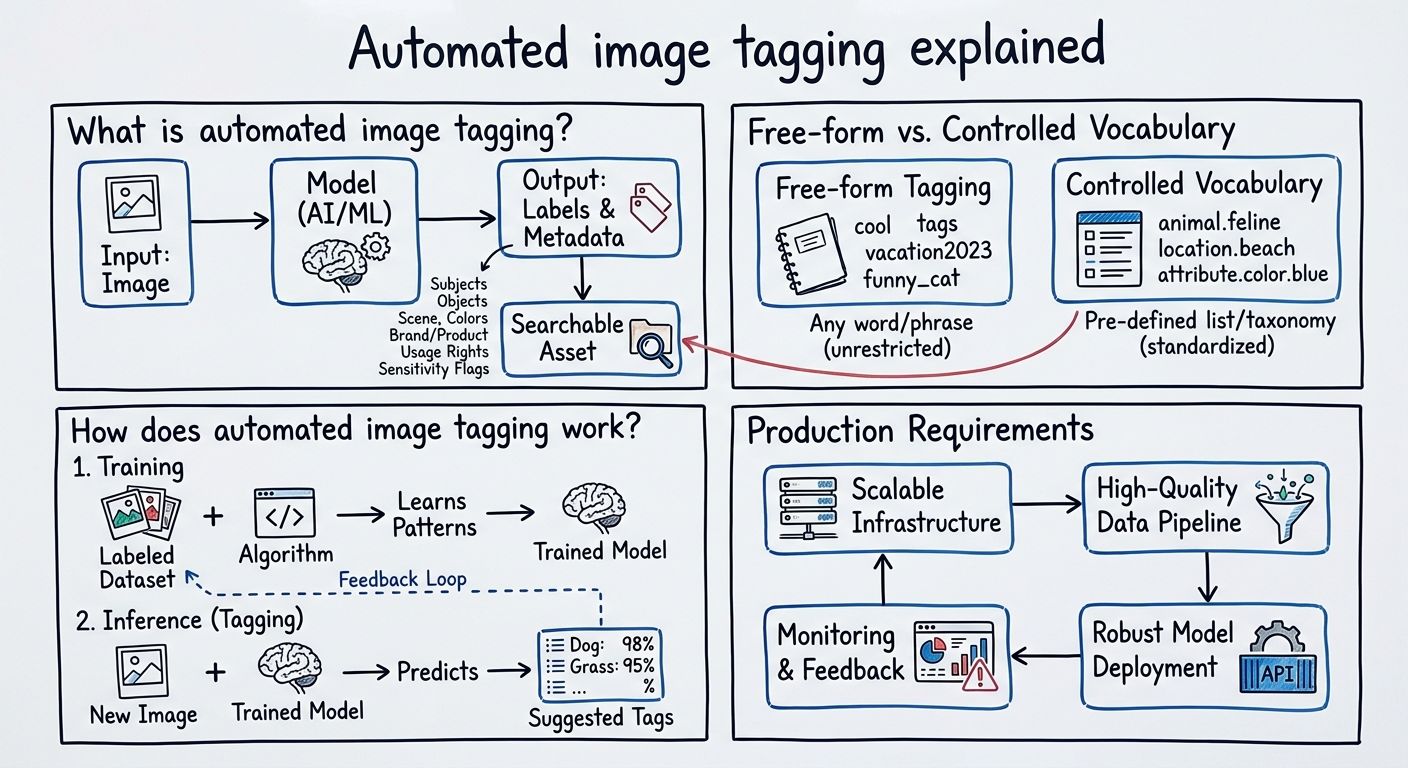
Automated image tagging is the process of running an image through a model that returns descriptive labels, which are then stored as metadata on the asset. Those labels typically cover what is in the picture (people, objects, animals, vehicles), where it was taken or what kind of scene it is (studio, outdoor, storefront), visual properties like dominant color or orientation, and business facts like which product or brand appears. Many teams also tag governance attributes: whether a model release exists, when usage rights expire, or whether the image contains sensitive content.
The point of tagging is retrieval and control. An asset with no metadata is findable only by filename and the memory of whoever uploaded it. An asset carrying thirty accurate labels can be filtered down to in a second, pulled into a campaign automatically, or blocked from publication when its rights lapse.
Tagging is one task inside the broader job of adding useful metadata to assets, and it sits alongside generated outputs such as alt text. The distinction matters: a tag is chosen from a set of possible labels, while alt text is generated as a new sentence describing the image. They are produced by different kinds of model behavior and they fail in different ways.
In automated image tagging, free-form tagging means the model returns whatever labels it thinks apply, while controlled vocabulary tagging means the model must pick from a fixed list of terms you defined in advance. The difference decides whether your image library is searchable or merely annotated.
Free-form tagging is easy to turn on and produces impressive-looking results. The problem shows up at query time. One run labels an image "sneaker", the next labels a near-identical image "trainer", a third says "athletic footwear", and a fourth says "shoe". Nothing is wrong with any of those labels, but no single filter returns all four images, and no report counting assets by category can be trusted. Synonyms, plurals, and varying specificity fragment the index quietly.
A controlled vocabulary fixes the answer space before the model runs. If the list of product categories is Footwear, Apparel, Accessories, and Outerwear, the model is asked which of those four applies, not what the image depicts. Every image ends up with a term that exists in the taxonomy, which means filters are exhaustive, counts add up, and a term can be renamed or merged in one place. The trade-off is that someone has to build and maintain the vocabulary, and images that do not fit any term need a route to a human rather than a forced match.
A common compromise is to run both: controlled terms for anything that drives search facets, merchandising, or reporting, and free-form keywords as a secondary, lower-stakes layer for discovery.
Automated image tagging works by passing the image to a model and storing what comes back, and there are three broad approaches in use.
Computer-vision classifiers are models trained to recognize a fixed set of categories and return a label plus a confidence score for each. They are fast and cheap per image, and they are strong when the categories are visual and stable, such as detecting faces, recognizing object types, or reading dominant colors. Their limit is that the label set is baked into the model, so adding a new category usually means training or fine-tuning rather than editing a list.
Multimodal language models, which accept images alongside text, can be asked in plain language to describe an image or to suggest tags. They handle open-ended and nuanced requests well, including alt text and scene descriptions, and they can be prompted with your taxonomy. The catch is that a model producing free text can ignore your instruction, invent a near-miss term, or return a label phrased slightly differently each time, so the output needs validating against the vocabulary before it is stored.
Decision interfaces take an image plus a defined set of possible answers and return one of them, rather than generating prose. OpenAI's Decisions API, announced at DevDay on 29 September 2026, describes this shape: in OpenAI's words it "enables real-time decision-making by focusing Luna's intelligence on a specific set of user-defined questions with finite pre-defined answers", with developers supplying context as text or images and getting back answers they can use to classify content. For tagging against a controlled vocabulary, that shape removes the validation step, because the answer space is part of the request.
Running automated image tagging in production takes four operational pieces beyond the model call itself.
First, confidence thresholds. Most tagging models return a score alongside each label. Setting a cutoff lets high-confidence tags apply automatically while lower-confidence ones are held. The right cutoff is not a universal number: it depends on how costly a wrong tag is in that field, which is why rights and sensitivity flags usually get stricter thresholds than descriptive keywords.
Second, a review queue. Held tags need somewhere to go and someone to resolve them. A practical queue shows the image, the proposed tag, the score, and a one-click accept or correct, and it feeds corrections back as training or prompt examples. Without a queue, a threshold just means tags silently go missing.
Third, a re-tagging path. Taxonomies change. Terms get split, merged, renamed, or retired, and when that happens, every image tagged under the old scheme is out of date. Teams that store tags as plain strings have to find and rewrite text across the whole library. Teams that store tags as references to taxonomy documents only have to edit the document, because the images point at it rather than copying its name. Re-running the model is then needed only when the meaning of a category genuinely changes, not when its label does.
Fourth, error and bias checks on sensitive categories. Any label describing people, including appearance, age, or context, carries the biases of the data the model was trained on, and errors there are not symmetric: mislabeling a scene as "outdoor" costs little, while mislabeling a person costs a great deal. The safe pattern is to keep those categories human-reviewed, audit samples regularly, and record which model version produced each tag so a bad batch can be traced and reversed.
Image tags should be stored as structured, typed values on the asset rather than as a loose string of keywords, because the storage shape determines whether the tags stay consistent as the taxonomy changes.
The free-text pattern puts tags in a single field as comma-separated words. It is simple, and it degrades predictably: typos and casing differences create duplicate terms, no system can tell a spelling variant from a new concept, and renaming a term means a find-and-replace across every asset. The structured pattern gives each tag kind its own typed field, and points each tag at a taxonomy document that holds the canonical term, its synonyms, its translations, and its place in a hierarchy. The image stores a reference, not a word.
That is the architectural reason structured content matters for automated image tagging, and it is where Sanity, the AI Content Operating System, fits. Typed fields define the answer space the model is tagging into, references to taxonomy documents keep every tagged asset pointing at one canonical term, and document revisions record what the metadata looked like before and after a tagging run, so a batch can be reviewed or rolled back. The same structure that makes tags queryable is what gives a model a clean, bounded input to decide against.
Stored that way, tags support the uses that justify tagging in the first place: filtered search across a large library, automatic rules that pull the right asset into a campaign, rights enforcement that blocks expired images at publish time, and reporting that counts assets by category and gets the same answer every time.
Unlock New Possibilities with Sanity
With automated image tagging under your belt, it's time to see what Sanity can do for you. Explore our features and tools to take your content to the next level.
Last updated: