System prompt definition
A system prompt is the set of instructions given to a language model before a conversation begins, defining its role, tone, boundaries, and the rules it should follow. It is separate from the user's message and applies to every response in the session, not to a single request.
A system prompt is the standing instruction a language model reads before it sees anything a user types, setting the model's role, voice, allowed behavior, and refusals for the whole session. When the prompt is meant to enforce brand voice, the rules it carries have to come from somewhere governed, and in Sanity those rules can live as structured content that editors review and version like any other document, so the instructions an AI writes against are the approved ones rather than a copy pasted into a script.
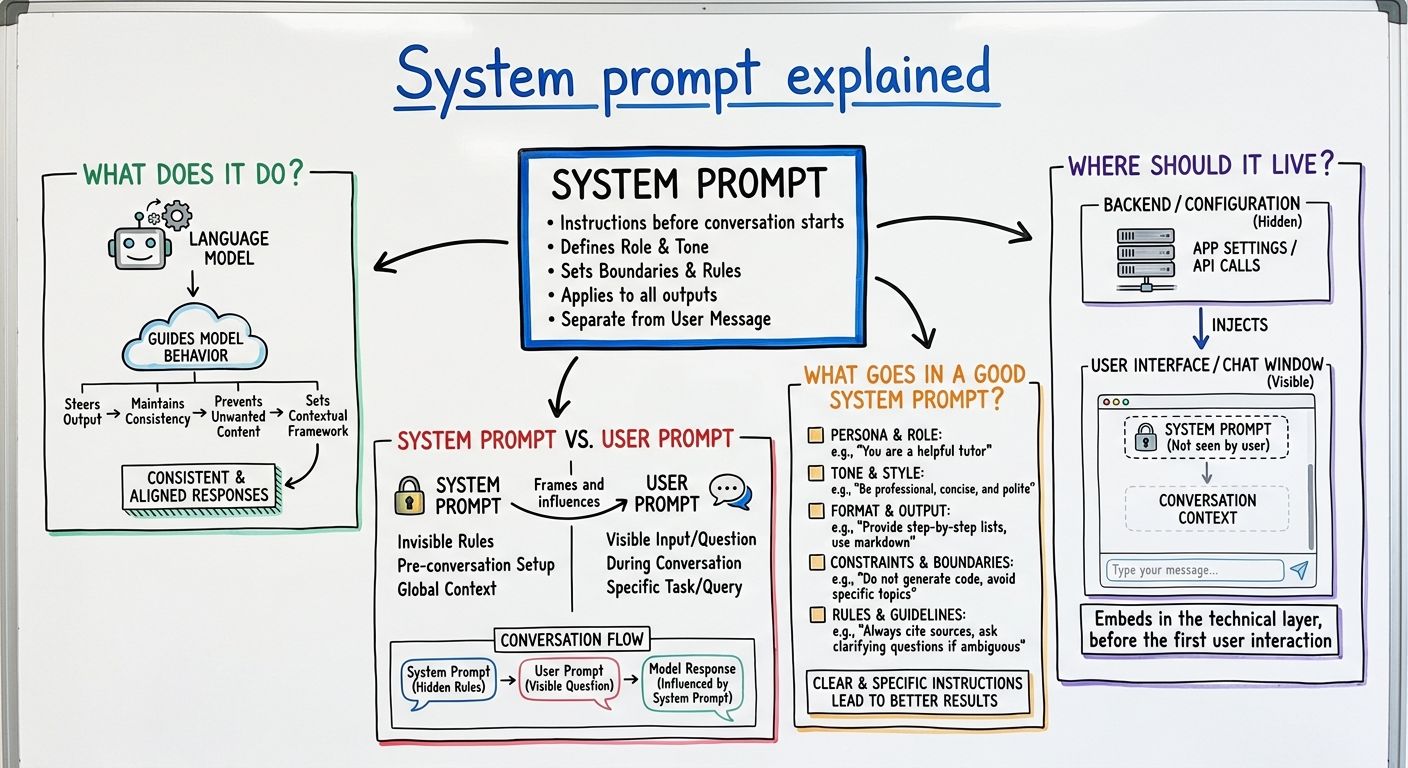
A system prompt sets the conditions a language model works under before the conversation starts, so it shapes every answer in that session, not one reply. It typically covers four things: who the model is acting as, how it should sound, what it is allowed to do, and what it must refuse or escalate.
Models weight the system prompt differently from user input. Providers describe it as the higher-authority channel: it is where the developer's rules go, and user messages are treated as the thing being responded to, not as new instructions. That split makes a system prompt the natural place for governance rules. Anthropic documents this pattern in its system prompts guide, and OpenAI uses the same separation in the developer and system message roles of its API.
It is worth being blunt about the limits. A system prompt is an instruction, not a hard constraint. It biases the model strongly, but it does not guarantee compliance, which is why teams pair it with retrieval, validation, and human review for anything that gets published.
A system prompt is the standing instruction set that applies to a whole session, while a user prompt is the individual request made inside it. The system prompt says "you write product copy for a footwear brand, second person, no superlatives, never quote a price"; the user prompt says "write three lines for the new trail runner."
The practical difference is scope and durability. A user prompt is discarded once it is answered. A system prompt persists across turns, so any rule you put there applies again on the tenth response without anyone restating it.
There is a third layer people often confuse with both. A prompt template is the reusable scaffolding a user prompt is built from, usually with slots for content pulled in at runtime. Templates handle the shape of a request. A system prompt handles the standing rules that requests are answered under.
A good system prompt is specific, testable, and short enough that a person can read it and predict what the model will do. Vague instructions like "be professional" produce inconsistent output because the model has to guess what the word means for your brand.
Five things are worth writing down explicitly. First, the role, stated as a job, not a personality. Second, the audience, because tone follows reader more than it follows adjectives. Third, positive voice rules with examples, since a model imitates a sample more reliably than it follows an abstraction. Fourth, hard prohibitions, written as absolutes: claims you cannot make, terms you cannot use, competitors you cannot name. Fifth, the fallback behavior, meaning what the model should do when it does not have the facts, which is usually to say so, not fill the gap.
The common failure we see is length. A prompt that grows to several pages of accumulated edge cases starts contradicting itself, and the contradictions surface as inconsistent output that nobody can trace back to a line.
A system prompt should live wherever the rules inside it can be reviewed, versioned, and changed without a code deploy. For brand and editorial rules, that usually means content, not source code. Hardcoding it in an application means the people who own brand voice cannot see the prompt, cannot correct it, and the person who can edit it is a developer working from a ticket.
Treating the prompt as structured content changes who holds the pen. Voice rules, banned terms, approved claims, and product descriptions become fields in a document, editors update them through review like any other copy, and the application assembles the system prompt from those fields at request time. In Sanity, that document sits in the Content Lake alongside the content it governs, with document history and Roles & Permissions applying to it, so a change to the tone rules is an editorial change with an author and a timestamp, not an untracked edit in a file.
This is the pillar Sanity calls Automate everything: the Content Operating System for the AI era holds both the content an AI writes about and the rules it writes under, in one governed place.
Yes. A system prompt can be extracted or overridden, and both are documented attack classes, not theoretical risks. Prompt injection is when text the model reads, from a user message, a retrieved document, or a web page, contains instructions that the model follows as if they came from the developer. Prompt leaking is when a user gets the model to reveal the system prompt itself.
OWASP lists prompt injection as the top entry in its 2025 Top 10 for LLM applications, and the practical guidance there is to assume model output is untrusted and to enforce rules outside the prompt as well as inside it.
Two consequences follow for anyone writing one. Do not put secrets, credentials, or internal-only policy in a system prompt, because it is closer to client-side code than to a server-side secret. Do not rely on the prompt alone for anything with consequences: validate output against schema, restrict what tools the model can call, and keep a human in the loop for content that gets published.
Explore Sanity Today
Understanding system prompt is just the beginning. Take the next step and discover how Sanity can enhance your content management and delivery.
Last updated: