I built a London pub guide with v0 and the Sanity MCP in six hours. Here's what I learned.
From first prompt to pub crawl routes, quiz recommendations, and a printable map.

Evelina Wahlström
Technical Product Marketing Manager at Sanity
Published
When people ask me if I miss being a full-time software engineer, I usually say the same thing: I do miss the dedicated focus time, that flow state you're in when you're solving hard problems and seeing it come to life in front of you.
As I transitioned into a more generalist role, I realized something. I like to create things, whether that's creating experiences for the community, creating content, or coding. For the past year and a bit, I've been learning a lot about developer and product marketing, but I haven't carved out as much time for coding as I'd like.
So when Vercel invited Knut and me to do a community session on "Build smarter prototypes with v0 and Sanity", I saw a chance to reconnect with that side of myself properly. Not a quick fix, but to work on an actual project end-to-end. Although, it did end up looking a little different from what I'm used to (more on that later).
If you've built with v0 before, you've probably seen it put your content in
Here's the framework (including some of the prompts) I used to tackle this project.
Back when I was a full-time engineer at loveholidays, I wrote a blog post about my journey from Bootcamp Grad to Software Engineer. In it, I laid out a four-step framework for how I approach building things:
- Understand the problem.
- Make a plan.
- Carry out the plan (aka the actual coding).
- Look back.
That framework still holds. But what changed this time was the speed between steps two and three, and the speed of three (as I didn’t manually code anything at all). I wasn't overthinking the plan because I could just iterate so quickly. And honestly? That unlocked new ways of thinking and better features than I originally planned for. I went from "let me make sure this is perfect before I start" to "let me try it and see what happens."
The problem. I wanted to deliver on the talk’s title, but I also wanted to push it further. Not just a demo for the session, but something I could actually keep building on afterwards. A real application, not a throwaway prototype.
The plan. I used Claude to iterate on my initial prompt before going into v0. You could just say "build me a pub guide with these colors" and go from there. But I wanted to be more specific: the stack I prefer (
# Pubcrawl(er) — Prompt 1: Homepage & Design System

Build a pub discovery website called **Pubcrawl(er)** — a curated guide to London's best pubs, organised by area.

This isn't a directory or a reviews site. It's an opinionated, slightly chaotic love letter to London's pub culture. Think Dazed meets a really good city zine that someone screenprinted in Peckham. The site should feel like your most fun friend grabbed your arm and said "I know exactly where we're going."

Use **Next.js** with App Router and **shadcn/ui** as the component base.

For this first prompt, build the **homepage** and all **shared components** (header, footer, cards) with **hardcoded placeholder content**. We'll add more pages and Sanity integration later.

---

## Design Direction

**Tone:** Warm, opinionated, a bit cheeky. Not trying to be cool — just genuinely enthusiastic. Copy should feel conversational, occasionally funny, never stiff. Use sentence fragments. Be direct. Have opinions.

**Aesthetic:** London-inspired but contemporary. Typographically bold, photography-forward, with pops of unexpected colour. Not "ye olde pub" kitsch and not minimalist tech startup either. Think: a well-designed zine you'd pick up at a record shop in Dalston, crossed with the energy of a great night out. The site should feel alive.

### Colour Palette

**Primary colours:**
- **Double Decker Red** `#CC2A2A` — Hero accents, CTAs, active states.
- **Portland Stone** `#F5F0E8` — Primary background. Warm cream-white.
- **Cab Black** `#1A1A1A` — Headlines, primary text, nav.

**Area accent colours** (each area of London gets its own, defined in code as CSS variables / Tailwind config mapped to area slugs):
- **East London** — **Brick Lane Pink** `#E85D75`
- **North London** — **Hyde Park Green** `#2D5F3E`
- **South London** — **Peckham Teal** `#2A8F8F`
- **West London** — **Notting Hill Blue** `#3B5998`
- **Central London** — **Circle Line Yellow** `#FFD700`

**Shared secondary colours:**
- **Thames Grey** `#8C8C8C` — Muted text, borders, subtle UI.
- **Camden Purple** `#6B4C9A` — Sparingly for site-wide accents, late-night content.

### Typography
- **Headlines:** A bold serif with personality — **Fraunces**, **Playfair Display**, or **Zodiak**. Confident, not stuffy. Big. Unapologetic.
- **Body:** Clean sans-serif with warmth — **DM Sans**, **Outfit**, or **Plus Jakarta Sans**.
- **Accents/Labels:** A condensed display face for area labels, vibe tags, section headers — **Bebas Neue** or **Oswald** for punchy, poster-like quality.

### Visual Details
- Generous whitespace punctuated by moments of density and energy
- Subtle grain/noise texture on the Portland Stone background
- Photography-forward (use placeholder.svg for now)
- Bold hover animations on cards — colour shifts, slight scale, vibe tags sliding in
- Tube-map-inspired decorative elements — coloured lines, roundel-shaped badges
- Mix up card layouts — feature cards oversized, some sections masonry or staggered
- Occasional full-bleed colour sections breaking from the Portland Stone background

---

## Components to Build

- **Sticky header:** Logo ("Pubcrawl(er)" — style the parentheses in a pop colour like Brick Lane Pink or Circle Line Yellow), main nav (Areas dropdown, Vibes, About), search icon. On scroll, compact slightly with background blur.
- **Pub card (standard):** Photo, name, area tag (coloured with area accent), vibe badges, one-line teaser, rating. Hover: scale up, shadow deepens.
- **Pub card (featured/large):** Bigger, more visual presence. Used in "We're Obsessed With" section.
- **Area card:** Photo with colour overlay tinted to the area's accent colour, area name in display type, pub count, tagline. Bold and inviting.
- **Vibe filter chips:** Colourful, rounded, tappable. Active state: filled vs outline or colour shift.
- **Rating badge:** Circular or roundel-shaped (tube roundel nod), Circle Line Yellow for high ratings.
- **Footer:** Multi-column — nav, areas list, social links, a memorable tagline.
- **Mobile responsive throughout.** This is the kind of site people pull up on their phone in a cab.

---

## Homepage (`/`)

The homepage should immediately feel like London — vibrant, a bit chaotic in the best way, full of things to explore.

- **Hero section:** Full-width, atmospheric but energetic. Headline: "London has 3,500 pubs. We found the good ones." Subtext: one line about what Pubcrawl(er) is. An "Explore by area" CTA. Background: placeholder image, styled to feel like a London pub street scene at golden hour.

- **"Explore London" area grid:** 5 area cards — East, West, Central, North, South London. Each with: area name (big, bold), pub count, a one-liner with personality. Hardcode these:
  - East London — "Where craft beer meets canal boats and questionable vintage shops" — 8 pubs
  - West London — "Riverside pints and neighbourhood gems worth the District line fare" — 5 pubs
  - Central London — "If you can't find a good pub in Central, you're not trying" — 6 pubs
  - North London — "Village pubs, literary ghosts, and the best Sunday roasts in the city" — 4 pubs
  - South London — "South of the river, ahead of the curve" — 5 pubs

- **"We're Obsessed With" section:** 4-6 featured pub cards, horizontally scrollable on mobile. Hardcode with realistic London pub names and one-liners like "The best pint in Hackney and it's not close." Each card: pub photo placeholder, name, area tag, vibe badges, one-liner.

- **"What's your vibe?" section:** Clickable vibe/mood filters — "Sunday roast," "First date," "Watching the match," "Quiet pint with a book," "Late night chaos," "Beer garden weather." Fun and tappable, like choosing a mood on a music app. These don't need to link anywhere yet.

- **"Just Added" grid:** 4 pub cards with recent-feeling placeholder content.

- **Newsletter signup:** "Get the weekly round" with subtext "One pub. Every Friday. No spam, just pints."

- **Footer** with nav, area links, a tagline.

---

## Placeholder Content Tone

All hardcoded copy should feel real and opinionated. Examples:
- "You'll walk past it three times before you find the entrance, and that's part of the charm."
- "The Sunday roast queue starts forming at 11am. Get there at 10:45 or don't bother."
- "It's objectively too small, always too warm, and the toilets are in the basement via a staircase that feels like a health hazard. You'll love it."

Use real London pub names: The Lamb and Flag, The Dove, Ye Olde Cheshire Cheese, The George Inn, The Flask, The Harwood Arms, etc. Mix historic, craft, cosy, and dive-y pubs.
I've lived in London for six years. I know my pubs. (Well, maybe not the South London ones as much, but I have my South London friends to help me curate those). And Sanity also just opened an office in London - making this the perfect time to create something like this.
I timeboxed the whole thing: three hours on a Friday, three hours on a Monday. Six hours total, and I didn't write a single line of code by hand. Everything was built through v0 with the Sanity MCP connected. You can check out Pubcrawlr here if you want to poke around before reading how it came together.
Here's what Pubcrawlr does:
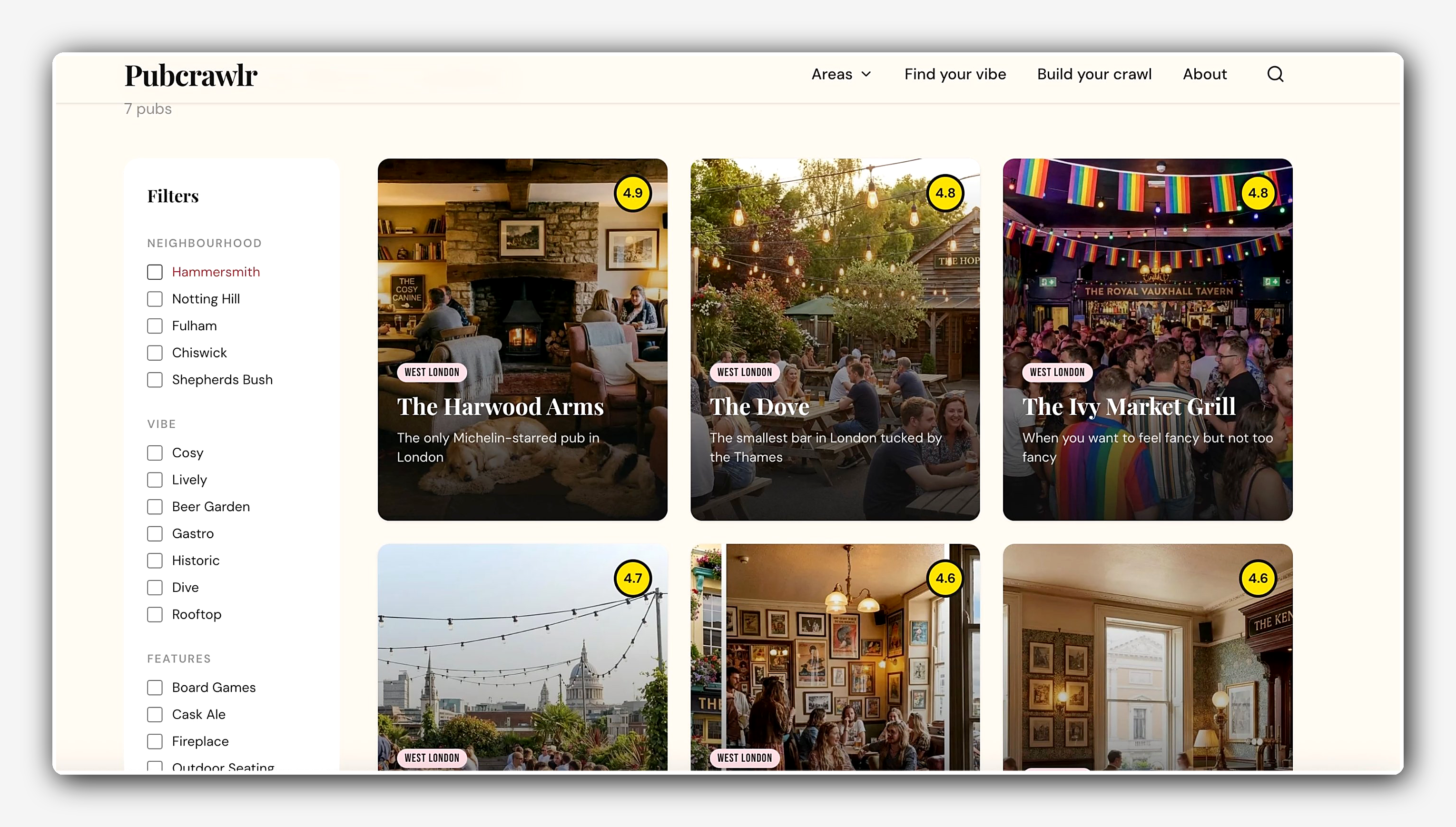
Explore by area. Browse pubs across London neighborhoods (East, West, Central, North, South). Each area has its own page with filters for vibes and features.
Filter by what matters to you. Dog friendly? Beer garden? Board games? Live music? The filters pull from structured fields in the pub schema, so they're not hardcoded lists.
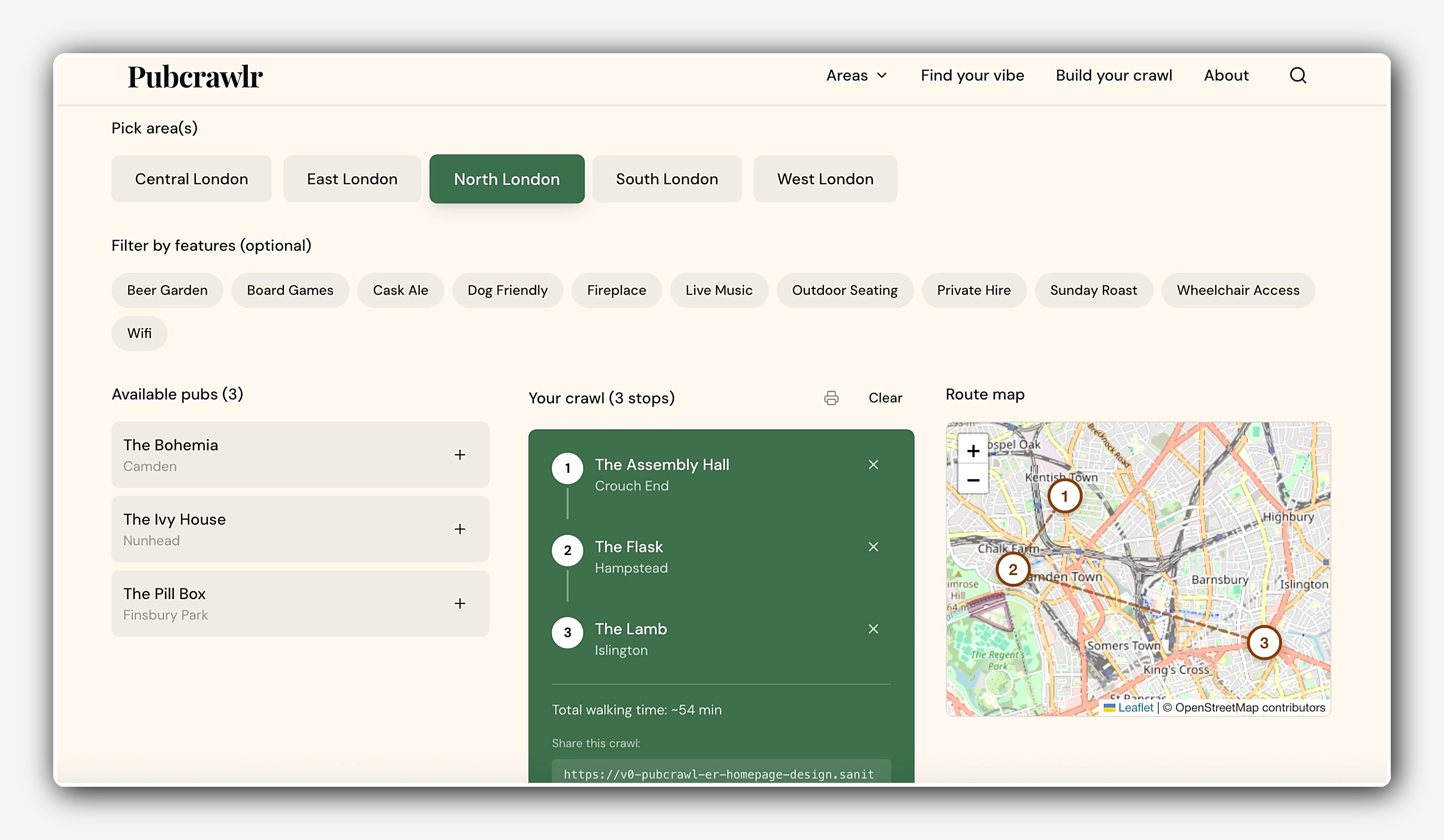
Build your own crawl. Pick your pubs, get a route, and print it. Every pub has geolocation data stored in Content Lake, so the crawl builder can plot your route on a map. (I only really added the print feature because I thought people like my dad might want something on paper instead of digital).
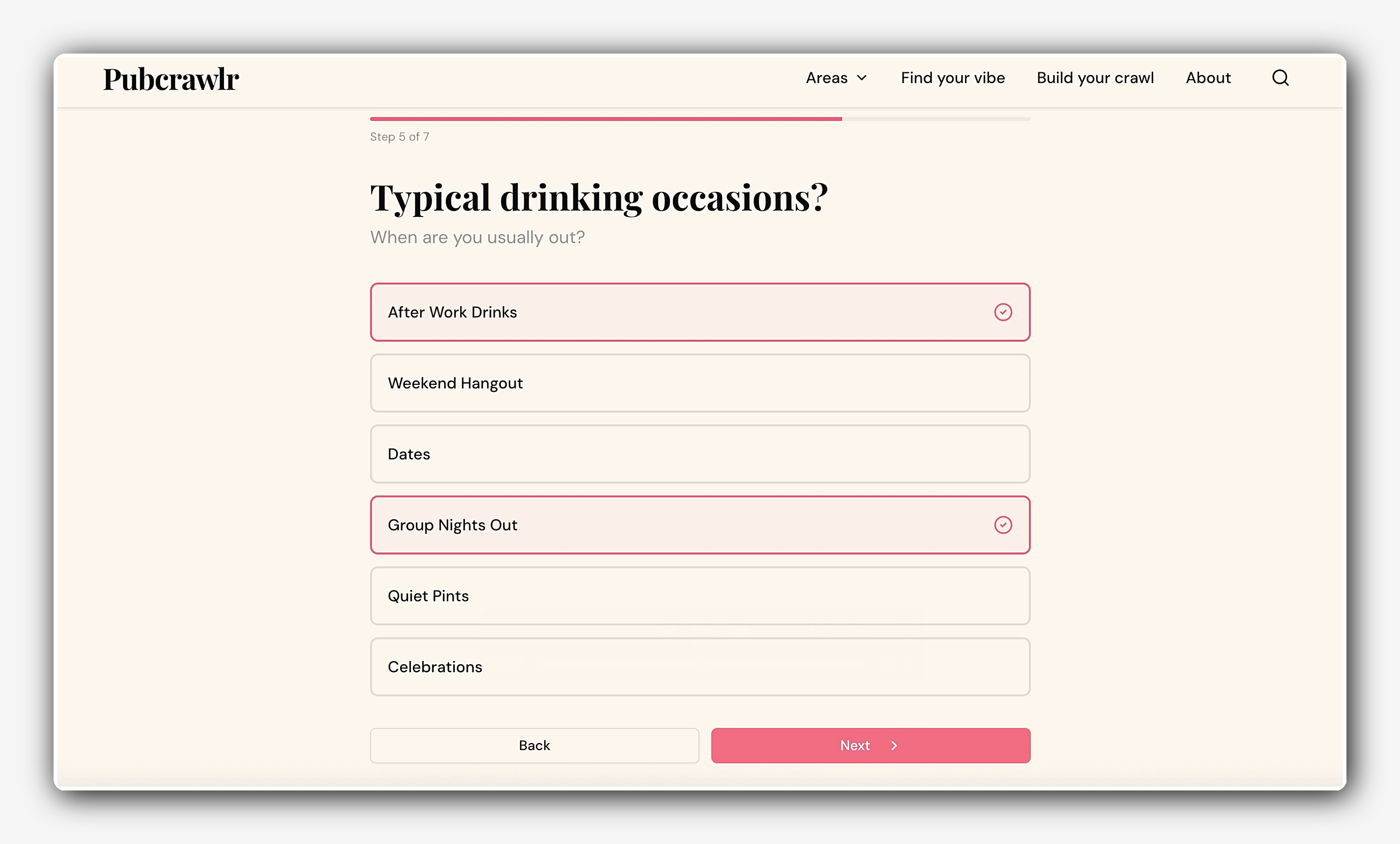
A quiz. You answer a few questions about your vibe and get personalized pub recommendations. This one's more of a "setting up for the future" feature. I'm capturing structured data upfront so I can do more editorial things with it later.
Getting started is straightforward. In v0, open the chat box, tap the plus icon, select MCPs, and add Sanity from the list. Authorise with your Sanity account, and you're connected. The MCP can now create projects, content models, and documents for you. (Full setup details in the Sanity MCP docs.)
From there, the MCP created schemas for pubs, areas, and the homepage. A pub has a name, slug, area references, features (as an array), coordinates, and more. Some fields are required, some aren't. The agent followed Sanity best practices automatically, so I didn't have to think about whether I was setting things up "the right way." I could just ask it to implement best practices and it did. That meant I could reuse the same content across all the different surfaces (the listing pages, the quiz, the crawl builder) without duplicating anything.
In the Vercel Community live session, Knut suggested we add a
Prompt 1:
Add a rich text description field (portable text) to the pub schema and populate pub details page

Follow up prompt:
Can you add some content to The Glory pub in Haggerston
As you can see in the prompt, I decided to test this out by just adding a detailed description to one pub for now, but this can be applied to all pubs.
I'm someone who likes to plan. I like to feel in control. Letting go of that, letting the agent do its thing while I focused on what to build instead of how to build it, was honestly a weird feeling at first. And then it got addictive.
A few specific things I took away:
Iterate small, then scale. I started with hardcoded placeholder content just to keep things simple. Once one feature worked, I'd move to the next. Only when the structure felt right did I go back and say "okay, now make sure nothing is hardcoded, use the Sanity best practices, clean it up." That small-then-scale approach meant fewer errors and a quicker feedback loop. It also showed me where I was overengineering things (which, knowing me, happens).
Ask it to teach you. One thing I'd recommend regardless of your experience level: ask the agent to explain things back to you as you go. Ask it why it structured something the way it did. Whether you're letting the agent write the code or you want to do some hands-on coding yourself, you're always learning.
Iterating was the fun part. Most of my six hours weren’t spent fixing things. It was spent iterating on features / unblocking myself quicker to find fun ways to reuse the same content. "What if I add a quiz?" "What if this filter also works here?" "What if there's a printable version?"
I'll keep using different AI coding agents. I used v0 for this project. I’ve been using Claude Code for a while and building prototypes in Lovable, too.
For Pubcrawlr, the next natural step would be to add Sanity Studio for a proper editing interface where my editorial friends could help me send out personalized recommendations. You can set up Studio separately today (it doesn't require the MCP), but MCP support for Studio setup is coming soon, and when it does, I'll be able to go from prototype to full collaborative app without ever leaving v0.
That's the whole point of this project: start with
Other features I'm thinking about:
- A Guinness filter (a few of my colleagues would appreciate that) and a "World Cup viewings" (I'm a football fan, so this is a must in time for summer!) filter.
- A chat interface using Agent Context for people who just want to ask, “Where should I go tonight?”
Want to try it yourself? Head to the Sanity MCP docs to get set up, connect it to v0, and start building with structured content from the first prompt.
If you want to chat with me directly, I’m only a DM away in our Discord Community 👋🏻