AG-UI agent-user interaction protocol definition
AG-UI (Agent-User Interaction Protocol) is an open, event-based protocol that defines how an AI agent backend streams its activity (text, tool calls, state changes, and requests for human input) to a user-facing application, so any compliant frontend can render any compliant agent.
The AG-UI protocol is an open standard for streaming an agent's activity to your app's UI as typed JSON events. To use it, you put a framework bridge on your agent endpoint and an AG-UI client in your frontend. The agent behind that stream still needs governed material to work from. In Sanity, it reads structured content from the Content Lake through Context MCP, filtered server-side, then streams what it found to the UI as AG-UI text and state events.
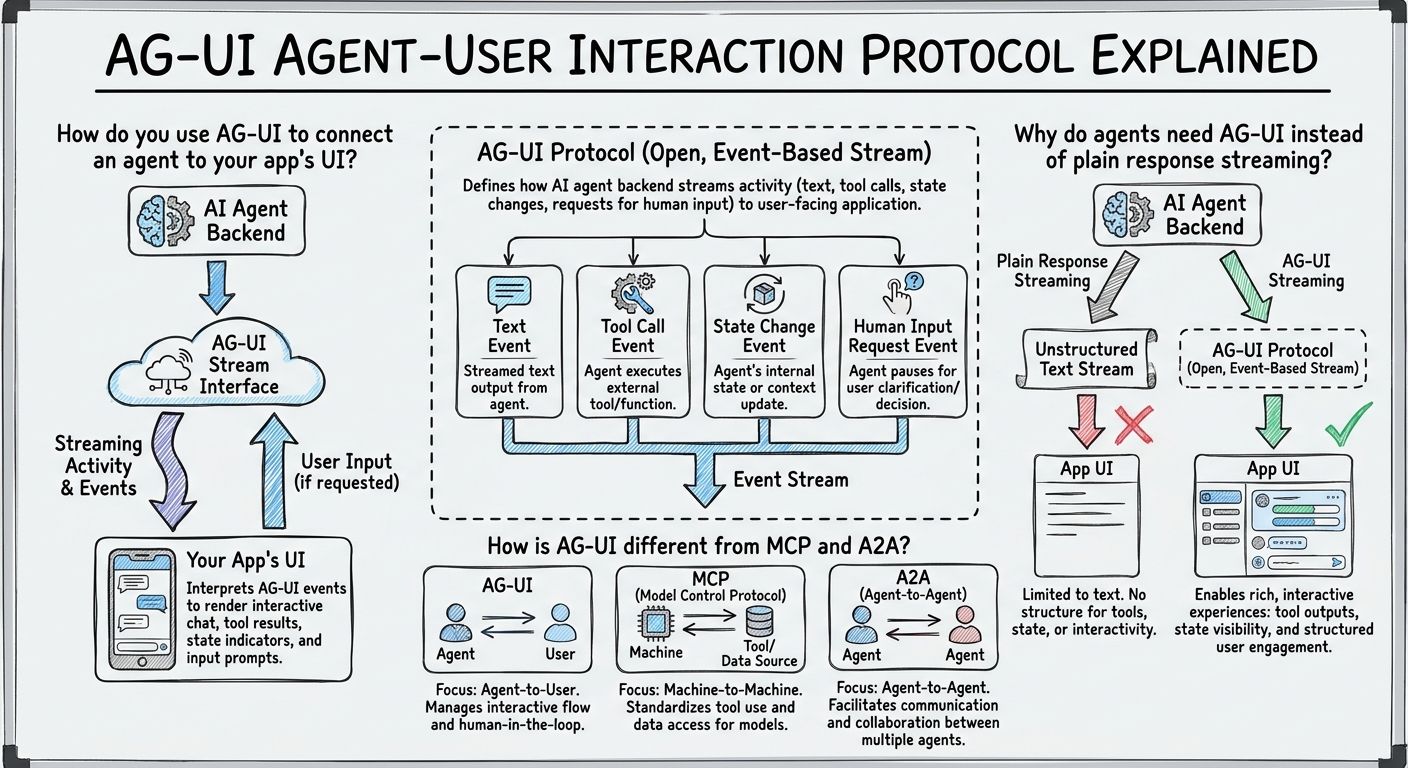
You connect an agent to your UI with AG-UI in three steps, as described in CopilotKit's AG-UI 1.0 announcement. First, your agent endpoint receives a request from the app. Second, a framework bridge converts the agent's native output into AG-UI events, and the endpoint streams those events back. Third, an AG-UI client, usually an SDK in your app, sends the request, validates each event against the spec, and hands each event to your UI to render.
A concrete AG-UI run makes the flow easier to picture. In CopilotKit's example of an agent asked to summarize a user's Notion notes, the stream runs RUN_STARTED, then TOOL_CALL_START when the agent reaches for the notes, TOOL_CALL_RESULT when they come back, STATE_DELTA to update shared state, TEXT_MESSAGE_CONTENT as the summary arrives token by token, and finally RUN_FINISHED. The frontend renders each event without needing to know which agent framework produced it.
To scaffold a new AG-UI project, the same post points to the command npx create-ag-ui-app@latest. CopilotKit lists AG-UI integrations for LangChain, Mastra, Google ADK, Claude Managed Agents, OpenAI Agents SDK, Strands Agents, Microsoft Agent Framework, and Pydantic AI, among others. The protocol source and docs live in the AG-UI GitHub repository.
Agents need AG-UI because their output is more than a single answer. According to CopilotKit, agents stream tokens, call tools mid-response, and spawn subagents, while HTTP returns one response per request. Without a shared standard, every frontend ends up writing a different stream parser for each agent framework it talks to.
A raw token stream, such as plain server-sent text or chat-completion streaming, carries only text. AG-UI adds a defined run lifecycle, tool-call events, state syncing, and interrupts for human input. Since version 1.0, every AG-UI event is validated against a published JSON Schema.
AG-UI 1.0 was released on September 30, 2026, as a stable spec plus a JSON Schema, with the TypeScript, Python, and .NET SDKs generated from that schema. The release is backwards compatible and adds subagent support, metadata, multimodal tool results, human-in-the-loop interrupts, and token usage reporting. The AG-UI introduction describes the protocol as "the general-purpose, bi-directional connection between a user-facing application and any agentic backend."
The AG-UI protocol groups its events into categories, according to the AG-UI events documentation: Lifecycle, Text Message, Tool Call, State Management, Activity, Subagent, Special, and Draft, with Reasoning events documented separately.
Lifecycle events frame every run. RUN_STARTED, which carries a threadId and runId, is mandatory, and every run must end with either RUN_FINISHED or RUN_ERROR. STEP_STARTED and STEP_FINISHED are optional markers for stages inside a run.
Text message events stream the agent's reply: TEXT_MESSAGE_START opens a message, TEXT_MESSAGE_CONTENT delivers it piece by piece, and TEXT_MESSAGE_END closes it.
Tool call events show the agent using a tool: TOOL_CALL_START, TOOL_CALL_ARGS, TOOL_CALL_END, and TOOL_CALL_RESULT. A UI can use them to show progress and let the user see what the agent is doing.
State events keep the frontend in sync with the agent. STATE_SNAPSHOT replaces the frontend's state entirely, while STATE_DELTA sends an array of JSON Patch (RFC 6902) operations that change only what moved, as described in the AG-UI state documentation. MESSAGES_SNAPSHOT syncs the conversation history.
AG-UI also defines activity, reasoning, and subagent events (such as SUBAGENT_STARTED), plus RAW and CUSTOM for anything outside the standard set. Every event shares a base shape with a type field and optional timestamp, rawEvent, and metadata fields.
AG-UI, MCP, and A2A are complementary layers of an agent system, each covering a different connection. The AG-UI introduction lays them out this way. AG-UI handles agent-to-user interaction, connecting agents to user-facing applications. MCP (Model Context Protocol, originated by Anthropic) handles agent-to-tools and data, letting agents reach external tools, workflows, and data sources. A2A (originated by Google) handles agent-to-agent communication, defining how agents coordinate and share work.
A single application can use all three: A2A to hand work between agents, MCP to fetch data or call tools, and AG-UI to show the user what is happening and collect their input. None of the three replaces the others.
AG-UI is often confused with two neighbors. A2UI is a generative UI specification that lets agents deliver UI widgets, while AG-UI is the interaction protocol that carries events between frontend and backend. The AG-UI docs say the two work well together. CopilotKit created and maintains AG-UI and ships an AG-UI client for React, Angular, Vue, React Native, and chat apps, but the protocol itself is open and framework-agnostic.
AG-UI handles human-in-the-loop approvals through interrupts, which let an agent pause a run and wait for a person. The AG-UI introduction describes the goal as being able to "pause, approve, edit, retry, or escalate mid flow without losing state."
In the AG-UI protocol, an interrupt is expressed through the outcome of RUN_FINISHED. According to the AG-UI events documentation, the optional outcome is either a success or an interrupt that carries a list of open interrupts. Your UI renders those interrupts as prompts, such as an approve button or an editable draft.
When the user responds, the client resumes by starting a new run whose input includes a resume array that addresses every open interrupt. Because shared state travels through STATE_SNAPSHOT and STATE_DELTA events, the agent picks up where it stopped instead of starting over. Interrupts became part of the stable spec in AG-UI 1.0.
In an AG-UI application, the content an agent shows the user comes from the tool and data layer, which is usually reached over MCP, not through AG-UI itself. AG-UI carries the conversation to the screen, and another layer has to supply accurate, approved material for the agent to talk about.
Sanity is the AI Content Operating System, and its role here sits on that MCP layer. Sanity Context turns content in the Content Lake into knowledge agents can read over MCP through Context MCP. Agents can query structured content directly with GROQ or read from a Knowledge Base (Beta) that Context builds ahead of time. Access is read-only, and a groqFilter is applied server-side, so nothing in the conversation can widen what the agent is allowed to see.
The resulting architecture has three hops: the agent reads governed, structured content through Context MCP, emits what it found as AG-UI text, tool call, and state events, and the app UI renders them. The split of responsibilities matters. The Content Lake supplies governed context, while AG-UI's own STATE events hold the session's UI state.
Sanity Context publishes connect guides for frameworks including LangChain, Mastra, Google ADK, and OpenAI Agents SDK, several of which also appear in AG-UI's integration list. For teams on those frameworks, the same agent can read from Context MCP on one side and stream AG-UI events on the other.
Discover More with Sanity
Now that you've learned about AG-UI agent-user interaction protocol, why not start exploring what Sanity has to offer? Dive into our platform and see how it can support your content needs.
Last updated: