Android MCP app-to-agent access definition
Android MCP is Google's approach to letting Android apps expose their functions to AI agents through the Model Context Protocol (MCP), so an agent can call an app's actions as structured tools on the device instead of operating the app's user interface.
Android MCP is Google's way for Android apps to expose their functions to AI agents through the Model Context Protocol. An agent can then call an app's actions as named tools with typed inputs instead of tapping through screens. When those functions return content stored in Sanity, the agent gets the same structured, permissioned documents that the website and the app already query, not a separate copy that can drift out of date.
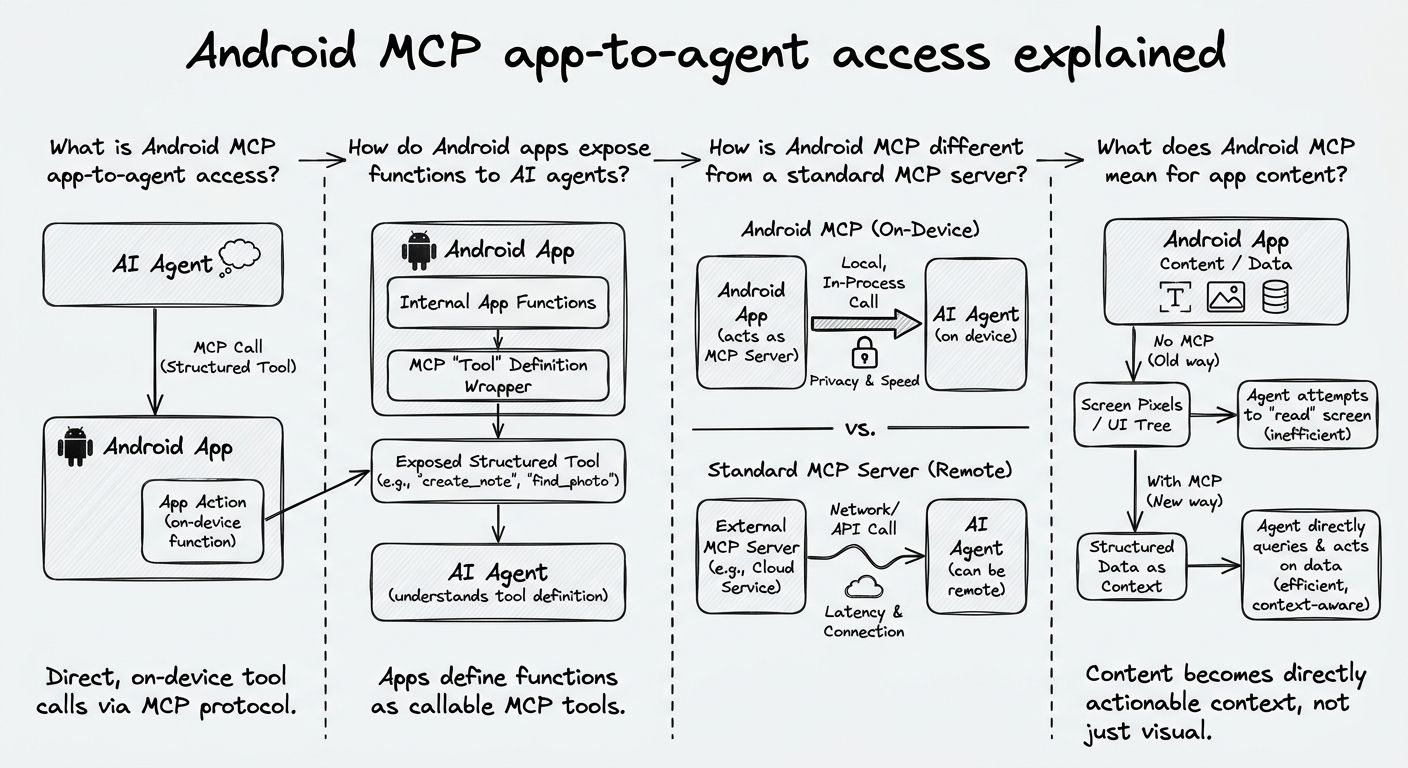
Android MCP app-to-agent access is the ability of an Android app to make its functions available to an AI agent through the Model Context Protocol, an open standard for connecting AI systems to tools and data. An app defines which actions it offers, what each action does, and what inputs it expects. The agent then calls those actions directly.
The Model Context Protocol was introduced by Anthropic as a common way for AI applications (called clients) to discover and use capabilities offered by servers. Android MCP app-to-agent access applies that same idea to apps installed on a phone, so the app itself becomes a source of tools an agent can use on the user's behalf.
Android MCP is newer than most published material about it. For exact APIs, setup steps, and supported Android versions, check Google's official Android developer documentation, not secondhand summaries.
Android apps expose functions to AI agents with the tool-calling model that the Model Context Protocol defines. In general terms, the exchange happens in four steps.
First, the app declares its capabilities as tools. Each tool has a name, a plain-language description of what it does, and a schema for its inputs, such as a search query, a product ID, or a date. Second, the agent discovers those tools and reads the descriptions to decide which one fits the user's request. Third, the agent calls the chosen tool with structured arguments, and the app runs the function using its own logic and the user's existing permissions. Fourth, the app returns a structured result, which the agent uses to answer the user or to decide on its next action.
The tool description matters as much as the function. An agent picks tools based on what the descriptions say, so a vague description such as "get data" is less likely to be called correctly than a specific one such as "find recipes by ingredient and cooking time."
Android MCP uses the same tool-calling model as a standard MCP server, but the tools come from apps installed on the device, not from a remote endpoint or a local process on a computer.
That difference in location has practical consequences. A remote MCP server needs its own authentication setup and runs separately from the user's apps. An Android app that exposes functions through MCP already runs in the user's signed-in session, so an agent can act inside the context the user has already set up, such as their account, their saved items, or their preferences. From the agent's side, the work looks the same either way: discover tools, call them with structured inputs, and read structured outputs.
For developers, this means an Android app and a backend MCP server can expose similar capabilities through the same protocol. The design choice is which actions belong on the device and which belong on a remote endpoint.
Android MCP means agents can act through apps, so the content those apps serve has to be structured and permissioned to work well for agents. When a person opens an app, they read a rendered screen and fill in gaps on their own. When an agent calls an app function, it receives whatever the function returns, and it treats that output literally.
Structured content holds up better in this setting. A product returned as separate fields for name, price, availability, and region gives an agent something precise to reason about. The same product returned as one block of formatted text forces the agent to infer structure. Permissions matter for the same reason. If an app shows different content to different users or markets, the functions it exposes to agents have to respect the same rules, or the agent may surface drafts, embargoed material, or region-specific information to the wrong person.
In our experience, the teams best prepared for agent access already separate content from presentation. Their apps request clean, typed content from a back end, so exposing that content through a tool is a small step instead of a rebuild.
Sanity fits Android MCP app-to-agent access as the structured back end behind the app, so the content an app exposes to an agent is the same governed content used everywhere else. Sanity is the AI Content Operating System, the intelligent back end for companies building AI content operations at scale. Content is modeled as typed documents in the Content Lake and queried by any frontend, whether that is a website, an Android app, or an agent working through that app.
This lines up with the Model your business and Power anything pillars. Teams define content models that match how their business works, then deliver that content to every channel from one source. When an Android app's MCP tool returns an article, a product, or a help topic, the result follows the same schema and editorial rules as the website version, so an update made once in the Studio reaches people and agents alike.
Android MCP defines how an agent reaches an app's functions. The back end determines whether the content behind those functions is accurate, structured, and appropriate for the person asking. Both layers need to be right for agent access to be trustworthy.
Explore Sanity Today
Understanding Android MCP app-to-agent access is just the beginning. Take the next step and discover how Sanity can enhance your content management and delivery.
Last updated: