Bounding box definition
A bounding box is the smallest axis-aligned rectangle that fully contains an object in an image, used to record where that object is. It is the standard output of object detection and of vision models asked to locate something, expressed as pixel coordinates, as x, y, width, and height, or as fractions of the image's width and height.
A bounding box in AI is the rectangle a model returns to say where an object sits in an image, given either as pixel coordinates or as fractions of the image's size. Those fractional coordinates are what make a box portable across resolutions, and a Sanity image field already speaks that language: crops and hotspots are stored as fractions of the image's height and width, so a normalized box maps onto an image field's crop values directly.
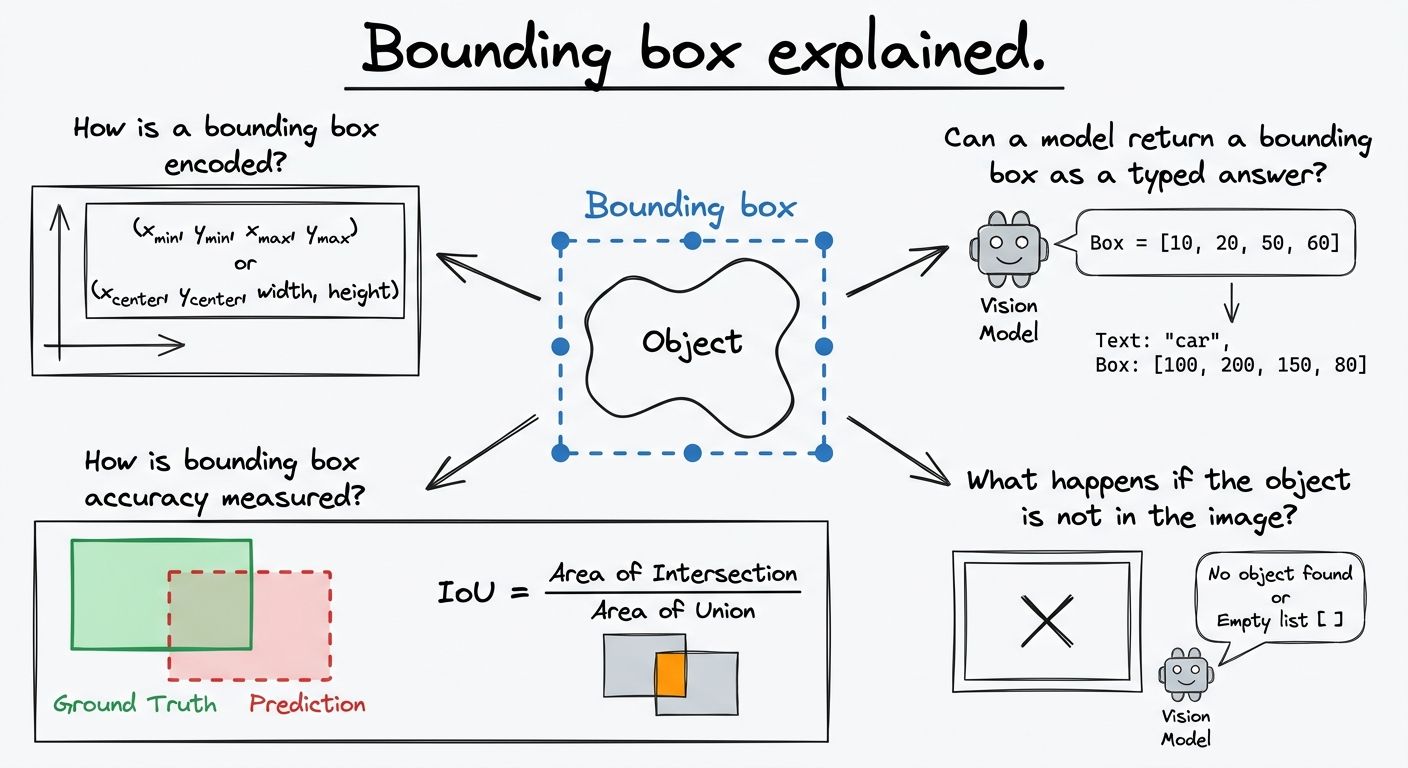
A bounding box is encoded in one of three common ways, and the difference matters because the same rectangle looks like completely different numbers in each.
The first is pixel corners: two points, the top-left and bottom-right, in pixels counted from the top-left corner of the image. The second is x, y, width, and height: one corner point plus how far the box extends, which is the format used by the COCO detection dataset and most training pipelines built around it. The third is normalized coordinates, where each edge is a fraction between 0 and 1 of the image's width or height. A box whose left edge sits a quarter of the way across the image has a left value of 0.25 no matter whether the image is 400 pixels wide or 4,000.
Normalized coordinates are the format worth preferring when a box has to survive resizing, cropping for different layouts, or being stored alongside an image whose rendered size is decided later. Pixel coordinates silently become wrong the moment the image is scaled.
Bounding box accuracy is measured with intersection over union, usually written IoU: the area where the predicted box and the correct box overlap, divided by the total area the two boxes cover between them.
IoU produces a single number from 0 to 1. A score of 1 means the predicted box and the ground-truth box are identical. A score of 0 means they do not touch at all. Detection benchmarks typically treat a prediction as correct when IoU passes a threshold, with 0.5 being the long-standing convention inherited from the PASCAL VOC challenge, and stricter evaluations averaging results across several thresholds.
IoU is useful because it punishes both kinds of error with one measure. A box that is far too large overlaps the object but covers a lot of empty space, so the union grows and the score falls. A box that is too small or offset misses part of the object, so the intersection shrinks and the score falls. For most practical uses, a box with an IoU around 0.9 is visually indistinguishable from a hand-drawn one, while 0.5 looks obviously loose.
Yes. In mid-October 2026, TypeSafe AI added a Box question type to Jev 1.14, which returns a bounding box as a typed value rather than as generated text. You name a target and the image, for example "the coffee mug in photo", and the answer comes back as top, bottom, left, and right expressed as fractions of the image's height and width from the top-left corner, plus a confidence.
This matters because of what Jev is. Jev is a System One model: it answers typed questions about a state with probabilities instead of producing free-form text, and until version 1.14 those answers were yes/no probabilities, choices from a fixed list, or scores on an ordered scale. A box is none of those. TypeSafe founder Diogo Almeida described the Box type as "somewhere in the gray area of decisions," because it is the first System One answer that is a position rather than a choice, a score, or a probability. Alongside the arrival of System One extraction models, it marks these models moving beyond pure decision-making.
TypeSafe labels both image input and the Box type experimental. A Box question requires an image in the request, the jev-1.14.0 or jev-preview model, and an opt-in header, TypeSafe-Danger-Zone-Images: true. TypeSafe gives no recommended confidence threshold for Box yet.
A Box question always returns a bounding box, even when the target is not in the image at all. The typed-output guarantee that these models offer is about format, not about correctness: you will always get four valid numbers back, and those numbers can still point at nothing.
TypeSafe's documentation handles this by pairing a Box question with a separate
The same caution applies to every claim in this category. Accuracy and latency figures for these models are self-reported by their makers, and the benchmarks are young and inconsistent between vendors, so treat a published number as the maker's measurement rather than as settled fact.
A normalized bounding box and an image crop describe the same rectangle from opposite directions, which is why converting between them trips people up.
A Sanity image field stores a crop as top, bottom, left, and right fractions, and a hotspot as a fractional center point plus a fractional width and height. The crop's values are how much to cut away from each edge, not where the edges sit. So the left and top line up directly, crop.left = box.left and crop.top = box.top, but the other two invert: crop.right = 1 - box.right and crop.bottom = 1 - box.bottom. Get that backwards and the crop lands on the wrong side of the picture.
The hotspot conversion is simpler arithmetic. The center is the midpoint of the box on each axis, and the width and height are the differences between its edges. Because both the box and the field use fractions of the image rather than pixels, the mapping holds for any source resolution and for every rendered size the image is later delivered at.
Explore Sanity Today
Understanding bounding box is just the beginning. Take the next step and discover how Sanity can enhance your content management and delivery.
Last updated: