Content source maps definition
Content source maps are metadata returned alongside a content query result that trace each value in the response back to the document and field it came from, so any piece of rendered content can be linked to its exact origin.
Content source maps are metadata that record, for every value in a query response, which document and which field produced it. That record makes rendered content traceable to its source. In Sanity, the Content Lake can return a content source map with a query result, and Visual Editing reads that map to turn a click on a headline or price into the exact field to edit in the Studio.
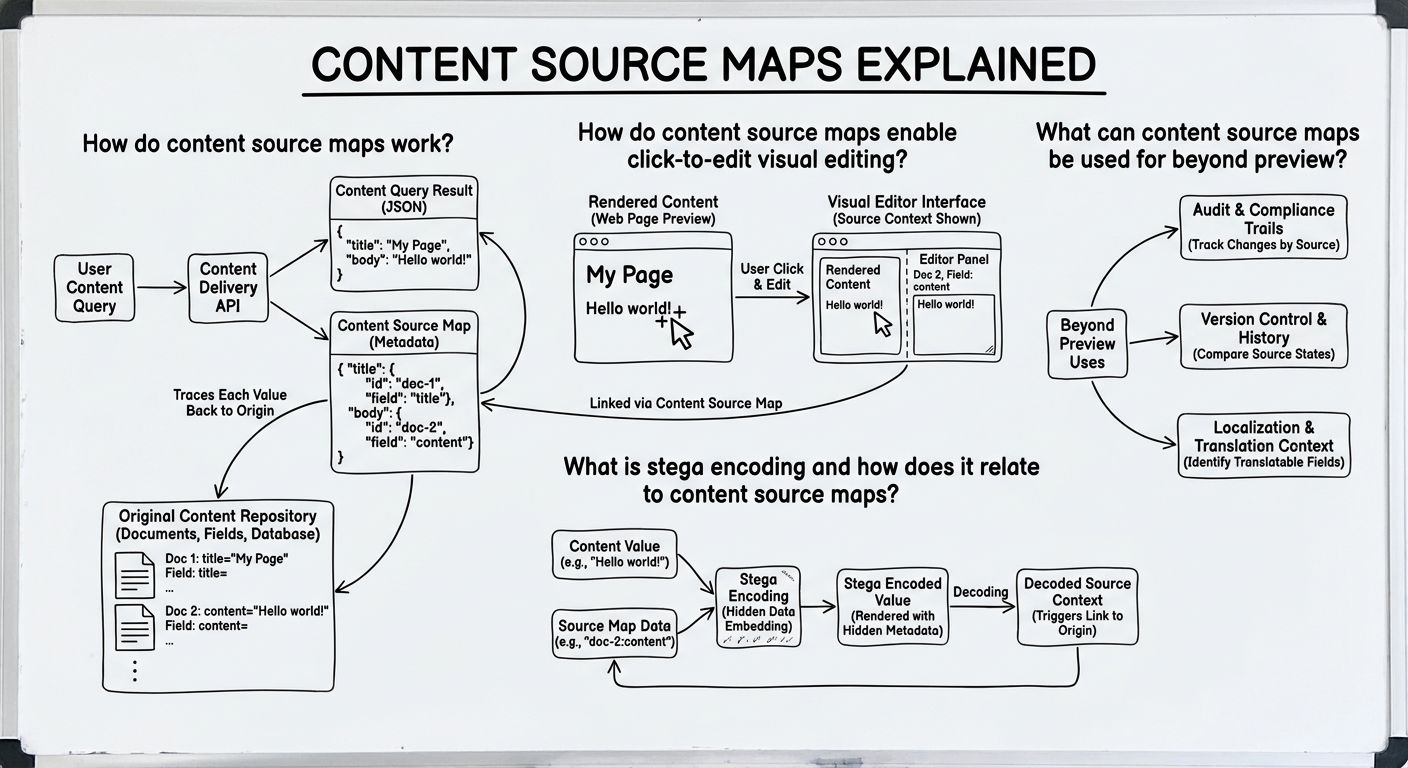
Content source maps work by pairing a query result with a second structure that describes where each value came from. When an application queries a content repository, it usually gets back a reshaped response, with fields renamed, references joined, arrays filtered, and values from several documents combined into one object. The original locations are lost in that response. A content source map keeps them by recording, for each path in the result, the document ID, the document type, and the field path inside that document that supplied the value.
The idea borrows its name from JavaScript source maps, which let a browser's developer tools point from minified, bundled code back to the original source file and line. Content source maps do the same for content. They point from a value on a rendered page back to the original document and field, even after a query has transformed the shape of the data.
Content source maps enable click-to-edit visual editing by giving a preview interface a reliable address for every piece of content on the page. Visual editing is an editing experience where an author views the live website or app, clicks on a piece of text or an image, and lands on the field that controls it. Without content source maps, a developer wires that connection by hand for each component, which often falls out of date as templates change.
With content source maps, the connection comes from the query result itself. The preview layer reads the map, finds which document and field produced the value under the cursor, and opens that field for editing. The mapping comes from the data, not the markup, so it still works when a component is refactored or a query is rewritten.
Stega encoding is a technique that embeds the information from a content source map directly into string values using invisible characters, so the source travels with the text into the rendered page. The name comes from steganography, the practice of hiding information inside other data. A heading that reads normally to a person can carry an encoded pointer to its document and field.
Stega encoding relates to content source maps as a delivery method. The content source map holds the mapping as separate metadata, and stega encoding writes that mapping into the strings themselves. That lets a preview overlay detect editable content on the page without the frontend code passing source information through every component. The tradeoff is that the hidden characters change the actual string, so code that compares, slugifies, or formats those values needs to strip the encoding first, and stega is normally enabled only in preview and draft contexts rather than in production output.
Content source maps are used beyond preview anywhere it matters which specific content produced an output. Because the map ties every value in a response to a document and field, it provides a precise record of what content was read, not just which page was shown.
One use is tracing which content an AI agent used. When an agent queries structured content to answer a question or draft a page, a content source map records the exact documents and fields that informed the result, which helps a reviewer check the agent's sources and correct the right field when an answer is wrong. Another use is content analytics, attributing views, clicks, or conversions to the individual fields and documents that appeared on screen, not only to the URL. Both uses rely on the same property that makes visual editing work, a dependable link from output back to source.
Content source maps are worth understanding before Sanity Live and createDataAttribute because both build on the same idea, linking what appears on screen to the document and field behind it. Questions about live updating previews, or about marking a specific element as editable, are easier to answer when the underlying mechanism is clear, a map from query results back to source content.
That ordering reflects how Sanity is designed. As the AI Content Operating System, Sanity treats content as structured data with a known origin for every value, and Content Source Maps are one place that design becomes visible. The concept comes first, then the related tools read as applications of one principle, not separate features to memorize.
Unlock New Possibilities with Sanity
With content source maps under your belt, it's time to see what Sanity can do for you. Explore our features and tools to take your content to the next level.
Last updated: