WebMCP standard for websites definition
WebMCP (Web Model Context Protocol) is a proposed web standard that lets a website register its own functions as structured tools, each with a name, a description, and an input schema, so AI agents in or through the browser can call them directly instead of reading and clicking through the page.
WebMCP is a proposed browser API that lets a website publish its own actions, such as searching a catalog or checking order status, as tools an AI agent can call directly inside the page instead of scraping it. Each tool returns whatever its code fetches at call time. When that code runs a GROQ query against Sanity's Content Lake, the agent receives typed fields from currently published content rather than text parsed from rendered HTML.
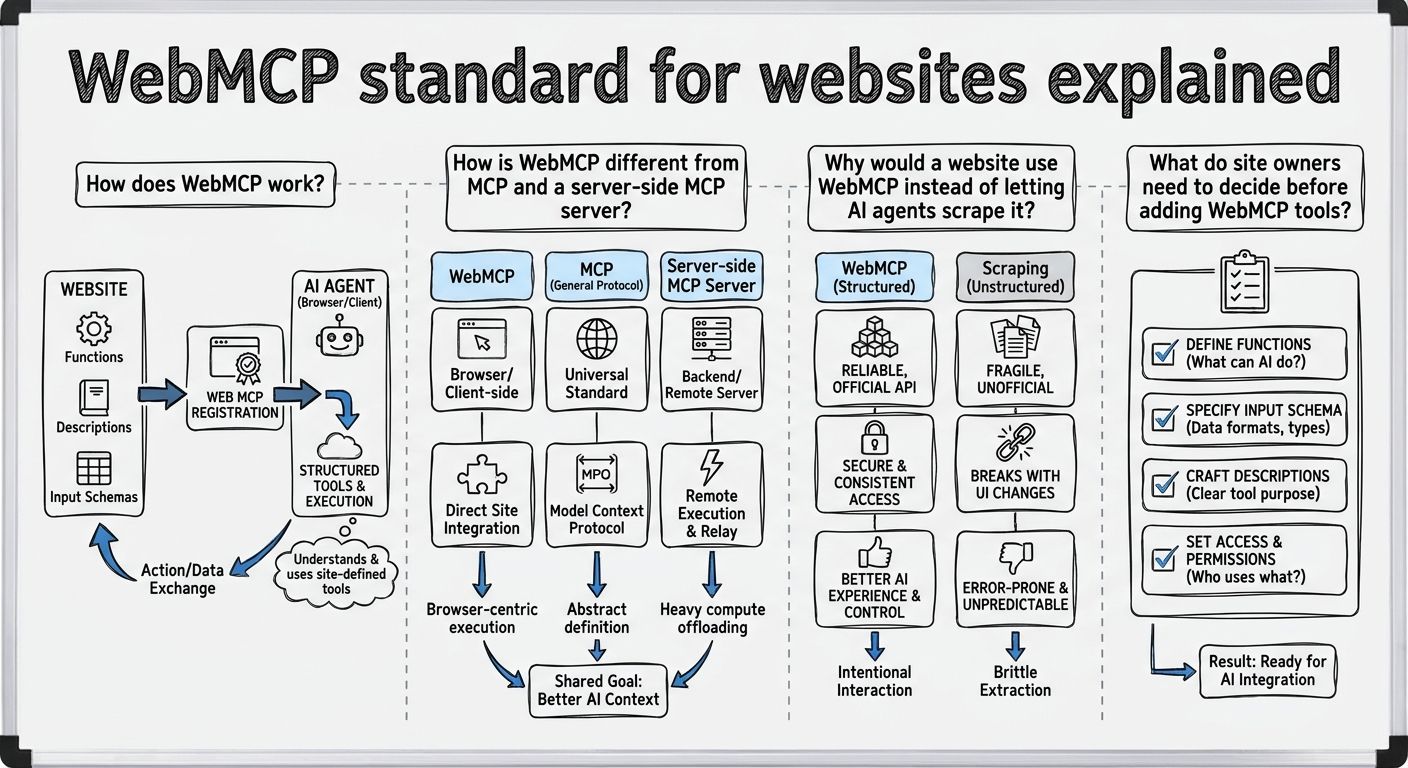
WebMCP works by letting a web page register tools, which are JavaScript functions the page already knows how to run, with the browser. In the WebMCP draft specification, each tool has a name, a plain-language description of what it does, a JSON Schema describing its inputs, and an execute function that does the work and returns a result. An AI agent reads the descriptions, picks a tool, supplies arguments that match the schema, and gets structured data back.
There are two ways to define WebMCP tools. The imperative API uses JavaScript: the page calls document.modelContext.registerTool() with a tool definition. Chrome's guide to agentic JavaScript tools recommends this for single-page apps where the available tools change with the route or the user's state. The declarative API adds attributes to an ordinary HTML form, and the browser builds the input schema from the form's controls. In Chrome's current implementation those attributes include toolname and tooldescription, though the declarative API is treated as separate proposal material, and the names may change.
Because WebMCP tools run inside the open page, they use the page's own logic and the visitor's existing logged-in session. The spec describes this as collaborative work in which users and agents share the same web interface while the user stays in control.
WebMCP is modeled on the Model Context Protocol (MCP), the open protocol originally from Anthropic for connecting AI clients to tool and data servers, but WebMCP is a browser API, not a network protocol. WebMCP borrows MCP's idea of a tool (a name, a description, an input schema, and a result) and moves it into client-side script. The spec says pages using WebMCP can be thought of as MCP servers that implement tools in client-side script instead of on the backend. AI Stack Current's summary of the draft adds that WebMCP does not define a network service protocol or a replacement for MCP.
The practical difference between WebMCP and a server-side MCP server is where the tool runs and whose session it uses. A server-side MCP server is a backend service that agents reach over the network. It is available whether or not anyone has the site open, and it authenticates the agent separately, typically with OAuth or tokens. WebMCP tools exist only while a visitor has the page loaded, and they inherit that visitor's cookies and login.
WebMCP and server-side MCP can work together. Cloudflare's WebMCP preview registers in-page tools that proxy each tool from a site's existing MCP server, running on the visitor's origin and with the visitor's existing session.
Websites adopt WebMCP so AI agents complete tasks through actions the site defines, not through guessed steps on pages built for humans. Without WebMCP, a browser agent has to interpret screenshots, the DOM (the page's underlying element tree), or scraped HTML, then click and type as a person would. Cloudflare puts the benefit plainly: with WebMCP, agents can use tokens on tasks, not navigation. Cloudflare also notes that crawlers copy content back to a server and too often give the original site none of the traffic and little of the credit.
WebMCP is opt-in. The site owner decides which tools exist and what they return, a level of control scraping does not offer. WebMCP also differs from llms.txt files, schema.org markup, and other structured data. Those formats describe content passively for machines to read, while WebMCP exposes callable actions that take inputs and produce results.
Site owners adding WebMCP make three decisions: which actions to expose, what each tool returns, and how the data behind each tool stays current.
First, choose the actions. Chrome's agentic forms guidance suggests letting agents submit read-only queries (searches, filters, fetching details, or checking status) and low-risk, reversible actions, such as adding an item to a cart or applying a coupon code, without waiting for the user. It advises requiring user confirmation for destructive actions, checkout and payments, publishing public-facing content, and sensitive account settings. Imperative WebMCP tools can flag this with a consequentialHint annotation.
Second, define what each tool returns. The execute function's result is serialized to JSON and handed to the agent, and Chrome notes that the browser does not validate arguments against the input schema or apply default values, so the site has to do both. The quality, structure, and accuracy of what an agent gets back are the site's responsibility.
Third, keep the source current. A WebMCP tool is only as current as the data it reads when it is called. If a tool returns prices or availability from a stale cache, the agent repeats stale facts.
Security runs across all three decisions. WebMCP annotations are hints only: AI Stack Current notes they do not enforce read-only behavior, sanitize output, or grant authorization, and the spec's security section addresses prompt injection and misrepresented intent.
WebMCP is a draft, not a finished web standard. It is published as a Draft Community Group Report by the W3C Web Machine Learning Community Group, with editors from Google and Microsoft. It is not a W3C Standard and is not on the Standards Track, and the latest draft referenced by AI Stack Current is dated 2 November 2026.
Browser support for WebMCP is experimental. Chrome first shipped WebMCP as an early preview behind a flag in Chrome 146, according to Cloudflare and Search Engine Land. The official WebMCP implementation status page lists an origin trial (a time-limited test that sites can opt into) live in Chrome 149 and in Edge 150. The same page lists experimental support in Brave's Leo AI chat and support in ChatGPT Desktop, while Firefox and Safari have standards-position discussions but no implementation. Developers can test WebMCP locally by enabling the enable-webmcp-testing flag in Chrome.
Early drafts and blog posts referred to navigator.modelContext. The current WebMCP spec and Chrome documentation use document.modelContext.
Sanity fits WebMCP as the data source behind a website's tools. A WebMCP tool's execute function is client-side JavaScript, so it can run a GROQ query against the Content Lake with Sanity's JavaScript client and return typed fields such as price, availability, or product specs, not text pulled from a rendered page. Sanity TypeGen generates TypeScript definitions from Studio schemas and GROQ queries, so the shape of what a tool returns can be typed from the same query that fetches it. Because the tool queries the Content Lake when the agent calls it, it returns what is published at that moment, and the Live Content API lets the page receive real-time updates as content changes.
The same backend can serve agents outside the browser. Sanity's MCP server lets MCP-compatible clients run GROQ queries, manage releases, and patch documents with awareness of the schema, using OAuth or token authentication. Sanity Context is a hosted, read-only MCP server that serves a live dataset in GROQ mode, or pre-indexed material in Knowledge Base mode (beta).
This is the Power anything idea behind Sanity as the AI Content Operating System: one structured source of content serving the website, the browser agents calling its WebMCP tools, and the MCP clients that reach it directly.
Unlock New Possibilities with Sanity
With WebMCP standard for websites under your belt, it's time to see what Sanity can do for you. Explore our features and tools to take your content to the next level.
Last updated: