Better context, better matches: An AI love story (for dogs)
Search filters force users to think in database terms. This AI-powered dog adoption app shows what happens when you let structured content do the work instead.

Ken Jones
Community Experience Engineer at Sanity
Published
View transcriptClose transcript
Every dog shelter website has the same filters. Size, breed, age. They work, but they don't work the way you actually think about getting a dog.
You don't search for "medium, 2-4 years, terrier mix." You think: "I need a dog that won't terrorize my neighbor's cats and doesn't make me sneeze." That's a vibe, not a filter. Traditional search can't handle it.
So I built Pup Finder: a
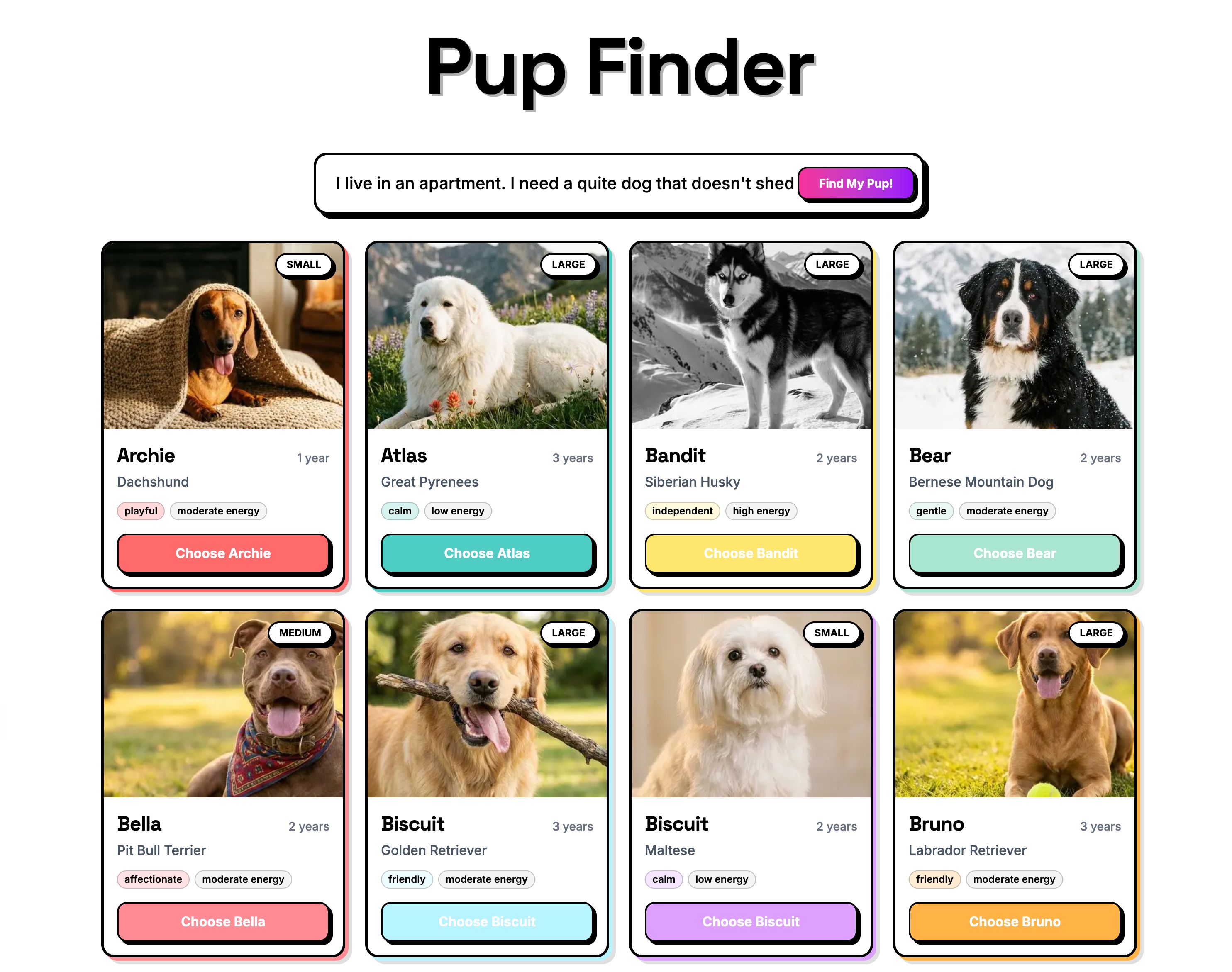
The whole thing took under an hour. Well, the functional app did. Then I spent another hour nudging pixels because I'm like that.
In this post I'll walk through how I built it, explain why Agent Context is a better fit for structured data than standard RAG, and show you how the AI matching actually works under the hood. The full source code is available at the end.
Before we get into the build, let's zoom out. This isn't really about dogs (even though dogs are the best demo subject and I'll die on that hill).
Think about any site with a catalog of things people need to filter through: real estate listings, e-commerce products, insurance plans, podcast episodes, job postings. Traditional filters force users to think in database terms: dropdowns, checkboxes, price ranges. That's not how people actually describe what they want.
Agent Context lets you put AI in front of your Sanity content so users can search the way they naturally think. The AI reads your schema, understands the relationships between fields, and queries your content intelligently. With embeddings enabled, it also supports size == "small") with meaning-based matching (text::semanticSimilarity) in a single GROQ call. Your structured data does the heavy lifting. AI just makes it conversational.
Here's my setup. Yours doesn't need to match. Pick the tools you're comfortable with.
- An LLM API key (I used Anthropic, but Agent Context works with any LLM provider)
- Next.js (App Router) and pnpm
- A photogenic dog (for testing purposes)
I used Claude Code for the build walkthrough below. The same approach works with Cursor, v0, Lovable, or any AI coding tool that supports MCP and skills.
Three Sanity AI tools made this come together:
Agent Skills are modular instruction sets that teach AI agents Sanity-specific best practices. I installed two: the Agent Toolkit (general Sanity development patterns) and the Agent Context skill (for building agents that query Sanity content). Without these, the coding agent would be guessing at conventions. With them, it reads Sanity's own docs and applies the right patterns from the start.
Sanity MCP server connects AI coding agents (Claude Code, Cursor, v0, etc.) to your Sanity workspace. During development, it helped scaffold the schema, generate sample dogs with matching AI-generated images, and wire everything up. If you've used an AI coding tool with Sanity before, you've probably already set this up.
Agent Context is the star of the show, and it's worth pausing on why.
Most AI-powered search follows the RAG (Retrieval-Augmented Generation) playbook: dump your content into a
Dog adoption data isn't a blog post. A dog has a temperament field set to "calm", a goodWithCats boolean, a hypoallergenic flag, an energyLevel, a size. These are discrete, queryable facts, not paragraphs to fuzzy-match against.
Agent Context gets this. It's a hosted MCP (Model Context Protocol) server that gives your AI agents read-only, schema-aware access to your Sanity dataset. The agent doesn't get a blob of text. It gets your schema, understands every field and relationship, and writes its own GROQ queries to find content that matches real constraints.
This is where it gets interesting. A user doesn't type hypoallergenic == true. They type "I'm allergic to dogs." A user doesn't type size == "small" && energyLevel == "low". They type "I live in a tiny apartment." The AI bridges that gap. It understands that allergies map to the hypoallergenic field, that a tiny apartment means you probably shouldn't adopt a high-energy Great Dane, and writes precise queries against your structured data. Combine that with semantic search through Sanity's embeddings, and you get agents that understand meaning and obey real constraints. The best of both worlds: semantic matching where it helps, structured queries where it matters.
You configure it all in Studio (which document types are visible, instructions for the AI, GROQ filters to scope access) and your content's structure does the rest.
If you haven't already, set up the Sanity MCP server in your AI coding tool of choice. This connects your agent to your Sanity workspace so it can scaffold schemas, create content, and generate images during development.
npx sanity@latest mcp configureThis handles most setups automatically. If you need instructions for a specific tool (Cursor, Windsurf, etc.), the MCP server docs have per-tool setup guides.
Before writing a single line of code, I gave my coding agent the context it needed:
# Best practices for schemas, GROQ, content modeling, and more
npx skills add sanity-io/agent-toolkit --all
# Guided setup for Agent Context (Studio plugin, agent code, frontend UI)
npx skills add sanity-io/agent-context --all
This is the equivalent of handing a contractor the building codes before they start framing. The Agent Toolkit skill teaches best practices for schema design, GROQ queries, and Studio setup. The Agent Context skill covers how to wire up AI agents that read your Sanity content. Instead of the agent pulling generic patterns from the internet, it reads Sanity's own guidance and applies it correctly.
I wrote a detailed prompt describing what I wanted: a Next.js app with an embedded Sanity Studio, a dog schema with fields covering everything from temperament to coat length, and a UX flow that starts with a grid of dogs and lets users describe their perfect match in plain language. It's not perfect (no prompt ever is on the first try), but it got me 90% of the way there.
Here's a condensed version. The full prompt is in the repo if you want to use it as a starting point, but honestly, make it your own. Half the fun is seeing what the agent does with your weird ideas.
## Tech Stack

- Next.js (App Router)
- next-sanity for client, image URLs, embedded studio
- Tailwind CSS
- Use latest versions of everything

## Agent Context Setup

- Use the Sanity MCP to find setup instructions for `@sanity/agent-context/studio`
- Add it to the Sanity config

## UX Flow

1. Landing page — grid of all dogs + text input: "Describe your perfect dog..."
2. User submits description → AI filters dogs and shows a summary
3. If 4+ dogs remain, AI asks one round of follow-up questions based on
   the remaining dogs' attributes. Follow-up questions should NOT be
   pre-answered before submitting. (IMPORTANT: only use dogs still in
   the list, don't re-query)
4. Filtered results with detail modals and a "Choose [Name]" confetti moment

## Design

- Bold maximalist: vibrant colors, gradients, layered shadows

## Sanity Schema

- name, slug, breed, dateOfBirth, sex, size, weight
- temperament, energyLevel, description, image
- Compatibility: goodWithKids, goodWithDogs, goodWithCats
- Health: spayedNeutered, vaccinated, houseTrained, specialNeeds
- Appearance: coatLength, color, hypoallergenic, barking level
I set Claude Code to plan mode first, so it would map everything out before writing code.
I reviewed the plan, okayed it, and let it run. The agent:
- Scaffolded a Next.js project with an embedded Sanity Studio
- Created the dog schema following Sanity conventions (thanks to the Agent Toolkit skill)
- Used the Sanity MCP server to create 62 sample dogs with AI-generated images that matched each breed. A Great Dane got a Great Dane photo, a Beagle got a Beagle photo
- Wired up Agent Context so the app's AI layer could query the Sanity dataset
- Built the full UI with the matching flow, follow-up questions, and confetti
Most of my iterations after this were UI tweaks: adjusting the layout, changing the number of follow-up questions. The architecture and data layer worked on the first pass.
Agent Context comes with a Studio plugin that adds a document type for managing your AI contexts. If your coding agent didn't already set this up, add it to your sanity.config.ts:
import {agentContextPlugin} from '@sanity/agent-context/studio'

export default defineConfig({
  // ...
  plugins: [structureTool(), agentContextPlugin()],
})
With the plugin installed, I navigated to Content > Agent Context in the embedded Studio at /studio and created a new document. This is where you tell AI what it can see and how to behave. The document has a few key fields:
- Name: a label for this context (e.g. "Dog matching")
- Instructions: natural language guidance for the AI. What it should help with, what tone to use, any constraints ("Only recommend dogs that are listed as available")
- Document types: which schema types the AI is allowed to query
- GROQ filter: an optional filter scoped across all queries (e.g.
status == "available"to exclude dogs that have already been adopted)
The important part: I scoped the GROQ filter to only expose dog documents that are ready for adoption. More context isn't always better for AI. An agent that can see your site settings, navigation config, and staff bios alongside your dog listings will make worse decisions, not better ones. Focused context means better answers.
You can create as many Agent Context documents as you need, each scoped to a different use case. A shelter site might have one for dog matching (only adoption-ready dogs), another for a support chatbot (FAQs and policies), and a third for an internal volunteer tool (schedules and shift documents). Same dataset, different lenses.
At the top of the document, the Studio shows an MCP URL. This is the endpoint your app's AGENT_CONTEXT_URL, published the document, deployed the Studio with npx sanity deploy, and the AI matching was live.
Two things bit me. One was my fault. The other was... also my fault.
I forgot to deploy my Studio. On my first test, Agent Context couldn't find my schema. That's because it reads your schema from the deployed Studio, not your local dev server. Since Pup Finder uses an embedded Studio, the Sanity MCP server's usual deploy didn't cover it. I needed npx sanity deploy --external to push the embedded Studio to production. Once I did that, everything clicked. If your Agent Context setup isn't working, check this first.
The multi-step UX was fiddly. The flow from search input to follow-up questions to final results has a lot of state transitions, and my prompt didn't describe them well enough. Dogs lingered on screen when they should have cleared, loading states fired at the wrong time, follow-up questions reappeared after being answered. The architecture worked on the first pass, but the UI choreography took a few rounds of nudging. Prompt better than I did and you'll probably skip this part entirely.
Under the hood, the flow is surprisingly simple:
- The initial page load fetches all dogs directly via a GROQ query through
next-sanity. No AI involved. Just fast, direct data fetching for the grid. - When a user types "I need a calm dog that's good with cats and doesn't shed much," that goes to your LLM of choice (I used Anthropic, but Agent Context is provider-agnostic, any LLM that supports MCP works). The AI agent connects to your Sanity dataset through Agent Context's MCP server.
- Agent Context gives the AI three tools:
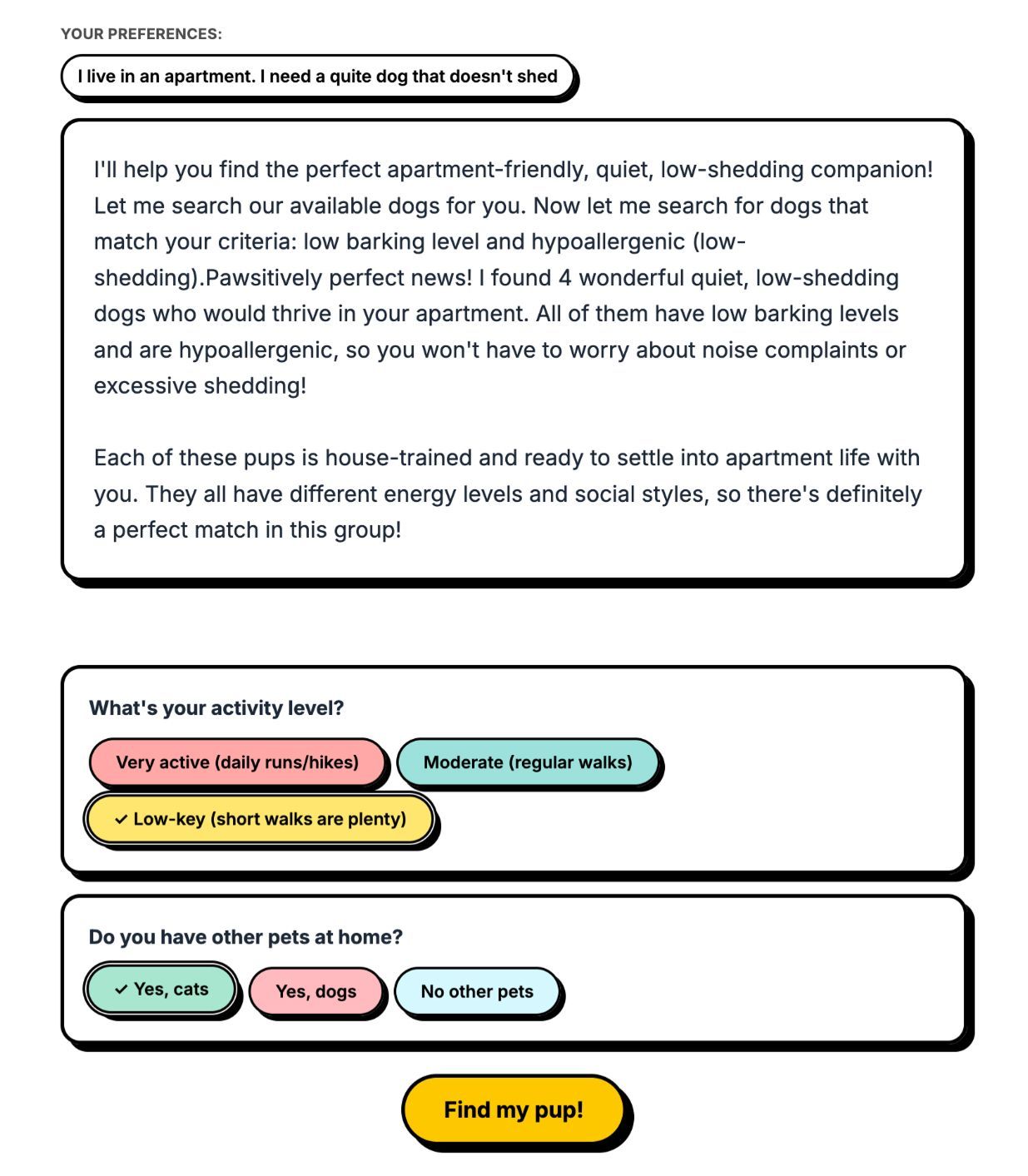
initial_context(compressed schema overview),groq_query(execute queries against your dataset), andschema_explorer(inspect specific types). Three tools. That's it. The AI uses them to understand your data shape and query the right dogs. - If four or more dogs match, the AI generates follow-up questions based on the attributes of the remaining dogs. If half of them are hypoallergenic and half aren't, it'll ask about allergies. If they vary in energy level, it'll ask about your activity level. Not a static list of questions. Dynamic, contextual, and (honestly) kind of delightful to watch in action.
- The filtered results come back with a friendly summary explaining why each dog is a good match. Not just "here are 3 dogs" but "Jara is calm, great with cats, and hypoallergenic. She's your best bet."
The AI isn't doing anything magical. It's reading structured data and making intelligent comparisons. Your content in Sanity is already structured and rich with metadata. Agent Context just gives AI a way to reason about it.
From prompt to working app, the whole build took just under an hour: scaffolding, schema, 62 sample dogs with matching AI-generated images, and a full matching UI with confetti (of course). The parts that would normally take the longest (schema design, data generation, wiring up the AI layer) were the parts the tools handled.
The full source code, prompt, and a dataset export with all 62 dogs are on GitHub. Yes, that includes 62 absurdly adorable AI-generated dog photos. You're welcome.
To get it running:
- Clone the repo
- Install dependencies with
pnpm install - Set up your Sanity project and import the sample dataset
- Add your Anthropic API key and Sanity tokens to
.env - Run
pnpm devand start describing your perfect dog
Pup Finder is a demo, but the pattern is real. Anywhere you have
A few ideas to riff on:
- Real estate: "I want a 3-bedroom with a yard, walkable to schools, under $400k"
- E-commerce: "I need running shoes for flat feet that work on trails"
- Job boards: "Remote backend role, Rust or Go, series A startup"
- Recipe sites: "Quick weeknight dinner, no dairy, feeds four"
The pattern is always the same: structured data in Sanity, Agent Context as the bridge, and AI that lets users search the way they actually think.