Skills are how your company works, written down for agents
How we built an internal skills platform on Sanity, so anyone at the company can author what our agents know, not just engineers.

Knut Melvær
Principal Developer Marketing Manager
Published
If you scrolled a tech feed lately, you have probably seen folks market their SKILL.md files as the canonical ones to install in order to get agents to output better stuff. Almost all of it skews toward engineering. But what about the rest of us?
Turns out skills are just content on how business operations work. And if you're describing business operations for agents to act on, that is stuff that needs governance and distribution. Sure, you can stick it in a private GitHub repo and call it a day (in fact, for the time being, you kind of have to). But you also want to make it available for the people who shouldn't need a GitHub account to collaborate on, contribute to, review, and control the skills a business runs on.
This post is how we built that at Sanity, and how you can stand up the same thing: somewhere for non-engineers to author skills, a pipeline that gets them into everyone's Claude minutes after publish, and the steps to add the same repo to the other agents your team uses, Codex and Cursor included.
Strip it down and a skill is a folder with a
But the format is the boring part. A skill typically describes some kind of workflow, process, or standard operating procedure. How we run a product launch. How we turn one announcement into eight platform-specific posts. Which table in our data warehouse actually means what, and which one will quietly mislead you if you trust the column name. The content is the stuff that usually lives in a senior person's head, or in a doc nobody has opened since they onboarded.
Once you see skills this way, the engineering framing starts to feel small. A skill isn't just a trick for making an agent write better React code. It's a way to write down how your company actually operates, in a form an agent can pick up and act on. And the moment you treat company knowledge as something you publish to agents, you inherit every problem that comes with publishing company knowledge. Someone has to own it. Someone has to keep it up to date. And you need a way to get it from the person who knows the thing to the agent that needs it.
In my opinion, GitHub isn’t that place.
The people who hold the operational knowledge are mostly not the people who are comfortable committing markdown to a private repo and opening a pull request. Skills can be a powerful and simple way for a company to automate more with AI, but if you want adoption, you also want to lower the threshold for adding and using skills as much as possible.
We built a Skills Studio on Sanity. It has a rather simple
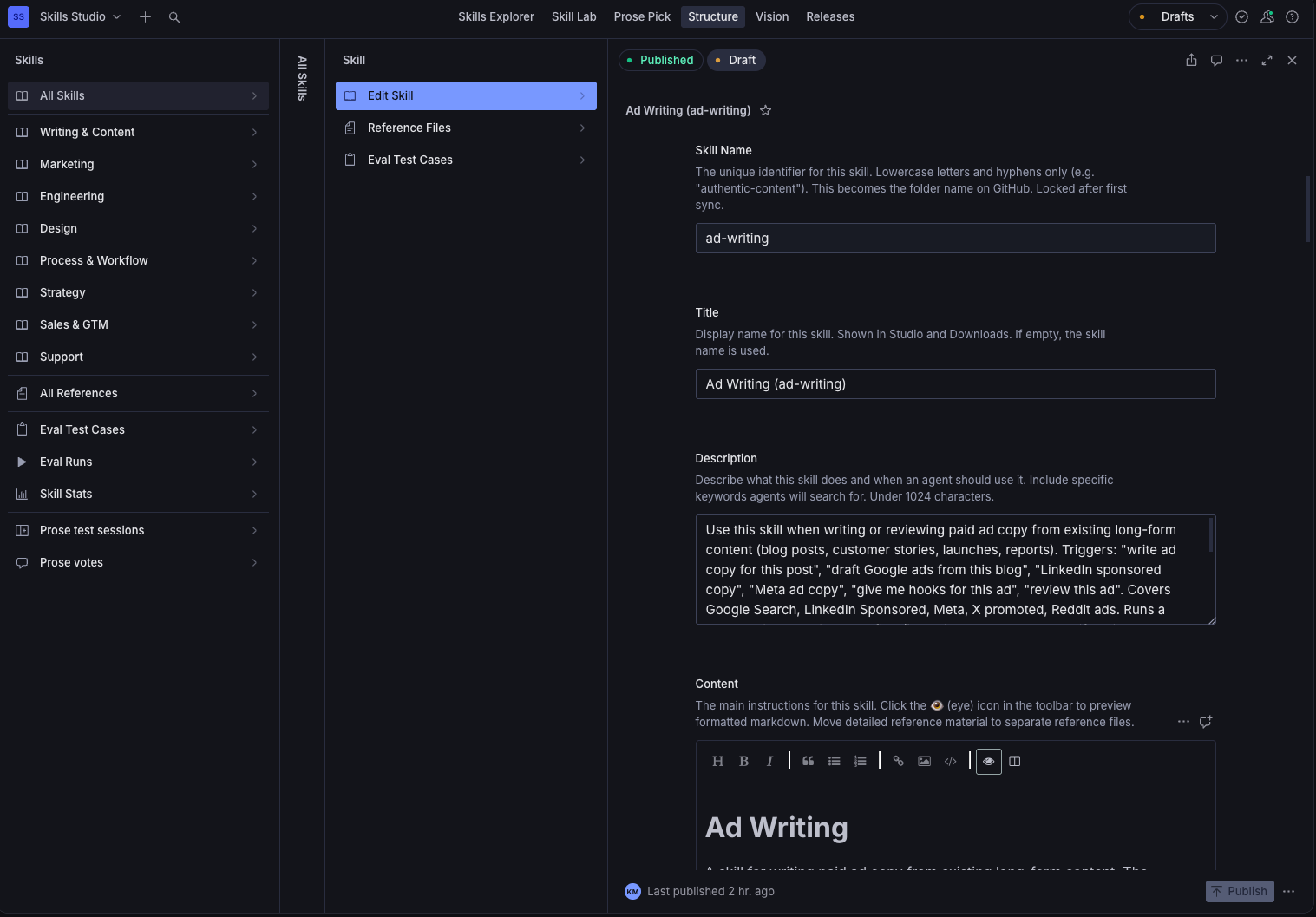
But how do we get from the Studio and the dataset that these skills are stored in, to everyone's Claude, Cursor, and Codex? Different agent harnesses each handle skill intake differently, so we're going to focus on how this works for Claude in this blog post.
When someone publishes an update to a skill it triggers a Sanity Function that commits the updated markdown to a GitHub repo. From there, the Claude org plugin picks it up, and within a few minutes the new version is live in the Claude Chat and Cowork of everyone at the company. Nobody re-installs anything. You're mid-task, and the company standard operating procedures under your agent quietly got better while you weren't looking.
A Sanity Function is just code that runs in response to a content change, configured in a blueprint. Ours listens for changes to skill documents and pushes them to Git. The GROQ filter and projection define what needs to change for the GitHub sync to trigger. We have additional metadata in the Studio that doesn't need to be synced down, so the filter watches only the fields that make up the skill itself (the name, description, content, and references). Editing a skill's owner or category doesn't fire a commit.
import {defineDocumentFunction} from '@sanity/blueprints'

export const publishToGitHubFunction = defineDocumentFunction({
  name: 'publish-to-github',
  event: {
    on: ['create', 'update'],
    filter: `
      (_type == 'skill' && delta::changedAny((skillName, description, content, references)))
      || (_type == 'skillReference' && delta::changedAny((content, filename)))
    `,
    projection: `{
      _id,
      _type,
      skillName,
      description,
      content,
      filename,
      references[]->{filename, content},
      "metadata": metadata { categories, tags, visibility, owner }
    }`,
  },
})
The function handler reads whatever changed, turns it into files, and commits them. It's a little less trivial than it sounds, in ways that turned out to matter. A skill is usually more than one file. There's the SKILL.md, plus whatever reference files it loads on demand. Those go up as one atomic commit through the Git Trees API, deletions included, so a publish can't half-land and leave the repo in a state no skill agrees with.
// publish-to-github.ts

export const handler = documentEventHandler(async ({context, event}) => {
  const client = createClient({...context.clientOptions, useCdn: false})
  const repo = `${REPO_OWNER}/${REPO_NAME}`
  const token = process.env.GITHUB_TOKEN

  // The change is a skill, or one of its reference files. If a reference
  // changed, walk up to the parent so we always sync the whole skill.
  const skill = event.data?._type === 'skillReference'
    ? await client.fetch(SKILL_BY_REF_QUERY, {refId: event.data._id})
    : event.data
  if (!skill?.skillName) return

  // Turn the skill into files: its SKILL.md and any reference files.
  const files = assembleFiles(skill)

  // GitHub has no "write these files" endpoint, so we assemble one commit by
  // hand with the Git Trees API: one tree, one commit, one ref move. Atomic,
  // so a publish never half-lands.
  const {object: {sha: headSha}} = await githubApi(`/repos/${repo}/git/ref/heads/main`, token)
  const baseTree = (await githubApi(`/repos/${repo}/git/commits/${headSha}`, token)).tree.sha

  const tree = files.map((f) => ({path: f.path, mode: '100644', type: 'blob', content: f.content}))
  // Files removed in the Studio become `sha: null` entries, so they're deleted
  // from GitHub too. Skip this and the repo fills with orphaned references.
  for (const path of await getOrphanedFiles(baseTree, skill.skillName, files, token)) {
    tree.push({path, mode: '100644', type: 'blob', sha: null})
  }

  const newTree = await githubApi(`/repos/${repo}/git/trees`, token,
    {method: 'POST', body: {base_tree: baseTree, tree}})
  const commit = await githubApi(`/repos/${repo}/git/commits`, token,
    {method: 'POST', body: {message: `Update ${skill.skillName} from Sanity Studio`, tree: newTree.sha, parents: [headSha]}})
  await githubApi(`/repos/${repo}/git/refs/heads/main`, token,
    {method: 'PATCH', body: {sha: commit.sha}})

  // The commit is the load-bearing fact. Record it back on the document so the
  // Studio can show "last synced" (best-effort, retried, behind an explicit
  // write token: the runtime's default client is read-scoped and 401s silently).
  await patchSkillSyncMetadata(context, skill._id, skill.skillName, commit.sha)
})
The GitHub repository also carries the marketplace and plugin manifests the agents read. The Function rewrites them on every publish to keep them in lockstep, but none of them lists the skills. Claude discovers those from the skills/ directory, so a new skill shows up without anyone hand-editing an index.
For people who don't live in any of the marketplace/plugin compatible apps, there's a downloads tool that packages any skill as a ZIP on demand, and the repo itself for anyone who wants the Git path. Of course, downloading the zip files won't get you the automatic sync, but at least it's accessible.
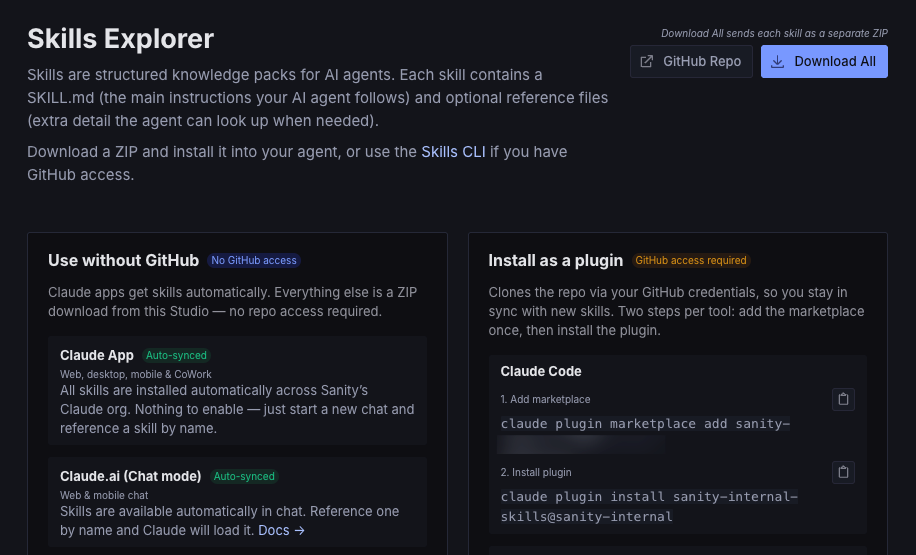
You also get the audit trail for free. Every skill is a document, so every edit is a revision. You can see who changed what, when, a diff against the version before it, and a one-click restore, in the Studio where people already work, no Git blame required. The model is also where the rest of the governance goes when you want it. Required owners, field validation, an approval step before a skill goes live. A folder of markdown gives you none of that until you build it yourself. Apply roles and permissions if you want to enable anyone to edit and draft skills, but limit publication to some chosen few.
That's the unlock for non-developers, too. An editing interface with real fields is approachable in a way a repo never will be. Our recruiting lead, our solutions architects, our analysts, the people who actually hold the operational knowledge, can contribute without learning Git or asking IT for access to our GitHub org. And because it's all structured, the system can describe itself. We built a meta-skill, /sanity-skills, that catalogs the catalog. Anyone at Sanity can now ask any agent where to add a skill or how the sync works, and it tells you. Organizational knowledge infrastructure should be able to explain itself to the people who use it.
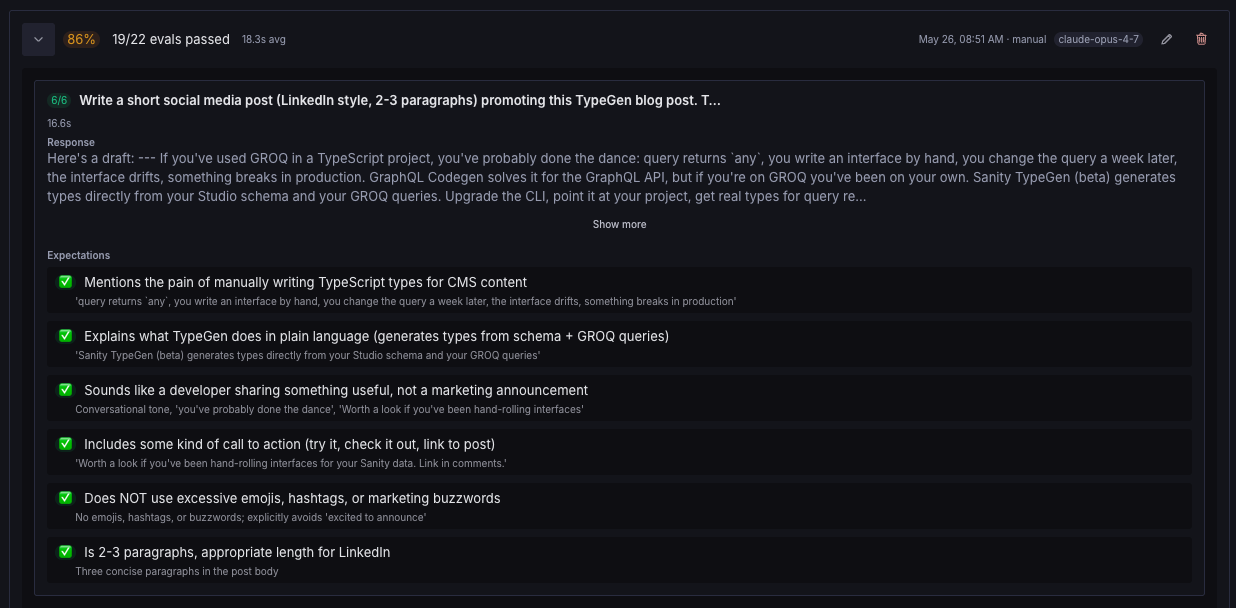
The Skills Studio doesn't only hold the content. It also runs evals and validation, so a skill's description and body don't eat more context than they should. If a description gets too long, then the Studio will block publishing it. The evaluation tooling builds on Anthropic's Skill creator skill, which ships with evaluation guidance and some best practices.
To distribute skills to different agent harnesses, you typically expose them within a plugin that declares a “marketplace.” In practice, it’s a JSON file manifest called .claude-plugin/marketplace.json that looks something like this:
{
  "name": "sanity-internal",
  "owner": {
    "name": "Sanity",
    "email": "hello@sanity.io",
    "url": "https://www.sanity.io"
  },
  "metadata": {
    "description": "Internal Sanity AI agent skills for content strategy, writing, development, and brand."
  },
  "plugins": [
    {
      "name": "sanity-internal-skills",
      "source": "./sanity-internal-skills",
      "description": "Sanity internal skills for content, brand, development, and strategy.",
      "version": "1.0.0",
      "repository": "https://github.com/{RETRACTED}",
      "author": {
        "name": "Sanity",
        "email": "hello@sanity.io"
      }
    }
  ]
}
Claude, org-wide (Team and Enterprise). This is the one that does the work for us. An owner enables code execution and skills in Organization settings, then adds a plugin marketplace pointed at the GitHub repo (Organization settings > Plugins, with GitHub syncing, so new commits flow to everyone automatically). A one-off skill can also go up as a .zip. Set it to install for everyone and each published skill lands in every person's Claude, across chat, Desktop, and Cowork, on their next session. Enterprise admins can scope a plugin to a single group, so the marketing skills reach only marketing. See Provision and manage skills and Manage plugins for your organization.
Claude Code. /plugin marketplace add your-org/your-repo, then /plugin install your-plugin@your-marketplace. To hand it to a whole team, declare it in managed settings with extraKnownMarketplaces and enabledPlugins. See plugin marketplaces.
Codex. codex plugin marketplace add your-org/your-repo, then install from the plugin directory. Codex reads its own .agents/plugins/marketplace.json and falls back to a Claude .claude-plugin/marketplace.json, which is why our repo installed in Codex before we ever wrote it a Codex manifest. See Codex plugins.
Cursor. /add-plugin in the editor, or install from the Cursor Marketplace. Teams and Enterprise admins can stand up a private team marketplace. See Cursor plugins.
GitHub Copilot. Reads a marketplace manifest at .github/plugin/marketplace.json. See Copilot agent skills.
The skill files are the same across all of them. It also seems like there is some interoperability between the different apps. For example, it’s possible to install a “Claude plugin” in Codex.
So this approach works. We have run it for a couple of months and are closer to 60 skills that’s published across nearly all teams.
But honestly, it feels a bit silly that we have to set up a Rube Goldberg Machine-esque pipeline to move markdown files around via GitHub. We get the appeal of plain text files for developer tooling and when you want to collocate skills with code in repositories.
So we are following this MCP working group discussion on distributing skills over MCP with great interest! When/if that gets possible, then we can probably add Sanity Context to this project to get an instant MCP that can distribute skills.
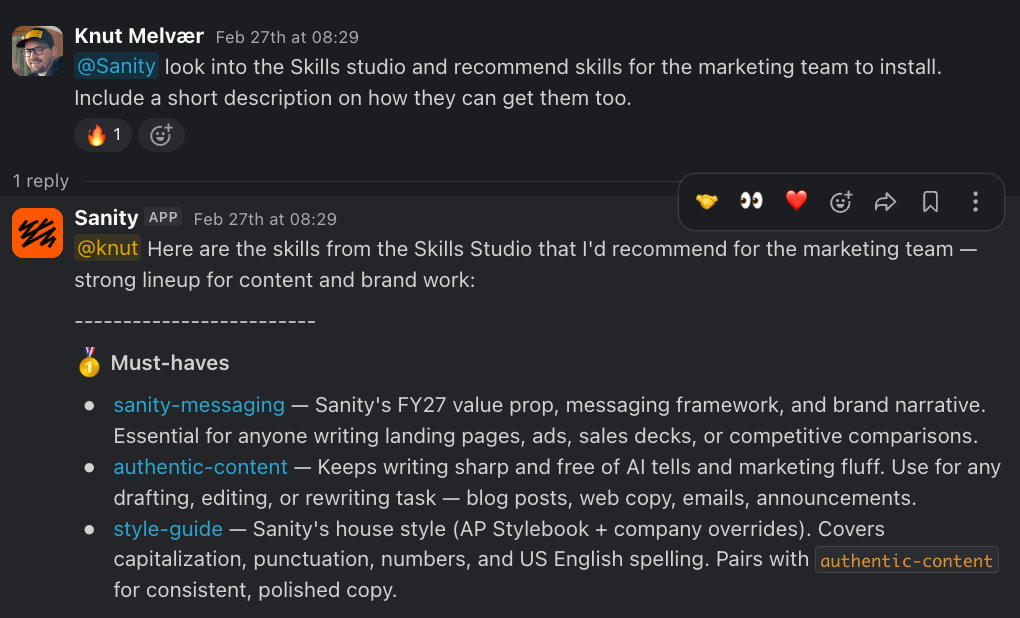
If you want to build this in your own org, you can probably point your agent to this blog post and ask it to spec a sanity project for skills for you. Using the Sanity MCP or Content Agent in Slack to stage and edit skills is a recommended pattern.
The knowledge that runs your company stops living only in people's heads and starts living somewhere an agent can act on it, somewhere a non-engineer can edit it, and somewhere you can actually govern it. We're not done. The obvious next control is a review step before a skill goes live, and the model gives us a clean place to add it. But the core bet, that operational knowledge deserves the same treatment as any other content you'd manage, has held up over a year of running it.