Multi-site content architecture definition
Multi-site content architecture is a way of running many websites, such as separate brands, regions, or product lines, from one content back end. Shared content is created once and reused across sites, while each site keeps its own site-specific content, settings, and permissions.
To scale a CMS for multi-site, store content once in a single back end, model which content is shared and which belongs to one site, and deliver it through APIs so each website pulls only what it needs. In Sanity, every site reads from one Content Lake: workspaces reuse the same schemas, documents reference a shared library instead of copying it, and each frontend queries the API for exactly its own content.
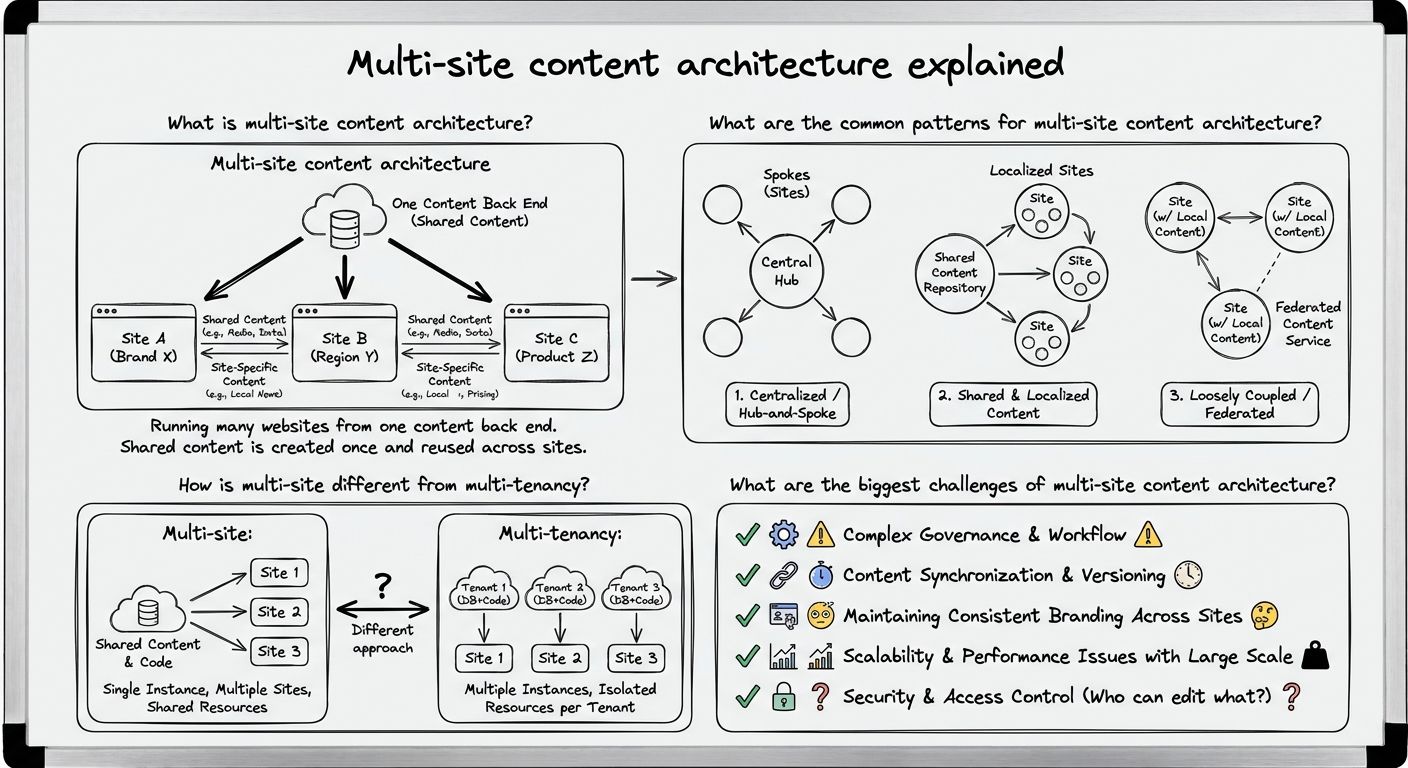
Multi-site content architecture is the design of a content system that powers several websites from one back end, rather than running a separate CMS for each site. The websites might be different brands owned by one company, country or regional versions of the same brand, or distinct product and campaign sites.
The core idea in multi-site content architecture is splitting content into two kinds. Shared content is written once and used everywhere, such as legal text, product data, author profiles, or a company boilerplate. Site-specific content belongs to one website only, such as a regional promotion or a brand's homepage. A good multi-site setup makes it obvious which is which. An edit to shared content reaches every site that uses it, and an edit to one site's content stays on that site.
Multi-site content architecture matters because the alternative, one CMS per website, means the same content gets copied, edited, and kept in sync by hand across many systems.
Multi-site content architecture usually follows one of three patterns, and many teams combine them.
The first pattern is one dataset with site fields. All content lives in a single store, and each document carries a field saying which site or sites it belongs to. Frontends filter by that field. This is simple to set up and makes sharing easy, but permissions and editorial views get crowded as the number of sites grows.
The second pattern is separate datasets or workspaces. Each site, or each group of sites, gets its own content space, often built on the same content model. Separation makes governance and editorial focus cleaner, but content that should be shared must be referenced across spaces, or it ends up duplicated.
The third pattern is shared libraries with local overrides. A central library holds canonical content, and each site references it, overriding specific fields (a price, a headline, a translation) where it needs to differ. This keeps one source of truth while giving local teams room to adapt.
In practice, the right multi-site pattern depends on how much content the sites truly share and how independent the teams running them are.
Multi-site and multi-tenancy describe different relationships between the websites and the people who own them. Multi-site content architecture serves many websites that belong to one organization, so sharing content between them is the goal. Multi-tenancy serves many separate customers, or tenants, from one platform, so isolation between them is the goal, and sharing is usually forbidden.
The distinction changes design decisions. In a multi-site setup, a brand team is allowed to reuse another region's product content, and a central team governs everything. In a multi-tenant setup, one tenant should never see another's data, and each tenant manages its own users. Treating a multi-site project like multi-tenancy tends to over-isolate content and cause duplication, while treating multi-tenancy like multi-site risks leaking data between customers.
The challenges of multi-site content architecture tend to appear in four places: governance, duplication, localization, and design consistency.
Governance and permissions come first. Each site usually has its own editors, and they should be able to change their site without touching another brand's pages or the shared library. Permissions need to work per site and per content type, not just per user.
Duplicated content is the second problem. When sharing is awkward, editors copy a document instead of referencing it, and the copies drift apart. In our experience, duplication is the clearest sign that a multi-site content model has not separated shared and site-specific content properly.
Localization adds another dimension. A regional site may need the same document in several languages, with some fields translated and others, like SKUs or prices, managed separately.
Design-system drift is the fourth. When each site renders content its own way, the same component slowly looks and behaves differently across sites. Keeping content structured and presentation-free in the back end helps because every frontend receives the same fields and can map them to a shared design system.
Scaling a CMS for multi-site works best as a sequence of decisions made in order.
Step one: inventory the content across every site and mark each type as shared, site-specific, or shared with local overrides. Step two: design one content model, or schema, that all sites reuse, so a product or article has the same structure everywhere. Step three: choose a separation pattern, either site fields in one store or separate datasets or workspaces, based on how independent the site teams are. Step four: connect sites to shared content by reference rather than by copy, so there is one source of truth. Step five: set permissions per site and per content type, and decide who governs the shared library. Step six: plan localization at the field level, deciding which fields get translated and which stay global. Step seven: deliver content through APIs so each frontend queries only its own content and maps it to a shared design system.
Following these steps keeps a multi-site content architecture growing through configuration changes, rather than by adding new systems.
Sanity supports multi-site content architecture by keeping every site's content in one Content Lake and reusing the same schemas across Studio workspaces. Each brand or region can have its own workspace for its editors, while documents reference shared content instead of duplicating it, so a change to a shared document reaches every site that points to it.
Delivery is API-first: each frontend queries the Content Lake for its own content, which lets brands and regions run different frontends on one content model. Sanity is the AI Content Operating System, and in a multi-site setup that means the shared foundation, the content model, and the references between sites live in one place, not spread across separate CMS installations.
Unlock New Possibilities with Sanity
With multi-site content architecture under your belt, it's time to see what Sanity can do for you. Explore our features and tools to take your content to the next level.
Last updated: