Headless CMS vs. Traditional CMS
Learn the key differences between headless and traditional CMSes in 2026. Discover which approach fits your needs for AI-powered content operations.

Joe Holmes
Software Developer and Technical Writer
Last Edited:

Learn about the differences between headless CMSes and traditional CMSes and choose the best option for your business.
When CMSes first hit the internet, they provided a path-breaking solution: create easily installable, one-size-fits-all software that can run on a server, providing both a front-end website that developers could edit and a back-end that they could configure.
This approach opened the internet up to non-technical users, offering a way to create rich, interactive experiences without expertise in web development. Simply log in to the admin panel of your website, write a post, and publish it in a matter of minutes.
Since then, however, the rise of mobile devices, omnichannel experiences, AI agents, and
Before content management systems, administering dynamic sites was a real challenge. A dynamic site changes frequently, with a constant influx of published and updated content. Think blogs, where authors frequently post new updates, or ecommerce sites, with product listings changing according to inventory.
Unless you were an experienced developer with a technical background, you had a few unappealing options for maintaining a dynamic site prior to CMSes. You could:
- Hire a technically-skilled developer to manually update your website every time you wanted to make a change.
- Hire a team of developers to build your own custom back end that allowed you to create and edit your own content.
- Learn to code the site yourself.
When they first arrived on the scene, traditional CMSes exploded in popularity. Plugins—small applications written by outside developers, which add functionality to your CMS—became a powerful, beginner-friendly way to customize your content management experience.
Soon, CMSes became even more widely-used by people who enjoyed their modular, open-source architecture. Many of these people used CMSes for much more than their original purposes. A CMS platform built for blogging, for example, might soon end up supporting an online store, a community forum, or an artist's portfolio. These design decisions often required compromises and hacky solutions.
Too many plug-ins could slow a website down and leave it vulnerable to security threats. As CMSes grew in size and complexity, it became harder for businesses to onboard new collaborators and understand what was going on. The internet began to outgrow traditional CMSes.
As the traditional CMS continued to spread across the internet, the rise of mobile devices, Internet of Things (IoT) technologies, and now AI agents posed new challenges to the traditional CMS approach.
Having their entire website content in monolithic software, with only one place to present the published content, created extra work for anyone who wanted to publish their website's content on a mobile-first platform (like a company app), IoT device, or other medium.
Traditional CMSes face a fundamental problem in the AI era: they were built for pages, not for
A headless CMS is built to address the drawbacks introduced above. It decouples the front-end presentation (the website your visitors see) from the back-end CMS (the user interface your site admins see, which they use to edit the site and publish content).
The main difference between headless and monolithic CMSes is exactly that decoupling. As a result of that architectural difference, users get an admin layer for their content that is no less user-friendly than the original version of the traditional CMS but can support enterprise-level growth.
Its unlimited front ends can be built with anything: a developer's favorite framework, a development kit for mobile apps or IoT, and so on. And the same content, edited and published within the headless back-end, can be shipped to numerous different complex presentation layers without additional strain.
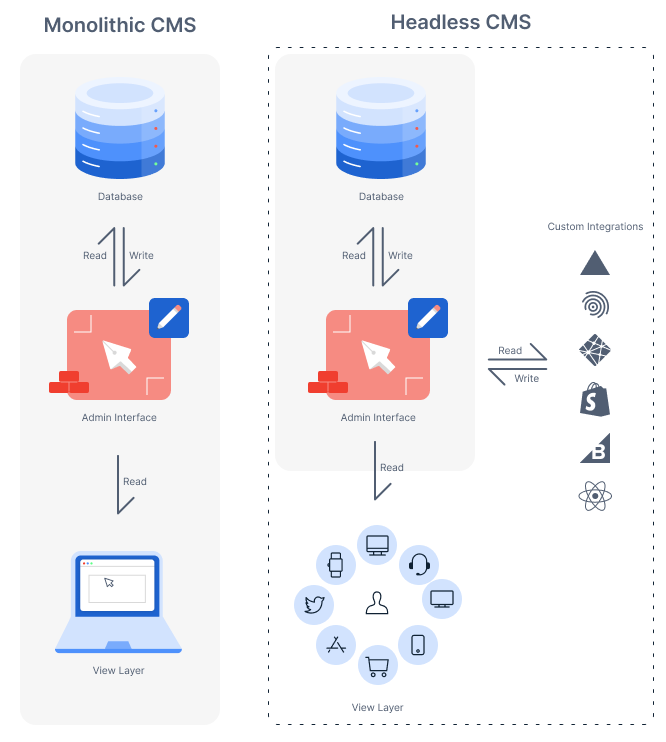
Imagine a computer factory. Under one roof, workers create the processors, chips, circuits, and every bit of hardware that goes into a functional computer. Then they assemble all those pieces into the computer itself.
When the computer leaves the factory, it's ready to be plugged in and used. This factory is like a conventional CMS, where the means of producing content are intertwined with the manner in which it's presented.
A decoupled approach, like the one employed by a headless CMS, is akin to splitting the computer factory in two. In one factory, you produce the chips, processors, and other building blocks that make computers work. Then you ship them to a second factory, which assembles those components into the computer. Both factories are optimized for speed and efficiency and can focus on what they're best at.
Better still, that same factory that makes the building blocks of the computer can ship its parts to other factories, which then assemble them into smartwatches, home refrigerators, airplanes, and other complex modern electronics. The component factory doesn't need to do anything special to accomplish this; it simply sends out its product to more places. By decoupling, the business dramatically expands its efficiency and market surface.
This is very much how a headless CMS functions.
What concrete solutions does a headless CMS offer over its predecessor?
- Omnichannel delivery makes it possible to spread your content across as many different types of media as you'd like and test without duplicating your work. Power websites, apps, AI agents, and any digital surface from a
single source of truth - Developer experience (DX) improves dramatically, since software engineers have much more freedom to use their preferred tools, as well as optimized, coder-friendly systems to interact with on the back end.
- Editorial experience is significantly augmented. Bespoke workflows, input structures, and interfaces can be crafted without any front-end concerns. Modern headless CMSes enable teams to model content that matches how their business actually operates, not the other way around.
- AI-powered automation becomes possible when content is structured as data. Workflows can be triggered automatically, repetitive tasks can be handled by AI, and teams can focus on what matters most rather than manual copy-paste work.
- Security improves, since the site's nerve center is far away from its outward appearance.
- Adaptability to market changes is faster, since you can easily swap out one front-end presentation for another without touching your
content layer - Performance gains from modern architectures like
static site generation
→ Read about the benefits of a headless CMS
Thanks to their simplicity, traditional CMSes are the best choice for dynamic website builders looking for a quick, easy way to get up and running with little time or money. Popular templates and themes make it easy to carry out basic web design and myriad freelance developers are willing to provide affordable help.
The traditional approach is also great if you're willing to roll up your sleeves and take a DIY attitude. It's not too hard to learn how to administrate and design a site using a traditional CMS.
Finally, a traditional model is good for projects that are not expected to scale and will remain small and simple.
If you're leading a project with growth ambitions, you'll want something that can move and scale as fast as you do. A headless approach will enable you to swap out front ends and code new back-end features faster and more effectively than with a traditional architecture.
Building omnichannel experiences? A headless CMS makes it possible to deliver the same content across multiple channels, from websites to mobile apps to AI agents.
Want to create bespoke, interactive experiences for your visitors? Going headless dramatically expands the scope of what you can do, since you're free to choose from a wider variety of languages, frameworks, and tools.
Need AI-powered workflows that actually work? Headless CMSes that structure content as data can automate repetitive tasks, trigger workflows based on content changes, and integrate with AI systems that understand your content.
The core consideration with a headless CMS is that it generally requires some knowledge of web development, both on the
The headless approach has been so successful that the CMS landscape has fundamentally changed. Now there are hundreds of headless CMS platforms to choose from, each with different approaches to
Meanwhile, modern headless providers are innovating beyond basic content delivery. The most forward-thinking platforms now position themselves as content operating systems, handling not just content storage and delivery, but the entire lifecycle of content operations: modeling, authoring, workflow automation, AI integration, and omnichannel delivery.
Today's enterprises need more than a headless CMS. They need a platform that can model content to match their business operations, automate repetitive workflows, and power every channel from a single source of truth.
Sanity's approach structures content as data with the rigor and reliability of modern database engineering. On Sanity's fully-featured platform, you can design flexible content models that adapt to your business, automate workflows with AI-powered tools, and deliver content to any surface—from websites to AI agents.
With features like Content Lake for structured data storage, GROQ for expressive querying, and real-time collaboration tools, Sanity is built for teams ready to move beyond traditional CMS limitations and embrace content operations at scale.