Automate your content audits with AI
- Catch stale pages, missing metadata, and terminology drift before they cost you traffic or erode brand trust
- Fix issues in the same session, so a quarterly audit that used to take a week fits into an afternoon
- Schedule recurring audits with the Agent API. Problems surface before anyone files a ticket

Knut Melvær
Principal Developer Marketing Manager

Bettina Dönmez
Staff Content Operations Specialist
Published:
View transcriptClose transcript
Your content team doesn't know what's broken until someone manually checks. And nobody manually checks. Pages go stale, meta descriptions stay empty, terminology drifts, and the blog post referencing a discontinued product is still live.
This guide shows how to turn content audits from a quarterly fire drill into a Tuesday-morning habit. You'll use Content Agent for interactive audits in Studio and the Agent API for scheduled, automated checks. This is AI content operations in practice: your content structure powers automated quality, not just delivery.
What you'll get
- Surface stale content, missing metadata, broken references, and terminology drift in minutes, not hours
- Pattern analysis across large libraries: tone consistency, tagging gaps, accessibility issues
- Content Agent proposes fixes as staged drafts, ready for human review in Studio
- Recurring audits that run on a schedule or from Slack, without manual intervention
Who this is for
- Developers building automated content quality pipelines
- Content teams running audits across large document libraries
- Technical leads evaluating AI for content operations
For technical leaders: The same schema that powers your frontend now powers automated quality checks. That means quality stops being a quarterly project and becomes a continuous baseline, without adding headcount. The tradeoff: AI credit costs scale with document count, so start with a subset and expand.
What you'll use
- Content Agent (Studio): Sanity's AI automation layer, accessible from the Studio. Describe what you want to audit in plain language. It writes GROQ queries, analyzes results, and proposes fixes. No additional setup required.
- Agent API (programmatic):
client.agent.action.prompt()for open-ended instructions and analysis,client.agent.action.transform()for structured field edits. Requires@sanity/clientv7.1.0+ andapiVersion: 'vX'. Use for scheduled audits, bulk operations, and CI/CD integration. - GROQ: The query language that makes audits precise. Filter by
_updatedAt, check!defined(seoDescription), traverse references, match withpt::text(body). Content Agent writes GROQ under the hood. The Agent API lets you write your own.
Why audits break down without structured content
When nobody has time to manually check 200+ pages, content quality quietly decays:
- Pages go stale
- Meta descriptions stay empty
- Terminology drifts across documents
- Old posts keep promoting discontinued products
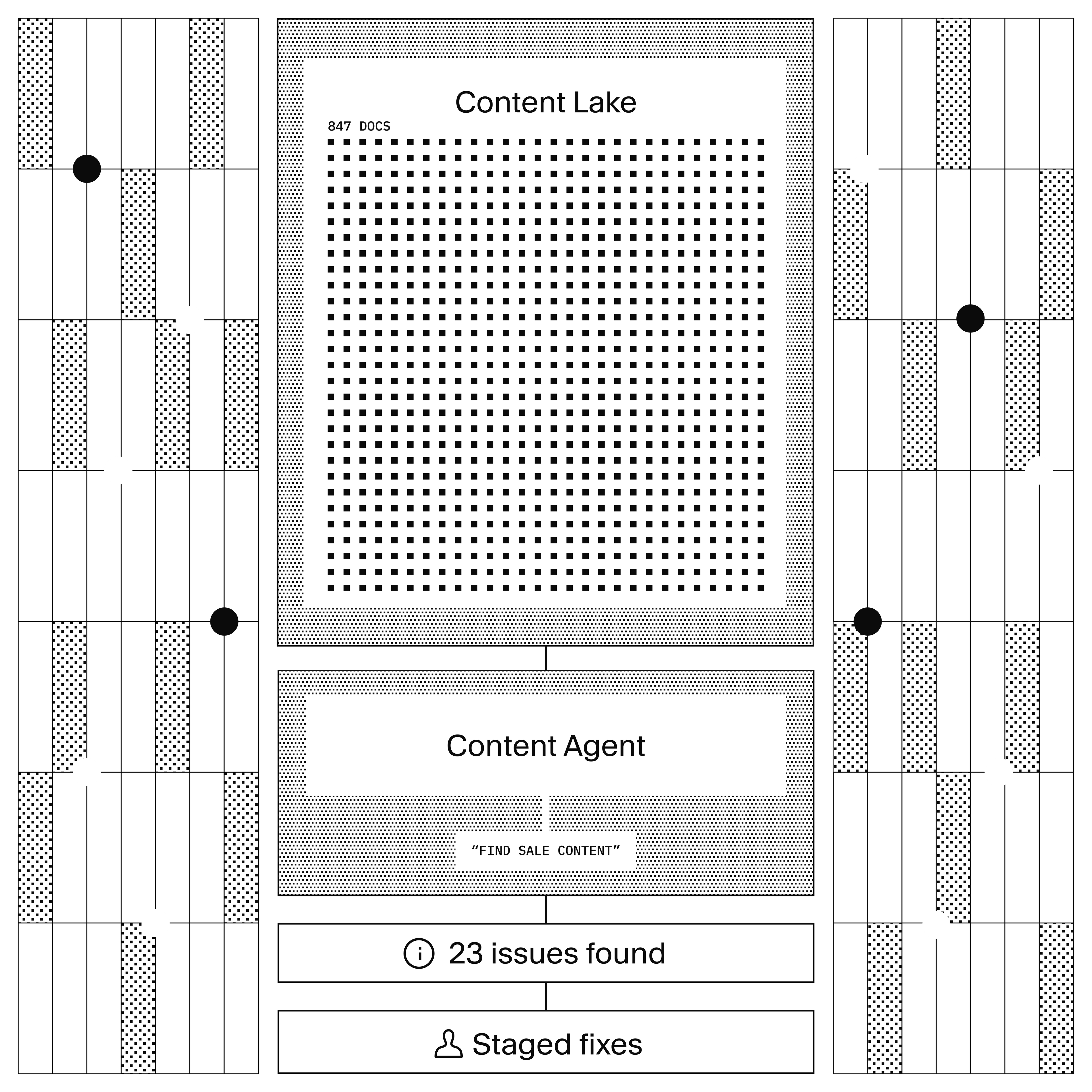
With Sanity, your content isn't locked in pages. It's structured data in Content Lake. That's what makes Content Agent different from spreadsheets, crawlers, and custom scripts:
- It reads your schema (document types, fields, references)
- It writes GROQ to find exactly what you describe
- It writes back to Content Lake, so findings are immediately actionable
Traditional audit tools crawl rendered pages. They can't distinguish a product name in a heading from the same text in a disclaimer. Content Agent works at the field level: update every seoDescription without touching body, find broken references without scanning full-text content. A quarterly audit that used to take a week now fits into an afternoon.
How to find stale content, missing metadata, and broken references
Content Agent writes GROQ queries against your Content Lake. You describe what you're looking for in plain language. It translates that into structured queries.
Start with the highest-value audit: freshness.
Find stale content
Show me all blog posts not updated in over 6 monthsContent Agent runs a GROQ query filtering on _updatedAt. You get a list of documents with titles and last-updated dates. No export, no spreadsheet, no manual date comparison.
Find missing metadata
List all pages with missing meta descriptionsThe agent queries for !defined(seoDescription) (or whatever your meta field is called). It reads your schema, so it knows the field names. If you're not sure what the field is called, ask: "What fields are available on the page document type?"
Find broken references
Show documents referencing products we no longer offerReference traversal. The agent follows references() in GROQ to find documents pointing to discontinued or unpublished products. This is the audit that catches the blog post still linking to last year's product line.
Find content gaps
Which topics are we under-representing compared to our competitors?The agent combines Content Lake queries with web search. It looks at what you've published, searches the web for what's trending in your space, and identifies gaps. This one's more exploratory than the others: web search results aren't deterministic, so run it a few times and look for patterns rather than treating any single result as definitive.
Find accessibility issues
Find images missing alt text across all article documentsGROQ query on image fields where !defined(alt). Also works for: non-descriptive link text ("click here"), heading hierarchy issues, and missing captions on media.
Find terminology drift
Find content using 'web app' instead of 'application' across all document typesText search across the Content Lake. The agent finds every instance and can show you the documents, the specific fields, and the surrounding context. Useful when you rebrand, update product names, or standardize terminology after a merger.
Find duplicate content
Find articles that answer the same question, then identify which is the most complete and up-to-date, mark the others as candidates for redirectionFind glossary terms that match a docs article title for a potential definition overlap between glossaryShow docs articles referenced by more than 2 blog posts, then check whether those blog posts explain the same concepts differently from the docsSemantic similarity analysis across your content. The agent reads documents, compares them, and flags overlaps. Good for content libraries that have grown organically over years.
More prompts to try
These audit patterns are more exploratory and may produce varying results:
- "Show me articles significantly longer or shorter than average"
- "Check if dates and numbers in this document match across all fields"
- "Find content with legal disclaimers that don't match current policy"
- "Which content types are missing introductions or subheadings?"
These are reasonable asks given Content Agent's architecture (GROQ queries + LLM analysis), but results may vary. Try them. If they work, they're powerful. If they don't, the tested prompts above cover the core audit workflow.
Analyze patterns across your content
Content Agent analyzes tone consistency, tag usage, and expired content across your entire library by combining GROQ aggregation queries with LLM-powered text analysis.
Tone consistency
Which articles don't match our brand voice guidelines?The agent reads your content and analyzes tone. It flags documents that are too formal, too casual, or inconsistent with whatever guidelines you describe. Works best when you're specific: "Our tone is professional but conversational. Flag anything that reads like a legal document or a text message."
Tagging audit
Which tags are overused or underused? Show me content missing tags entirely.GROQ aggregation across your tag/category taxonomy. The agent identifies redundant tags that could be merged, orphaned tags nobody uses, and content that slipped through without any categorization.
Expired content
Flag any promotions or offers that have expired but are still publishedDate comparison in GROQ. The agent finds documents where an expiry date has passed but the document is still published. This is the audit that prevents customers from seeing last month's sale prices.
Before you fix: the cost-aware audit
Here's the thing nobody tells you about AI-powered content operations: every change costs AI credits.
A search that scans 10,000 documents costs the same as scanning 10 (read operations have flat cost). But a prompt that updates 500 documents creates 500 write operations. Each one uses AI credits.
The practical pattern: Audit first (read-only, cheap). Review the findings. Then fix in targeted batches of 10-20 documents. Don't run "fix everything" as your first prompt. Run "find everything" first, review the list, then fix the documents that matter most. Smaller batches also keep each request within the AI's context window, which means better results per document.
This isn't a limitation. It's good practice. You wouldn't deploy a regex find-and-replace across your entire codebase without reviewing the matches first. Same principle.
How to fix audit findings without leaving Content Agent
Content Agent generates fixes as staged drafts in the same session where it found the problems. No export, no tickets, no context-switching to a different tool.
Generate missing metadata
Create meta descriptions for all blog posts that don't have oneThe agent reads each post, generates a description based on the content, and stages the changes as drafts. You review each one in Studio before it goes live.
Bulk terminology updates
Replace 'web app' with 'application' across all marketing pagesBulk mutation. The agent finds every instance, makes the replacement, and stages all changes. You see exactly what changed before approving.
Fix tone issues
Rewrite the headlines on these 5 articles to match our brand voiceThe agent rewrites, you review. Same staged-review pattern. Nothing changes until you approve.
Automate audits with the Agent API
The Studio workflow is interactive. You sit down, run an audit, review findings, fix issues. That's great for deep dives. But the audits that matter most are the ones that run without you.
The Agent API gives you programmatic access to the same AI capabilities. Combined with GROQ queries and a cron job (or Sanity Functions), you can build scheduled audit pipelines.
Scheduled freshness audit
Use client.agent.action.prompt() to analyze query results. The prompt action returns text or JSON without mutating documents, making it safe for automated read-only audits.
import { createClient } from '@sanity/client'

const client = createClient({
  projectId: '<your-project-id>',
  dataset: 'production',
  apiVersion: 'vX',
  token: process.env.SANITY_TOKEN,
})

// Step 1: Find stale content with GROQ
const stalePages = await client.fetch(
  `*[_type in ["page", "post", "product"] && _updatedAt < now() - 60*60*24*180]{
    _id, _type, title, _updatedAt
  }`
)

if (stalePages.length === 0) {
  console.log('No stale content found')
  process.exit(0)
}

// Step 2: Analyze with the Agent API
try {
  const analysis = await client.agent.action.prompt({
    instruction: `You are a content freshness auditor. Review these documents and
      report which ones need updating, why, and what specifically looks outdated.
      Respond in JSON with format: { "findings": [{ "title": "...", "issue": "...", "priority": "high|medium|low" }] }`,
    instructionParams: {
      documents: {
        type: 'constant',
        value: JSON.stringify(stalePages),
      },
    },
    format: 'json',
  })

  console.log(analysis)
  // Send to Slack, email, or a dashboard
} catch (error) {
  console.error('Audit failed:', error.message)
}
Run this on a Monday morning cron. Your content team starts the week knowing what's stale. The prompt action is read-only: it analyzes but doesn't change anything.
Bulk metadata fixes with Transform
Once you've identified issues, use transform to fix them. Transform edits existing documents in place, staging changes as drafts.
// Find posts missing meta descriptions
const missingMeta = await client.fetch(
  `*[_type == "post" && !defined(seoDescription)]{ _id, title }[0...20]`
)

// Fix each one with Transform
for (const doc of missingMeta) {
  try {
    await client.agent.action.transform({
      schemaId: '<your-schema-id>',
      documentId: doc._id,
      instruction: 'Write a concise meta description (under 160 characters) based on the document content.',
      target: { include: ['seoDescription'] },
      async: true,
    })
  } catch (error) {
    console.error(`Failed to transform ${doc._id}:`, error.message)
  }
}
The async: true flag means each request fires without waiting for the AI to finish. The changes appear as drafts in Studio, where an editor reviews them before publishing. The target restricts the action to the seoDescription field, so nothing else gets changed.
Terminology updates across documents
When you rebrand or standardize terminology, use Transform to make bulk updates.
// Find documents using outdated terminology
const outdated = await client.fetch(
  `*[_type == "post" && pt::text(body) match "web app"]{ _id, title }`
)

for (const doc of outdated) {
  try {
    await client.agent.action.transform({
      schemaId: '<your-schema-id>',
      documentId: doc._id,
      instruction: `Replace "web app" with "application" throughout this document.
        Preserve the surrounding context and tone.`,
      target: { include: ['body', 'title', 'description'] },
      async: true,
    })
  } catch (error) {
    console.error(`Failed to transform ${doc._id}:`, error.message)
  }
}
Same pattern: find with GROQ, fix with Transform, review in Studio. The transform instruction handles context-aware replacements (not just find-and-replace), so "web app development" becomes "application development" naturally.
Trigger audits from Slack
We're building Content Agent for Slack, so you can trigger audits and review findings directly from where your team works. Coming Spring 2026.
For now, use Content Agent in Studio for interactive audits, or build scheduled automation with the Agent API (shown above).
How Content Agent turns natural language into content audits
Content Agent reads your schema, writes GROQ queries, and uses LLM analysis. That's the architecture. Here's what that means in practice:
You describe what to audit (natural language)
  → Content Agent reads your schema (document types, fields, references)
    → Writes GROQ queries to find matching content
      → Analyzes results with LLM (tone, quality, patterns)
        → Proposes fixes as staged drafts
          → You review in Studio before anything publishes
What it can query: Anything in your Content Lake. Document fields, references, dates, nested objects, array items, Portable Text content. If GROQ can express it, Content Agent can find it.
What it can analyze: Tone, terminology, completeness, freshness, accessibility, duplicates, patterns across documents. The LLM layer adds judgment on top of the structured queries.
What it can't do: It can't modify schemas, check validation rules, see who's currently editing, delete documents, or publish. Schema changes require code. Validation rules run client-side in Studio. Presence is a WebSocket feature. Deletion and publishing are restricted by design.
The safety model: All changes are staged as drafts. Content Agent can't publish, can't delete, can't modify schemas. The real risk isn't accidental changes (they're all reviewable). The real risk is AI credit consumption. A prompt that updates 1,000 documents creates 1,000 write operations. Audit first (read-only), fix in batches.
What works and what doesn't
Works well
- Finding stale content by date ranges and specific fields (empty descriptions, missing images, broken links).
- Writing metadata (titles, descriptions, summaries) based on existing content.
- Terminology replacement and brand standardization across documents.
- Bulk fixes to a specific field (e.g., rewriting all image alt text).
- Analyzing patterns when given a constrained scope (e.g., "What's the average word count of our top 50 posts?").
Works with caveats
- Finding outdated claims or broken facts. Content Agent can't always tell if a statistic or product reference is actually stale without explicit context. Be specific in your prompt (e.g., "Find content mentioning our 2025 pricing, which changed in February 2026").
- Tone-of-voice audits. Content Agent can rewrite content, but it's better at fixing tone when you give it a reference document or detailed guide. Let it rewrite the first few examples, review them, then refine the instruction.
- Cross-document consistency (e.g., "Do all product descriptions follow the same format?"). You can ask Content Agent to analyze this, but you'll need to review the findings manually. It's better suited for the first pass of discovery than enforcement.
Doesn't replace manual review
- Content Agent can't determine editorial judgment calls. If a post should be archived, merged, or left alone, you need to decide that. Content Agent can flag it, but it won't know the business context.
- Content Agent doesn't see your traffic, analytics, or engagement data. It can't tell you which stale content is actually visited often and worth updating.
- Bulk fixes always need a human gate. Draft reviews exist for this reason. Use the cost-aware audit approach: find first, estimate scope, then fix.
Try it yourself
The fastest way to start: open Content Agent in your Sanity Studio and ask "Run a freshness audit on all blog posts."
For programmatic audits, install the Sanity client and try a simple prompt:
npm install @sanity/client
import { createClient } from '@sanity/client'

const client = createClient({
  projectId: '<your-project-id>',
  dataset: 'production',
  apiVersion: 'vX',
  token: process.env.SANITY_TOKEN,
})

try {
  const result = await client.agent.action.prompt({
    instruction: 'Review these stale documents. For each one, explain what specifically looks outdated and suggest whether it should be updated, merged with another post, or archived. Respond in JSON.',
    instructionParams: {
      content: {
        type: 'groq',
        query: '*[_type == "post" && _updatedAt < now() - 60*60*24*180]{ title, body, _updatedAt }',
      },
    },
    format: 'json',
  })

  console.log(result)
} catch (error) {
  console.error('Audit failed:', error.message)
}
For the full API reference, see the Agent API documentation.
More in this series
This guide is part of AI Content Operations, a series on building AI-powered content workflows with Sanity.
- AI Translations. Store glossaries and style guides in Sanity, feed them to the Agent API at translation time
- Agent Context for E-commerce. Give an AI shopping assistant structured access to your product catalog