Build an agent knowledge base on Sanity: a guide
One governed dataset, two scoped AI agents. The implementation patterns for an agent knowledge base on Sanity, with video, docs, and a starter.

Jarod Reyes
Head of Developer Experience & Community at Sanity

Adam Gray
Senior Solution Architect at Sanity

Tormod 'Tor' Flesjø
Senior Solution Architect at Sanity

Noah Gentile
Principal Solution Architect at Sanity
Published:
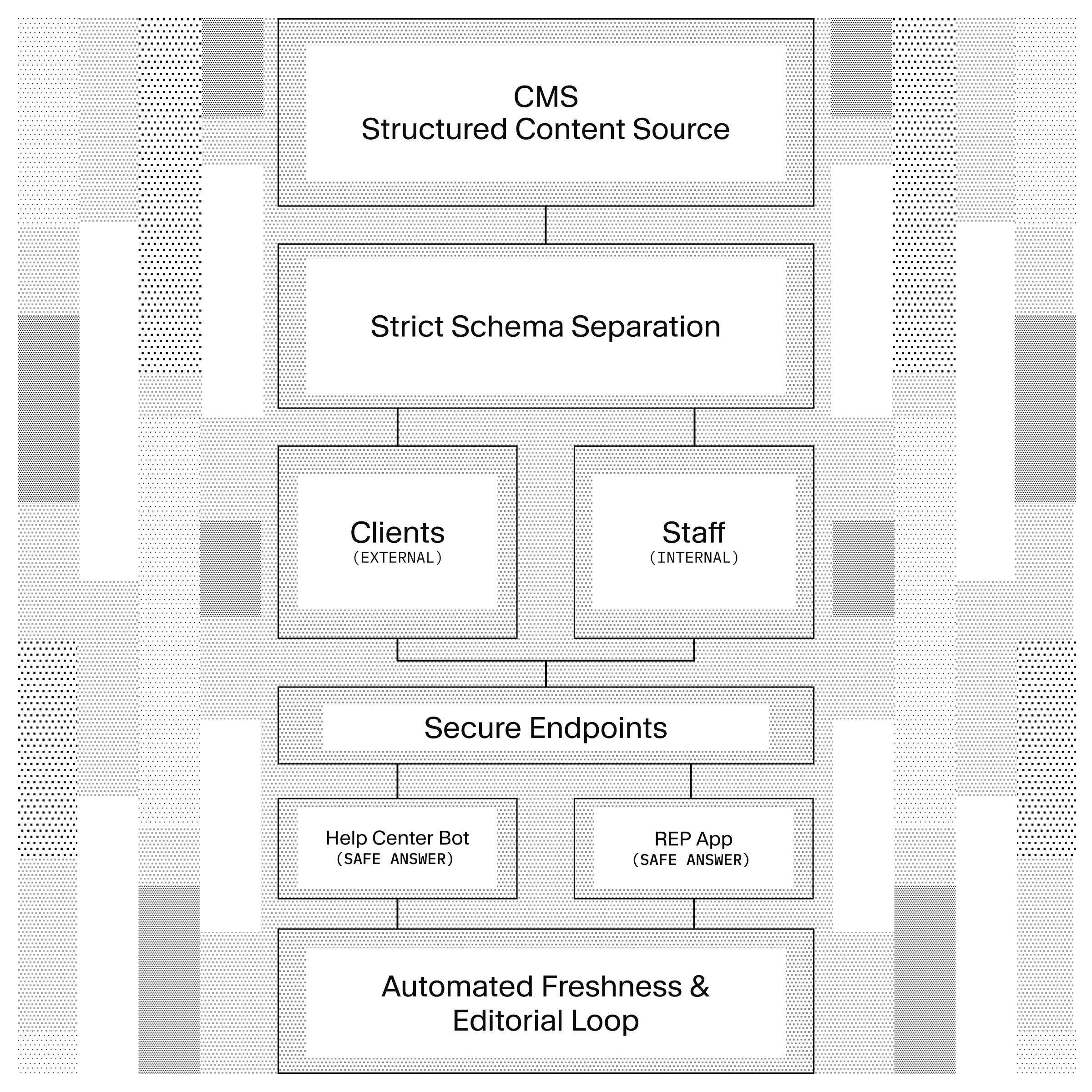
The Head of Sales Enablement at Klaviyo described the problem like this. The same product fact lives in Zendesk, Salesforce, the wiki, and a deck somebody updated last quarter. They all say slightly different things. "This exact thing has kept me up for eight years."
Before AI agents, this was a nuisance. Now it's an existential problem. When you point a chatbot at a help center built for humans, it does not triangulate between the wiki and the policy doc and the help article. It picks an answer and ships it. When the answer is wrong, it is wrong in front of a customer.
Now can you build this yourself? Yes of course and you will. The question is where you should invest your time. Retrieval is the solved half of this problem and most guides stop there. A competent engineer can wire BM25 and hard filters onto Pinecone in a week and get retrieval quality comparable to anything described here. But that is not where these projects are failing for our customers. They fail on a question you can answer about your own team right now: when a policy changes, what happens?
If the answer is a ticket to an engineer, then the agent’s accuracy is capped by how fast the ticket queue moves. What we see is that six months in, the agent is retrieving data just fine, but the answers are out of date. A better, longer lasting solution is one where retrieval is wired into the workflow that already governs the rest of your content.
This is a guide to the implementation patterns behind agent-ready knowledge bases, not a step-by-step tutorial. Watch the video above for a walkthrough of the pattern in action, and you'll find links to the relevant docs and starter when you're ready to build it yourself.
The retrieval itself is one GROQ query against the same dataset your editors are publishing to. By putting knowledge into a typed, structured CMS, the agent queries the live
Around that retrieval, the starter ships the governance that makes it hold up:
- A scoped boundary per audience, so the internal playbook cannot leak into the customer-facing bot.
- A review gate, so compliance-sensitive changes are staged before an agent can read them.
- A freshness mechanism the editorial team owns without filing a ticket.
This guide assumes you can migrate your content into Sanity. That requires some setup, but it is what makes everything downstream possible. The rest of this article walks through each of the three pieces above.
This pattern works best when your content already has real structure: products with fields, policies with categories and review dates, FAQs tied to specific products. GROQ filters and ranks against that structure directly, which is why the hybrid query in this guide holds up so well for product and policy content.
It's a worse fit for content that has no structure: long freeform transcripts, ticket threads with no consistent shape, tribal knowledge scattered across docs with no schema in common. Forcing that into typed fields can be more migration work than it's worth.
That problem has a product answer coming… keep an eye on everything.sanity.io for more info on that.
Sanity Context is a hosted MCP endpoint Sanity exposes from a configuration document. The config is a typed Sanity document with two fields that matter: a GROQ filter that scopes what content the agent can see, and an instructions field that tells the model how to query and present that content.
The starter ships two of these documents.
// studio/seed/sanity-context-external.ts
{
  _type: 'sanity.agentContext',
  title: 'Customer Support',
  groqFilter: '_type in ["helpArticle", "faq", "product", "topic"]',
  instructions: `
    Rules
    - Only answer from the provided content. If unsure, say so.
    - Cite the article title and slug in every answer.

    Schema notes
    - helpArticle.content is Portable Text. Use pt::text(content) for plain text.
    - audience is a multi-select: developer | admin | end-user | all.

    Query patterns
    - Filter by audience: && $audience in audience[]
    - Filter by product: && $productSlug in products[]->slug.current
  `
}
// studio/seed/sanity-context-internal.ts
{
_type: 'sanity.agentContext',
title: 'Team KB',
groqFilter: '_type in ["helpArticle", "faq", "playbook", "policy", "product", "topic", "internalCategory"]',
instructions: `
Rules
- Answer customer-facing questions from helpArticle/faq.
- Answer internal procedure questions from playbook/policy.
- Surface importance: critical first.
Schema notes
- playbook and policy are internal-only. Never quote them to customers.
- reviewByDate: warn the user if the document is past review.
`
}The boundary between what customers see and what reps see is hard, non-negotiable, and should be enforced in the endpoint configuration. A single config with conditional filter logic is one missing condition away from leaking the escalation playbook into the customer chatbot. Two endpoints with two server-side tokens makes the boundary structural.
Each config produces its own stable MCP URL. The
The GROQ filter on a Context document is a content governance mechanism, not a security boundary. If the dataset is public, anyone with the MCP URL can bypass the filter and query the whole dataset directly.
Set the dataset to private. Provision two read tokens, one per surface. Hold both tokens server-side. The browser never sees them.
// app/src/app/api/chat/route.ts (external help center)
import { createMcpClient } from '@ai-sdk/mcp'

const mcp = createMcpClient({
  type: 'http',
  url: process.env.AGENT_CONTEXT_EXTERNAL_URL!,
  headers: { Authorization: `Bearer ${process.env.SANITY_READ_TOKEN_EXTERNAL}` }
})
// dashboard-server/src/chat-proxy.ts (internal tool)
const mcp = createMcpClient({
type: 'http',
url: process.env.AGENT_CONTEXT_INTERNAL_URL!,
headers: { Authorization: `Bearer ${process.env.SANITY_READ_TOKEN_INTERNAL}` }
})The internal tool is built with the App SDK, which runs in the browser. The starter solves the "App SDK is browser-only but the token must stay server-side" problem with a small chat proxy (dashboard-server/) that holds the internal token and brokers requests to Sanity Context. The browser app talks to the proxy. The proxy talks to Sanity. The token stays on the server.
If you skip this step, the GROQ filter does not protect anything. Curl the MCP URL with no token and it returns nothing. Curl with the leaked browser token and it returns whatever the filter says, which is "internal policies" if the internal token leaks.
Sanity stores
- Markup tags add noise to the embedding vector.
- Title matches outrank body content.
- Embedding counts vary per article depending on markup density.
Portable Text avoids all three because the structure lives in JSON, not in the text. GROQ’s pt::text() walks the tree and returns clean strings for the semantic index, while the same field renders the help center page with full editorial control.
*[_type == "helpArticle" && slug.current == $slug][0] {
  title,
  summary,
  "content": pt::text(content)
}
Heads up that you may need to migrate your content. Content imported from an HTML-first system has to be converted to Portable Text; follow our migration guide for tips on doing it correctly. This starter ships a Beacon SaaS seed dataset already in Portable Text so you can see the shape before you migrate anything.
Resist the urge to model this as one article type with a visibility flag. The reason is the same reason the two Context documents are separated. If visibility: internal is the only thing protecting the escalation playbook, every query author has to remember to include the filter. They will forget.
Model the boundary into the schema:
// studio/schemas/helpArticle.ts (external)
defineType({
  name: 'helpArticle',
  type: 'document',
  fields: [
    defineField({ name: 'title', type: 'string' }),
    defineField({ name: 'slug', type: 'slug' }),
    defineField({ name: 'summary', type: 'text' }),
    defineField({ name: 'content', type: 'array', of: [{ type: 'block' }] }),
    defineField({
      name: 'audience',
      type: 'array',
      of: [{ type: 'string' }],
      options: { list: ['developer', 'admin', 'end-user', 'all'] }
    }),
    defineField({ name: 'products', type: 'array', of: [{ type: 'reference', to: [{ type: 'product' }] }] }),
    defineField({ name: 'topics', type: 'array', of: [{ type: 'reference', to: [{ type: 'topic' }] }] }),
    defineField({ name: 'reviewByDate', type: 'date' }),
    defineField({ name: 'owner', type: 'reference', to: [{ type: 'person' }] })
  ]
})

// studio/schemas/playbook.ts (internal)
defineType({
  name: 'playbook',
  type: 'document',
  fields: [
    // ...same shape as helpArticle...
    defineField({
      name: 'importance',
      type: 'string',
      options: { list: ['standard', 'critical'] }
    }),
    defineField({
      name: 'internalCategory',
      type: 'reference',
      to: [{ type: 'internalCategory' }]
    })
  ]
})
The external Sanity Context's GROQ filter is _type in ["helpArticle", "faq", "product", "topic"]. The internal Context's filter extends the list. The boundary is the type, which is a property of the schema. It cannot be set wrong on a document because it is not a field.
Knowledge gets stale on its own. The editorial team has to maintain freshness somehow, or the agent ends up citing the November billing policy in February.
A Sanity Function fires on every publish event and sets reviewByDate to 90 days from now if it is not already set further out.
// functions/on-publish-set-review-date/index.ts
import { documentEventHandler } from '@sanity/functions'

export const handler = documentEventHandler(async ({ event, context }) => {
  const reviewableTypes = ['helpArticle', 'faq', 'playbook', 'policy']
  if (!reviewableTypes.includes(event.data._type)) return

  const ninetyDaysOut = new Date(Date.now() + 90 * 24 * 60 * 60 * 1000)
    .toISOString().split('T')[0]

  const current = event.data.reviewByDate
  if (current && new Date(current) > ninetyDaysOut) return

  const client = createClient({ ...context.clientOptions })
  await client.patch(event.data._id).set({ reviewByDate: ninetyDaysOut }).commit()
})
Using Structure Builder, a customized view surfaces documents whose reviewByDate has passed, with a "needs review" badge. The editorial team sees the stale queue on first open. No ticket, no spreadsheet. The agent's accuracy now tracks the content team's diligence, not an engineering sync schedule.
For compliance-sensitive content, editors route changes through a Content Release. The agent only reads the published dataset, so a staged release keeps the pending change out of the agent’s context until it’s been approved and published by a human.
The starter enables Dataset Embeddings on the dataset, which computes embeddings for every document on publish. A single GROQ query does both filtering and semantic ranking:
*[_type in ["helpArticle", "faq"] && $audience in audience[]]
| score(text::semanticSimilarity("content", $query))
| order(_score desc)
[0..5] {
  _id, _type, title, summary, slug,
  "products": products[]->{ title, slug },
  "topics": topics[]->{ title, slug }
}
The text::semanticSimilarity() function scores each document against the user's query using the embedding for the content field. The structural part of the query (_type in [...], audience filter) precedes the semantic ranking, which means the model never sees irrelevant content types or wrong-audience content in the first place.
Embedding recompute lag is about a minute on publish. Acceptable for almost every use case. If your team needs tighter freshness, a Function on publish can pre-warm a cache or send a notification to the agent surface.
This is the architectural argument for keeping retrieval in the
While retrieval may be the part that you’ll demo to your team, the argument for building it this way shows up six months later… the content workflow and governance around it.
Clone it, point it at a Sanity project, and ask the two chatbots the same question. Ask a question as a user vs an employee and you’ll get different answers from one dataset. That's the whole loop.
pnpm create sanity@latest --template sanity-labs/starters/knowledge-base
cd your-project
pnpm install
# Copy each .env.example to .env and fill in values
pnpm bootstrap
pnpm dev
pnpm bootstrap does the following:
- deploys the blueprint and schema
- enables Dataset Embeddings
- generates types
- imports the Beacon SaaS seed data
- serves the studio at
localhost:3333. - serves the “help center” at
localhost:3000.
The internal App SDK app is in dashboard/ with its chat proxy in dashboard-server/. Ask the external chatbot a billing question and ask the internal app the same question. Two different answers from the same dataset, scoped correctly by Sanity Context.
The starter is at sanity-labs/starters/knowledge-base.
The pattern Braze ships in production has a fourth piece worth flagging. A Studio agent document type with fields for name, description, systemPrompt, and agentContexts[]. Non-technical leads (CS, UX research, product marketing) create their own scoped agents from Studio, pick which Sanity Context they want, write a system prompt, and get a working chat interface wired to the document.
The starter does not ship this yet because the pattern is still settling, but every part of the foundation is in place. Two Sanity Context MCP servers. A private dataset. Server-side tokens. Hybrid retrieval. Once the framework is up, adding the configurator pattern is a small schema and a thin UI on top of what you already have.
That is the secondary reason to build this now. The primary reason is that better retrieval means fewer wrong answers reaching your customers.
*We are building first-class support for this exact use-case and if you are interested in being an early tester of the knowledge base product join the Pioneers program or reach out to devrel@sanity.io.