Build better product pages with Sanity and Shopify
Differentiate every product page without a document per product:
- —Author once, apply by tag. Create rules that decide which products get care guides or fit descriptors. One Sanity customer covers roughly 60,000 products with 16 rules of their own.
- —Make specific products standout Create a SKU-specific document and define which images, copy and badges show up for the products that are extra special.
- —AI drafts but a human approves. A review queue that allows a human on your team to edit all ai-generated attributes that end up surfacing to your customers.

Jarod Reyes
Head of Developer Experience & Community at Sanity
Published:
Open two product pages on almost any Shopify store and you'll notice they’re nearly identical. One Sanity customer put it bluntly: "every one of our product descriptions is the same. There's no reason to define which product I should choose."
Nobody plans it this way. Everyone agrees the care guide and the fit notes belong on the page. But writing them one product at a time stops making sense a few dozen SKUs in, and asking engineering for a new template per category is a wasteful use of your eng hours.
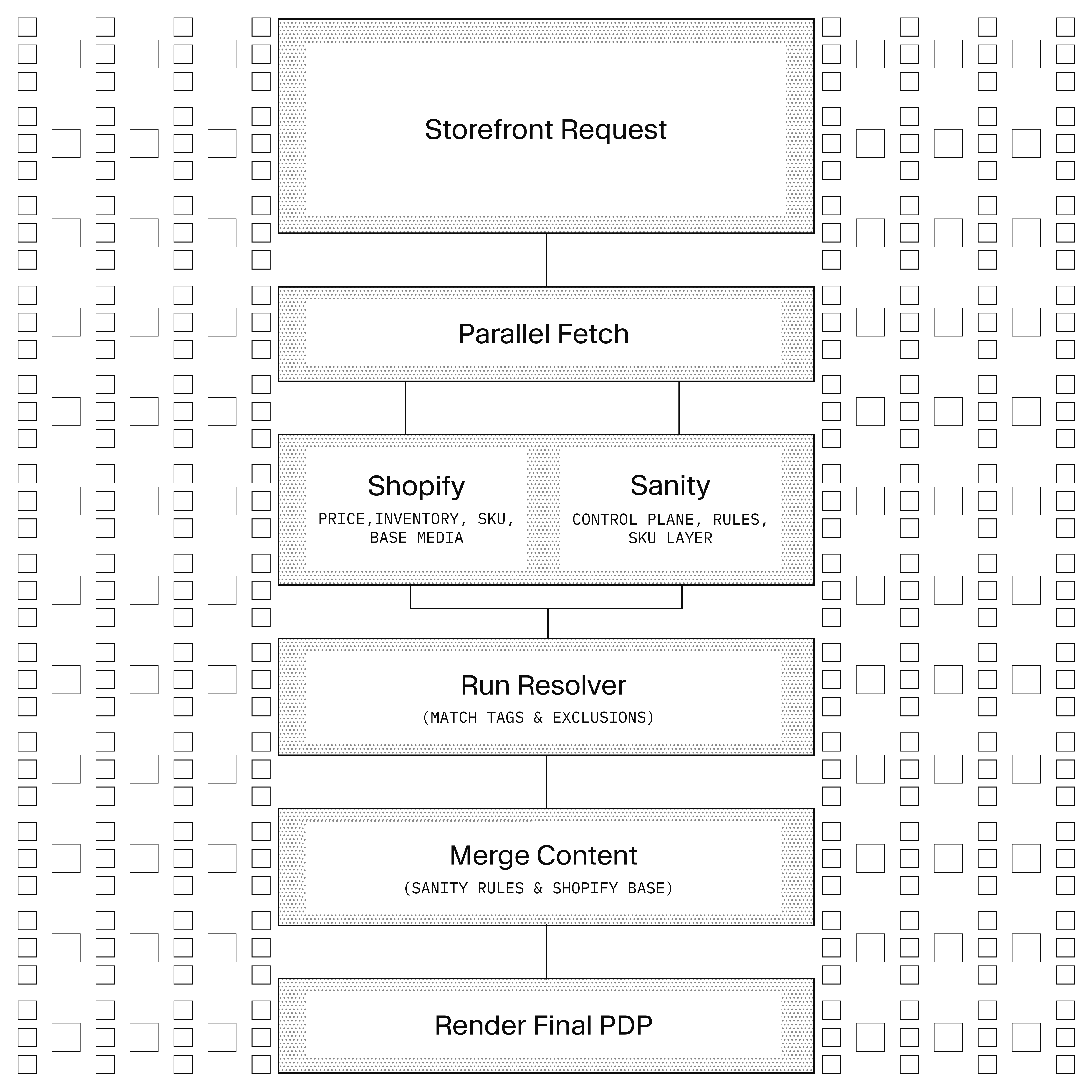
This guide shows you how our top e-commerce customers have moved this editorial work to the content team without taking anything away from Shopify. Shopify keeps track of titles, prices, inventory and variants while Sanity holds the editorial content. Even better, we then define rules that decide which products inherit which pieces, so a wool care guide written once lands on every product tagged wool. Hero products can get individual treatment, AI can draft at volume, and a review queue makes sure nothing reaches the store before a person has read it.
This is the product detail page (PDP) half of a pair. The category-page half uses the same wiring against a different document, and lives at /commerce-product-listing-page.
Good product pages increase customer satisfaction. Buyers who don't understand what they're buying end up returning more goods. Wool care guides, fit descriptors, and spec sheets are the kind of content that reduces returns and lifts conversion. Many brands skip these pieces on most products, because per-product authoring is not a viable operation at 10,000 SKUs.
A developer closes the gap by setting up a Sanity Studio workspace, a storefront resolver against the Shopify Storefront API, and a Studio review workflow for the content team. That's one to two days of engineering work. Once it's wired up, the content team runs the show without opening another ticket.
You don't have to author a document per product. We’ve seen a brand cover a 60,000-product catalog with 16 attribute rules. Each rule has tag conditions ("apply to products tagged activity:Lounge, except products tagged Nova Sport Mens") and a
And the AI side actually works, because a human keeps the voice. Content Agent generates draft attribute content in bulk, governed by a brand voice document the content team owns. When they’re ready, drafts land in a Studio review queue with a status field. Nothing reaches a customer until a human approves it.
Three patterns show up when brands try to differentiate their product pages at scale.
The first is one piece of content per-product. One description per Shopify product, edited by hand. This doesn’t scale well as your catalog grows. One of our larger customers modeled per-variant docs and a single collection reached 100,000+ documents; not to mention the vast majority of those documents were URL-mapping stubs nobody ever edited.
The second is page templates per category. Developers build a Denim template to make the Denim category page pop. But then every content change is a ticket followed by a separate build.
The third is Shopify metafields. Author content once per product in Shopify Admin. Now you’re back to the same issue as per-product Sanity documents, with a worse editorial surface.
Here is what you build to scale across a growing catalog. Create content rules that dictate which products inherit which editorial pieces. Each rule has tag inclusion conditions (all must be present on the product for the rule to match) and tag exclusion conditions (any match disqualifies). Create a control plane that holds the priority-ordered list of active rules. So for the winter season the care guide outranks the summer lifestyle callouts. At render time, the storefront reads the control plane, walks the priority list, evaluates each rule's conditions against the current product's Shopify tags, and renders the matched content next to Shopify's product data.
For hero products that deserve individual attention (a new launch, etc), a separate document layers-in the content on top of any categorical rules. This is optional. Almost all products in the catalog get rule-resolved content only.
The resolution is pull-only. Nothing is written back to Shopify. That is a deliberate departure from the PLP starter, which pushes to a Shopify metaobject so Liquid and search plugins can read it. PDP editorial overlay is not indexed by search plugins or consumed by third-party integrations, so the push path adds operational complexity for no compatibility benefit.
Sanity Connect for Shopify is complementary to this pattern rather than an alternative. The starter works against any Shopify store with no sync: rules match on tags, and the Studio product picker searches your live catalog. Add Sanity Connect when editors want the catalog as real, searchable Sanity documents; point skuEnrichment and rule matching at the synced documents, and the render-time resolver stays pull-only either way. One caution if you take the synced route: direct sync creates a document per product and per variant, which is how the 100,000-document collection earlier in this article happened. Sanity Connect's custom sync handler lets you sync variants as arrays on the parent product instead.
Four document types do the work.
attributeRule is the
attributeRule (document)
├─ name: string
├─ category: care | fit | lifestyle | spec | launch
├─ description: PortableText
├─ icon: image
├─ tags: string[]              # ALL must be present on product
├─ excludedTags: string[]      # ANY match disqualifies
├─ language: string
├─ order: number
├─ aiGenerated: boolean        (default: false)
├─ status: draft | in-review | approved   (default: draft)
└─ aiEnrichment
   ├─ generatedAt: datetime
   ├─ reviewedBy → user
   └─ reviewedAt: datetime
The tags field carries the inclusion condition: all listed tags must be present on the product for the rule to match. excludedTags carries the exclusion condition: any listed tag disqualifies the rule. The category field drives first-match-wins semantics within a category (more on that in the resolver section). order decides display sequence for rules that survive resolution. status gates the control plane: only approved rules are eligible.
controlPlane is the singleton that decides which rules are active and their priority.
controlPlane (document, singleton)
├─ priorityList: (→ attributeRule)[]         # ordered; higher wins per category
└─ productTypeScopes: object[]
   ├─ productType: string
   └─ priorityList: (→ attributeRule)[]      # per product-type override
Editing this one document changes what appears on every PDP in the catalog. productTypeScopes is optional and gives brands with distinct taxonomies (say, Footwear needing a different rule order than Apparel) a per-product-type override.
skuEnrichment is the SKU-specific document, opt-in, layered on top of the rule-resolved base.
skuEnrichment (document)
├─ productGid: string          # Shopify product GID; exact-match key
├─ headline: string
├─ editorialCopy: PortableText
├─ lifestyleImages: image[]
├─ launchBadge: string
└─ status: draft | approved
The productGid field is the exact match key. Note that if you use Sanity Connect for Shopify this can be an actual reference. A hero product gets one skuEnrichment document. Every other product in the catalog gets rule-resolved content only.
brandVoice is the singleton that holds the tone and voice guidance for AI generation.
brandVoice (document, singleton)
├─ persona: PortableText
├─ toneGuidance: PortableText
├─ contextPrompt: text                 # wired to org-level Content Agent prompt
└─ examplePhrases: object[]
   ├─ do: string
   └─ dont: string
Brand voice governance runs through Content Agent's persistent rules. In this starter, the brandVoice document is the authoring surface: its contextPrompt is registered as the org-level rule at setup, so when the content manager updates the document, every subsequent generation run follows the new guidance without a deploy.
The resolver is the logic that decides which display rules apply to a given product, every time someone loads that product's page. The storefront runs this on every product page render.
// packages/@starter/commerce/src/resolvePdp.ts
export function resolveAttributeRules({ product, controlPlane }) {
  const list =
    controlPlane.productTypeScopes?.find(s => s.productType === product.productType)
      ?.priorityList ?? controlPlane.priorityList

  const matched = []
  const seenCategories = new Set()

  for (const rule of list) {
    if (!allTagsPresent(rule.tags, product.tags)) continue
    if (anyExcludedTagPresent(rule.excludedTags, product.tags)) continue
    if (seenCategories.has(rule.category)) continue // first-match wins per category
    matched.push(rule)
    seenCategories.add(rule.category)
  }

  return matched.sort((a, b) => a.order - b.order)
}
This is just four simple steps written in TypeScript. Pick the priority list (a matching productTypeScope overrides the global list). Walk the list in priority order. For each rule, evaluate tag conditions against the current product; skip if a rule for that category already matched. Sort the matched set by order for display.
The merge is a separate function that layers the resolved rules and any SKU enrichment on top of the Shopify product data.
// packages/@starter/commerce/src/mergePdp.ts
export function mergeProduct({ shopify, controlPlane, skuEnrichment }) {
  const rules = resolveAttributeRules({ product: shopify, controlPlane })

  if (!rules.length && !skuEnrichment) {
    return { ...shopify, enriched: false }
  }

  return {
    ...shopify,
    enriched: true,
    attributes: rules,
    headline: skuEnrichment?.headline ?? shopify.title,
    editorial: skuEnrichment?.editorialCopy ?? null,
    lifestyleImages: skuEnrichment?.lifestyleImages ?? [],
    launchBadge: skuEnrichment?.launchBadge ?? null
  }
}
Shopify stays authoritative for identity, price, inventory, variants, and base media. Sanity supplies the editorial layer around it. If nothing matches and no SKU enrichment exists, the product renders as pure Shopify output with enriched: false.
The storefront calls the merge from a product page handler that fetches Shopify and Sanity in parallel.
// frontend/lib/product.ts
export async function getProduct(handle: string) {
  const shopify = await fetchShopifyProduct(handle)
  if (!shopify) return null

  const [controlPlane, skuEnrichment] = await Promise.all([
    fetchControlPlane(),
    fetchSkuEnrichment(shopify.id)
  ])

  return mergeProduct({ shopify, controlPlane, skuEnrichment })
}
The AI generation workflow uses Content Agent to draft attribute content in bulk. Brand voice governance uses Content Agent rules directly. Rules are persistent instructions the agent applies to every generation run, edited by the content team in the Content Agent surface. Personas, tone guidance, prohibited phrases, and example phrasing live there. When guidelines change, the content manager updates the rules; the next generation reflects the change with no code or configuration touched. Drafts land as attributeRule documents with aiGenerated: true and status: in-review. The Studio Review Queue is a filtered Structure Builder view that surfaces those documents to the review team.
// studio/structure.ts (excerpt)
S.listItem()
  .title('Review Queue')
  .child(
    S.documentList()
      .title('AI-generated attribute rules, in review')
      .filter(
        `(_type == "attributeRule" && aiGenerated == true && status == "in-review") ||
         (_type == "skuEnrichment" && status == "draft")`
      )
  )
Reviewers open a document from the Review Queue and read the AI-generated copy. Each rule records the brand voice it was generated against, so a reviewer can easily open that singleton and check tone for anything that feels off then set status: approved once it meets the bar. Only approved rules are eligible to be added to the control plane.
A small Sanity Function stamps aiEnrichment.reviewedAt on approval so the review history is queryable.
// functions/review-stamp/index.ts
import { documentEventHandler } from '@sanity/functions'

export const handler = documentEventHandler(async ({ event, context }) => {
  if (event.data._type !== 'attributeRule') return
  if (event.data.status !== 'approved') return
  if (event.data.aiEnrichment?.reviewedAt) return // don't loop

  const client = createSanityClient(context)
  await client
    .patch(event.data._id)
    .set({ 'aiEnrichment.reviewedAt': new Date().toISOString() })
    .commit()
})
Because the check for existing reviewedAt runs first, the Function does not loop when its own write fires the event.
The resolver is pull-only. Nothing gets pushed to Shopify. For high-traffic product pages, the storefront’s CDN cache is doing the heavy lifting, so getting invalidation right isn’t something you bolt on after the fact.
A Sanity Function fires when the control plane, an attribute rule, or a SKU enrichment publishes. On publish, the cache-revalidate function pings the storefront's revalidate endpoint, which invalidates the cached pages so they refresh with the new content.
// functions/cache-revalidate/index.ts
import { documentEventHandler } from '@sanity/functions'

const REVALIDATE_TYPES = ['controlPlane', 'attributeRule', 'skuEnrichment']

export const handler = documentEventHandler(async ({ event }) => {
  if (!REVALIDATE_TYPES.includes(event.data._type)) return

  await fetch(`${process.env.STOREFRONT_URL}/api/revalidate`, {
    method: 'POST',
    headers: {
      'content-type': 'application/json',
      authorization: `Bearer ${process.env.SANITY_REVALIDATE_SECRET}`
    },
    body: JSON.stringify({
      type: event.data._type,
      id: event.data._id
    })
  })
})
For a control plane change, the storefront can either revalidate every PDP in the catalog or clear the entire product route cache. For an attribute rule or SKU enrichment publish, the storefront can be more surgical. The starter revalidates broadly by default and leaves finer-grained invalidation to the implementer.
Clone it, point it at a Shopify store, publish one attribute rule, and add it to the control plane. The rule shows up on every matching PDP at render time, no deploy. That's the whole loop.
pnpm create sanity@latest --template sanity-labs/starters/commerce-pdp-management --package-manager pnpm
cd your-project
pnpm install
cp .env.example .env
cp studio/.env.example studio/.env
cp frontend/.env.example frontend/.env
# Fill in the env files
pnpm shopify:storefront-token   # one-time mint of the public Storefront token
pnpm bootstrap                   # deploy blueprint + schema, generate types, seed
pnpm dev
Start with the product family that drives the most returns. Because enrichment is presence-based, every other product keeps
pnpm shopify:storefront-token uses your Shopify Admin credentials once to mint the public Storefront token used by Sanity Studio's product picker and by the storefront's product reads. Notice there's no catalog sync in that list: the starter reads your products live, so there's nothing to install in Shopify and no product documents to maintain. If your editors would rather browse the catalog as real Sanity documents, Sanity Connect for Shopify adds that later without changing this setup. pnpm bootstrap deploys the blueprint and schema, generates types, and seeds a shared attribute-rule vocabulary plus a control plane and brand voice singleton.
Studio runs at localhost:3333. The demo storefront (styled as the Sanity Swag Store) runs at localhost:3000. Create an attributeRule with tags that match a product in your store, add it to the control plane priority list, publish, and the PDP will reflect the change on refresh.
The starter is at sanity-labs/starters/commerce-pdp-management.
The natural next step is running PDP and PLP together. The shared package (packages/@starter/commerce) is designed to serve both. The Shopify adapter, the merge orchestration, and the Studio product picker component are reused. Adding PLP alongside PDP is a new document type and a new page route on the same foundation. See the PLP guide for the category-page side.
Other commerce engines slot in behind the same adapter. Swapping Shopify for SFCC, Commercetools, or a custom OMS is an adapter change, not a schema or resolver change. The pull-only nature of PDP resolution makes this cleaner than the push-based PLP path, because the engine only needs a way to fetch products by handle and by ID batch.
Full merge semantics across rules is the third direction. First-match-wins per category is the Phase 1 default; the control plane's priority order gives the content team full control without needing to reason about field-level merges. Teams operating large rule sets sometimes want two rules of the same category to both appear on a product. That is a resolver change (a merge policy on the control plane) with no schema change.