

article
Build automated retail campaign orchestration on Sanity
Nordstrom Rack's Digital Merchandising team added an editorial tile to the women's shoes product listing page (PLP) one afternoon. Average daily clicks on that page went from 2,300 to 3,700. The team handled the change directly in their CMS, because their category pages are enriched from Sanity on top of Shopify.

Jarod Reyes
Head of Developer Experience & Community at Sanity

Noah Gentile
Principal Solution Architect at Sanity
Published:


In most commerce stacks, this kind of change belongs to engineering. Shopify (or SFCC, or Commercetools) owns products, price, and inventory. The storefront template owns layout. Every brand you compete with runs the same launch playbook. File a ticket for each banner, badge, and tile, and you run it two to five business days behind.
Sanity as an enrichment layer on top of Shopify moves that work back to the merchandising team. Shopify stays canonical. Sanity owns the editorial layer: hero content, faceouts, in-grid tiles, badges, facet order, and custom collections that Shopify's rule-based smart collections can't express. The storefront queries both at render time and merges them.
This is the PLP (product listing or category page) build. The PDP (product details page) build uses the same wiring against a different document. You can read that at /commerce-product-detail-page.
Business case first. Architecture and code after. If you're the engineer, jump to The architectural shift.
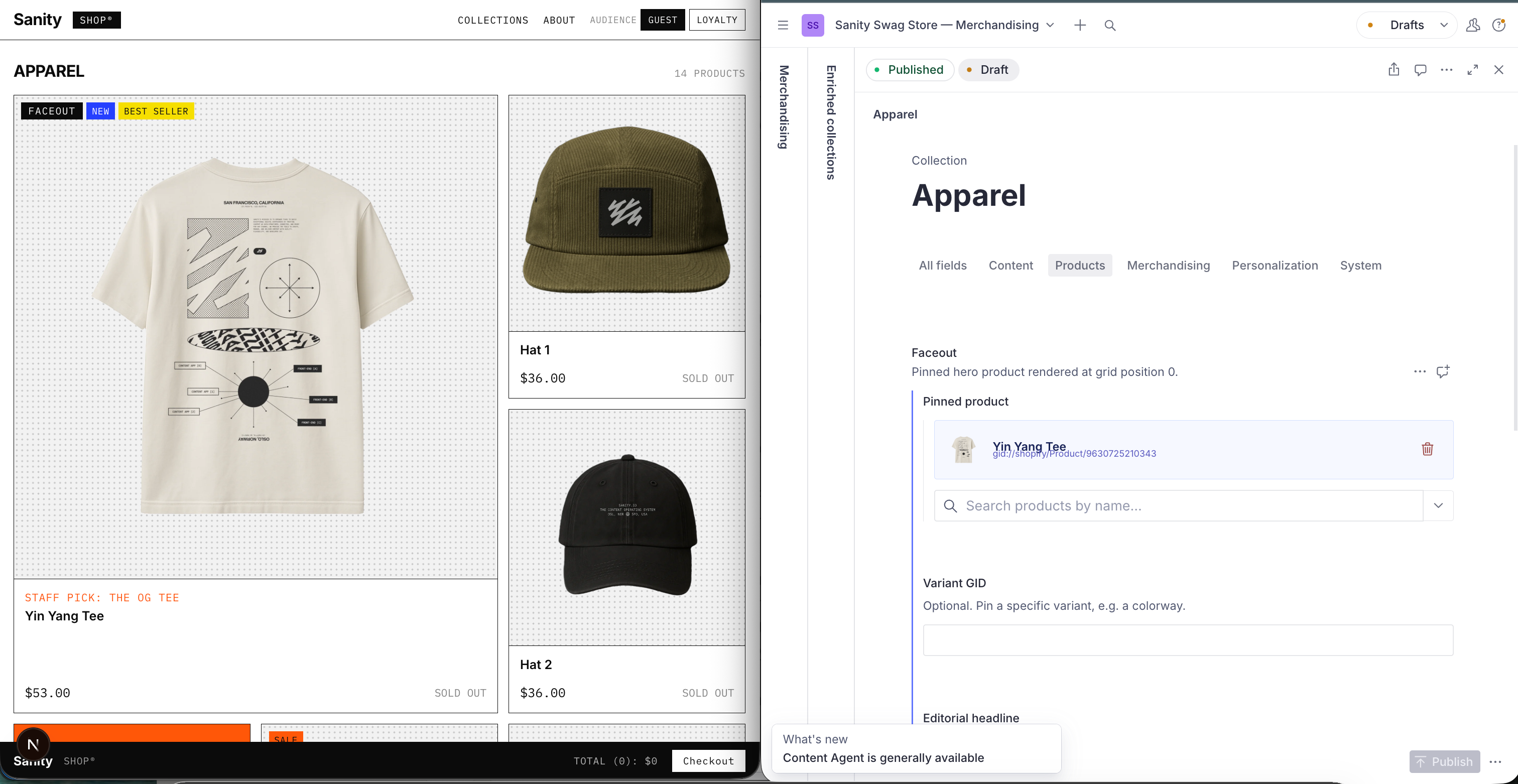
Category pages are the slowest surface in most merchandising stacks. Nordstrom Rack's Digital Merchandising team says change orders that used to take "days, sometimes a week" now ship the same day. Coordinated seasonal launches, in-grid storytelling, badges timed to a launch window: all of it moves at that speed once merchandising owns the page.
A developer sets up a Sanity Studio workspace, a Sanity Function that pushes enrichment to Shopify on publish, and a storefront query that merges both systems at render time. That's one to three days of engineering work, and it's the only engineering work required. Once it's wired up, merchandising runs the show without opening another ticket. Nordstrom Rack, Skims, Mejuri, and Tecovas are all running this in production right now.
You don't have to rip anything out to get there. Enrichment only kicks in where it exists: if a Sanity document is attached to a collection, the storefront uses it; if not, Shopify renders exactly as it does today. Most teams start with their ten highest-traffic collections and expand once they see it working.
Nordstrom Rack saw daily clicks on one enriched PLP jump from 2,300 to 3,700 after adding a single tile, and their PLP content output has climbed every quarter since. Tecovas's merchandising team folded Content Releases into their existing seasonal workflow without friction.
The naive way to give merchandising more control is to add more Shopify metafields. Metafields are per-product, so a single badge change means a write per product per collection. Fifteen collections with thirty products each comes out to 450 API calls on one publish, and that's enough to hit Shopify Admin API rate limits the moment you run a coordinated campaign.
A single structured enrichment document per collection, held in Sanity and merged with Shopify at render time, scales past that ceiling. Shopify still owns what it's good at: products, pricing, inventory, collection membership. The editorial layer sits in Sanity instead: banners, editorial tiles, badge coordination, facet order, and the curated collections that never fit a clean tag rule anyway.
Whether Sanity or Shopify supplies the page for a given handle comes down to presence: if an enrichment document exists, it renders; if not, Shopify's default takes over. On publish, that enrichment gets pushed into a Shopify metaobject too, so any tool reading directly from Shopify still sees it. And at render time, the storefront reads both systems in parallel and merges them into one page.
One document type does most of the work. The collectionEnrichment document holds everything the merchandiser controls, keyed by collection handle.
// studio/schemaTypes/documents/collectionEnrichment.ts
defineType({
  name: 'collectionEnrichment',
  type: 'document',
  fields: [
    defineField({
      name: 'handle',
      type: 'string',
      description: 'Shopify collection handle. Immutable after first publish.',
      validation: r => r.required()
    }),
    defineField({
      name: 'collectionType',
      type: 'string',
      options: { list: ['shopify-native', 'sanity-custom'] },
      initialValue: 'shopify-native'
    }),
    defineField({ name: 'banner', type: 'banner' }),
    defineField({ name: 'faceout', type: 'faceout' }),
    defineField({
      name: 'editorialTiles',
      type: 'array',
      of: [{ type: 'editorialTile' }]
    }),
    defineField({
      name: 'badges',
      type: 'array',
      of: [{ type: 'badgeAssignment' }]
    }),
    defineField({ name: 'facetConfig', type: 'facetConfig' }),
    defineField({
      name: 'productList',
      type: 'array',
      of: [{ type: 'product' }],
      hidden: ({ document }) => document?.collectionType !== 'sanity-custom'
    }),
    defineField({
      name: 'variantOverrides',
      type: 'array',
      of: [{ type: 'variantOverride' }]
    }),
    defineField({
      name: 'syncStatus',
      type: 'syncState',
      readOnly: true
    })
  ]
})
The handle field is the join key. It matches a Shopify collection handle for shopify-native collections, or names a Sanity-owned URL for sanity-custom collections. It is immutable after first publish because renaming a handle breaks inbound links.
The collectionType field determines which resolution path the storefront takes. shopify-native means Shopify owns membership and Sanity layers editorial on top. sanity-custom means Sanity owns membership and Shopify supplies live product data by GID batch.
The remaining fields are what the merchandiser edits: banner, faceout, editorial tiles, badges, and facet configuration.
A second document type, productBadge, holds shared vocabulary that badge assignments reference. Labels, colors, and icons live once. Changing the label on the Sale badge updates every collection that references it on the pull path immediately, without republishing collections.
// studio/schemaTypes/documents/productBadge.ts
defineType({
  name: 'productBadge',
  type: 'document',
  fields: [
    defineField({ name: 'slug', type: 'slug' }),
    defineField({ name: 'label', type: 'string' }),
    defineField({ name: 'color', type: 'string' }),
    defineField({ name: 'icon', type: 'string' })
  ]
})
Badge assignments live on the collection enrichment document, not on the badge. Each assignment carries a product GID, a badge reference, and a start and end date. Date-gating is enforced at render time, so badges appear and disappear on their configured schedule without a manual publish at the boundary.
If a collectionEnrichment document exists for a handle, the storefront merges it over the Shopify output; if it does not, it renders pure Shopify.
// frontend/lib/collection.ts
export async function getCollection(handle: string, audienceTag?: string) {
  const [shopify, enrichment] = await Promise.all([
    fetchShopifyCollection(handle),
    fetchEnrichmentByHandle(handle) // may return null
  ])

  if (!enrichment) return { ...shopify, enriched: false }

  return mergeCollection({ shopify, enrichment, audienceTag })
}
The null-check is what makes incremental rollout safe. A team can enrich the twenty collections that matter this quarter and let the remaining three hundred render as pure Shopify. Enriching more collections is a matter of creating documents in Studio; the storefront and the template code do not change.
Storefront-side merging handles the pull path, where the storefront queries both systems and combines them. Some Shopify ecosystem tools (Liquid templates, search plugins, partner apps) read directly from Shopify without going through the storefront. Those tools need the enrichment to exist inside Shopify, which is what the push sync handles.
A Sanity Function fires on every collectionEnrichment publish. It shapes the enrichment into a single Shopify metaobject (sanity_plp_collection) and writes it via the Admin API. Because all the enrichment for one collection lands in one API call, the pattern stays under Shopify's rate limits even during coordinated campaigns.
// functions/collection-sync/index.ts
import { documentEventHandler } from '@sanity/functions'
import { upsertCollectionMetaobject } from '@starter/commerce'

export const handler = documentEventHandler(async ({ event, context }) => {
  if (event.data._type !== 'collectionEnrichment') return

  const client = createSanityClient(context)
  await stampSyncStatus(client, event.data._id, 'pending')

  try {
    const enrichment = await shapeForShopify(client, event.data._id)
    await upsertCollectionMetaobject(shopifyAdmin(), enrichment)
    await stampSyncStatus(client, event.data._id, 'synced')
  } catch (err) {
    await stampSyncStatus(client, event.data._id, 'failed', err.message)
  }
})
The syncStatus field on the document displays the push state in Studio (green when synced, red with an error message when the push fails). This gives merchandisers visibility into sync state without leaving Studio, and it means engineering does not need a separate monitoring surface for the sync job.
The metaobject definition is version-controlled in the starter (packages/@starter/commerce/src/shopify/metaobject.ts) and created idempotently by pnpm shopify:setup. It is the contract between Sanity and Shopify. If a developer modifies the schema in Shopify Admin outside the code, push writes will fail and the syncStatus field will surface the error in Studio.
A second Function handles badge label changes. When a productBadge document publishes, it re-syncs every collectionEnrichment that references that badge. Without this re-sync, the pull path would show the new label while the metaobject-fed path would still serve the old one.
The merge function combines the two data sources into one collection payload.
// packages/@starter/commerce/src/merge.ts
export function mergeCollection({ shopify, enrichment, audienceTag }) {
  if (!enrichment) return { ...shopify, enriched: false }

  const variant = resolveVariant(enrichment, audienceTag)
  const badges = buildBadgeMap(enrichment.badges, new Date())

  const products =
    enrichment.collectionType === 'sanity-custom'
      ? orderCustomProducts(enrichment.productList, shopify.productsByGid)
      : shopify.products

  const withFaceout = injectFaceout(products, variant.faceout)
  const withTiles = injectEditorialTiles(withFaceout, variant.editorialTiles)
  const facets = reorderFacets(shopify.facets, enrichment.facetConfig)

  return {
    enriched: true,
    banner: variant.banner,
    products: withTiles,
    facets,
    badges
  }
}
The merge runs five steps. It resolves the audience variant (or falls back to the default). It builds a badge map filtered by the current date. It orders products: sanity-custom collections use the Sanity-authored order, shopify-native collections use Shopify's. It moves the faceout to grid position 0 and injects editorial tiles at their configured positions. Finally, it reorders facets, placing the promoted ones first.
The storefront calls the merge once per page render. The two fetches (Shopify by handle, Sanity by handle) run in parallel with Promise.all, so the added enrichment does not introduce a request waterfall.
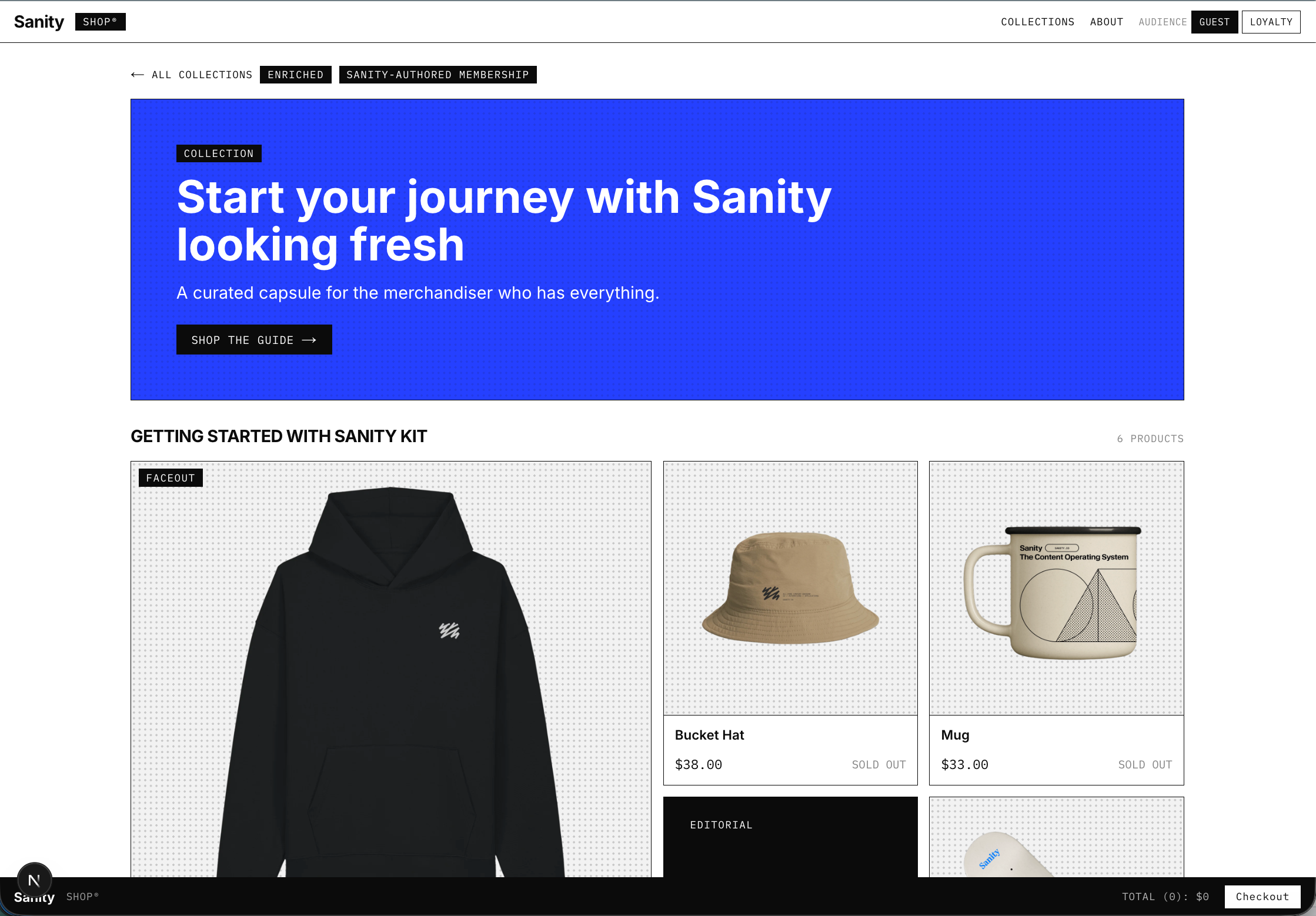
Consider a Holiday Gift Guide with forty hand-picked products in a specific order, a brand story tile at position four, and a loyalty-specific hero for returning customers. Shopify smart collections can express product rules but not curation order. Manual collections handle order but cannot inject editorial content between products.
Setting collectionType: 'sanity-custom' on the enrichment document gives Sanity authority over membership and order through the productList array. Shopify is queried only for live product data by GID batch. The URL /collections/holiday-gift-guide-2026 routes through the same page handler; the storefront falls through the "does this handle exist in Shopify" branch and lands on the Sanity-authored collection.
// frontend/app/collections/[handle]/page.tsx
const collection = await getCollection(params.handle, audienceTag)
if (!collection) notFound()
return <PLP data={collection} />
The same route handles both cases. The null-check determines which path resolves. Merchandising can create a curated campaign collection without engineering building a new landing page.
The starter ships two guardrails for the custom-collection path. An async Studio validation rule checks each productList GID against Shopify and warns when a referenced product is inactive or deleted. And the handle field is immutable after first publish, because renaming a Sanity-authored URL without
Coordinated launches use Sanity Content Releases. A merchandiser stages the fifteen collection enrichment documents for the campaign into a single release (say, Summer Sale - Week 1) and schedules it for midnight. The Creative Director previews the whole campaign in Presentation before anything publishes. When the release fires at the scheduled time, all fifteen documents publish atomically, the push sync Functions run per document within seconds, and the storefront reflects the new state on the next request.
This is the same recipe covered in the campaign management article, applied here to PLP surfaces specifically. It does not require custom code beyond what the enrichment layer already provides. Tecovas's merchandising team runs seasonal campaigns this way in production.
Audience-targeted PLPs use an inline variantOverrides array on the enrichment document, resolved at the storefront edge from a first-party cookie or edge variable. A returning loyalty member sees a different banner, faceout, and set of editorial tiles than a first-time visitor to the same URL. The base document holds every variant; the edge picks one.
// frontend/lib/audience.ts
export function resolveVariant(enrichment, audienceTag) {
  const override = enrichment.variantOverrides?.find(v => v.audienceTag === audienceTag)
  if (!override) return enrichment
  return {
    ...enrichment,
    banner: override.banner ?? enrichment.banner,
    faceout: override.faceout ?? enrichment.faceout,
    editorialTiles: override.editorialTiles ?? enrichment.editorialTiles
  }
}
The pattern has one limit worth naming. All variant content lands in every GROQ response regardless of audience, which is appropriate for non-sensitive segmentation (loyalty tier vs. new visitor) and inappropriate for high-stakes personalization where the audience distinction should not appear in the payload at all. For those cases, resolve the variant server-side and scope the query per audience so the storefront never receives content it should not render.
Clone it, point it at a Shopify store, and publish one enrichment document. The tile shows up on the category page at render time, with no deploy. That's the whole loop.
pnpm create sanity@latest --template sanity-labs/starters/commerce-plp-management --package-manager pnpm
cd your-project
pnpm install
cp .env.example .env
cp studio/.env.example studio/.env
cp frontend/.env.example frontend/.env
# Fill in the env files
pnpm shopify:setup   # one-time Shopify metaobject definition
pnpm bootstrap       # deploy blueprint + schema, generate types, seed
pnpm dev
Start with your highest-traffic collection. Because enrichment is presence-based, every other collection keeps
pnpm shopify:setup creates the sanity_plp_collection metaobject definition in your Shopify Admin. pnpm bootstrap deploys the blueprint and schema, generates types, and seeds a shared badge vocabulary plus two example collections (clothing and holiday-gift-guide-2026).
Studio runs at localhost:3333. The demo storefront (styled as the Sanity Swag Store, a brutalist monospace layout) runs at localhost:3000. Point the clothing collection at a real Shopify handle in your store, add a faceout and one editorial tile, and the PLP will reflect the change on refresh.
The starter is at sanity-labs/starters/commerce-plp-management.
The pattern in this article covers the PLP surface. The PDP (product detail page) uses the same wiring against a different entity. A productEnrichment document keyed by product handle carries editorial modules for a single SKU: hero storytelling, spec callouts, related-product curation, and richer content blocks. Shopify remains canonical for the product record, and Sanity owns the layer around it. The push sync, storefront merge, and presence-based fallback work identically.
The PDP piece is at /commerce-product-detail-page. If you are building both surfaces at once, the shared package (packages/@starter/commerce) is designed to serve both. The Shopify adapter, the merge orchestration, the metaobject contract, and the Studio product picker component are all reused. Adding PDP is a new document type and a new page route on the same foundation.
Other commerce engines slot in behind the same interface. The packages/@starter/commerce adapter is what shapes the enrichment payload for the target platform. Swapping Shopify for SFCC, Commercetools, or a custom OMS is an adapter change, not a schema change.