A conference with agents on the ops team
- —Running a conference means retyping the same information into multiple tools. The CFP platform, the email tool, the website, the schedule spreadsheet, and the slide deck on the venue screens. The versions drift, and reviewing 120 submissions by hand eats your evenings.
- —This reference architecture makes events and conferences workable for agents, with the Content Lake as the single source of truth: a Function screens the CFP, an organizer bot edits the schedule over chat, a read-only concierge answers attendee questions, and the website, emails, and venue TVs pull from the same canonical content.
- —A full-stack example: agents running conference ops on one dataset.

Knut Melvær
Principal Developer Marketing Manager
Published:
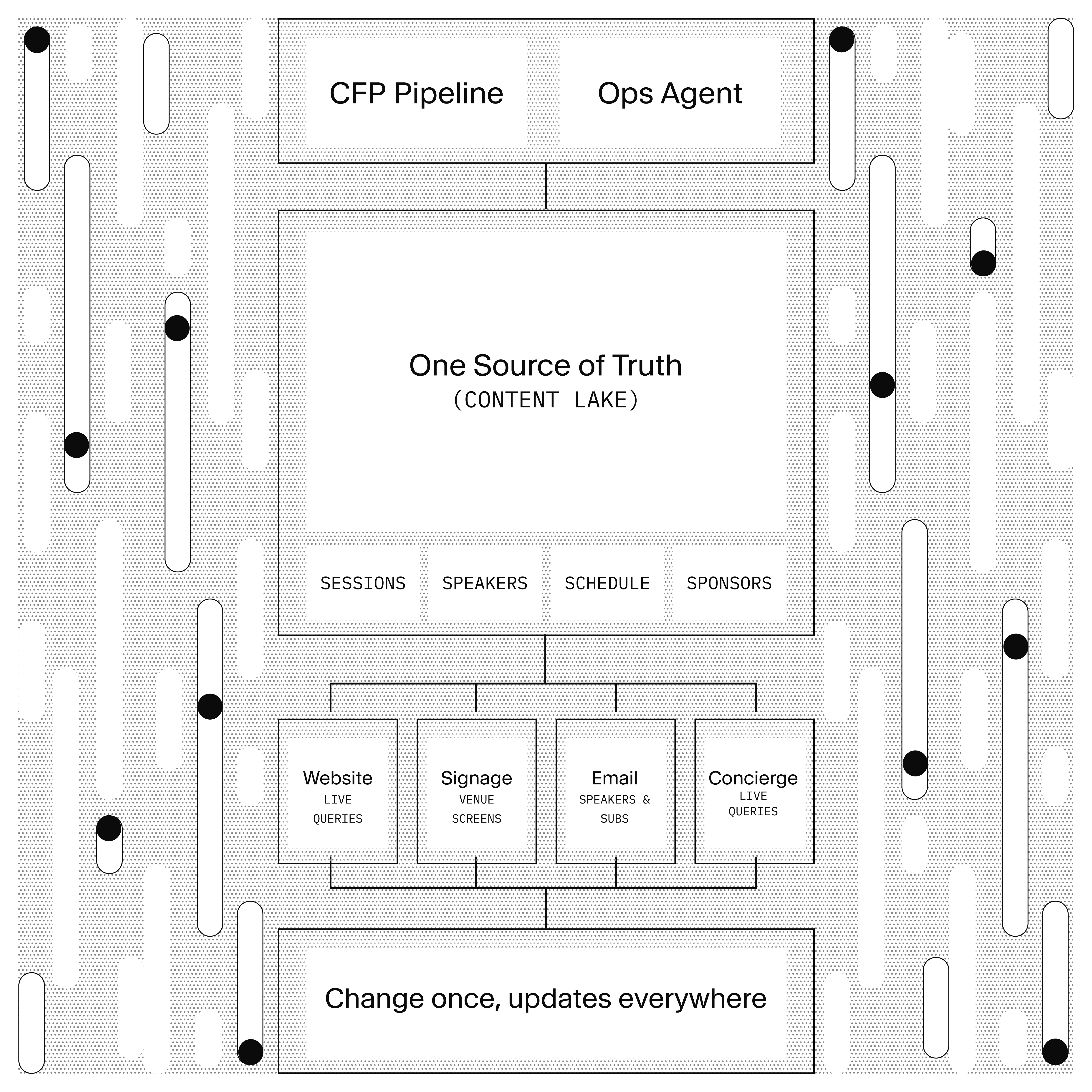
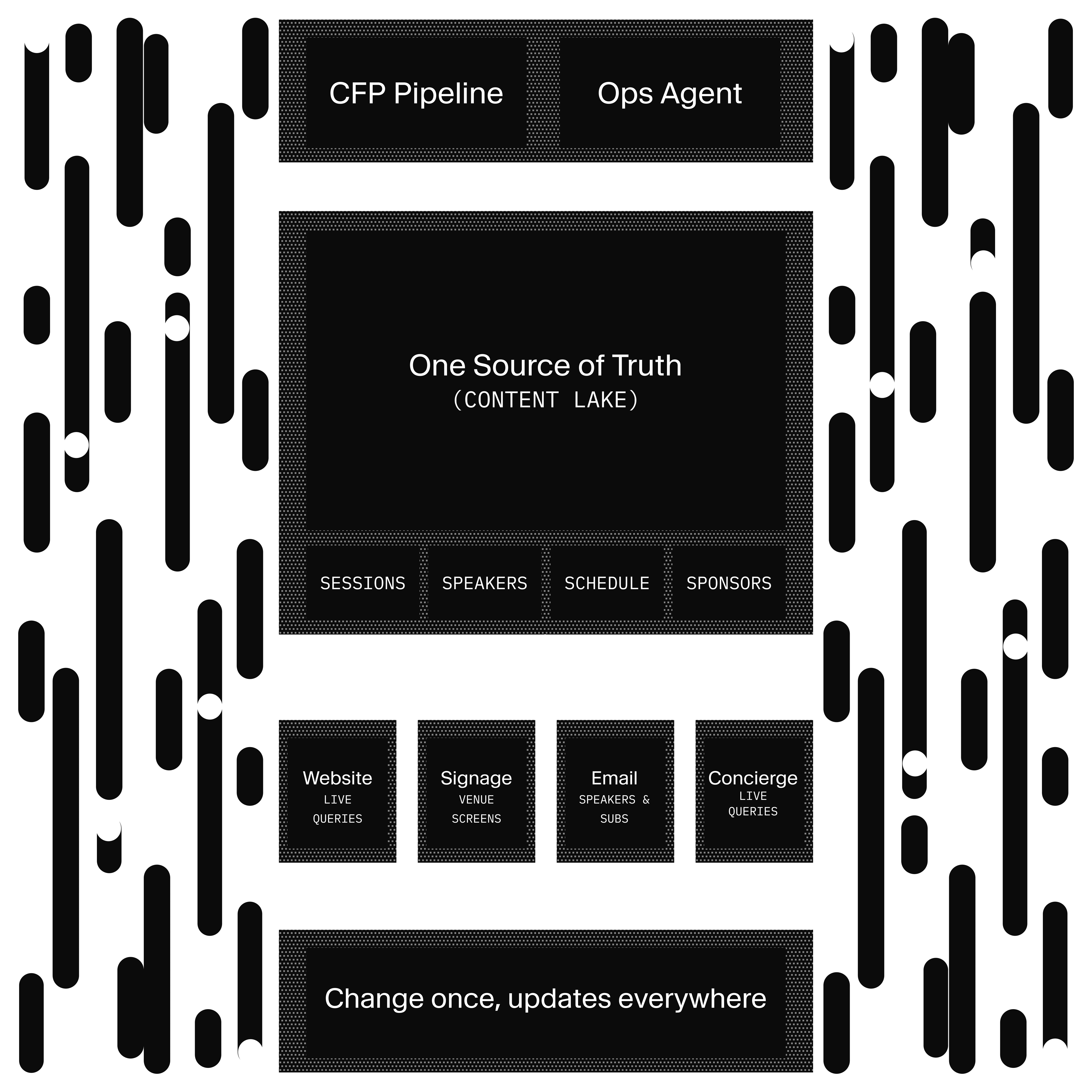
This guide is for technical leaders and event organizers who are looking for an alternative to a disjointed stack of subscriptions (a CFP platform, an email tool, a signage service) plus the glue code between them, and the glue is where conferences break.
It demonstrates single-source-of-truth content across channels: change a session title or the agenda once and it propagates to the website, the emails, and the venue signage. It also shows you how you can use AI to automate and assist editors, like pre-screening of talk submissions, conference chatbots, and conference operations.
This is a proof of concept, not a step-by-step tutorial, and the receipts are in the repo. You can clone it and test it out for yourself, and use it as a build pattern in agentic engineering. It’s (partly) pressure tested as the stack for our own conference, Everything *[NYC].
Here are the Sanity features that are demonstrated in this guide:
- Agent API: schema-aware AI operations on documents. Here it scores CFP submissions against criteria the organizers edit in Studio. (In code:
client.agent.action.generate.) - Sanity Functions: event-driven serverless compute, declared in a Blueprint. Nine functions handle screening, emails, announcement fan-out, and conversation classification.
- Studio document actions: for the human gate. Accept, reject, and re-screen buttons that only appear when a submission is ready for review.
- Portable Text email templates: acceptance and rejection emails are Sanity documents with variable interpolation, sent through Resend.
- Content Agent and Sanity Context: power the two Telegram agents (in code: the
@sanity/agent-contextpackage).
Your CFP closes with hundreds of submissions. They ended up in a form tool, so someone exports a spreadsheet and emails it to the program committee. Three reviewers rate them in three tabs with three different ideas of what a 4 means. Accepted speakers get an email someone writes by hand, pasting the talk title from the spreadsheet. One paste goes wrong, and a speaker gets congratulated for someone else's talk. Then their name is typed again into the website CMS, and a fourth time into the schedule.
The same information, typed four times, with a reviewer bottleneck in the middle. And a lot of opportunities to err.
Scoring, emailing, and retyping names are the parts a machine should do. Program design isn't.
When someone posts a submission through the website, it is stored as a document with status field. From packages/sanity-schema/src/documents/submission.ts:
defineField({
  name: 'status',
  title: 'Status',
  type: 'string',
  group: 'screening',
  description:
    'Current status in the CFP pipeline. Moves from submitted → screening → scored → in-review → accepted/rejected/withdrawn.',
  options: {
    list: [
      {title: 'Submitted', value: 'submitted'},
      {title: 'Screening', value: 'screening'},
      {title: 'Scored', value: 'scored'},
      {title: 'In Review', value: 'in-review'},
      {title: 'Accepted', value: 'accepted'},
      {title: 'Rejected', value: 'rejected'},
      {title: 'Withdrawn', value: 'withdrawn'},
    ],
    layout: 'radio',
  },
  initialValue: 'submitted',
  readOnly: true,
}),
That readOnly: true means nobody can drag a submission to "accepted" by hand (but it’s easy to enable if that’s what you want). Status only changes through Functions and document actions, so no one can skip a step, and every downstream automation can trust what the field says. This is an example of how you can configure guardrails and processes for how your team works together.
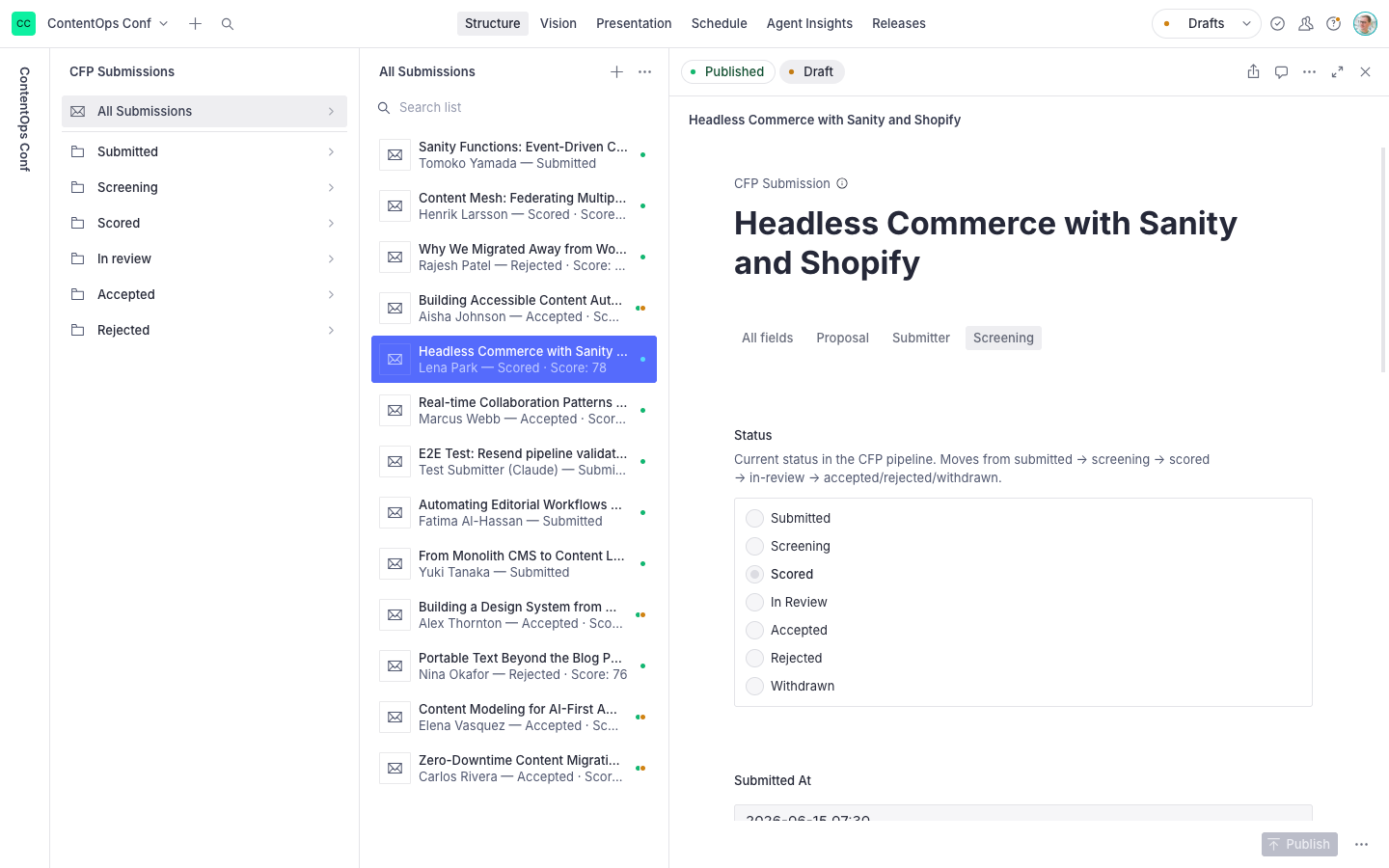
The AI's output lands in a separate aiScreening object (score, summary, timestamp), also read-only, so the evaluation is visible but not editable (unless you want to).
The screening Function doesn't hardcode what a good talk looks like. It fetches two things the organizers own and can edit through the studio and their conference ops agent. The function that runs the AI-powered pre-screening fetches the criteria and instruction:
{
  "criteria": *[_type == "conference"][0].scoringCriteria,
  "instruction": *[_id == "prompt.cfpScreening"][0].instruction
}
The criteria live on the conference document as a weighted array (name, description, percentage weight, with a note that weights should sum to 100). The prompt lives in a prompt.cfpScreening document with liveEdit enabled. Change either in Studio and the next submission runs on the new rules. No deploy. This allows for rapid iteration to get it right, and organizationally, it builds a common understanding of what makes a great talk for the event.
The seeded prompt is worth reading because it shows the variable convention:
Evaluate this CFP submission against the conference scoring criteria.

Session title: $title
Session type: $sessionType
Abstract: $abstract
Speaker bio: $bio

Scoring criteria:
$criteria

Rate the submission on a scale of 0 to 100 based on:
- Topic relevance and audience fit
- Speaker expertise (based on bio)
- Abstract quality and clarity
- Session type appropriateness

The score field must be a number between 0 and 100.
Write a brief 2-3 sentence evaluation summary explaining the score.
You can also develop this system into taking accepted talks into account (to avoid repetition) and whatever other criteria that’s relevant.
The Agent API call, from apps/functions/screen-cfp/index.ts:
const result = await client.agent.action.generate({
  schemaId: process.env.SANITY_SCHEMA_ID!,
  documentId: data._id,
  instruction,
  instructionParams: {
    title: {type: 'field', path: 'sessionTitle'},
    sessionType: {type: 'field', path: 'sessionType'},
    abstract: {type: 'field', path: 'abstract'},
    bio: {type: 'field', path: 'bio'},
    criteria: {
      type: 'constant',
      value: criteria,
    },
  },
  target: {path: 'aiScreening', include: ['score', 'summary']},
  conditionalPaths: {
    defaultReadOnly: false,
  },
  noWrite: true,
})
With noWrite: true, the Agent API evaluates but doesn't touch the document. The Function inspects the result, rejects it if the score isn't a finite number or the summary is missing, clamps the score into range, and only then writes to the submission document.
The score is one LLM judgment, not a measurement. The criteria weights go into the prompt as text; the model doesn't do arithmetic with them. So the number's only job is to sort the review queue, and the summary next to it (two sentences on why the score) is the part reviewers actually use:
await client
  .patch(data._id)
  .set({
    'aiScreening.score': Math.round(Math.min(100, Math.max(0, score))),
    'aiScreening.summary': summary,
    'aiScreening.scoredAt': new Date().toISOString(),
    status: 'scored',
  })
  .commit()
When screening fails, the Function says so where a reviewer will see it:
// Leave status as submitted on failure so it can be retried
await client
  .patch(data._id)
  .set({
    reviewNotes: `AI screening failed: ${error instanceof Error ? error.message : 'Unknown error'}. Manual review required.`,
  })
  .commit()
The repo's architecture log states the governing rule as "AI enhances, it doesn't enable." We built the example so that it still works with AI features turned off, and every AI feature has a manual fallback. The failure path above is that rule as code. A dead API key means reviewers read submissions the old way. It never means submissions disappear.
Another Sanity Function triggers an email confirmation when someone has submitted their talk (and another when it’s accepted). The email templates are also editable in the Studio.
There is no auto-accept threshold anywhere in the codebase. We don’t think you would want to leave your event agenda purely to agents. The score sorts the review queue and weeds out obviously unqualified submissions. But people make the call.
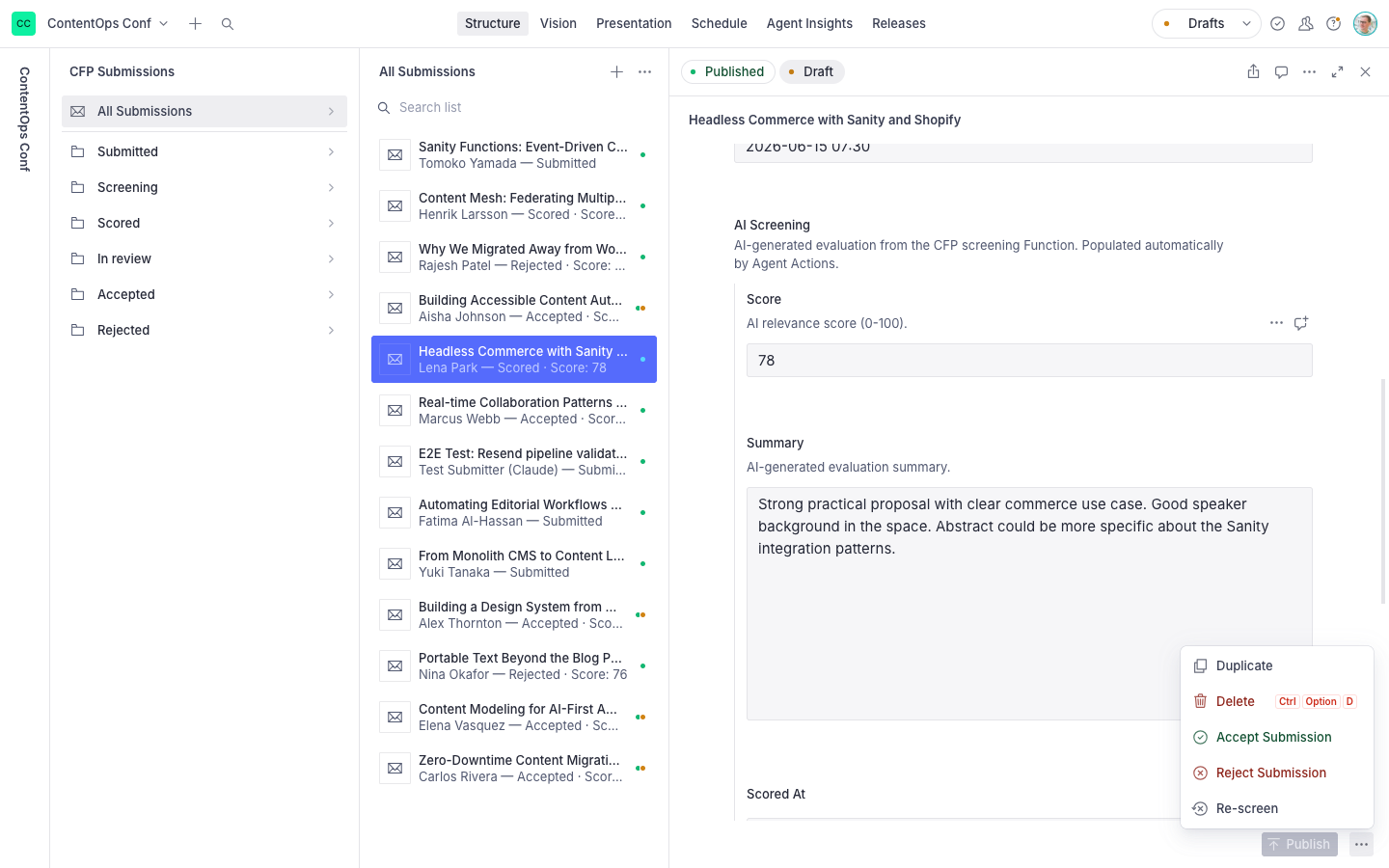
When a reviewer clicks accept, the action performs a one-way transform: it creates a person document for the speaker, a personInternal document with a deterministic ID for the private data (email, travel status, notes), and a session document with the speaker referenced, then patches the submission to accepted. The spreadsheet-era retyping (speaker name into the website, again into the schedule) is gone because the website and the schedule builder read the same documents the action created.
A rejection is smaller, and the comment explains why:
await client.patch(id).set({status: 'rejected'}).commit()
// The send-status-email function handles sending the rejection email
Each trigger in the pipeline is a GROQ filter in sanity.blueprint.ts, which means that things happen only when certain content fields change. The whole event architecture reads like a config file, here is how you define the screening trigger:
defineDocumentFunction({
  name: 'screen-cfp',
  src: './apps/functions/screen-cfp',
  event: {
    on: ['create'],
    filter: '_type == "submission" && status == "submitted"',
    projection:
      '{_id, sessionTitle, sessionType, abstract, level, topics, submitterName, submitterEmail, bio, status, conference}',
    resource: {type: 'dataset', id: 'yjorde43.production'},
  },
  timeout: 60,
}),
The status-change email uses delta::changedAny(status), and the re-screen escape hatch fires only when a reviewer sets a submission back to screening: delta::changedAny(status) && after().status == "screening". The email Function maps status to a template trigger, fetches the matching emailTemplate document (
Speaker submits form (honeypot + validation, /api/cfp/submit)
  → submission document created (status: submitted)
    → screen-cfp Function: Agent API scores it (noWrite, validate, clamp)
        → status: scored, aiScreening populated
    → send-cfp-confirmation Function: confirmation email
  → Reviewer opens Studio, queue sorted by score
    → Accept action: creates person + personInternal + session
        → status: accepted
    → send-status-email Function: acceptance email from a Portable Text template
  → Website, schedule builder, and signage read the new session
  → Telegram attendee agent can answer questions about it
The submission document is the only state machine, so there's no sync between tools to break. Structured fields make the AI screening reliable (it evaluates abstract and bio, not a PDF attachment). And because accepted content lands as ordinary person and session documents, everything downstream is already wired to it. The loop from "stranger fills in a form" to "their face is on the hallway TV" crosses one dataset.
The CFP is one workflow of several on the same lake. Publish an announcement document and two Functions fan it out to email subscribers and a Telegram channel, with per-channel delivery tracking written back to the document, and an optional takeover on every venue screen.
The
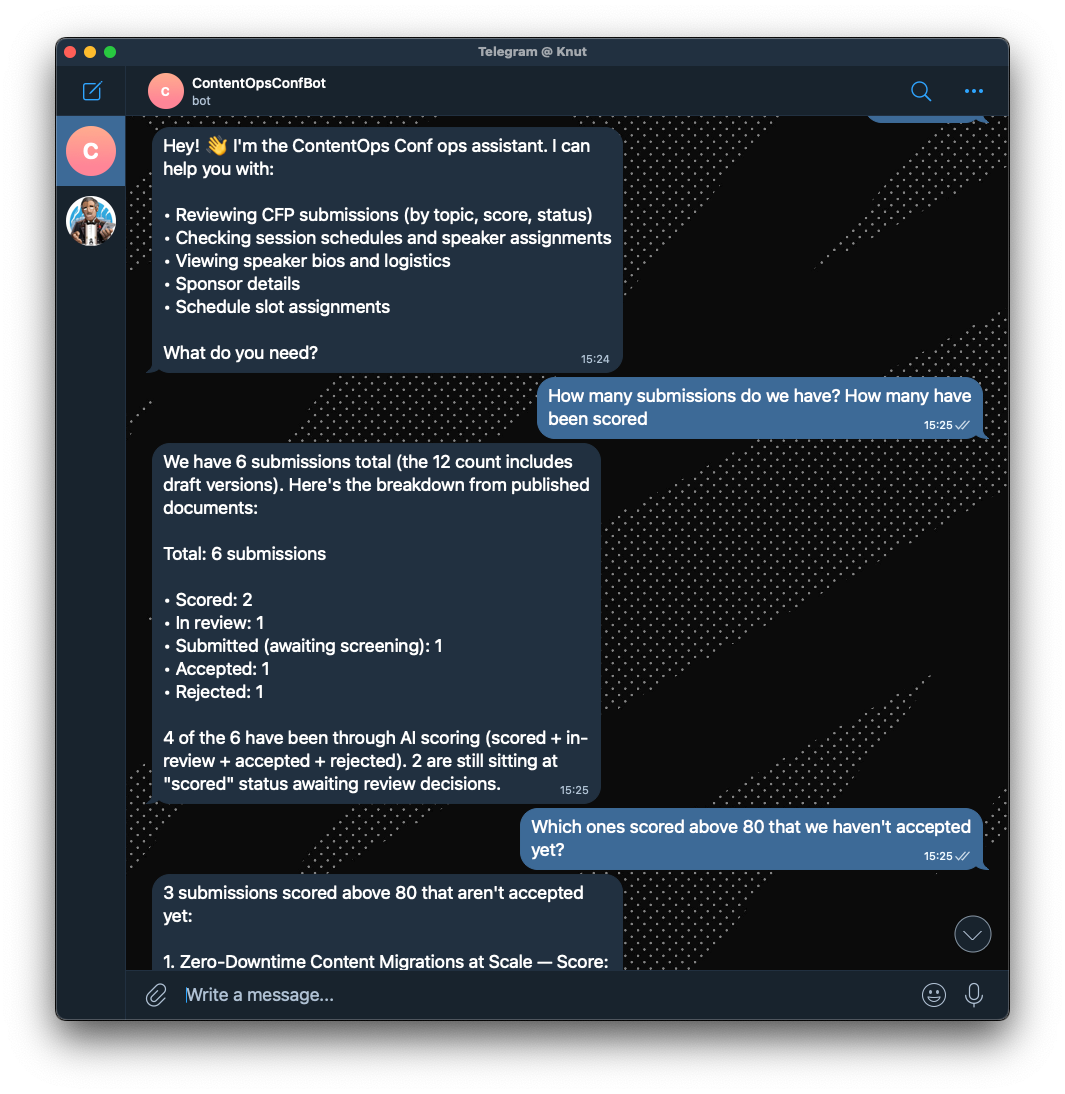
Attendees who message the same bot get the conference concierge: An agent with read-only access through Sanity Context, answering "when is the
One allowlist check in apps/bot/src/bot.ts decides which agent you're talking to, and the allowlist itself is content (the conference document's organizer list, joined to Telegram IDs):
if (await isAllowedOrganizer(userId)) {
  console.log(`[mention] organizer — routing to ops handler`)
  await handleOpsMessage(thread, message)
} else {
  console.log(`[mention] attendee — routing to attendee handler`)
  await handleAttendeeMessage(thread, message)
}
The ops agent's permissions are GROQ filters in apps/bot/src/ai/content-agent.ts, meaning that you can define what content types should be editable via the agent:
return contentAgent.agent(threadId, {
  application: { key: config.sanityAppKey },
  config: {
    instruction: systemPrompt,
    capabilities: { read: true, write: true },
    filter: {
      read: '_type in ["session", "person", "track", "venue", "room", "scheduleSlot", "submission", "conference", "announcement", "sponsor", "prompt"]',
      write:
        '_type in ["session", "person", "track", "venue", "room", "scheduleSlot", "submission", "conference", "announcement", "sponsor"]',
    },
  },
});
The two filters differ by one type: the agent can read the prompt documents that steer it, but can't edit them. Neither filter includes personInternal, so the agent can't touch (or even read) the documents holding speaker emails and travel notes. (Add the type to the array if you want the agent to reach it.)
The ops agent does more than lookups. Content Agent drafts documents, and the API has a web search toggle, so sponsor intake becomes a hallway message:
ACME said yes to gold tier. Find their company info on the
web and set up the sponsor doc for my review.
This prompt makes the agent research the company, draft a sponsor document on the gold tier, and then tell you to review it. The organizer reads the draft, fixes what the web might have gotten wrong, and publishes; it’s up on the website, and the sponsor reel on the venue screens picks it up from there.
Telegram is used as an adapter in this example because it’s easy to add bots to the platform, but it isn’t the required architecture. The bot is built on the Chat SDK, which also speaks Slack, Teams, Google Chat, Discord, GitHub, and Linear; the agents and their filters carry over unchanged. You can turn on several platforms at once, including an embedded chatbot on your event website.
The concierge's boundary sits lower in the stack. It connects to Sanity Context's MCP endpoint with a Viewer-role token, so the API enforces read-only no matter what the model decides.
Both agents come with full build walkthroughs: the organizer agent and the attendee concierge.
Clone the repository to your local environment and run it:
git clone https://github.com/sanity-labs/conference-starter
cd conference-starter
pnpm install
cp apps/web/.env.example apps/web/.env.local
cp apps/studio/.env.example apps/studio/.env.local
cp apps/bot/.env.example apps/bot/.env
pnpm tsx scripts/seed-prompts.ts   # prompts, email templates, sample submissions
pnpm dev
Deploy the Functions with pnpm blueprints:deploy, then submit a test proposal and watch it come back scored. The seeded submissions carry hand-written demo scores so the Studio looks alive before the Functions are deployed; a fresh submission is how you see the model score for real.
The Generate action, Functions, and Sanity Context each have reference docs.
Already have a Sanity project? Don't read the monorepo yourself. Point a coding agent at the repo, describe what you need, and tell it to treat the code as patterns:
Read github.com/sanity-labs/conference-starter. I want CFP screening
like theirs in my existing Sanity project: prompt as a document,
noWrite scoring, human accept and reject actions. Adapt it to my schema.
The repo is built for this. It ships a CLAUDE.md and agent skills (create-agent-with-sanity-context, telegram-ops-bot, chat-sdk), so the agent finds the conventions without you narrating them. And the pieces stand alone (the prompt-as-document convention, the noWrite screening Function, the status-gated document actions), so ask for the one workflow you need, not the whole conference. If you'd rather lift code by hand, start with apps/functions/screen-cfp and apps/studio/actions.
Digital signage is a signageDisplay document type driving full-bleed TV routes with six display kinds, updated in seconds via live queries when the schedule changes. A scheduled Function classifies bot conversations every 10 minutes, so organizers see what attendees actually ask about and where the content gaps are. And a
There's also a custom scheduler app for dragging and dropping sessions across multi-track, multi-room events inside Studio, and editable speaker email templates with dynamic placeholders, with an example integration using Resend.
This guide is part of AI Content Operations, a series on building AI-powered content workflows with Sanity.
- AI Translations: store glossaries and style guides in Sanity, feed them to the Agent API at translation time
- An AI shopping assistant that actually checks inventory: structured catalog access for agents via Sanity Context
- Content Audits: automated content quality checks using the Agent API
- Automated email marketing: campaign emails from structured content