Live preview definition
Live preview is an editing capability that renders draft content changes in the actual frontend of a website or app, updating in real time as the editor types, so the editor sees exactly how a change will look before it goes live.
Live preview shows an editor's draft changes in the real website or app, using the same code, components, and styling, and updates that view as they type. They do not need to save, rebuild, or refresh. It works by fetching content in a draft-aware mode and keeping the page current over a real-time channel. In Sanity, the Presentation Tool loads your frontend inside the Studio, queries the Content Lake with the drafts perspective, and sends updated query results to the page as fields change.
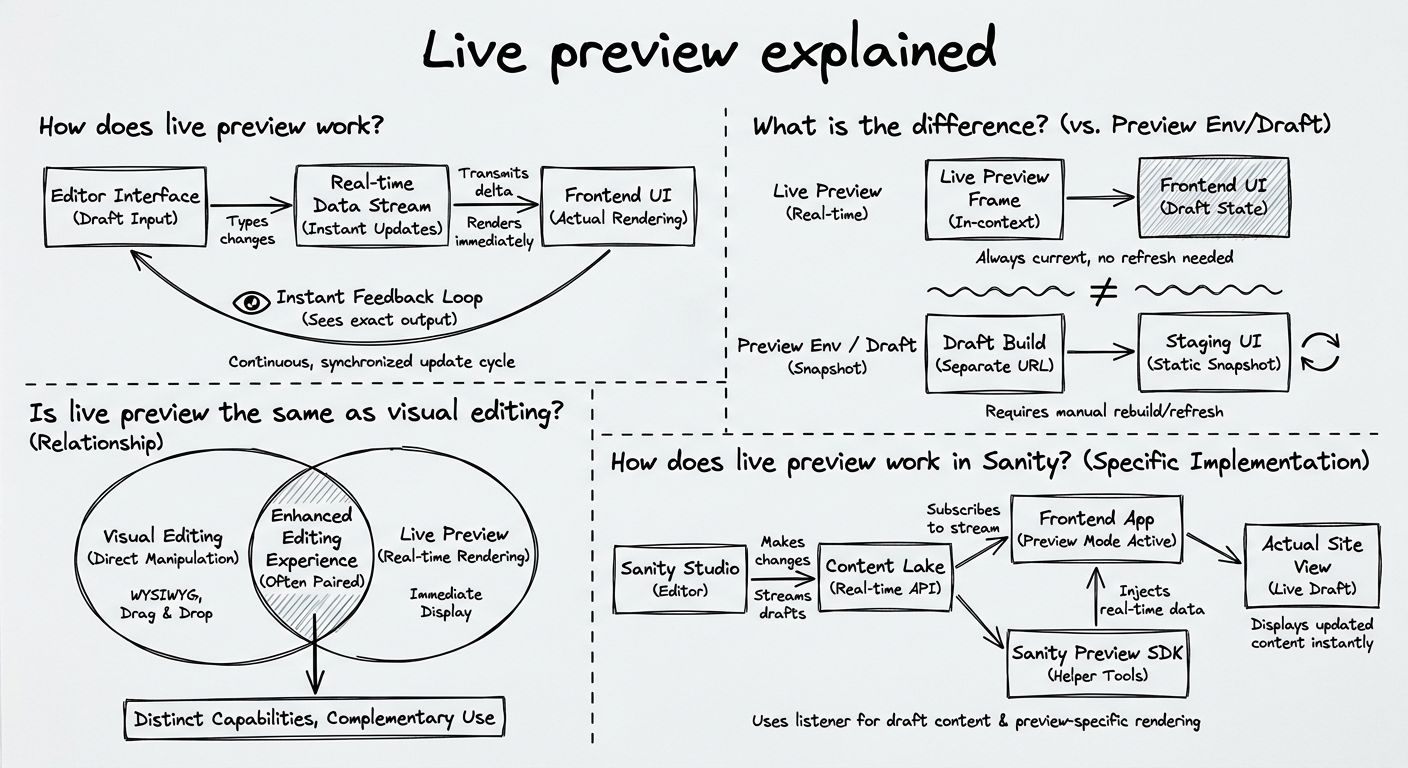
Live preview works by combining three pieces: draft-aware queries, a real-time update channel, and integration with the frontend framework. A draft-aware query asks the content backend for the latest draft of each document. A normal production query asks only for published content.
A typical live preview runs in four steps. First, the editing interface loads the real frontend in a preview pane, usually an iframe (a web page embedded inside another page). Second, the frontend switches into a draft mode, so it fetches draft content and bypasses the caches that serve production traffic. Third, when the editor changes a field, the editing interface or the content backend sends a change signal to the frontend. In the browser, this signal is often a postMessage event, the standard way two windows talk to each other. Fourth, the frontend re-fetches or receives the affected data and re-renders only what changed.
The framework integration matters because each framework handles caching and rendering differently. For example, Next.js Draft Mode sets a cookie that bypasses pre-rendered and cached content and serves responses with no-store cache headers, so the page reflects the latest draft.
Live preview shows content edits as they happen, not after a save and reload. A preview environment tests code changes, and a static draft preview shows drafts only after a save and reload.
A preview environment, also called a preview deployment, is a separate deployment of a site's code, usually created for each git branch or pull request. As Vercel's documentation puts it, preview environments let you "deploy and test changes in a live setting, without affecting your production site." A preview environment previews code, not content edits. It can host a live preview, but it is not one.
A static draft preview is the familiar Preview button. The editor clicks it, a new tab opens a draft-aware render of the page, and new changes appear only after the editor saves and reloads. A static draft preview supplies the draft-aware fetching half of live preview without the real-time half.
A WYSIWYG preview is different again. It shows formatting inside the editor's own text field, not in the real frontend, so it does not show how a change affects layout, navigation, or other components.
Live preview and visual editing are related but separate. Live preview is about seeing changes. Visual editing is about getting from the page to the field that produced it.
Visual editing, sometimes called click-to-edit, draws an interactive overlay on top of the preview. The editor clicks a headline or image on the rendered page and jumps straight to the field that controls it. Sanity's documentation describes the two as separate layers, where overlays "handle click-to-edit while live mode handles data updates."
The two often ship together, because an editor who can see a change also wants to fix it in place. A team can still run live preview without overlays, or add overlays to a preview that updates only on reload.
Live preview in Sanity runs through the Presentation Tool and Visual Editing on top of the Content Lake, using two update paths. Sanity is the AI Content Operating System, and its preview stack uses the same query layer that serves production. One GROQ query returns draft content when you pass the drafts perspective and returns live content when you pass the published perspective.
The first path is live mode inside the Presentation Tool. When an editor changes a field, the Presentation Tool detects the change and sends updated query results to the frontend over postMessage, and the frontend re-renders. This is the fastest path because the Studio already holds the results.
The second path uses the Live Content API, a real-time delivery API. When content is saved or published, the Content Lake emits sync tags for the affected queries, and the frontend re-fetches only those queries. This path works inside and outside the Presentation Tool.
A few dated technical details help when setting it up. The Live Content API is available on all plans, including free, and requires API version v2021-03-25 or later. Event replay is kept for 15 minutes on the Free and Growth plans. Since API version 2025-02-19, the default perspective is published, so preview code has to ask for drafts explicitly. Drafts queries are not cached in the CDN, so preview clients should turn the CDN off. For click-to-edit,
Sanity publishes Visual Editing quickstarts, including live preview, for Next.js (both the App Router and the Pages Router),
Framework libraries such as next-sanity, @nuxtjs/sanity, and @sanity/
Unlock New Possibilities with Sanity
With live preview under your belt, it's time to see what Sanity can do for you. Explore our features and tools to take your content to the next level.
Last updated: