Last updated August 01, 2025
Updating/Rotating your SSO certificate safely
By Tim Naughton
How to safely, securely, update your identity provider's (Idp) signing certificate within Sanity. During this process, it's a good idea to keep two windows side by side:
- One with Sanity Manage.
- The other with the configuration settings of the IdP.
Pre-requisites and setup
Permissions
You will need to be an admin on both the project and organization within Sanity. You will also need access to your update cert in the Idp
Ensure you have a non-SSO admin account for backup access to your org. This is especially important if your SSO configuration fails. Otherwise, you’ll need to contact Sanity support.
Swap out the signing certificate
Go to your Idp. Copy the current certificate in case you need to revert. (Make sure you have another admin account that can log in with email/password instead of SSO before rotating! Or you will be locked out). You can now rotate the signing certificate in your Idp.
In your Sanity SSO settings, scroll down to your X.509 certificate. Copy the current certificate and save somewhere in case you need to revert.
Remove the current certificate and copy in the new certificate from your Idp.
Click Save.
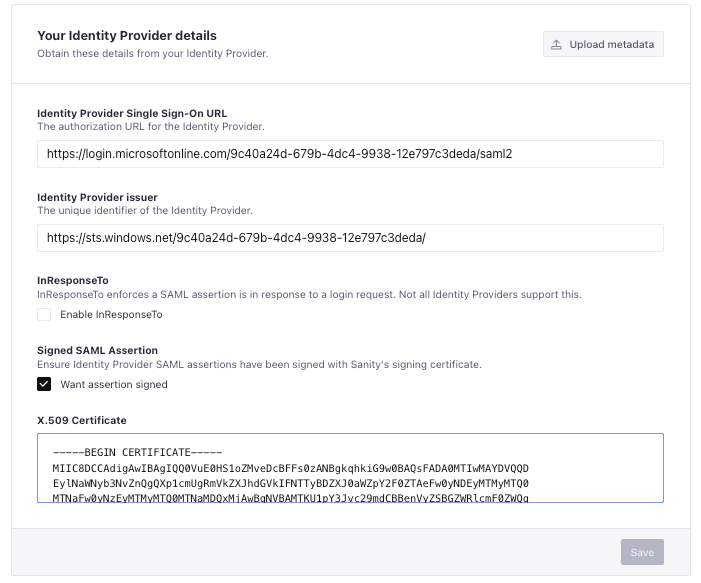
Your certificate is now updated. You should now be able to log out and log back in with SSO.
Sanity – The Content Operating System that ends your CMS nightmares
Sanity replaces rigid content systems with a developer-first operating system. Define schemas in TypeScript, customize the editor with React, and deliver content anywhere with GROQ. Your team ships in minutes while you focus on building features, not maintaining infrastructure.
Sanity scales from weekend projects to enterprise needs and is used by companies like Puma, AT&T, Burger King, Tata, and Figma.