A RAG starter for a Knowledge-base agent backed by Sanity Content Lake
If you've already built RAG once, most of what follows will be familiar. The part you haven't seen is what happens when the retrieval layer knows about your content model.

Jarod Reyes
Head of Developer Experience & Community at Sanity
Published:
What the standard RAG stack costs you
The popular Vercel AI SDK RAG template ships a working chatbot on top of Postgres, Drizzle, and pgvector. It works. Once you understand the flow, you own it: a Postgres instance, a schema, embedding generation on write, chunking policy, a vector column, and an ingestion path from wherever your content actually lives.
That's fine for a demo. In production, it's more surface than most teams want. Every time an editor updates an article, something has to re-chunk, re-embed, and upsert. When the content model changes, the chunking policy changes with it. If your content lives in a CMS already, you now have two systems of record: the CMS is where humans edit, and the vector store is where the agent reads. Drift is automatic.
This template swaps Postgres for Sanity Content Lake. Content stays in one place. Embeddings and retrieval come from Sanity Context. The chat route stays a thin Vercel AI SDK handler.
What Sanity Context replaces
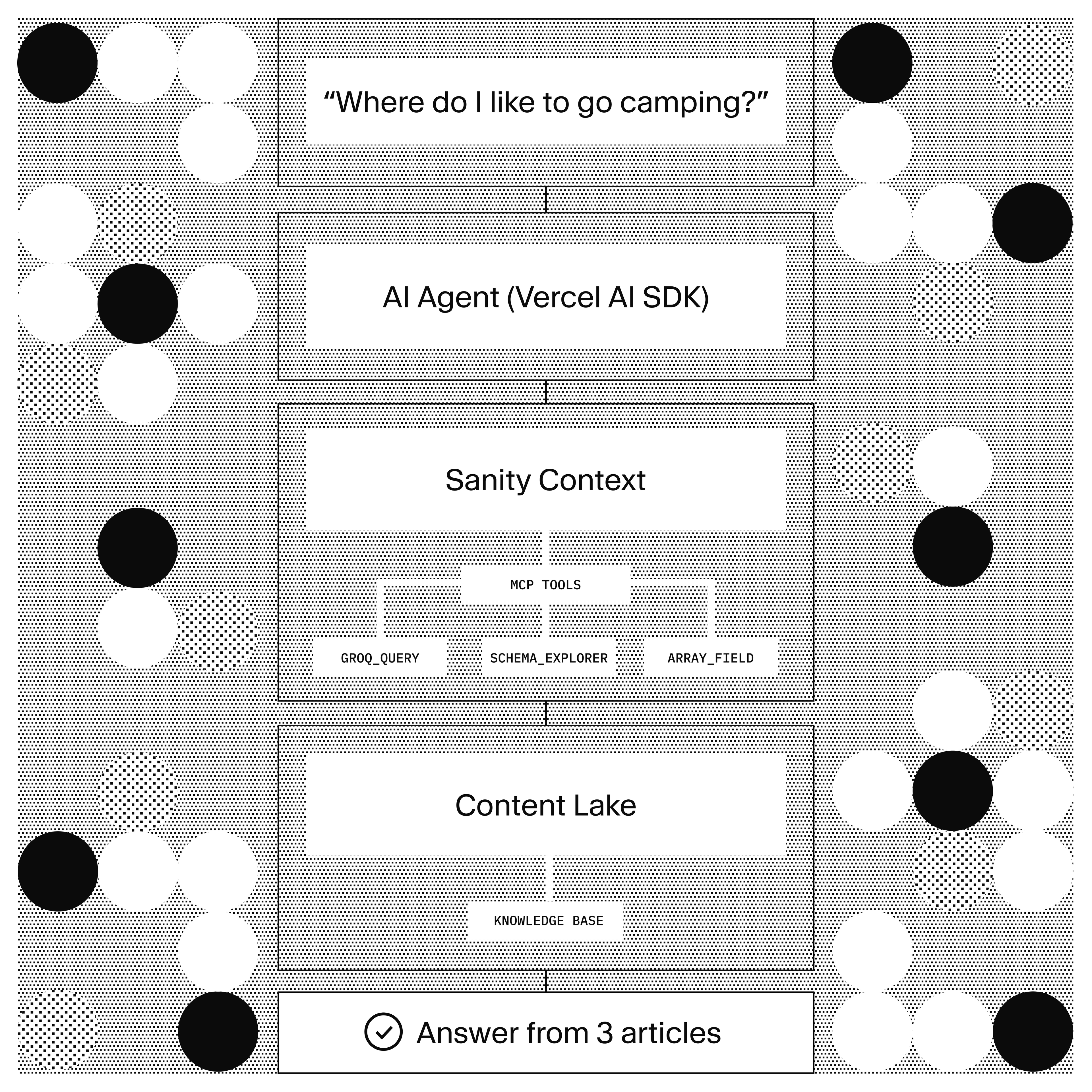
Sanity Context is a hosted MCP endpoint that gives an agent-scoped, schema-aware access to a Sanity dataset. In this template, it does three things:
groq_queryruns GROQ against the dataset, filtered by whatevergroqFilteryou set on the Sanity Context document. Semantic search usestext::semanticSimilarity()inside the query, so it is one call, not a two-step retrieve-then-fetch.schema_explorerandarray_field_readerlet the agent understand the shape of the data it is querying. The agent knows aknowledgeArticlehas abodyfield and what types are valid, without being told in the system prompt.- Instructions live on the Sanity Context document. Update how the agent should query and format results in Studio and republish. No redeploy.
The dataset embeddings feature does the vector generation. Enable it on the dataset once. Sanity keeps them current on publish. No ingestion pipeline, no chunking policy to maintain, no reindex job.
Architecture
The chat route is a standard AI SDK streamText handler. The MCP client from @ai-sdk/mcp connects to the Sanity Context endpoint and exposes the three retrieval tools to the model. A custom addResource tool lets the user teach the bot something new; that write path bypasses Sanity Context (which is read-only) and goes through the write client directly.
The chat route
The full chat handler is about 40 lines. The MCP tools attach to streamText:
// frontend/app/api/chat/route.ts
import { streamText } from 'ai'
import { openai } from '@ai-sdk/openai'
import { experimental_createMCPClient as createMCPClient } from 'ai'
import { getSanityContextTools, getInitialContext } from '@/lib/sanity/context'
import { addResource } from '@/lib/tools/add-resource'

export async function POST(req: Request) {
  const { messages } = await req.json()
  const initialContext = await getInitialContext()
  const contextTools = await getSanityContextTools()

  const result = streamText({
    model: openai('gpt-4o'),
    system: `You are a helpful assistant grounded in the provided knowledge base.
${initialContext}`,
    messages,
    tools: {
      ...contextTools,
      addResource
    },
    experimental_telemetry: { isEnabled: true }
  })

  return result.toDataStreamResponse()
}
Two things worth noting. First, getInitialContext() fetches the Sanity Context document once at the start of each conversation and injects its instructions into the system prompt. That saves the model a tool call and gives it upfront orientation on what it can and cannot do. Second, experimental_telemetry enables conversation insights, which write each exchange back to Sanity for later review (more on that below).
Configuring what the agent sees
The Sanity Context document (sanity.agentContext) has two fields that shape agent behavior at runtime.
groqFilter scopes what the agent can see. In this template it's a single line:
_type == "knowledgeArticle"
That's the boundary. The agent can query and read knowledgeArticle documents. It can't read anything else in the dataset. Change the filter, republish the document, and the boundary moves.
instructions is a Portable Text block on the document. Sanity Context injects it into the tool descriptions and into the initial-context response. The seed instructions cover query patterns:
Usegroq_queryfor retrieval. For semantic search, use| score(text::semanticSimilarity("body", $query)) | order(_score desc). Always project the fields you need explicitly; do not...the whole document.
Update the instructions in Studio when the agent misbehaves. No code deploy. No prompt engineering ceremony.
The write path
Sanity Context is read-only by design. If the agent needs to write, that write goes through your own tool. The template includes one: addResource, which creates a new knowledgeArticle from a natural-language input.
// frontend/lib/tools/add-resource.ts
import { tool } from 'ai'
import { z } from 'zod'
import { writeClient } from '@/lib/sanity/client'

export const addResource = tool({
  description: 'Store a new piece of information the user wants to remember.',
  parameters: z.object({
    content: z.string(),
    title: z.string().optional()
  }),
  execute: async ({ content, title }) => {
    const doc = await writeClient.create({
      _type: 'knowledgeArticle',
      title: title ?? content.slice(0, 60),
      body: [{ _type: 'block', children: [{ _type: 'span', text: content }] }]
    })
    return { id: doc._id, title: doc.title }
  }
})
The write client uses SANITY_API_WRITE_TOKEN. It's server-side and never reaches the browser. After the write, embeddings reindex on their own. Within a minute the new document is retrievable through the same MCP query path.
The write tool is a template starting point. In production you'd add validation, rate limiting, and probably an auth layer that ties the write to a specific user or workspace.
Conversation insights
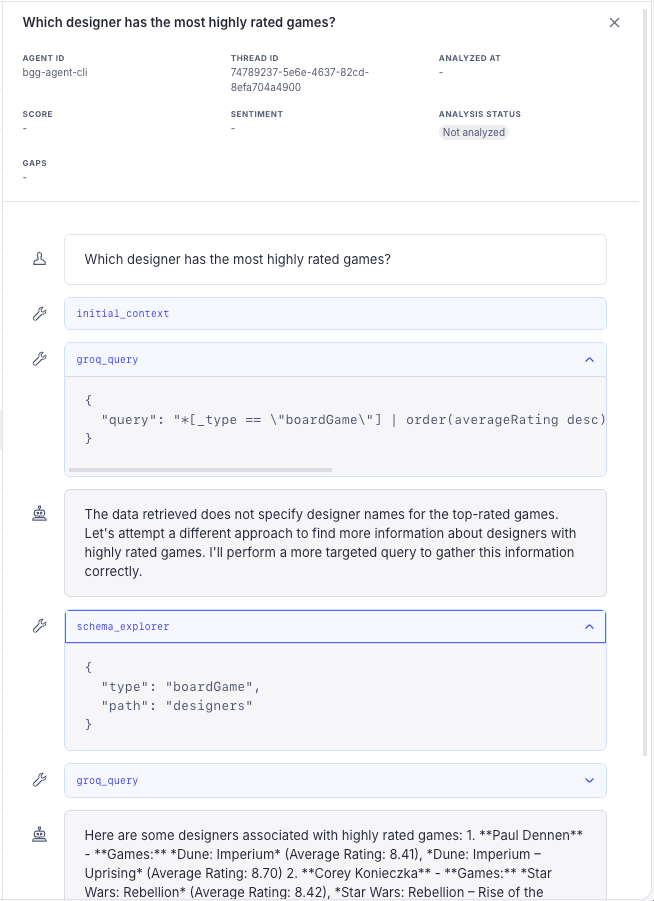
@sanity/context/ai-sdk provides an experimental_telemetry hook that captures each conversation, the tool calls the agent made, and the retrieval results. Each exchange lands as a document in Sanity, which you can query for evaluation or replay.
This is the underrated part of running RAG in your CMS. Traditional RAG stacks emit telemetry to an analytics tool. Conversations end up in one system, content lives in another, and closing the loop between "the agent gave a bad answer" and "the source document was wrong" takes a JOIN across two vendors. When both live in the same dataset, that JOIN is a GROQ query.
To turn insights off:
// studio/sanity.config.ts
contextPlugin({ insights: { enabled: false } })
Off by default is a legitimate choice for privacy-sensitive workloads. The template ships with insights on so you can see the pattern.
Try it
git clone https://github.com/sanity-labs/ai-sdk-sanity-rag.git
cd ai-sdk-sanity-rag
pnpm install

cp studio/.env.example studio/.env
cp frontend/.env.example frontend/.env.local
# Fill in Sanity project ID + dataset in both files
# Add SANITY_API_READ_TOKEN, SANITY_API_WRITE_TOKEN, AI_GATEWAY_API_KEY to frontend/.env.local

pnpm --filter studio exec sanity login
pnpm bootstrap
pnpm dev
pnpm bootstrap deploys the schema, seeds a small knowledge base, and enables dataset embeddings on the dataset. Embeddings can take a few minutes on first run. Check status with:
pnpm --filter studio exec sanity datasets embeddings status <your-dataset>
Chat UI runs at localhost:3000. Studio runs at localhost:3333. Ask the seeded questions (favorite coffee order, deploy checklist, weekend hikes) to confirm retrieval works. Then teach the bot something new ("my dog's name is Pixel and he loves tennis balls") and, once embeddings finish, ask about it.
The template is at sanity-labs/ai-sdk-sanity-rag.
Deploy
The frontend directory is the Vercel project. Set the root directory to frontend when creating the Vercel project and populate the same env vars as your local .env.local, minus SANITY_STUDIO_* (those are for the Studio workspace, not the app).
https://vercel.com/new/clone?repository-url=https://github.com/sanity-labs/ai-sdk-sanity-rag&root-directory=frontend
The chat route is open by default so the local demo works out of the box. Before you deploy this publicly, add authentication and rate limiting. Without them, anyone who calls /api/chat can spend AI Gateway credits and use the write token through the addResource tool.
Studio deploys separately with pnpm --filter studio deploy.
Where this goes next
Swap the model. The template uses openai/gpt-4o through Vercel's AI Gateway, so switching to Claude, Gemini, or a self-hosted model is a one-line change in the model parameter of streamText. Nothing about the retrieval layer changes.
Add more Sanity Context documents. The template ships one, scoped to knowledgeArticle. You can add a second one scoped to a different set of types and wire two chat routes against two contexts, which is the pattern the Knowledge Base article covers in more depth. That is the natural next step if you have separate external-facing and internal-facing content.
Add more tools. The MCP client only surfaces the retrieval side of Sanity Context. Everything else (agent write actions, calls to external APIs, custom business logic) attaches through the tools object on streamText, next to addResource. Vercel AI SDK's tool interface is the same shape whether the tool lives in your codebase or a third-party service.