Build grounded support agents using Sanity Knowledge Bases
- —Know where to look. Content is organized for retrieval that's faster and cheaper.
- —Knowledge Bases are a single source of facts. Facts from Sanity content, PDFs, and other sites land in one place.
- —Stop editorial drift. One page says 30-day returns, another says 45. Sanity flags it, you pick.

Jarod Reyes
Head of Developer Experience & Community at Sanity
Published:
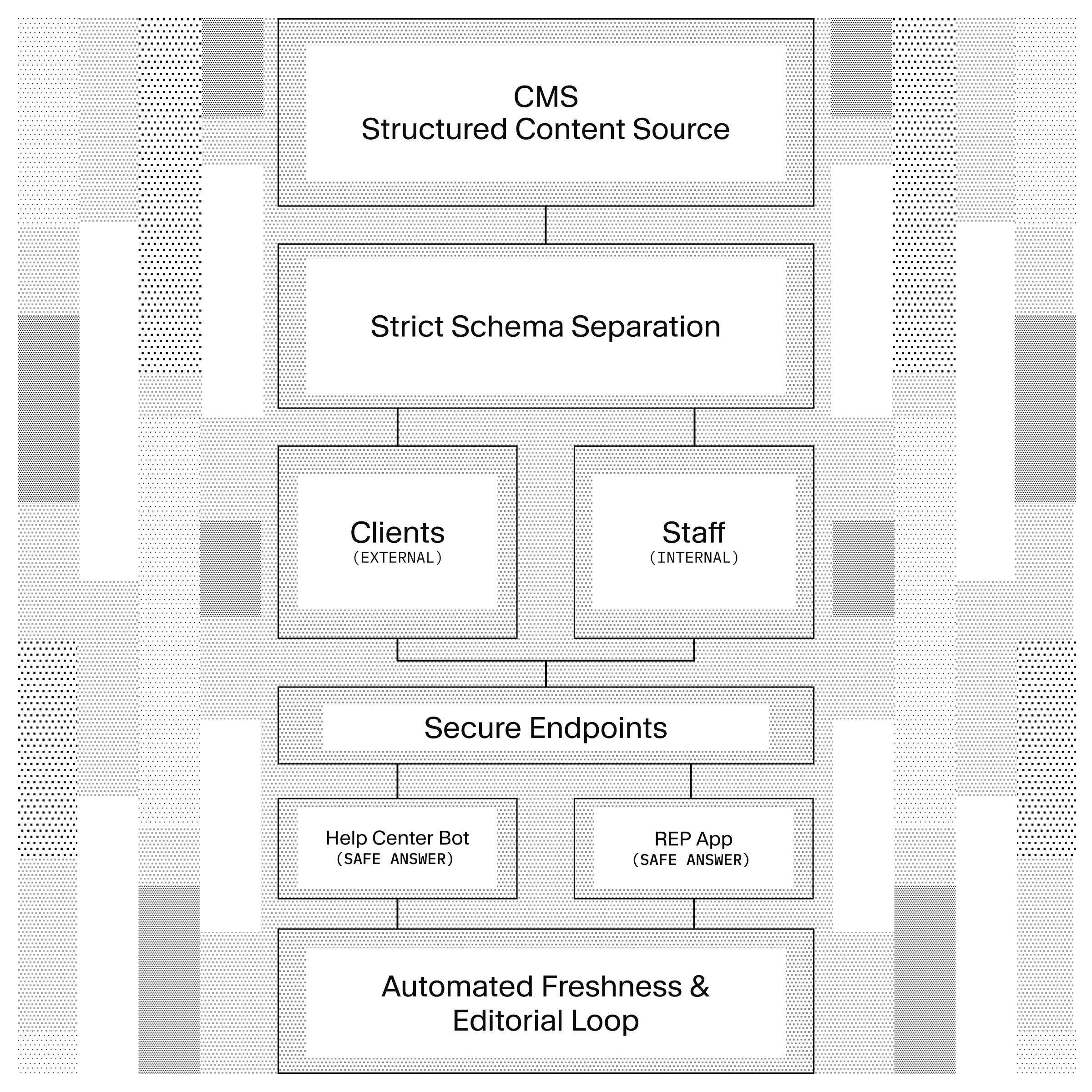
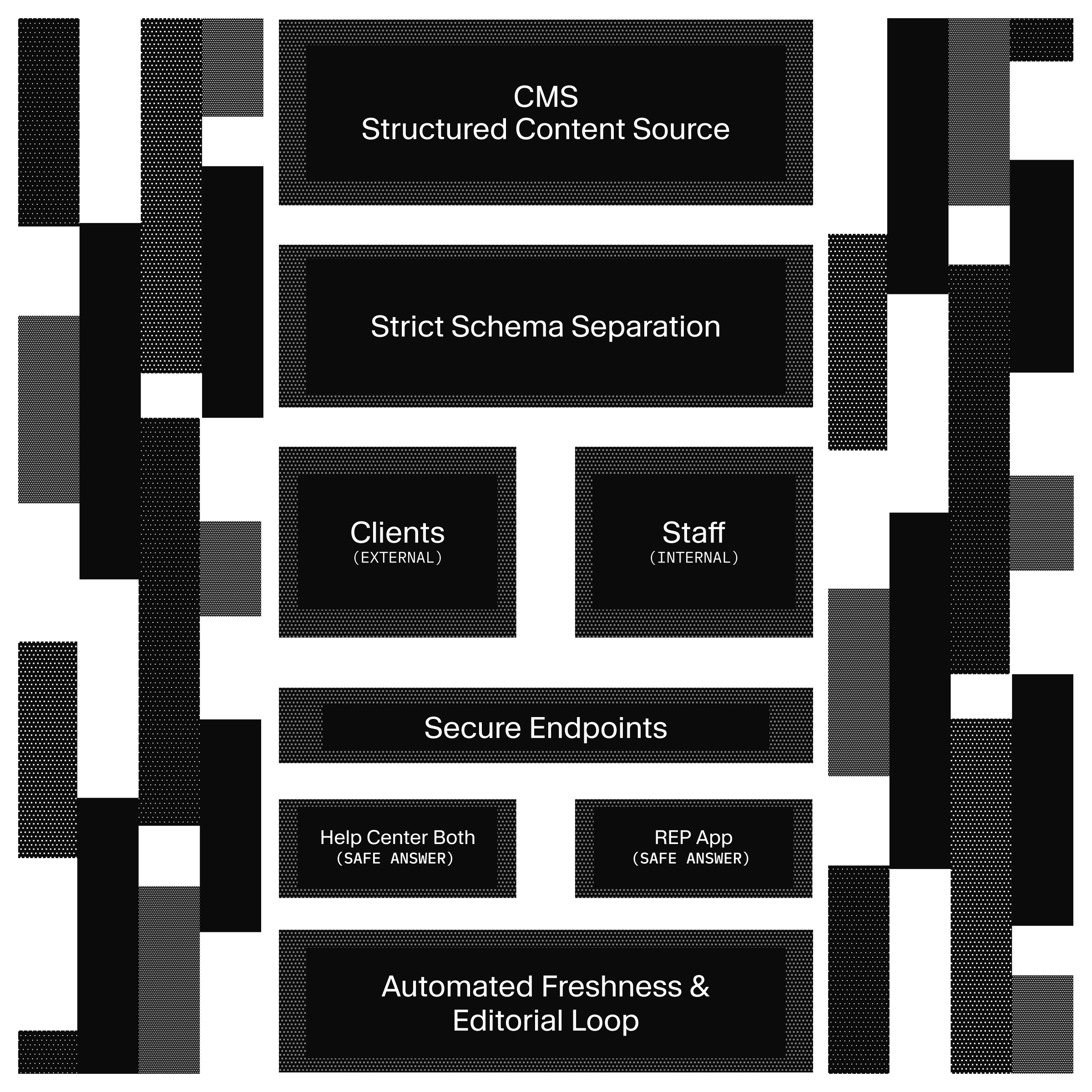
It's a Tuesday morning and your boss's boss just asked you to build a support agent. She has her reasons: it'll speed up response times, improve your customers' experience, and bring the company into the modern era.
The problem is that the knowledge this agent needs is scattered everywhere. There's an old corner of your website with some FAQs, a Google Drive folder full of new policy PDFs, and products that change daily. The agent has to know where to look, and it has to know what to do when those sources disagree.
Sanity built
Knowledge Bases was built to solve for a few common problems, specifically Knowledge Bases…
- Know where to look. Content is organized for retrieval that's faster and cheaper.
- Are a single source of facts. Facts from Sanity content, PDFs, and other sites land in one place.
- Stop editorial drift. One page says 30-day returns, another says 45. Sanity flags it, you pick.
For high-risk knowledge, this product moves the work of conflict resolution, traceability, staleness and truthiness to the ingest process. Point it at your content, wherever it lives: your Sanity dataset, a website you don't manage in Sanity, uploaded PDFs and exports. Knowledge in all of these places then gets built to the Knowledge Base and will stay forever linked to the source.
As far as cost, the hard work happens at ingest. The agent starts each conversation with an index of everything in the Knowledge Base, so it can go and grab the right answer instead of spelunking for clues.
Most importantly, this knowledge layer is managed by you and your team. It sits behind an MCP endpoint inside your own stack, meaning your own people can manage the sources alongside the content they already see every day.
A Knowledge Base is a collection of pre-built entries. You give it a purpose (one or two sentences describing the audience and the job) and then attach your sources. Then from within your Sanity Dashboard (no export needed) the build produces three things: outlines, entries and issues.
Knowledge Base
├─ purpose                    # steers the build; agents read it first
├─ sources: dataset | website | files[]
├─ outline                    # slash-path index, part of the system-prompt
├─ entries                    # short Markdown fact sheets, source-cited
└─ issues → resolve → instructions
The outline is a table of contents small enough for the agent to hold in context from the first message. The entries are behind-the-scenes
Conversely questions about your
Beacon, our fictional SaaS company, gets a public help center and two chat agents, each answering from its own Knowledge Base:
Beacon help center (Next.js)
├─ /chat (support agent)
│  ├─ beacon-support-kb  → KB: help articles + customer PDFs
│  └─ beacon-catalog     → GROQ: products, FAQs
└─ /internal (ops agent)
   ├─ beacon-ops-kb      → KB: runbooks + Confluence exports
   └─ beacon-ops         → GROQ: policies, catalog
Because we have an internal and external chat bot we needed two agents and two Knowledge Bases. The customer chat agent combines a dataset source (published help articles) with uploaded PDFs, a common pattern where some knowledge lives in Sanity and some lives in Google Drive, Dropbox and random help articles around the website. The internal ops Knowledge Base is built entirely from uploaded files, Confluence-style Markdown and runbooks (more PDFs), a case where none of the internal support knowledge ever lived in Sanity. Shoutout to all of you hold-outs who yelled "I will never migrate my runbooks into a CMS first!", we built this for you.
By creating separate endpoints we are handling audience scoping from the start. The internal agent can read SEV-1 runbooks because its endpoint serves the ops Knowledge Base, and the customer agent can't because its endpoint doesn't.
This is a demo only, be careful when hosting publicly. Both chat routes are unauthenticated demos so host at your own peril (also see the README for more instructions). The internal ops surface is fictional Beacon content, isn’t gated, and either route spends your Anthropic quota. If you intend to point the internal endpoints at real internal sources, make sure to add proper authentication before you deploy.
Installing the template is straightforward but like always there is some setup you need to do inside your Sanity dashboard. Knowledge Bases and their endpoints are authored in the Context app so you’ll need to create them there.
pnpm create sanity@latest --template sanity-labs/starters/knowledge-base
cd knowledge-base && pnpm install && pnpm bootstrap
pnpm dev
The bootstrap script prompts for an Anthropic API key and an org-level token with Context Viewer permissions (created under Manage → API → Tokens), then deploys the blueprint and schema, makes the dataset private, enables Dataset Embeddings, imports the Beacon seed with policy review dates relative to today, and mints a project Viewer token for help-center reads. Studio runs at localhost:3333, the help center at localhost:3000.
You don't need all four endpoints before trying chat. Each route can run with whichever of its two MCP URLs is set, so create beacon-catalog first (which is just a GROQ query on the seeded documents) and /chat answers catalog questions while your first Knowledge Base builds.
In the Context app, create two Knowledge Bases.
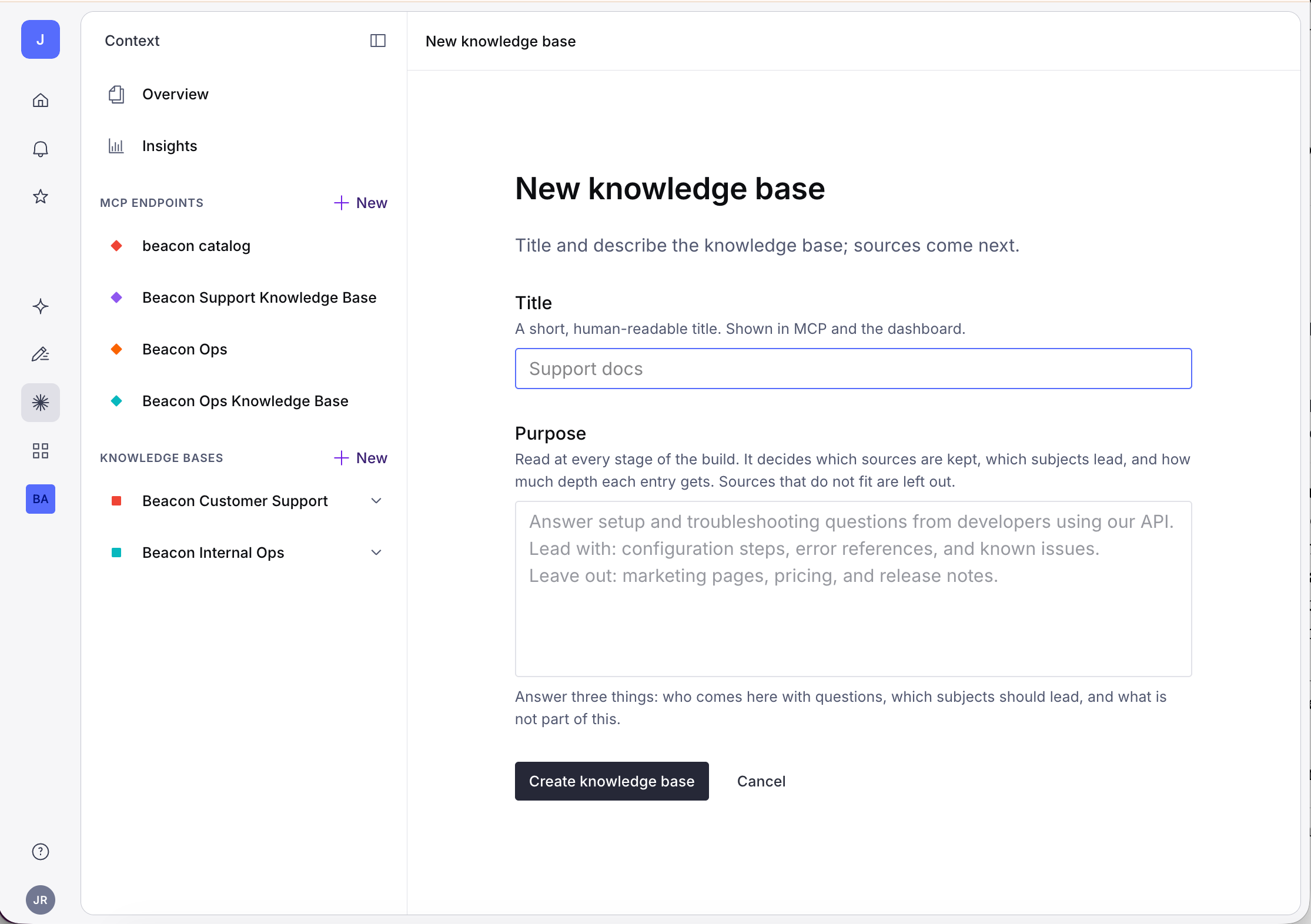
Everything you'll paste (purpose text, source queries, file lists, endpoint instructions) is included in the starter. You can find them in the context/ directory. For your own Knowledge Base be sure to spend the time to write real purposes; the purpose steers the outline, decides which entries the build tags as core, and is the first thing agents read. "Beacon docs" produces a worse index than what's in context/knowledge-bases/ so feel free to start with what's there.
Beacon Customer Support
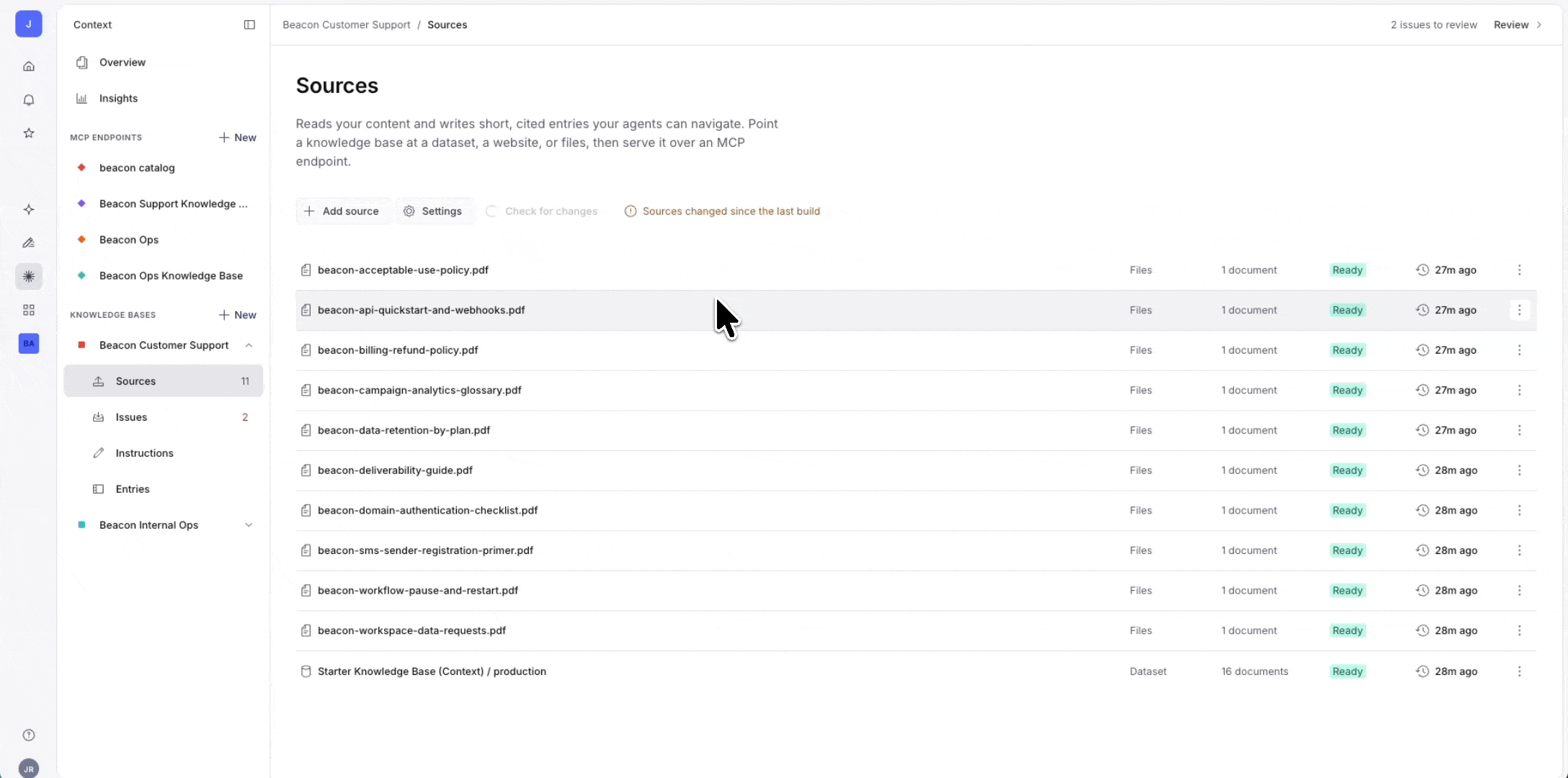
The external Knowledge Base takes two sources: this project's dataset, with a query that selects published help articles, and the 10 PDFs in studio/seed/files/customer/, one of which disagrees with the articles about the refund window on purpose. The dataset source takes a full GROQ query, and the starter's query dereferences its references so the build sees topic titles instead of _ref ids:
*[_type == "helpArticle" && status == "published"]{
  title,
  summary,
  "content": pt::text(content),
  audience,
  "products": products[]->title,
  "topics": topics[]->title
}
Beacon Internal Ops
Upload the 12 PDFs in studio/seed/files/internal/. No dataset source here; structured policy records are served live through the ops GROQ endpoint instead.
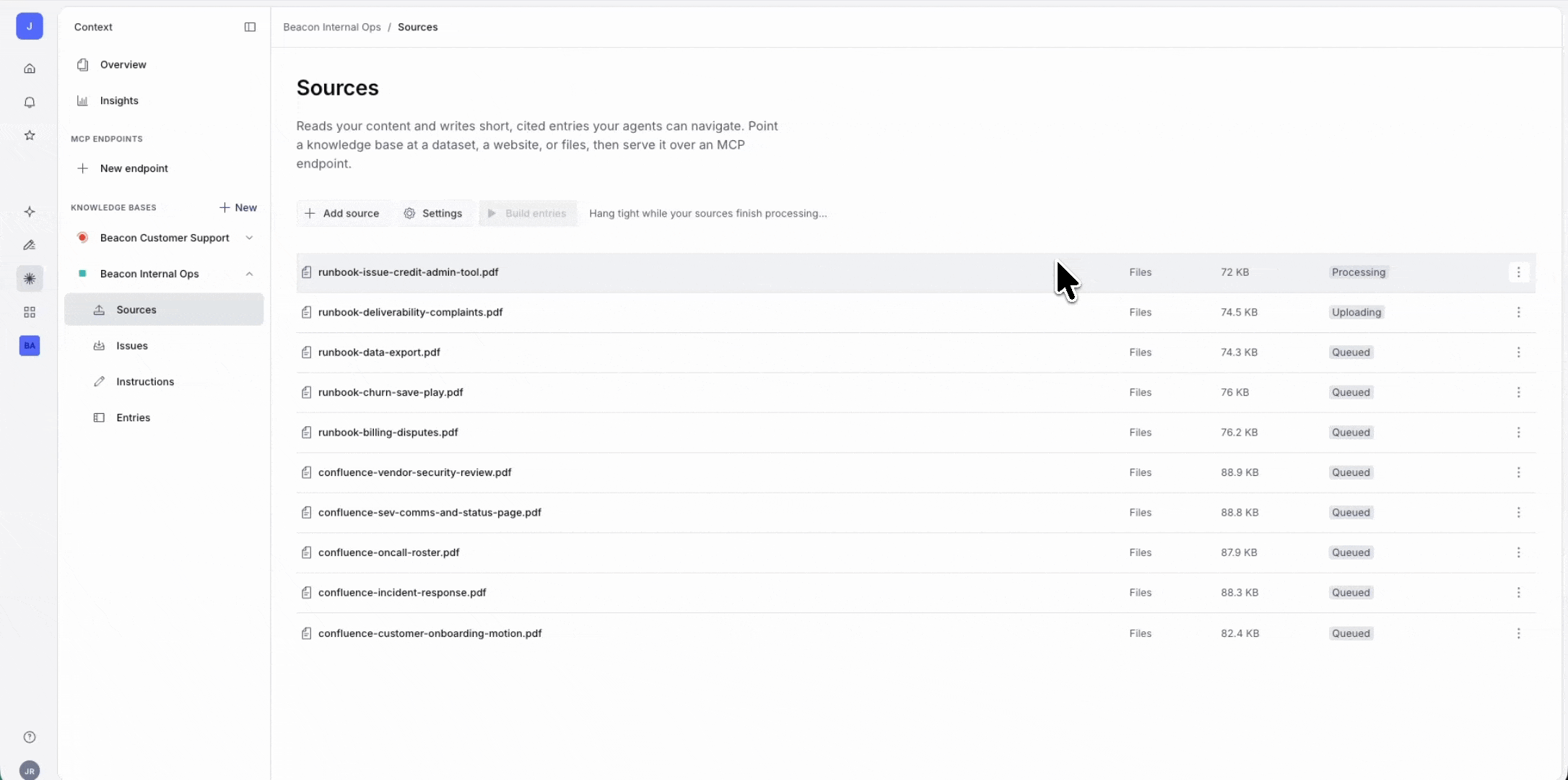
Click Build entries on each. The build is done when the status reads Entries up to date. Open Entries and read a few before going further; the summaries should describe your material accurately, and each entry should cite where it came from.
Create four MCPs in the Context app, one per agent per retrieval kind. Names are immutable after save.
Name: beacon-support-kb
Sources: KB: Beacon Customer Support
Name: beacon-ops-kb
Sources: KB: Beacon Internal Ops
Name: beacon-catalog
Sources: Dataset, groqFilter: _type == "product" || (_type == "faq" && status == "published")
Name: beacon-ops
Sources: Dataset, groqFilter: _type in ["policy", "product"]
The catalog endpoint is a customer surface, so its filter passes only published FAQs. Each endpoint also carries instructions (full text in context/mcp/), which is where per-agent behavior lives instead of in your prompt code: the support KB endpoint notes the refund ground truth, the ops KB endpoint says not to invent approval thresholds, the ops endpoint says to warn when a policy's reviewByDate has passed.
Paste the four endpoint URLs into app/.env.local and verify each one before blaming your agent code:
curl -X POST "$SANITY_MCP_SUPPORT_KB_URL" \
  -H "Authorization: Bearer $SANITY_ORGANIZATION_TOKEN" \
  -H "Accept: application/json, text/event-stream" \
  -H "Content-Type: application/json" \
  -d '{"jsonrpc":"2.0","id":1,"method":"tools/list"}'
The app fetches each endpoint's /initial-context at regular intervals and inlines it into the
Then ask the agents something specific. "Is a paused campaign's audience still billed?" reads the support Knowledge Base. "What are the first 15 minutes of a SEV-1?" reads the ops one. "Tell me about Beacon" tests nothing.
This is one of the coolest parts of what the Knowledge Base team built. Open the Beacon Customer Support Knowledge Base after its first build and check Issues. The build read the help article and the FAQ (30-day refund window) and the finance PDF (45 days), and it files the disagreement. It’s not guaranteed that Issues will raise every known issue, but you can always add the Instruction yourself with the text from context/knowledge-bases/.
Keep the 30-day claim. In the future this resolution becomes an Instruction, anchored to the sources that were in conflict. Ask the support agent "what is the refund window?" and it answers 30 days, citing the article. The PDF is still wrong, and the Issue told you exactly which document to fix; the Instruction holds the line until someone fixes the original source material.
The seed also shows what Issues can't catch. A second stale PDF disagrees about which plans include SMS, but the thing it disagrees with is the product catalog, which isn't a source of this Knowledge Base. There is no issue raised, because conflict detection runs between a Knowledge Base's own sources, not against the rest of your organization. Catalog facts live on the GROQ endpoint, and keeping them there is what keeps that PDFs staleness from mattering.
Knowledge Bases will auto check for changes and ask you to review them, but you should think about how you will maintain the source materials. Dataset and website sources refresh on a schedule (weekly by default). But a refresh doesn't rewrite entries, it just recrawls sources and files issues describing what changed. Until someone actually reviews the issues and resolves them, the Knowledge Base sits in Review and keeps serving the last build. A schedule alone doesn't keep a Knowledge Base current, someone needs to own the queue.
If you need to refresh uploaded sources (PDF’s, .md files), you need to re-upload. Changing a Knowledge Base's purpose requires a full rebuild, so be wary of changing too often. A build you regret can be restored to an earlier version from the Entries view while you fix what caused it.
This starter does ship with a helpful tool to make sure you are reviewing the dataset. The set-review-date Function governs the content side of things, stamping a 90-day review clock on policies in the dataset, because a Knowledge Base built from governed content inherits the benefits of fresh content.
Add your own sources to the agents and see what arises when you are using real internal ops or support documentation. If you have to choose between URLs or markdown files, choose the URLs so that your Knowledge Base can fetch changes automatically.
Check out Conversation Insights (which lives in the Context app) if you want to close the loop from real transcripts back into content gaps. And if the ops agent graduates from Beacon fiction to your actual internal runbooks, lock down the route first.
- Sanity + Vercel AI SDK RAG template: the minimal path to an agent on Sanity Context, without the Knowledge Base build or the review workflow.
- Automated campaign management with Sanity: query-time slot resolution, the structured-content discipline the catalog endpoints rely on.