FileSpin
Use images and videos from your FileSpin DAM library in Sanity Studio. Search, filter and browse collections, then either keep the file in FileSpin (served from the FileSpin CDN, resized on the fly) or copy it into Sanity from the standard image picker.
Install command
npm i sanity-plugin-filespinFileSpin for Sanity
Use images and videos from your FileSpin library in Sanity Studio. Editors search FileSpin, filter by type, date or metadata, browse collections, and pick a file, all without leaving the document they are editing.
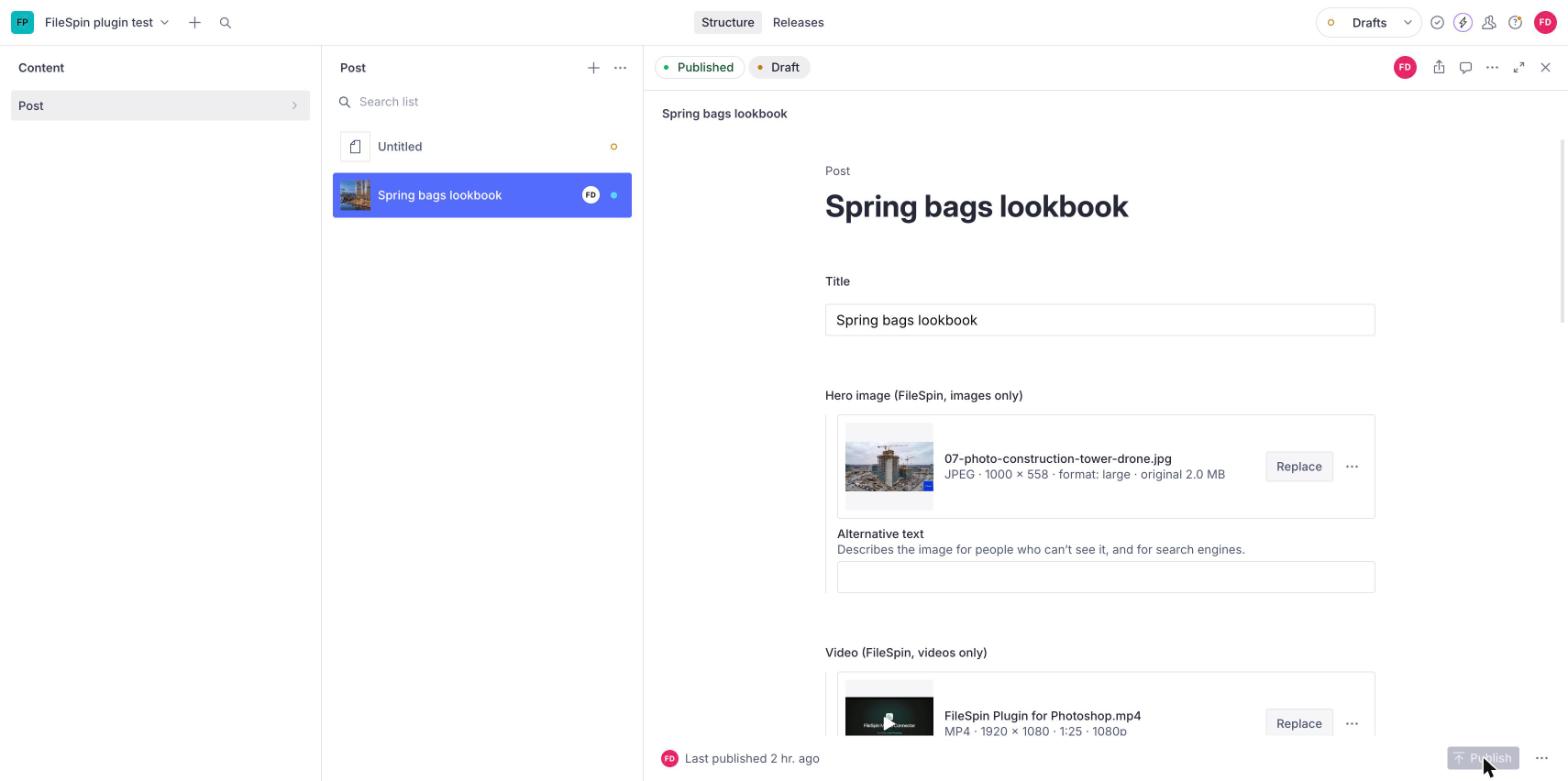
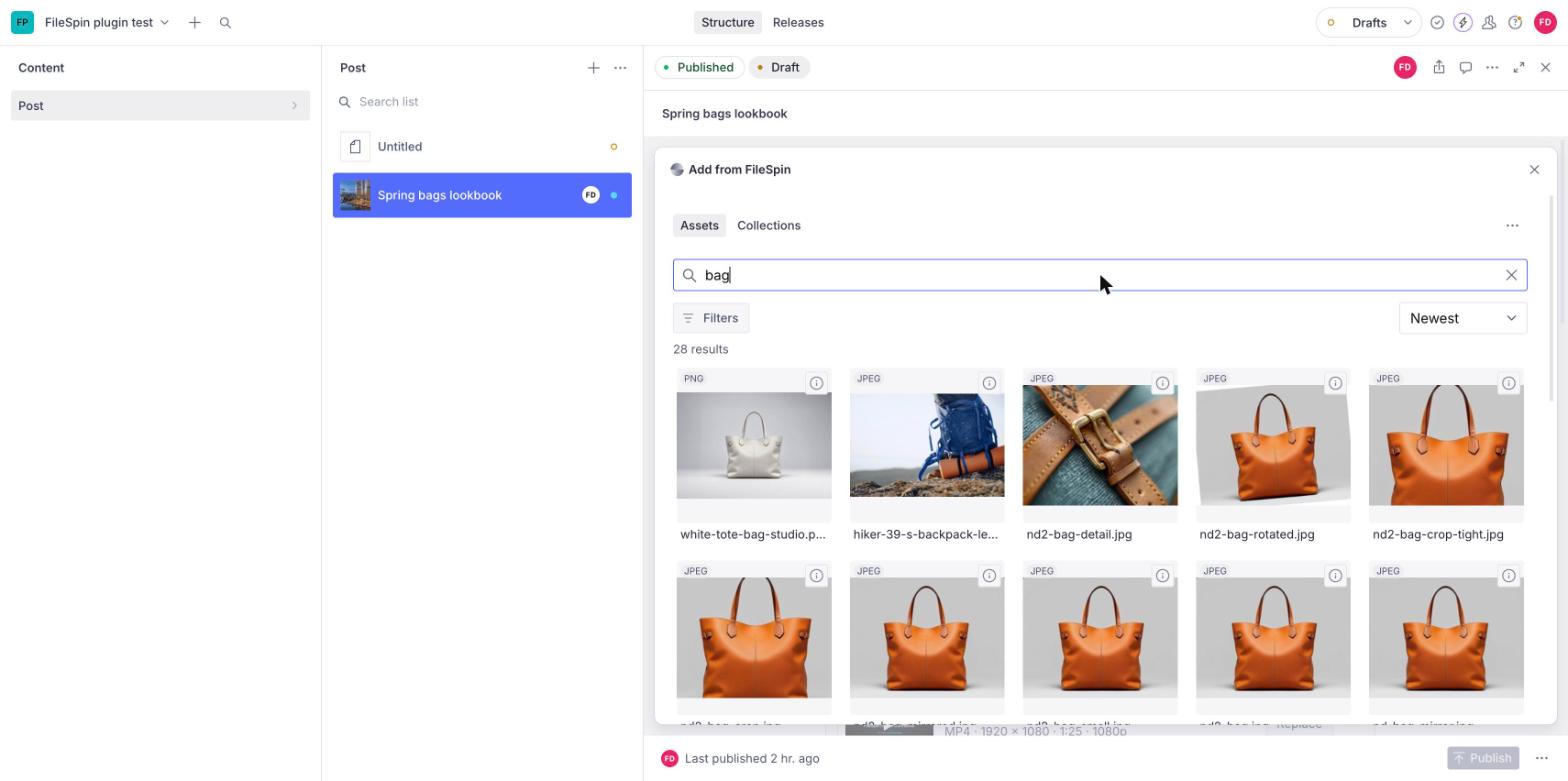
Two ways to use it. You can use both in the same Studio:
FileSpin asset field (filespin.asset) | FileSpin in Sanity's image picker | |
|---|---|---|
| Where the file lives | Stays in FileSpin | Copied into Sanity |
| Served from | FileSpin CDN (resized on the fly, AVIF/WebP) | Sanity CDN |
| Updates in FileSpin | New uploads of the same asset show up | The copy doesn't change |
| Video | Yes (public web versions, e.g. 720p MP4) | Yes, into file fields |
| Best for | New schemas, brand-controlled assets | Existing image fields, Sanity hotspot/crop |
Each editor signs in with their own FileSpin account. They see exactly what that account can see in FileSpin. No API key goes in your code or your dataset.
- Supports Sanity Studio v5 and v6 (React 19)
- Works in light and dark mode
- Read-only: the plugin never changes or deletes anything in FileSpin
Install
npm install sanity-plugin-filespinAdd it to sanity.config.ts:
import {defineConfig} from 'sanity'
import {filespin} from 'sanity-plugin-filespin'

export default defineConfig({
  // ...
  plugins: [filespin()],
})
Use the FileSpin asset field
Add a field of type filespin.asset:
import {defineField, defineType} from 'sanity'

export const post = defineType({
  name: 'post',
  type: 'document',
  fields: [
    defineField({name: 'title', type: 'string'}),
    defineField({name: 'hero', type: 'filespin.asset', options: {accept: 'image'}}),
    defineField({name: 'video', type: 'filespin.asset', options: {accept: 'video'}}),
    defineField({name: 'gallery', type: 'array', of: [{type: 'filespin.asset'}]}),
  ],
})
options.accept can be 'image' or 'video'. Leave it out to allow both.
Editors press Choose from FileSpin, sign in the first time, and click an asset. The (i) button on a tile shows details, metadata and versions: an image's formats (custom conversions) or a video's web versions. Images get an alternative text box.
What the field stores
{
  "_type": "filespin.asset",
  "assetId": "0ec02ba4…",          // FileSpin asset id
  "name": "spring-campaign.jpg",
  "kind": "image",                 // or "video"
  "contentType": "image/jpeg",
  "width": 2048, "height": 1365,   // size of the file at `url`
  "size": 4810233,                 // bytes of the original
  "duration": 31.5,                // seconds, video only
  "variant": "720p-video.mp4",     // chosen format or video version, if any
  "url": "https://cdn.filespin.io/api/v1/assets/0ec02ba4…/conversions?resize=2048,1365",
  "posterUrl": "https://cdn.filespin.io/…",  // the image, or a video's poster frame
  "cdn": "https://cdn.filespin.io",
  "version": 3,                    // changes when the file is replaced in FileSpin
  "alt": "Two people on a beach"
}
Query it like any object:
*[_type == "post"]{title, hero{url, width, height, alt}, video{url, posterUrl}}Show it on your website
url works as is. For other sizes, crops and srcset, use the helpers from
sanity-plugin-filespin/url. They have no dependencies and are safe in any
frontend:
import {filespinImageUrl, filespinSrcSet, filespinVideoUrl} from 'sanity-plugin-filespin/url'

<img
  src={filespinImageUrl(post.hero, {width: 800})}
  srcSet={filespinSrcSet(post.hero)}
  sizes="(max-width: 800px) 100vw, 800px"
  alt={post.hero.alt}
/>

<img src={filespinImageUrl(post.hero, {width: 400, height: 400, crop: 'face'})} alt="" />

<video src={filespinVideoUrl(post.video)} poster={post.video.posterUrl} controls />| Option | Meaning |
|---|---|
width, height | Fit inside this box (FileSpin serves up to 2048 × 1536) |
crop | Fill exactly width × height. true or 'center', 'top', 'bottom', 'left', 'right', 'face' |
format | 'jpg', 'png', 'webp', 'avif', 'gif'. Leave it out and the CDN picks the best one for each browser |
quality | 1–100 |
bgcolor | Fill transparent areas, e.g. 'ffffff' |
Use FileSpin in Sanity's image and file pickers
With the plugin installed, every image and file field gets a FileSpin
choice in its Select menu. Picking a file there copies it into Sanity,
so Sanity's own image tools (hotspot, crop, @sanity/image-url) work as
usual. The copy remembers where it came from, so picking the same file again
reuses it.
Don't want copies? Turn it off:
filespin({assetSource: false})Settings
filespin({
  host: 'https://app.filespin.io', // your FileSpin; this is the default
  assetSource: true,               // FileSpin in Sanity's image/file pickers
})
On a FileSpin environment other than the standard ones, also set clientId
(a public OAuth2 client for that FileSpin) and cdnHost. Ask FileSpin support
for these.
For your FileSpin admin
- Videos need a public web version (such as 720p) to be used in the FileSpin asset field. Without one, the plugin explains what to do.
- Image formats (custom conversions) must be public to be used in the FileSpin asset field. Private ones can still be copied into Sanity.
- Editors see what their own FileSpin role allows. Nobody needs admin rights.
Privacy and security
- Sign-in uses FileSpin's OAuth2 device flow. A FileSpin tab opens, the editor signs in there and presses Authorize. The Studio never sees their password.
- The login is kept in the editor's browser (localStorage), per Sanity project and user. It is never written to your Sanity dataset or exports. Sign out of FileSpin in the panel's menu removes it and revokes it at FileSpin.
- The plugin asks only for read access (
read_assets). - It talks to your FileSpin host and its CDN, nothing else. Terms · Privacy
No FileSpin account?
Support
- Setup guide: https://developers.filespin.io/guides/sanity/
- Email: support@filespin.io
- Bugs and ideas: GitHub issues
Develop
npm install
cp test-studio/.env.example test-studio/.env   # set your Sanity project id
npm run dev        # test Studio on http://localhost:3334, plugin from source
npm run lint
npm run build      # verify-package + build to dist/
To try the built package in another Studio: npm run link-watch, then in that
Studio npx yalc add sanity-plugin-filespin && npx yalc link sanity-plugin-filespin.
License
MIT © FileSpin