Sanity Plugin Jev Fields
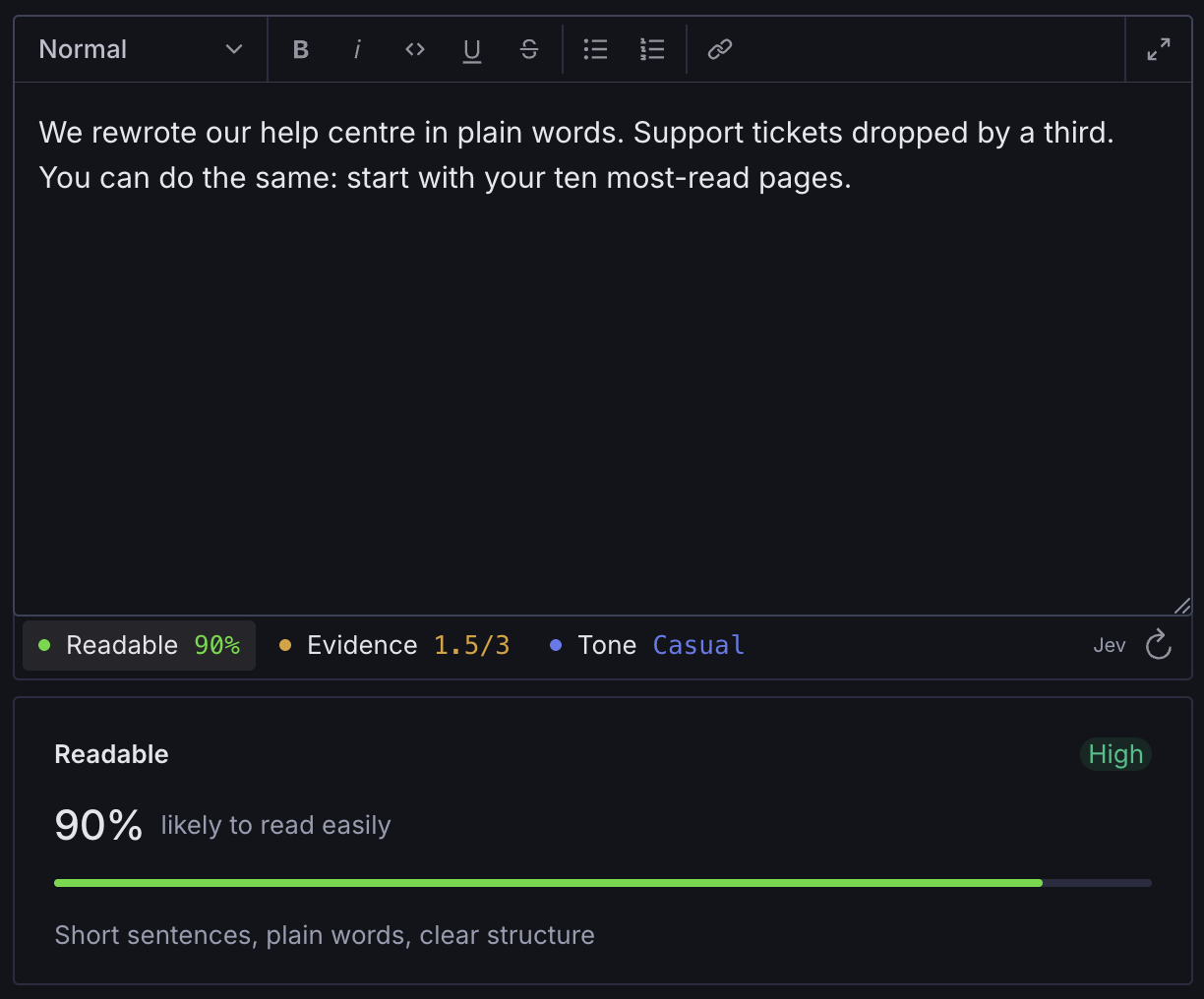
This plugin allows you to enrich fields in Sanity with feedback from the Jev model from TypeSafe. Show editors a real-time score for things like readability, tone, trustworthiness, credibility or anything else you can think of.
sanity-plugin-jev-fields
This plugin allows you to enrich fields in Sanity with feedback from the Jev model from TypeSafe. Show editors a real-time score for things like readability, tone, trustworthiness, credibility or anything else you can think of.
The Jev model is reached through Vercel AI Gateway, as Sanity Studio runs in the browser and TypeSafe's own API doesn't accept requests from the browser at the moment.
You can also use the plugin for editorial checks, by either warning the editor or blocking publishing when an answer is below a threshold you define. The answers are also saved to the dataset, so you can use them in your frontend.
The plugin supports all three of Jev's primitives:
noul: a yes/no question, answered with the probability that the answer is yesscore: a position on an ordered scale you definechoice: one option from a named set, with a probability for each option
Install (Requires Sanity v6)
npm install sanity-plugin-jev-fieldspnpm add sanity-plugin-jev-fieldsyarn add sanity-plugin-jev-fieldsUsage
Add the plugin, and wrap your schema types with withJevAnswers so every question gets a field to
store its answer in:
// sanity.config.ts
import {defineConfig} from 'sanity'
import {jev, withJevAnswers} from 'sanity-plugin-jev-fields'

export default defineConfig({
  // ...
  plugins: [jev()],
  schema: {types: withJevAnswers(schemaTypes)},
})
Then attach questions to any field with options.jev:
import {defineArrayMember, defineField} from 'sanity'
import {choice, noul, score} from 'sanity-plugin-jev-fields'

defineField({
  name: 'body',
  type: 'array',
  of: [defineArrayMember({type: 'block'})],
  options: {
    jev: {
      readable: noul({
        instructions: 'Is this article easy to read for a general audience?',
        true: 'Short sentences, plain words, clear structure',
        false: 'Dense, jargon-heavy or hard to follow',
        label: 'likely to read easily',
      }),
      evidence: score({
        instructions: 'How well does this article support its claims?',
        // Lowest first. Text before a colon is the label.
        criteria: [
          'none: no backing for its claims',
          'anecdotal: personal experience only',
          'data: add a source or figure',
          'cited: key claims cite their sources',
        ],
      }),
      tone: choice({
        instructions: 'What is the tone of this article?',
        criteria: {
          formal: 'Professional and reserved',
          casual: 'Conversational and relaxed',
          playful: 'Light-hearted and witty',
        },
      }),
    },
  },
})
A question only reads the field it is attached to. Portable Text, slugs and nested objects are
flattened to plain text. Each key (readable, evidence, tone) becomes the name of a field
next to it that stores the answer; withJevAnswers adds those fields and stops with an error if a
name is already taken. A score takes 2 to 10 criteria and a choice 2 to 255 options; see
Question options for the rest.
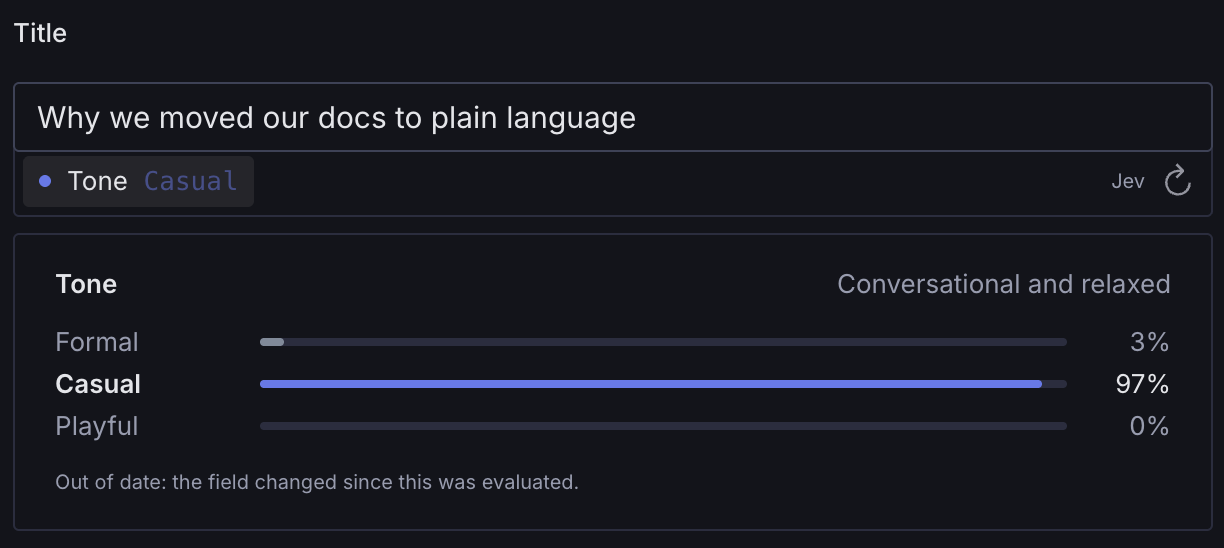
When a field changes, its answers are marked out of date until they are evaluated again.
Rules
Give a question a warn or require rule to act on its answer: warn shows a warning on the
attached field, require an error that blocks publishing.
options: {
  jev: {
    readable: noul({...question, warn: {atLeast: 0.6}}), // probability, 0–1
    evidence: score({...question, require: {atLeast: 2}}), // position on the scale
    risk: score({...question, colors: 'reverse', warn: {atMost: 1}}), // lower is better
    tone: choice({...question, warn: {oneOf: ['formal', 'casual']}}),
  },
}
noul and score rules take atLeast, atMost or both. choice rules take oneOf, the options
the answer must be one of.
Rules judge the stored answer, so they say nothing until a question has been evaluated, and an answer that is out of date is still judged as it is.
What Jev is good at
Jev judges meaning in text: tone, clarity, whether claims are backed up. It reads only text, so images and other media in a field are ignored. It is not built for counting or arithmetic: ask "Is this under 150 words?" in a validation rule instead. Test questions on content in your own languages before relying on them. A field's text may be up to about 32k tokens; the Studio warns when a field gets close.
API key
Open the Jev tool in the Studio, click Set key and paste an AI Gateway API key. The tool shows whether a key is set, when it last changed, and can test the connection.
Anyone who can read the dataset can read the key. It is stored in the document
secrets.jev. Unauthenticated queries can't read it, but every Studio user can, and so can every API token with read access, such as a frontend's read or preview token. It is also included in dataset exports and backups. Use a dedicated key with a spend limit.
You can also pass the key as the plugin's apiKey option, but then it is bundled into the
Studio's JavaScript, where anyone who can load the Studio can read it.
If editors and tokens must never see the key, send requests through your own server instead:
jev({
  transport: (request, {signal}) =>
    fetch('/api/jev', {
      method: 'POST',
      headers: {'Content-Type': 'application/json'},
      body: JSON.stringify(request),
      signal,
    }),
})
Your endpoint forwards the body unchanged to https://ai-gateway.vercel.sh/v1/evaluate with an
Authorization: Bearer <key> header and a Content-Type: application/json header, and returns
the Gateway's response with its status.
When more than one is set, transport wins over apiKey, and apiKey over the stored key.
Stored values
*[_type == "article"]{
  title,
  // noul: probability that the answer is yes, 0–1
  "readable": readable.probability,
  // score: score runs from 0 to max; label is the nearest criterion; confidence is 0–1
  "evidence": evidence{score, max, label, confidence},
  // choice: the chosen option, confidence 0–1, and a probability for every option
  "tone": tone{choice, confidence, probabilities[]{option, probability}}
}
Every value also stores evaluatedAt, model (e.g. typesafe-ai/jev) and a sourceHash the
Studio uses to show when a value is out of date. sourceHash is internal: how it is made may
change in any release, which only marks stored values out of date until they are evaluated again.
The types NoulValue, ScoreValue and ChoiceValue describe the full shapes.
Translations
Everything editors see is in the jev namespace of the Studio's translations, in US English.
Add another language with a locale bundle that uses the same keys (see JevTranslationKey):
import {defineLocaleResourceBundle} from 'sanity'
import {JEV_NAMESPACE} from 'sanity-plugin-jev-fields'

export const jevNorwegian = defineLocaleResourceBundle({
  locale: 'nb-NO',
  namespace: JEV_NAMESPACE,
  resources: {'strip.set-up': 'Sett opp Jev' /* … */},
})
Rule messages and config problems stay in English: Sanity's validation has no translation hook, and config problems are meant for schema authors.
Options reference
Plugin options
Passed to jev({...}). All are optional.
| Option | Default | Description |
|---|---|---|
transport | (request, {signal}) => Promise<Response>. Sends requests yourself, e.g. through your own server. See API key. | |
apiKey | AI Gateway key. Bundled into the Studio's JavaScript; prefer the Jev tool or transport. | |
endpoint | https://ai-gateway.vercel.sh/v1/evaluate | Where requests go. Ignored when transport is set. |
model | typesafe-ai/jev | Decision model to call. |
debounceMs | 500 | Delay after the last edit before re-evaluating, in milliseconds. |
tool | true | Adds the Jev tool for setting, testing and removing the stored key. |
tags | ['feature:jev-fields'] | AI Gateway reporting tags, for cost attribution. Each request also gets a tag for its question, e.g. jev.noul:article.readable. |
Question options
Every question takes:
| Option | Description |
|---|---|
instructions | Required. The question Jev answers about the attached field. |
title | Chip and detail heading. Defaults to the question's key: readable → "Readable". |
warn | Shows a warning on the field when the answer breaks this rule. See Rules. |
require | Blocks publishing when the answer breaks this rule. |
And, per kind:
| Kind | Option | Description |
|---|---|---|
noul | true | Required. What a yes means. Shown when the probability is 50% or higher. |
noul | false | Required. What a no means. Shown when the probability is below 50%. |
noul | label | Short phrase after the percentage, e.g. "likely to read easily". |
score | criteria | Required. 2 to 10 criteria, lowest first. Text before a colon is the short label. |
score | colors | 'traffic' (default): red at the bottom, green at the top. 'reverse': green at the bottom, for scales where lower is better. 'neutral': one colour throughout. |
choice | criteria | Required. 2 to 255 options, as option name → what it means. |
Rules on a noul take probabilities (0–1), rules on a score take positions on the scale (0 to
the number of criteria minus one), and rules on a choice take option names.
Contributing
See CONTRIBUTING.md.
License
MIT