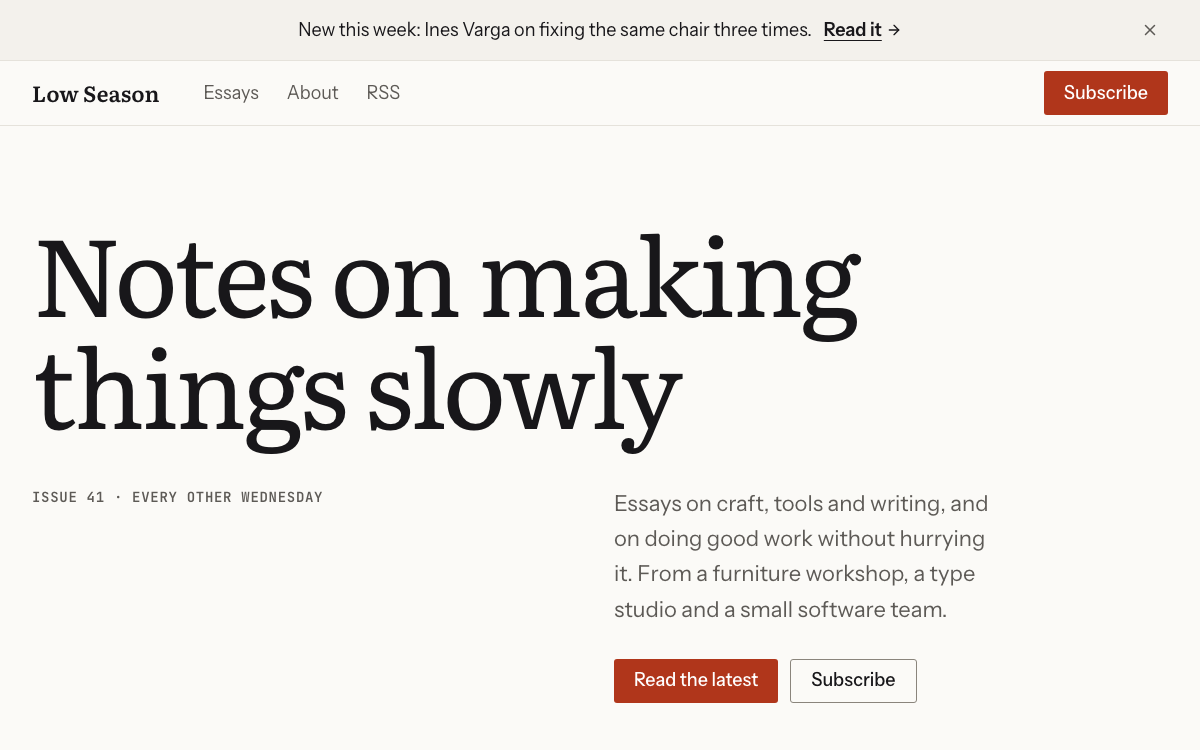
Recto: a blog template for Astro and Sanity
A calm, fast blog for Astro and Sanity: posts, authors, an essay archive, a page builder with nine sections and live preview in Presentation. Built statically, light and dark. Free and MIT.

Recto for Astro: a blog template for Astro and Sanity
This is the Astro edition of Recto, our free blog template for Next.js and Sanity. It has the same pages and the same Studio, so the same dataset and demo content work with both, in a lighter, all-sans design of its own. Posts and pages are edited in Sanity Studio, with live preview in the Presentation tool. The site is an Astro site: every page is built ahead of time as a static file, and a small Cloudflare Worker answers the preview and the newsletter form.
The look is a calm page set for reading. Geist is used for everything, titles, post body and interface alike, with Geist Mono for code. Text is ink on white, with one deep red accent for links and buttons, hairline rules, soft corners and quiet bands. Every post has a photograph. Dark mode follows the reader's system setting.
The demo is an invented journal, Low Season, written by three invented people. Every name, essay and figure in it is made up, and the photographs (the covers and the writers' portraits) are AI-generated.
Made by themes.dev, where you'll find more themes for Astro, Next.js and Sanity.
What you get
- Pages: a home page with a poster headline, the newest posts (one large, three beside it) and an archive list; an essay archive with pagination; an about page; a privacy page; a thank-you page; and a 404.
- Posts: a large title on the reading column, a byline, a cover, a body with headings, lists, quotes, links, images with captions, tables and code (highlighted at build time, in the preset's colours, with an optional file name), the author's bio, and three more posts below.
- A page builder in the Studio with nine sections: hero, page header, posts, content, split, media, team,
newsletter and call to action. Each section has layouts and tones (the page ground or a quiet band;
inverse draws the quiet band too). Posts sections left empty show the newest posts. Every section is a native
.astrocomponent. - Visual editing: the Studio's Presentation tool shows your drafts beside the form, and a click on a text in the
preview opens its field (
@sanity/astro, stega). - Newsletter sign-up that works without JavaScript and forwards each address as JSON to your email service, with a honeypot for bots.
- SEO: titles and descriptions, canonical links, Open Graph images drawn at build time for every page and post,
JSON-LD (website, organisation, blog posts, breadcrumbs), a sitemap, robots.txt, an RSS feed,
llms.txtand every post as Markdown (/blog/<slug>.md). - Speed and access: static HTML, self-hosted fonts with matched fallbacks (Astro's font API), photos in WebP with their sizes, and no client JavaScript except the mobile menu, the announcement's close button, the code blocks' copy button and the one-line script that applies dark mode. Text contrast is AA in light and dark (checked with axe).
- Deploys to Cloudflare Workers: the pages as static assets, the preview and the form in the same Worker.
Start
The quickest way is Sanity's CLI. It copies this repository, creates (or picks) a Sanity project and a dataset, makes
a read token and a write token, and writes frontend/.env.local and studio/.env for you:
npm create sanity@latest -- --template themesdev/recto-astroThen, in the new folder:
pnpm seed         # import the demo journal into your dataset
pnpm dev          # the site on http://localhost:4321 and the Studio on http://localhost:3333
After the seed, remove SANITY_API_WRITE_TOKEN from frontend/.env.local: the site never needs it.
You can also clone the repository and follow Set up Sanity below.
Quick look
You need Node.js 22.12 or newer and pnpm (npm install -g pnpm).
pnpm install
pnpm dev:astro    # http://localhost:4321
Until you connect a Sanity project, the site shows the demo content from frontend/seed/. It reads that content with
the same GROQ queries it uses against Sanity, through groq-js. This is for a first look only: a production build
needs a Sanity project, and stops with a message when there is none. To build the demo content anyway (for a static
preview of the design), set SANITY_FIXTURE=1:
SANITY_FIXTURE=1 pnpm build
pnpm preview      # the built site, in Cloudflare's runtime
Set up Sanity
Sanity's free plan is enough. It takes about ten minutes.
Create a project. Sign in at sanity.io/manage, choose Create new project and pick the Free plan. Note the project ID. Create a dataset called
productionwith public visibility. Published content is then read without a token, and drafts stay private either way.Tokens. In the project, go to API › Tokens › Add API token. Create one with Editor rights (for the import in step 4) and one with Viewer rights (for the build and the preview).
Settings.
- Copy
frontend/.env.exampletofrontend/.env.local. Fill inPUBLIC_SANITY_PROJECT_ID,SANITY_API_WRITE_TOKEN(the Editor token) andSANITY_API_READ_TOKEN(the Viewer token). - Copy
studio/.env.exampletostudio/.envand fill inSANITY_STUDIO_PROJECT_ID.
- Copy
Import the demo content:
pnpm seedThis uploads the demo photos and writes the Site document, three pages and eight posts. Running it again replaces them and touches nothing else. Afterwards, remove
SANITY_API_WRITE_TOKENfromfrontend/.env.local, because the site never needs it.CORS. In the project, go to API › CORS origins and add
http://localhost:3333with Allow credentials. This is the Studio on your computer.Run both:
pnpm dev # the site on http://localhost:4321 and the Studio on http://localhost:3333
Publishing
The site is static: a published change shows once the site is built again. Run pnpm deploy:cf, or let your CI build
on a schedule or on a Sanity webhook (API › Webhooks, on create, update and delete, filter
_type in ["page", "post", "siteSettings"]) that starts a build in your CI. The preview never waits: it reads drafts
as you type.
Editing in the Studio
- Site (one document): the announcement bar, the header (name, navigation, button), the footer (link columns, feed, legal line) and the organisation behind the site, for search engines.
- Pages: each page has a title, a path, a description and its Sections. You can add, remove and reorder
sections. Each one has a Layout and a Tone. Give a section an Anchor to link to it: the newsletter's anchor
newslettermakes the header's Subscribe button jump to/#newsletter. - Posts: title, slug, date, excerpt, cover, author (name, photo, role, bio), up to three tags, and the body.
| Address | Page document (slug) | Notes |
|---|---|---|
/ | home | its title is used in full |
/blog/ | blog | its first section (the page header), then the posts, then its other sections |
/blog/<slug>/ | a post | with three more posts and the blog page's newsletter section |
/about/ | about | |
/privacy/, /thanks/, 404 | files in frontend/src/pages/ | the privacy page holds a sample text for the demo journal |
To add a page at another address, copy frontend/src/pages/about/ to frontend/src/pages/<address>/, change the slug
and path in it, create the page document with that slug, and add the address to CMS in
frontend/src/pages/preview/[...path].astro so the preview knows it too.
The privacy page is a sample written for the demo journal, not legal advice. A note at the top says so while the
page passes isSample. Rewrite it for your own site, have it checked, then remove isSample.
Visual editing
The Studio's Presentation tool shows the site next to the form, with your unpublished drafts, and refreshes as you type. A click on a heading, a paragraph or a name in the preview opens that field.
The public pages are static files, so drafts are shown under /preview/: the same pages, rendered on request in
the Worker with drafts and with stega (invisible markers in each text that point at its field). This is how it fits
together:
- Presentation opens
/api/draft-mode/enable/with a one-time secret. The Worker checks it against your project with the read token (@sanity/preview-url-secret), sets a signed cookie (HMAC with the read token, eight hours) and goes to/preview/…. /preview/…renders the page with drafts only while that cookie is valid; without it, it sends you to the published page. Links inside the preview stay in it (frontend/src/middleware.ts).@sanity/astro/visual-editingdraws the overlays and reloads the page when a document changes. Its code is only on preview pages, never on the public site.
It needs three settings:
SANITY_API_READ_TOKENwhere the site runs (a Worker secret);SANITY_STUDIO_PREVIEW_URLinstudio/.env, set to the site's address;SANITY_STUDIO_URLwhen you build the site, set to the Studio's address. That is the only site allowed to show yours in a frame, and where a click in the preview goes.
Stega is added only to the words a reader sees (headings, leads, titles, excerpts, names, the body text). Layouts,
tones, links, slugs and dates stay plain, so the preview renders exactly like the published page. The list is
STEGA_FIELDS in frontend/src/lib/data/index.ts.
What's where
studio/                   Sanity Studio (its own app in this workspace), the same as the Next edition's
  sanity.config.ts        the Studio: structure, Presentation, Vision
  presentation.ts         which page shows which document (under /preview/)
  schema/                 generated/ (sections, pages, posts, Site) plus this template's additions in index.ts
frontend/                 the Astro site
  astro.config.mjs        static output, the Cloudflare adapter, @sanity/astro, fonts, the security headers
  wrangler.jsonc          the Worker and its static assets
  src/pages/              one file per address, plus the feed, sitemap, robots, llms.txt, Open Graph images, the
                          preview (preview/[...path].astro) and the API routes (api/)
  src/views/              the page bodies, shared by the static pages and the preview
  src/components/         the site layout (head, header, footer), the page builder, the legal page shell
  src/kit/                our Astro kit: Seo, JsonLd and schema.ts, Time, PortableText (astro-portabletext) and its parts
  src/lib/                content.ts (what pages read), queries.ts (GROQ), views.ts (what each page needs),
                          latest.ts (empty Posts sections), data/ (Sanity fetch and the demo fixture), preview.ts
                          (the preview cookie), forms.ts, markdown.ts, seo.ts, og/
  src/sections/           the sections (.astro), their parts and recipes, the generated queries, their stylesheets
  src/styles/             global.css, presets/recto.css (every colour, font and size), prose.css
  seed/                   the demo content in Sanity's format (pnpm seed imports it)
  public/images/          the demo photos (covers, the home page's photo, the writers): replace them with your own
  tools/                  lint.mjs (the design rules), favicon.mjs
  tests/                  the form handler, and every query run against the demo content
Customising the look
Everything the site draws comes from the custom properties in frontend/src/styles/presets/recto.css, under shadcn's
token names:
- Colours:
--background,--foreground,--card,--muted,--muted-foreground,--secondary,--accent,--border,--input,--primary(links and the main button),--primary-foreground,--destructive,--ring, plus the section library's--border-strong,--primary-softand--primary-soft-foreground. The:rootblock holds the light values and.darkthe dark ones.[data-tone='muted']is the quiet band: the page ground with 40% of--mutedin it, no more. - Type:
--font-sans(Geist, used for headings too),--font-mono(Geist Mono), and one scale from--text-size-xs(12px) to--text-size-display(60px), plus--text-size-herofor the home page's headline. Every size is a step on Tailwind's scale, and each heading size carries its own leading and tracking (60px and up 1.0 and -0.03em, 40 to 59px 1.04 and -0.024em, 28 to 39px 1.08 and -0.018em, 22 to 27px 1.15 and -0.01em, smaller 1.25). The post body is 18px at 1.6 in a column under 60 characters (--measure, inprose.css). - Space and shape:
--space-section,--space-gap,--size-container,--radius(the others follow from it). Buttons and fields are 36px tall with 14px text. - Phones: the
@media (width < 40rem)block.
The design rules are checked by pnpm lint: colours only from the preset, no serif fonts, type only on the scale (no
text-[15px], no clamp()), no inverse or dark bands, no gradients or patterns, one <h1> per page, every <img>
with alt, width and height, and demo images as WebP photos. Keep text at 4.5:1 contrast against its background, and
use the token classes in your own markup (bg-card, text-muted-foreground, rounded-card, text-size-lg).
Tailwind's own palette and type scale are switched off on purpose.
Photos. The demo photos are AI-generated placeholders: replace them with your own in the Studio. A cover is drawn
at 16:9 (the files are 1536×864), the home page's photo at 16:7 (2048×896), a portrait square (128×128). The Sanity
CDN serves each at the size it is drawn. After changing the accent colour, run pnpm favicon for the icon.
Fonts are self-hosted from Fontsource (SIL Open Font License) through Astro's font API (fonts in
frontend/astro.config.mjs), which preloads them and sizes a fallback font to match. To change one, install its
package (pnpm --filter recto-astro-frontend add @fontsource-variable/<name>), point its src at the woff2 file and
update the stack in the preset. The Open Graph images use the static files of the same font
(frontend/src/lib/og/image.ts).
Dark mode follows the system setting: src/kit/components/ThemeScript.astro sets the dark class on <html>
before the first paint (or the reader's choice, saved as theme in local storage, if your site adds a switch).
The newsletter form
The sign-up posts to /api/newsletter/, a small endpoint in the Worker (frontend/src/pages/api/newsletter.ts),
handled by frontend/src/lib/forms.ts:
- The address goes as JSON to
FORWARD_URL: your email service's API, an automation tool or a webhook. The visitor then sees/thanks/. - Without
FORWARD_URLthe form fails closed: it answers 503 and accepts nothing. The log names the form, never the address. - A hidden honeypot field,
company_website, catches bots. A submission with it filled gets the normal answer and is dropped.
To use a newsletter provider's own form instead, set the section's Form action to its URL and add that origin to
form-action in the Content-Security-Policy in frontend/astro.config.mjs.
Deploy to Cloudflare
The pages, images and feeds are static assets on Cloudflare Workers, and the same Worker (Astro's Cloudflare adapter,
frontend/wrangler.jsonc) answers only /preview/…, /api/draft-mode/… and /api/newsletter/.
Log in once:
cd frontend && npx wrangler login.Add the secrets the Worker reads at request time:
npx wrangler secret put SANITY_API_READ_TOKEN
npx wrangler secret put FORWARD_URL
Put the build settings in
frontend/.env.local(or export them in the shell):PUBLIC_SANITY_PROJECT_ID,PUBLIC_SANITY_DATASET,SANITY_API_READ_TOKEN,SITE_URLandSANITY_STUDIO_URL.Build and deploy from the repository root:
pnpm deploy:cfAdd the site's address to your Sanity project's CORS origins, and set
SANITY_STUDIO_PREVIEW_URLinstudio/.envto it.
The 404 page, trailing slashes and the security headers (_headers, written by the build) are handled by Workers
static assets. To build in Cloudflare's own CI (Workers Builds) instead, connect the repository, set the root directory
to frontend, the build command to pnpm build, the deploy command to npx wrangler deploy, and the build variables
above.
Studio. Run pnpm studio:deploy for Sanity's free hosting (https://<name>.sanity.studio). Set
SANITY_STUDIO_PREVIEW_URL in studio/.env to the live site first, and add the live site to the project's CORS
origins.
Environment variables
The site (frontend/.env.example):
| Variable | When | ||
|---|---|---|---|
PUBLIC_SANITY_PROJECT_ID, PUBLIC_SANITY_DATASET | build | public | your project; empty: the demo content |
SANITY_API_READ_TOKEN | build and Worker | secret | a Viewer token: published content at build time, drafts in the preview |
SANITY_STUDIO_URL | build | your Studio's address, allowed to frame the site | |
SITE_URL | build | the site's address, for canonical links, sitemap, feed and Open Graph images | |
FORWARD_URL | Worker | secret | where newsletter sign-ups go |
SANITY_API_WRITE_TOKEN | pnpm seed only | secret | an Editor token; remove it after the seed |
SANITY_FIXTURE | build | 1 builds the demo content without a Sanity project |
The Studio (studio/.env.example): SANITY_STUDIO_PROJECT_ID, SANITY_STUDIO_DATASET, SANITY_STUDIO_PREVIEW_URL
(the site, http://localhost:4321 while you work), and SANITY_STUDIO_HOST for pnpm studio:deploy.
The names match the Next edition's, except the two public ones: Astro reads PUBLIC_, not NEXT_PUBLIC_.
Security
- Only the project ID and dataset reach the browser. The read token is a server secret (
astro:env/server), used at build time and in the Worker, and the write token only bypnpm seed. - The preview turns on only through the Studio, which signs each request with a one-time secret; the cookie it sets is signed and expires.
- A Content-Security-Policy allows scripts, styles and fonts from the site itself, images from the site and Sanity's CDN, forms to the site, and framing only by your Studio. It is sent with the static pages and the Worker's answers.
Commands
Run them from the repository root.
| Command | |
|---|---|
pnpm dev | the site and the Studio together |
pnpm dev:astro / pnpm dev:studio | one of them |
pnpm build | production build of the site |
pnpm preview | the built site, locally, in Cloudflare's runtime |
pnpm seed | import the demo content into your dataset |
pnpm check | astro check for the site |
pnpm typecheck | TypeScript for the site and the Studio |
pnpm lint | the template's design rules |
pnpm test | the form handler, and every query run against the demo content |
pnpm favicon | draw the favicon in the preset's accent |
pnpm studio:deploy | deploy the Studio to Sanity's hosting |
pnpm deploy:cf | build and deploy the site to Cloudflare Workers |
pnpm validate | check the repository against Sanity's template rules |
License
MIT, see LICENSE. The fonts keep their own licenses (SIL Open Font License 1.1). The demo essays and photos are
yours to replace; the photos are AI-generated.
Want more than a blog? themes.dev has full site themes for Astro, Next.js and Sanity.