Sanity plugin color input
sanity-plugin-color-input is a beautifully designed and highly customizable color picker for Sanity Studio (v3, v4, and v5). It supports solid colors and linear gradients, returns rich color formats (HEX, RGBA, HSL, and full CSS gradient strings), and includes customizable presets with one-click copy functionality. Built natively for modern Sanity architecture.
By Code-Journey
Install command
npm i sanity-plugin-color-inputSanity Plugin Color Input
A beautifully designed, premium, and highly customizable color picker plugin for Sanity Studio v3, v4, v5, and v6. Supports solid colors and linear gradients.
Documentation
For full setup guides, configuration options, visit our In-depth Documentation.
Key Features
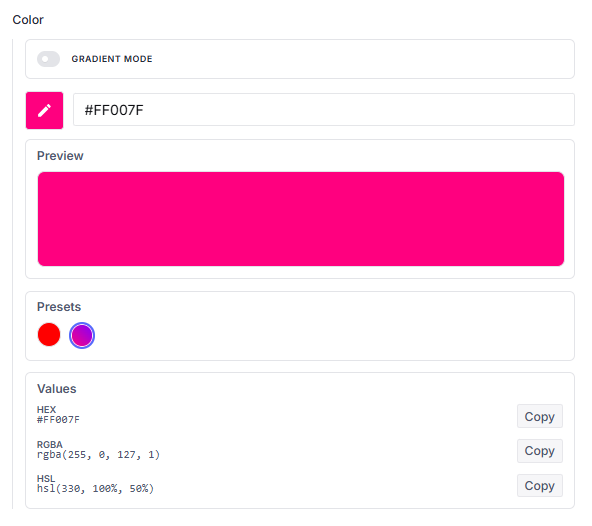
- Visual Color Picker: A sleek, modern user interface for precise color selection.
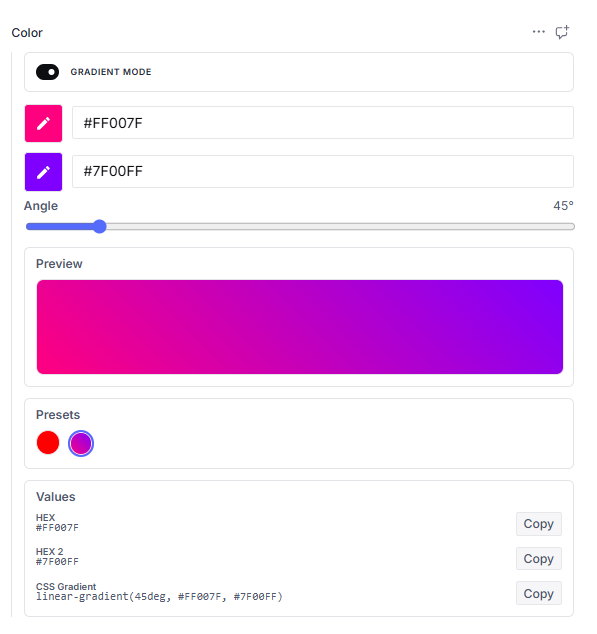
- Dual Modes: Seamlessly toggle between solid colors and gorgeous, linear gradients.
- Rich Format Outputs: Computes and displays
HEX,RGBA,HSL, andOKLCHformats, plus full CSSlinear-gradientstrings for gradients. - One-Click Clipboard: Instant copying of any color format to your clipboard.
- Branded Presets: Choose between our built-in curated presets or supply custom, brand-specific color arrays.
- Studio Optimized: Fully integrated with Sanity Studio's design tokens and responsive layout system.
Installation
Install the package using your preferred package manager:
# Using npm
npm install sanity-plugin-color-input

# Using yarn
yarn add sanity-plugin-color-input

# Using pnpm
pnpm add sanity-plugin-color-input
Configuration & Setup
[!NOTE]
Compatible with Node.js 22, 24, and 26.
Initialize the plugin within your sanity.config.ts (or sanity.config.js) file:
import { defineConfig } from 'sanity'
import { customColorPicker } from 'sanity-plugin-color-input'

export default defineConfig({
  plugins: [customColorPicker()],
})
OR
import { defineConfig } from 'sanity'
import { customColorPicker } from 'sanity-plugin-color-input'

export default defineConfig({
  plugins: [
    customColorPicker({
      disablePresets: false,
      disableCopyValues: false,
      enableAlpha: true, // Enable alpha channel for colors
      colors: [
        // Solid colors
        '#FF0000',
        '#00FF00',
        '#0000FF',
        '#FFFF00',
        // Gradient colors
        { hex: '#FF007F', hex2: '#7F00FF', angle: 45 },
        { hex: '#00F2FE', hex2: '#4FACFE', angle: 180 },
      ],
    }),
  ],
})
Schema Configuration
Once initialized, the custom color schema type becomes globally available in your schema configurations.
Basic Usage
Add the color type directly into your document schemas:
export default {
  name: 'project',
  title: 'Project',
  type: 'document',
  fields: [
    {
      name: 'accentColor',
      title: 'Accent Color',
      type: 'color',
    },
  ],
}
Default Color Presets
By default, the picker provides a curated array of professional preset solid and gradient colors:
- Solid Colors:
Red:#f44336Pink:#e91e63
- Linear Gradients:
Warm Sunset:#ff9a9eto#fad0c4(at90°)Spring Meadow:#84fab0to#8fd3f4(at45°)
Providing Branded Color Presets
To lock the color palette to your brand specifications, override the default presets by providing a colors list inside the field options:
export default {
  name: 'project',
  title: 'Project',
  type: 'document',
  fields: [
    {
      name: 'accentColor',
      title: 'Accent Color',
      type: 'color',
      options: {
        colors: ['#1A1A1A', '#F5F5F5', { hex: '#E91E63', hex2: '#2196F3', angle: 45 }],
      },
    },
  ],
}
Hiding Presets, Copy Values, and Enabling Alpha
You can disable the presets section or the copy value outputs section, or enable the alpha channel globally via the plugin configuration, or individually on a per-field basis:
export default {
  name: 'project',
  title: 'Project',
  type: 'document',
  fields: [
    {
      name: 'accentColor',
      title: 'Accent Color',
      type: 'color',
      options: {
        disablePresets: true,
        disableCopyValues: true,
        enableAlpha: true, // Show opacity sliders
      },
    },
  ],
}
Return Data Structure
The returned database schema adapts dynamically to the selected mode.
Without Alpha (Default)
When enableAlpha is false, the hex strings will be standard 6-digit hex codes.
{
  "_type": "color",
  "hex": "#f44336",
  "rgba": "rgba(244, 67, 54, 1)",
  "hsl": "hsl(4, 90%, 58%)",
  "oklch": "oklch(62.8% 0.258 29.2)",
  "isGradient": true,
  "hex2": "#000000",
  "angle": 180,
  "css": "linear-gradient(180deg, #f44336, #000000)"
}
With Alpha
When enableAlpha is true, the hex strings will be 8 digits, including the alpha channel value at the end.
{
  "_type": "color",
  "hex": "#f44336d6",
  "rgba": "rgba(244, 67, 54, 0.84)",
  "hsl": "hsla(4, 90%, 58%, 0.84)",
  "oklch": "oklch(62.8% 0.258 29.2 / 0.84)",
  "isGradient": true,
  "hex2": "#000000ff",
  "angle": 180,
  "css": "linear-gradient(180deg, #f44336d6, #000000ff)"
}
Rich Text / Portable Text Highlight Integration
To use the custom color picker inside Portable Text (Rich Text) highlight annotations, define a mark annotation inside your portable text array configuration:
export default {
  name: 'richText',
  title: 'Rich Text',
  type: 'array',
  of: [
    {
      type: 'block',
      marks: {
        annotations: [
          {
            name: 'highlight',
            type: 'object',
            title: 'Highlight Annotation',
            fields: [
              {
                name: 'color',
                type: 'color',
                title: 'Text Color',
              },
            ],
          },
        ],
      },
    },
  ],
}
Stored Rich Text Payload Example
{
  "_key": "2ef685a16342",
  "_type": "block",
  "children": [
    {
      "_key": "4b929316bf10",
      "_type": "span",
      "marks": ["f9bfae1005c4"],
      "text": "Learning Platform"
    }
  ],
  "markDefs": [
    {
      "_key": "f9bfae1005c4",
      "_type": "highlight",
      "color": {
        "_type": "color",
        "hex": "#cddc39",
        "hsl": "hsl(66, 70%, 54%)",
        "oklch": "oklch(84.7% 0.199 119.5)",
        "isGradient": false,
        "rgba": "rgba(205, 220, 57, 1)"
      }
    }
  ]
}
Development & Contribution
To work on this plugin locally or submit contributions, use the following developer commands:
- Run Linting:
npm run lint(or auto-fix withnpm run lint:fix) - Run Tests:
npm run test - Format Code:
npm run format(checks withnpm run format:check) - Build Production Bundle:
npm run build
⚖️ License
MIT License © Code-Journey. All rights reserved.
Licensed under the MIT License. You may obtain a copy of the License at LICENSE.
⭐ Support & Feedback
If you find this plugin helpful, intuitive, or visually stunning, please consider leaving a star on our repository! Your appreciation helps keep us motivated to design, update, and maintain premium developer tools.