Last updated September 04, 2026
How We Built a Deterministic Chatbot with Astro, Sanity and TypeScript, Without an LLM

Learn how we built a deterministic chatbot with Astro, Sanity, TypeScript, and Fuse.js without relying on an LLM for customer-facing answers. This guide covers intent matching, text normalization, fuzzy search, confidence scoring, conversation context, caching, and how unanswered questions can become useful customer research data.
Modern chatbots are almost automatically associated with generative AI.
For our project, however, we chose a different approach.
We needed a system capable of answering questions such as:
- “How much does it cost?”
- “What are your opening hours?”
- “Are you available on Saturdays?”
- “Can I come without an appointment?”
But there was one important requirement:
The business's official answers should not be generated by AI.
If the opening hours are 09:00-18:00, the chatbot should return information approved by the business rather than generate a plausible interpretation of that information.
That led us to a relatively simple architecture:
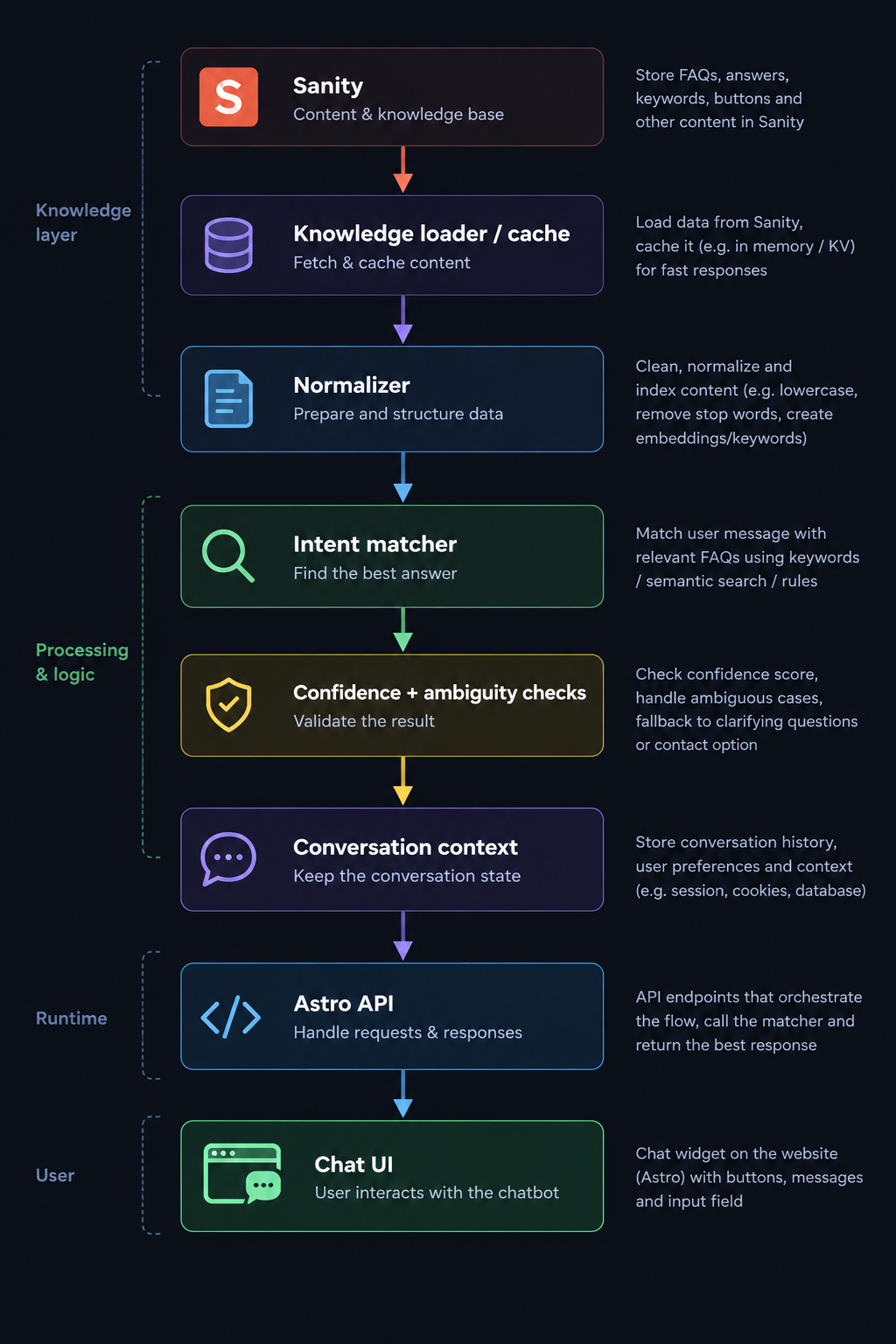
The main stack:
- Astro
- TypeScript
- Sanity
- Fuse.js
1. We Store Intents in Sanity Instead of Hardcoding Conversations
One of the first architectural decisions was to separate application logic from business information.
A developer should not need to deploy the application because the price of a service changed.
In Sanity, an intent can be represented approximately like this:
export interface ChatIntent {
  id: string
  title: string

  phrases: string[]
  keywords: string[]
  negativeKeywords?: string[]

  answer: string

  priority?: number

  contextTags?: string[]
  requiredContextTags?: string[]

  buttons?: ChatButton[]

  enabled: boolean
  }
For example, one document could represent a consultation-price intent:
{
  "title": "Consultation price",
  "phrases": [
    "How much does a consultation cost?",
    "What is the price of a consultation?",
    "What do you charge for a consultation?"
  ],
  "keywords": [
    "price",
    "cost",
    "charge",
    "consultation",
    "consult"
  ],
  "answer": "A consultation costs...",
  "priority": 10,
  "enabled": true
}
The major advantage is that the answer can be changed directly from the CMS.
The matcher decides what the user is asking about.
The business decides what the answer is.
2. First Step: Normalize the Message
Users do not always write:
How much does a consultation cost?
We might receive:
- consultation price
- how much consult
- how mutch is consultation
- HOW MUCH???
Before attempting to match anything, we normalize the text.
A simplified implementation might look like this:
export function normalizeText(value: string): string {
  return value
  .toLowerCase()
  .normalize('NFD')
  .replace(/\p{Diacritic}/gu, '')
  .replace(/[^\p{L}\p{N}\s]/gu, ' ')
  .replace(/\s+/g, ' ')
  .trim()
}Normalization does not solve the matching problem by itself, but it significantly reduces the number of variations the matcher needs to handle.
3. Exact Matching Is Useful, but Not Enough
The strongest signal can sometimes be the simplest one.
If Sanity contains:
how much does a consultation cost
and the user asks exactly that question, there is little reason to run sophisticated fuzzy matching.
We can check known phrases first:
function exactPhraseMatch(
  message: string,
  phrases: string[],
): boolean {
  return phrases.some(
    phrase => normalizeText(phrase) === message
  )
}
We can also check whether a known phrase appears inside a longer message:
function containedPhraseMatch(
  message: string,
  phrases: string[],
): boolean {
  return phrases.some(phrase =>
    message.includes(normalizeText(phrase))
  )
}4. Keywords Are Another Signal
For the consultation-price intent, we might have:
[
  'price',
  'cost',
  'charge',
  'consult',
  'consultation'
]
We can calculate how many of those keywords occur in the message:
function keywordCoverage(
  message: string,
  keywords: string[],
): number {
  if (!keywords.length) return 0

  const matches = keywords.filter(keyword =>
    message.includes(normalizeText(keyword))
  )

  return matches.length / keywords.length
}5. Fuse.js Helps with Approximate Wording
For typos and similar formulations, we use fuzzy matching.
We chose Fuse.js as an additional signal rather than allowing it to determine the response on its own.
Conceptually:
import Fuse from 'fuse.js'

const fuse = new Fuse(searchablePhrases, {
  includeScore: true,
  threshold: 0.35,
  keys: ['text'],
})
Then:
const results = fuse.search(normalizedMessage)Fuse can help us identify that slightly misspelled words are probably referring to the same concept.
For example:
- consultation
- consutation
- consultaton
But a good fuzzy score does not automatically mean we have enough confidence to answer.
6. The Final Score Combines Multiple Signals
Instead of doing this:
Fuse says this is the best result → answer
we combine several signals.
For example:
interface MatchSignals {
  exactPhrase: number
  containedPhrase: number
  keywordCoverage: number
  fuzzySimilarity: number
  contextBoost: number
  priorityBoost: number
  negativePenalty: number
}
A simplified scorer could look something like this:
function calculateScore(signals: MatchSignals) {
  return (
    signals.exactPhrase * 0.35 +
    signals.containedPhrase * 0.20 +
    signals.keywordCoverage * 0.20 +
    signals.fuzzySimilarity * 0.15 +
    signals.contextBoost * 0.05 +
    signals.priorityBoost * 0.05 -
    signals.negativePenalty
  )
}
These weights are illustrative rather than universal production values.
Good weights should be calibrated using real conversations rather than chosen because they simply “feel right.”
7. Negative Keywords Help Reduce False Positives
Suppose we have two intents:
- consultation price
- cancel consultation
Both contain the word consultation.
For the first one, we might define relevant keywords:
"keywords": [
  'price',
  'cost',
  'charge'
]
And negative keywords:
"negativeKeywords": [
  'cancel',
  'cancellation',
  'reschedule'
]
If the user's message contains those terms, we can penalize the score for the pricing intent.
Sometimes eliminating an incorrect candidate is just as important as finding the correct one.
8. We Do Not Automatically Pick the First Result
This is probably the most important mechanism in the system.
Suppose the matcher produces:
[
  {
    intent: 'consultation-price',
    score: 0.81
  },
  {
    intent: 'subscription-price',
    score: 0.79
  }
]
The first result has the highest score.
But the difference is only:
0.02
That is not enough.
We can introduce two checks:
const ANSWER_THRESHOLD = 0.75
const AMBIGUITY_MARGIN = 0.10
Then:
const [best, second] = matches

if (best.score < ANSWER_THRESHOLD) {
  return fallback()
}

if (
  second &&
  best.score - second.score < AMBIGUITY_MARGIN
) {
  return clarification()
}

return answer(best.intent)
Again, these values are examples rather than universal thresholds.
The principle matters more:
9. There Are Three Outcomes, Not Two
The matcher does not need to operate only with:
- found
- not found
A more useful model is:
type MatchResult =
  | {
    type: 'answer'
    intent: ChatIntent
    confidence: number }
  | {
    type: 'clarify'
    candidates: ChatIntent[]
    }
  | {
    type: 'fallback'
    }
This gives us three possible behaviors.
High confidence
User: How much does a consultation cost?
Bot: A consultation costs...
Ambiguous
User: How much does it cost?
Bot: Which service would you like the price for? [Consultation] [Tests] [Subscription]
Low confidence
User: I have a more complicated situation...
Bot: I don't have enough information to answer that correctly. Would you like me to send your question to the team?
10. We Keep a Small Amount of Conversation Context
Consider this conversation:
User: How much does the consultation cost?
Bot: ...
User: And what does it include?
The second message:
and what does it include
does not contain enough information when analyzed independently.
So the session can retain a small amount of context:
interface ConversationContext {
  previousIntent?: string
  activeTopic?: string
  contextTags: string[]
}
After the consultation question, we might have:
{
  previousIntent: 'consultation-price',
  activeTopic: 'consultation',
  contextTags: ['consultation']
}
An intent such as consultation-includes might then specify:
requiredContextTags: ['consultation']The matcher can give that intent a small context boost.
We do not need to send the entire conversation to a language model to handle this type of follow-up.
11. The Astro API Keeps the Logic Outside the UI
The frontend should not decide which answer is correct.
The widget can send a request to:
POST /api/chatbot/messagewith:
{
  "message": "how much does a consultation cost",
  "sessionId": "..."
}
A simplified Astro endpoint:
import type {
    APIRoute
} from 'astro'
import {
    matchMessage
} from '@/lib/chatbot/matcher'
export const POST: APIRoute = async ({
    request
}) => {
    const body = await request.json() const result = await matchMessage({
        message: body.message,
        sessionId: body.sessionId,
    }) return new Response(JSON.stringify(result), {
        headers: {
            'Content-Type': 'application/json',
        },
    }, )
}
The UI receives a predictable structure:
{
    "type": "answer",
    "message": "A consultation costs...",
    "buttons": [{
        "label": "Book an appointment",
        "action": "..."
    }]
}
This separation means we can completely redesign the interface without rewriting the matching system.
12. We Do Not Want to Query Sanity for Every Message
The intent database does not change every second.
There is therefore little reason to query Sanity every time someone sends a message.
Instead, we can load the knowledge base and construct our matching index inside a cache.
Conceptually:
let cachedKnowledge: KnowledgeBase | null = null
let expiresAt = 0
export async function getKnowledge() {
    if (cachedKnowledge && Date.now() < expiresAt) {
        return cachedKnowledge
    }
    const intents = await fetchIntentsFromSanity() cachedKnowledge = buildKnowledgeBase(intents) expiresAt = Date.now() + CACHE_TTL
    return cachedKnowledge
}
Sanity remains the CMS and source of truth without necessarily sitting in the critical path of every message.
13. We Also Log What the System Does Not Understand
Initially, conversation logs might seem useful mainly for debugging.
They can actually become much more valuable.
Suppose we discover:
- 37 * "do you provide emergency services?"
- 21 * "can I pay monthly?"
- 18 * "are you open on Saturdays?"
At this point, we are no longer only analyzing chatbot performance.
We are analyzing the market.
Depending on the project's privacy requirements, a conversation event might contain:
interface ConversationEvent {
    sessionId: string message: string matchedIntent ? : string confidence ? : number result: | 'answered' | 'clarification' | 'fallback'
    createdAt: string
}
Unanswered messages are particularly interesting.
They can reveal:
- missing intents;
- expressions we did not anticipate;
- the terminology customers actually use;
- information that is difficult to find on the website;
- content ideas;
- potential new services.
14. This Is Where I Would Use AI
The second use case is much more interesting to us.
A developer or someone from the business can then decide whether:
- an existing intent needs to be improved;
- a new intent should be created;
- the information should be more visible on the website;
- there is a new product or service signal.
AI helps analyze the data.
It does not automatically change the official information shown to customers.
Final Architecture
Conceptually, the complete system looks like this:
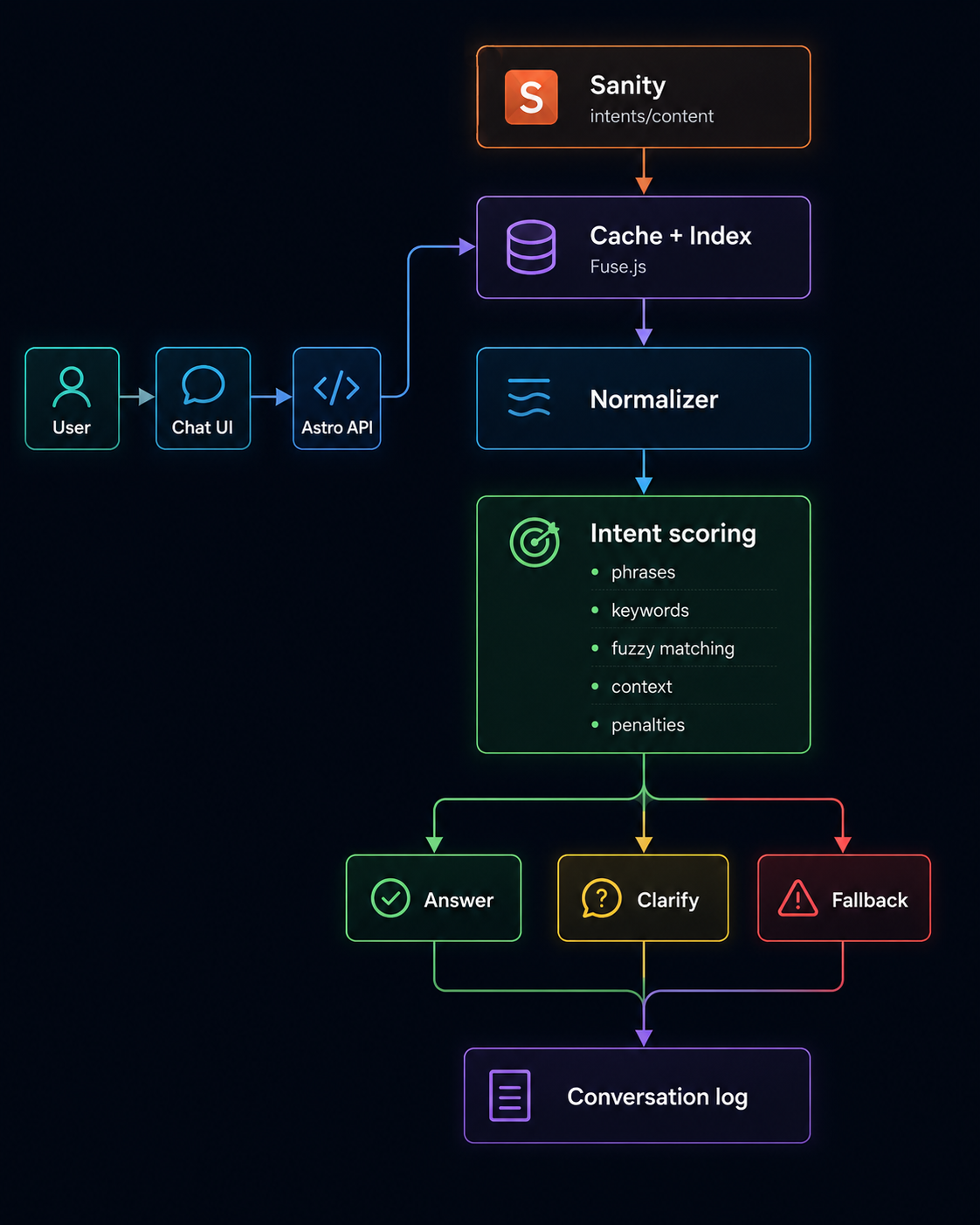
What We Learned
The most interesting technical challenge was not making the chatbot answer as many questions as possible.
It was defining when the chatbot is allowed to answer.
A fuzzy matcher can almost always find something that looks similar.
A reliable system must be capable of saying:
I found something.
but also:
I'm not confident enough to use it.
For information such as prices, opening hours, policies or commercial conditions, we prefer a limited and predictable system over one capable of producing an extremely convincing incorrect answer.
The part we did not fully anticipate at the beginning was that the questions the system cannot answer may become some of the most valuable data it collects.
The chatbot started as a customer support tool.
It is gradually becoming a customer research tool as well.
Product and Business Case Study
This article focuses on the implementation.
For the reasoning behind the project, the business problem we were trying to solve, and what we learned from using the chatbot as a customer-research tool, read our “Virtual Assistant - Chatbot” (it is on Romanian) experiment in the Digital Empr Research & Development section.
Sanity – The Content Operating System that ends your CMS nightmares
Sanity replaces rigid content systems with a developer-first operating system. Define schemas in TypeScript, customize the editor with React, and deliver content anywhere with GROQ. Your team ships in minutes while you focus on building features, not maintaining infrastructure.
Sanity scales from weekend projects to enterprise needs and is used by companies like Puma, AT&T, Burger King, Tata, and Figma.