Published November 27, 2026
Sanity Sync Tags: 6 GROQ Rules for Granular Next.js Revalidation
To keep a site showing fresh dataset content, Sanity has offered sync tags since October 2024, introduced with the Live Content API (Your content is now Live by default). Sanity attaches sync tags to every query response based on the query’s shape, connecting what content a query read with what content a publish touched. next-sanity registers those response tags as Next.js cache tags, so a publish revalidates only the routes whose tags intersect with the tags emitted by the event.
1. The query shape sets the tags
Content Lake derives the response tags from the filters of the query, from selectors: conditions on _id, slug.current or _type (Sync tags → How Content Lake generates sync tags). The value comes from the query itself: _id == "page-about" gives the document tag of page-about. The Studio schema, the field type and the content of documents do not affect the tags, not even whether a document was found: a query by an _id that does not exist still gets the tag of that document. The exception is ->: it gives the tag of the document that the reference in the data points to.
Tags have different widths:
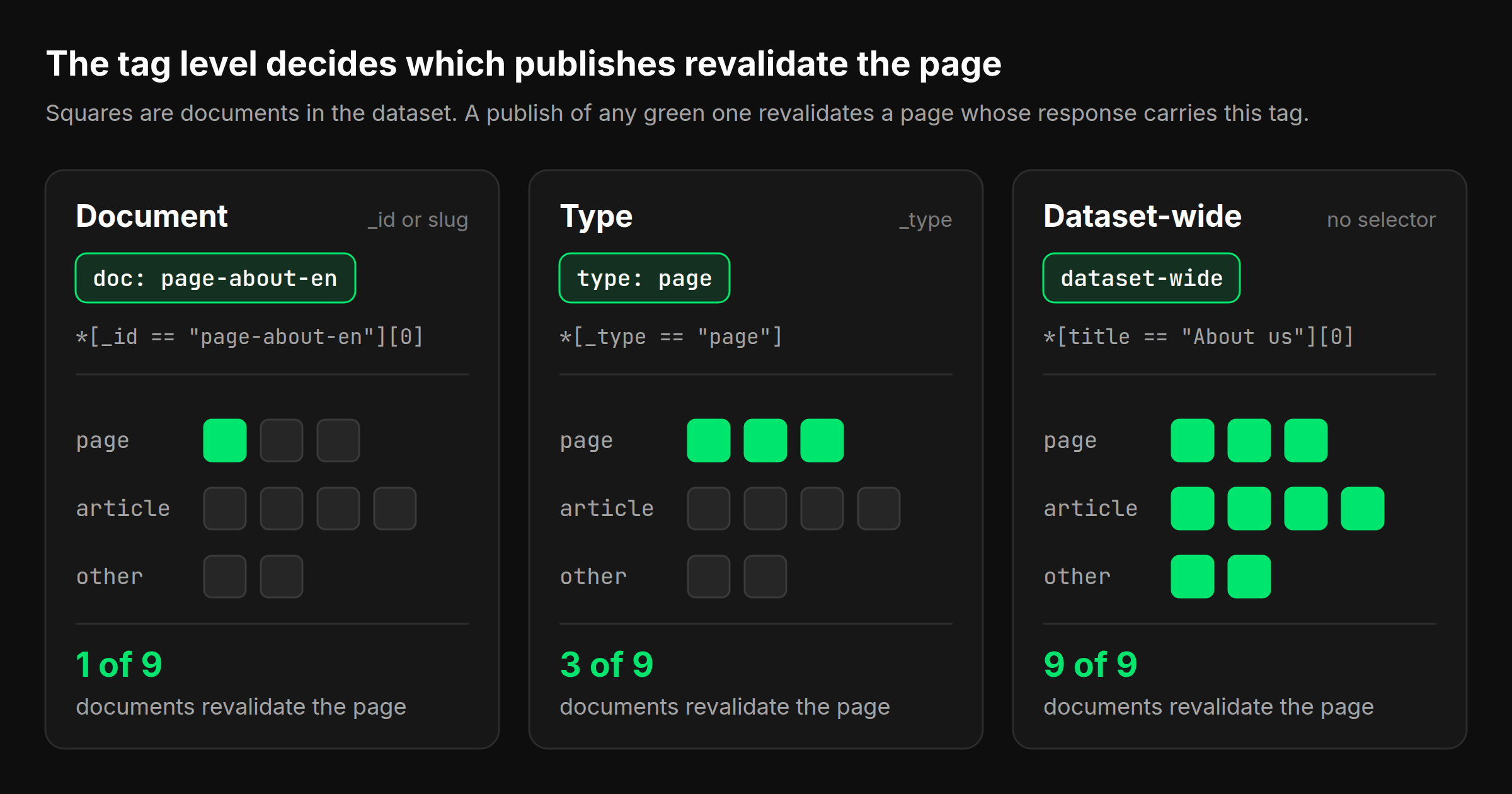
_id == "page-about"→ document tag: revalidated by a publish of this document.slug.current == "about"→ slug tag: revalidated by a publish of a document with this slug._type == "page"→ type tag: revalidated by a publish of any document of typepage.- no selector → dataset-wide tag (see §3): revalidated by any publish in the dataset.
If a filter combines conditions of different widths with &&, the response gets the tag of the narrowest one: *[_type == "post" && slug.current == $slug] carries only the slug tag.
For granular revalidation, you usually need the narrowest tags that still cover everything the response shows: then a publish of a document revalidates only the routes that show it.
Even the narrowest tag points to the whole document, not to a field. If the navigation shows only the URL of the "About" page, an edit of the title of that page revalidates all routes with the navigation. The query shape cannot fix this, only the schema can: the URL moves into a separate document.
2. Name the URL field slug
The selector for a URL is only a path where the segment right before .current is exactly slug. For Content Lake, a field pathname of type slug is the same kind of field as title.
defineField({name: 'pathname', type: 'slug'}) // ✗ type slug does not help
defineField({name: 'slug', type: 'slug'}) // ✓*[_type == "page" && slug.current == $slug][0] // slug tag: one page
*[_type == "page" && pathname.current == $slug][0] // type tag page: a publish of any page revalidates allA nested path also works, for example seo.slug.current, if it does not go through an array. If you rename the field, migrate the data first, drafts included, then deploy the query: otherwise the query by slug finds nothing.
3. Add _type to the filter of every scan
A scan is a filter that finds documents not by _id and not by slug, for example by another field, through references() or a subquery with ^. The documentation says that such a filter without _type gets the dataset-wide tag. In practice, the dataset-wide tag is added only if the whole query gave no other tag (sanity-io/sanity#16489). If another part of the query gave a tag, even a type tag, the scan gets no tag, and edits of the documents it finds do not revalidate the route:
// author page: a new post does not appear until the author itself changes
*[_type == "author" && slug.current == $slug][0]{
  name,
  "posts": *[references(^._id)] | order(publishedAt desc){title}
}
The fix is *[_type == "post" && references(^._id)]: the type tag post, and the route is revalidated on a publish of any post. You can safely add _type next to _id or slug: the narrow tag stays.
Also check a home page lookup like *[_type == "page" && (slug.current == $slug || !defined(slug.current))][0]. _type is already there, but the response gets only the slug tag of $slug, while the home page has no slug, and given what the event carries, its edits do not reach this response.
4. Related documents: through ->
A subquery with ^ does not give the outer filter a tag of its own, so the correlated form with _type gets the type tag right away. If such a subquery of the form _type == T && _id in *[... ^ ...] repeats inside an array projection (items[]{...}), for example through fragments, a second effect comes in: after several repeats, the document tags are replaced by the tags of their types, and with many repeats the response ends up with the dataset-wide tag. The form with -> gives the tag of the right document and withstands about six times as many repeats:
// correlated subquery: type tag page
"target": *[_type == "page" && language == $lang
  && _id in *[_type == "translation.metadata" && references(^.^.ref._ref)][0]
      .translations[].value._ref][0]

// dereference: tag of the right language version
"target": *[_type == "translation.metadata" && references(^.ref._ref)][0]
  .translations[language == $lang][0].value->
Both forms keep the type tag translation.metadata, because references() is not a selector. The High-performance GROQ guide advises against repeating ->, but only this form gives the document tag.
5. Listings: decide whether they need a precise tag
mainCategory._ref == $id, references($id) and mainCategory->slug.current == $slug are not selectors. A category page with such a query and _type == "post" gets the type tag post, and a publish of any post revalidates all categories. For most blogs this is fine. If you have many category pages or they are expensive, copy the category slug into the post, into a field whose path ends in slug.current:
defineField({name: 'categoryKey', type: 'object', fields: [{name: 'slug', type: 'slug'}]})*[_type == "post" && categoryKey.slug.current == $category] // slug tag of the categoryKeep the copy in sync, for example with a Document Function. If a post moves to another category, the event carries the old and the new slug, and both pages are revalidated.
A "three latest posts from the same category" block inside a post scans all posts, and a publish of any post revalidates every post with such a block. Replace it with links that an editor picks by hand (through ->), move it into a separate cache boundary, or remove it.
6. Measure the tags of the assembled query
A tag forecast from the source code is not reliable. You can get the response tags from @sanity/client (Sync tags → Get the sync tags for a query). They are hashes, and you can only compare them with each other:
const {result, syncTags} = await client.fetch(query, params, {filterResponse: false})Measure the assembled query (after fragment interpolation) as a whole and each top-level projection separately. If the whole has fewer tags than all parts together have distinct tags, the tags collapsed. At 100 tags or more, the response collapses to type tags or to the dataset-wide tag, and in the drafts perspective (what it is) each id gives two tags. The revalidation-audit skill for Claude Code measures all routes.
Before you deploy, go through the queries:
- the URL field is named
slug; - every filter that finds documents not by
_idand not by slug has_type; - the home page lookup does not use
|| !defined(slug.current); - related documents come through
->, not through a correlated subquery with^; - listings carry the type tag on purpose or look up by a denormalized slug;
- the response has fewer than 100 tags, and the whole carries no fewer tags than its parts together.
On a production Next.js site with 418 cached routes, applying these rules cut unnecessary revalidations by 97.4%: from 174,958 to 4,480. How Content Lake assigns tags, what a publish event carries and where tags get lost, with measurements, is covered in the article Practical Use of Sanity Sync Tags for Granular Next.js Revalidation.
To check your own project, run the Revalidation Audit Skill for Claude Code: it measures the sync tags of every route and shows which publishes revalidate it.
Sanity – The Content Operating System that ends your CMS nightmares
Sanity replaces rigid content systems with a developer-first operating system. Define schemas in TypeScript, customize the editor with React, and deliver content anywhere with GROQ. Your team ships in minutes while you focus on building features, not maintaining infrastructure.
Sanity scales from weekend projects to enterprise needs and is used by companies like Puma, AT&T, Burger King, Tata, and Figma.