The content editor's guide to content operations [E-commerce edition]
How content editors at Tecovas, SKIMS, and Lady Gaga scale e-commerce.

John Siciliano
Senior Technical Product Marketing Manager
Published
Why can some teams launch global campaigns in minutes (👋 Tecovas) while yours is still waiting on a homepage swap?
Hint: It's not their CMS. It's their approach to
The best teams don't scale by adding headcount or hacking together workflows.
They build systems around their team and operations.
Not a custom CMS, but a stack built on
Fully configurable. Minimal maintenance. Built to scale.
Commerce teams are creating more content for more channels with smaller teams and higher expectations. But most systems were built for publishing, not operations.
AI can't work without structured, queryable content. New surfaces mean more duplication without reuse. Each workaround adds complexity, and replatforming becomes inevitable.
Sanity gives you the infrastructure to move faster and adapt to whatever comes next. Structured content, programmable workflows, and automation-ready architecture built for scale.
This guide shows the workflows, tools, and strategies behind high-velocity, scaling e-commerce teams.
The brands you'll see:
- Tecovas – Western boots and apparel, known for craftsmanship and rapid product drops.
- SKIMS – Kim Kardashian’s shapewear and loungewear brand with a massive global presence.
- Lady Gaga – The artist’s official storefront, featuring exclusive merch and creative campaigns.
- Sanetti – A premium cycling brand built by Sanity to demo complex e-commerce workflows (without NDAs or blurred screenshots).
But first, what’s everyone dealing with right now?
Get access to this guide
You'll be redirected to the complete guide.
E-commerce teams are under pressure to move faster with less.
Customers expect personalized, localized, story-driven experiences across every channel. But most content systems still assume you're shipping static pages, not orchestrating real-time campaigns. Teams know they need AI and automation to survive, but most tools bolt these on as afterthoughts instead of building them into the foundation.
What's shifting in the industry:
- AI adoption is accelerating but unevenly applied. Leading brands use AI to translate entire collections in hours instead of weeks, while others still copy-paste between spreadsheets. The gap between early adopters and laggards is widening fast.
- Manual campaign orchestration is killing velocity. Sales, product drops, and regional promotions require updates across 5+ markets within hours. Teams that can't automate these workflows miss revenue windows and burn out their staff.
- Headless freed the frontend, but editorial stayed stuck. Development teams ship faster, but content teams still fight with rigid interfaces that weren't built for commerce workflows. The result: features ship on time, but content doesn't.
- PDPs are becoming mini brand sites. Top performers pack product pages with embedded video, long-form storytelling, and market-specific modules. Teams without flexible content modeling can't compete on experience.
- Lean teams are the new normal. Successful brands now support 3x more channels, languages, and campaigns without adding headcount. Those still scaling linearly with manual processes are getting priced out of growth.
The most forward-looking teams are rethinking how content gets planned, modeled, and delivered, not just how it gets displayed.
The commerce platform doesn't matter as much as it used to. They can all sell a product online, whether it's Shopify, Magento, SFCC, BigCommerce, or Commerce Tools. The real challenge is everything that happens around the product: localized campaigns, seasonal storytelling, personalized promotions, and managing all of it across markets without scaling your team.
Here's where content operations start to break down:
- Multi-market content is a mess. Launching in five regions means managing five versions of the same content. Every region duplicates efforts.
- Campaigns live in spreadsheets and Slack threads. There's no
single source of truth - Personalization is talked about more than it's implemented. Targeting VIP customers or tailoring content by UTM parameters is theoretically possible, but operationally out of reach for most teams.
- Content teams rely too heavily on devs. Even minor updates, like tweaking PDP copy or scheduling a homepage swap, often require an engineer's time.
- Tech is holding them back. Even with headless stacks and composable platforms, most teams still rely on rigid models, duplicated content, and manual processes that don't scale.
The shift doesn't happen because someone wants a shinier CMS. It happens when the cost of doing things the old way gets too high. What starts as fixing one pain point becomes an opportunity to rethink how content moves through your organization—not just how it's stored or displayed but also how it's modeled, governed, reused, and orchestrated. I.e., how companies can leverage a Content Operating System.
You're already running a content system (even if you didn't mean to).
It's the spreadsheets, CMS, Slack threads, and last-minute dev requests that hold everything together. Launching a sale means chasing down banners, image variants, and approvals and duplicating those efforts across markets.
A Content Operating System replaces that with actual infrastructure: structured content, flexible workflows, and tools that match how your team operates, not just how content looks but also how it moves.
This guide shows our customers' approaches in five stages of content operations:
- Plan and govern – Define complex product structures, evolve without waiting for rewrites, and set smart rules that guide editors without blocking them.
- Create and manage – Use editing tools that fit your teams' exact workflows, from full-featured content workbenches to single-purpose apps.
- Distribute and automate – Efficiently launch campaigns across languages, regions, and surfaces.
- Analyze and optimize – Connect content variants to conversion data, run experiments, and personalize without ballooning scope.
- Extend and integrate – Connect to your stack (PIM, ERP, DAM, storefront) with real-time sync and zero infrastructure headaches.
The Content Operating System is built to be shaped. It includes editors, workflows, and data models. Every part is customizable to match how your team works.
This guide shows how teams at brands like Tecovas, SKIMS, and Lady Gaga moved from managing content to orchestrating it. It's not about switching CMSes. It's about building systems that scale with your business.
In this section, we'll explore:
- Why flexibility matters more than perfection
- How Tecovas structures products, colorways, and variants
- How to enable editors to create multi-market campaigns at scale
- Setting precise governance policies
Starting from a blank slate feels like the best opportunity to get it right this time. No more duplicated efforts per market. Let's finally fix our wonky colorways and structure of variants.
Of course, you want to learn from and fix the shortcomings of your current system. However, even if you design the perfect model today, it will slowly calcify as your business evolves (e.g., new product types, seasonal campaigns, unexpected market requirements, etc.).
Most companies are forced into an impossible choice:
- Invest months in an exhaustive
content model - Or build something quick and simple that you'll painfully outgrow within months.
What if your foundation wasn't fixed in concrete but could adapt organically as your needs change? Let's learn how your competition keeps shipping while your team is stuck maintaining increasingly complex workarounds and spending too much time on manual processes.
With Sanity, you can start by shipping something that works. See how it performs. Then refine and optimize once you understand what's needed.
These capabilities make this possible:
- Flexible data structure: Add, remove, or modify fields without breaking existing content. Your engineering team can handle structure changes without disrupting your workflow.
Content migration - Graceful sunsetting: Mark old fields as outdated while transitioning to new ones smoothly.
- AI assistance: Let AI help suggest and implement content model improvements.
This is why your content foundation can evolve. As you learn what works and what doesn't, you can adapt your content system without starting over.
While the definition of "perfect" will change, let's explore how Tecovas structures the trickiest parts of e-commerce.
E-commerce data is highly relational. How do you structure your data to enable maximum reuse and flexibility for those edge cases?
Tecovas needed a product structure that separated core product information from color-specific details while keeping variant complexity manageable. This would enable them to define global product information once and optionally add specific information to colorways, such as care guides.
Tecovas' product structure separates base products from colorways. Shared content like name, description, and sizing lives on the product. Colorways are separate but connected, so editors can override things like imagery or marketing copy when needed.
+-------------------+
|     Product       |
|-------------------|
| Name              |
| Description       |
| Sizing            |
| Images (base)     |
| [Colorways] ------+----+
+-------------------+    |
                         |
                         v
                +-------------------+
                |    Colorway       |
                |-------------------|
                | Color             |
                | Images (override) |
                | Marketing copy    |
                +-------------------+
For example, Tecovas uses a separate "care guide" that provides instructions on the PDP based on the colorway the user selects.
+--------------------+
|     Care Guide     |
|--------------------|
| Instructions       |
| Applies to:        |
| [Colorways] -------+
+--------------------+
If the user selects the "Scotch" colorway, they'll see instructions for "Polish and shine," but if they choose "Sand/Bone," the care instructions will now read "DO NOT condition or polish." This happens automatically because Tecovas treats content as data.
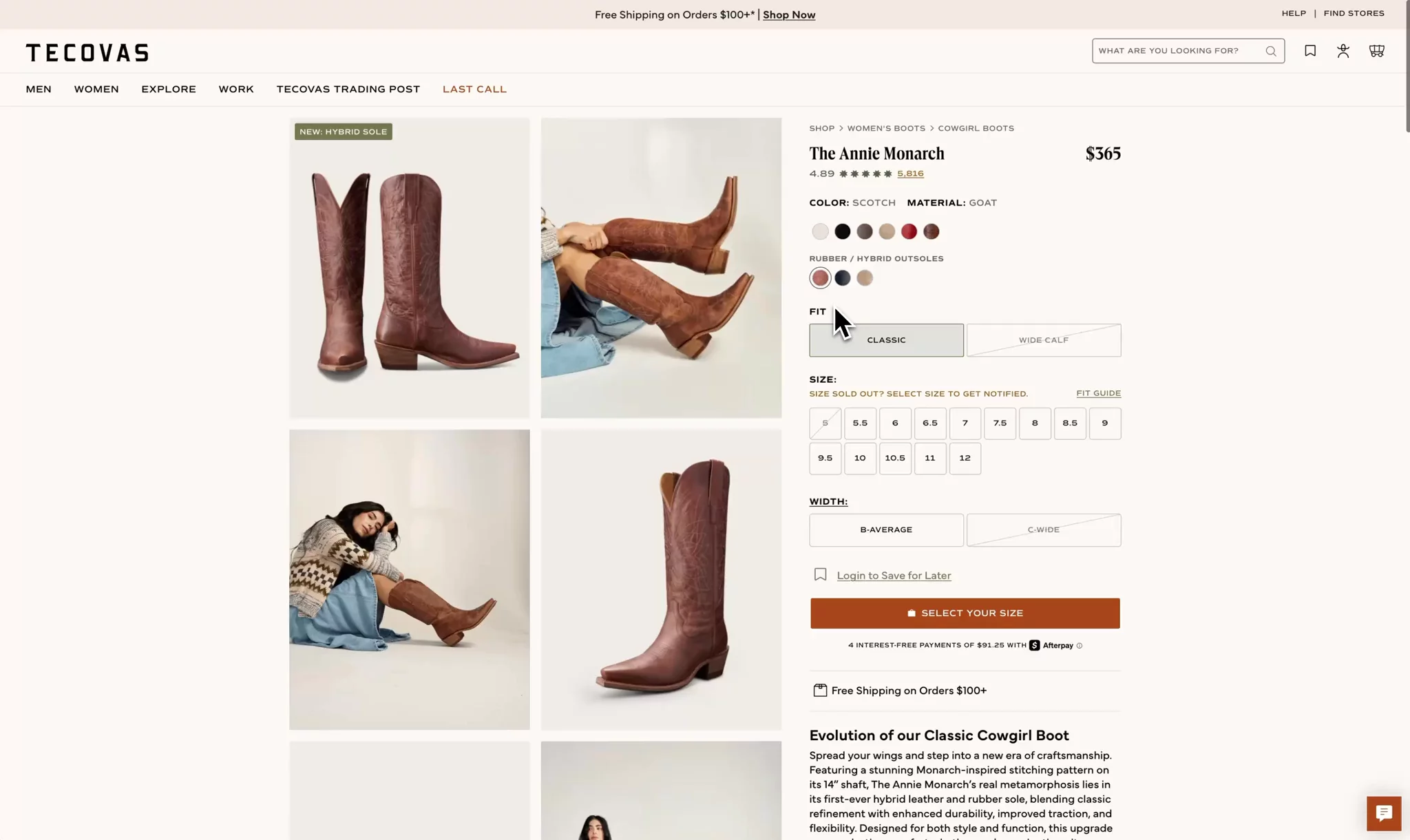
This structure gives them
This approach reduced Tecovas' product launch time from two weeks to around 20 minutes and empowered their editorial team to make content changes without developer intervention.
In the past, this was something that had to be manually maintained. Now we're able to do this automatically for our merchants.
Kevin HarwoodCTO


Most teams end up with creative marketing ideas bottlenecked by development capacity, leading to delayed campaigns and frustrated teams.
As your team defines data models, consider how to empower editors to create campaigns without developers. And to do it well, so editors can create bespoke designs without stepping outside the
Content is data. That's a fundamental belief of Sanity. Site-wide banners, heroes, product carousels, feature grids, and CTAs are no different. These become reusable layout components that editors can compose safely and flexibly, all within the constraints of your design system.
Let's explore how to create award-winning shopping experiences and launch multi-market campaigns without duplicating efforts per market or filling up the engineering backlog.
This isn't just about spinning up cookie-cutter product detail pages. Lady Gaga's creative vision demands much more, like dynamic visuals and interactive shopping experiences.
Lady Gaga’s team had never used a CMS before. Now they are logging into Sanity and using Sanity Studio to make updates on their own.
Melody YungCreative Lead & Founder


In fact, their editorial team now owns 9/10 website updates, including creating four homepages and a site that won them three industry awards.
Editors can run with it because the engineers built a library of blocks, such as heroes, mood pickers, and album displays. Each component is connected to the
Fans expect constant evolution, and with Sanity, we can iterate fast without breaking the site.
Michal KlimCTO & Partner


With live preview, there are no surprises. The team sees exactly how updates will look before publishing, something especially critical during high-stakes moments like Grammy-night launches.
Lady Gaga's team turned homepage launches into editorial plays by treating landing page content as data.
Zoom out to something like Black Friday, and the problem shifts from creativity to scale. Every market, page, and product needs updating. Without structured content, teams hardcode links, duplicate blocks, and scramble to clean up when the sale ends. Efforts are multiplied by locales, regions, and surface areas.
Sanetti solves this by modeling campaigns as structured, referenceable content.

A single campaign document contains:
- Hero copy
- Supplemental terms and conditions
- Exit modal copy
- Side cart copy
- Inline editorial callouts
- PDP copy
- Scheduling, including start and end dates
This single document contains the promotional data, including translations and the ability to define market-specific promotions.
Sanetti's team queues up promotions ahead of time, previews them on the live site, and launches confidently. They don't worry about 404s, duplication, or cleanup. Structured content isn't just a dev convenience, it's the only sustainable way to operate at e-commerce scale.
Actually, yes.
Beyond providing blocks to build pages that stay within the design system, there are governance policies that ensure editors create compliant content that looks great on the front end.
You can have context-aware validations, conditional fields, and custom inputs that guide editors toward correct content without blocking their workflow. Since these rules are defined by your development team, they can incorporate your specific business logic, access real-time data, and evolve alongside your content model.
Unlike UI-based systems, Sanity gives you several powerful tools to create precise editing experiences:
- Smart validation rules: For example, Tecovas configured a validation rule that prevents editors from creating CTAs that will wrap on the front end, ensuring the CTA is easily scannable and converts the best.
- Conditional fields: Show fields only when they're relevant based on other selections.
- Custom input experiences: Create specialized interfaces for complex data entry.
By implementing these precise guardrails, teams dramatically reduce the number of issues that reach production.
Let's explore how companies configure the default editing interface, Sanity Studio, build custom editing experiences, and define editorial workflows to move products from merchandising to live (in 20 minutes).
In this section, we'll explore:
- How the editing interface adapts to your content model
- Why teams like Sanetti and Tecovas run multiple studios with role-specific access
- When to use specialized apps vs. the main studio
- How SKIMS launches coordinated content drops across products, blogs, and banners
- How the right tools make editing easier (not harder)
Most platforms treat the CMS UI as the starting point. Sanity flips that. Your team defines the content model, and the interface adapts to that. Add a new field? The input shows up in the UI.
Let's briefly understand how Sanity works, then look at how Sanetti splits their editing experience across multiple studios and how SKIMS uses structured releases to coordinate high-stakes launches down to the minute.
When you log into Sanity, you land at the Dashboard which is your command center to jump into recent activity, access your apps, and see what your team's been working on.
From the Dashboard, you can access all your content tools:
- Studio - Where you'll spend most of your time editing and managing content. Unlike other CMSes, this interface is completely tailored to how your team works.
- Media Library - Your central hub for all images, videos, and files across projects. Upload once, use everywhere.
- Canvas - A familiar writing environment (like Google Docs) where you can write naturally. The powerful part: it automatically maps your freeform content to your structured content model. Write a product description with all its details, and Canvas figures out which parts go where without you having to think about it.
- Custom apps - Bespoke tools your team builds for specific tasks. Need to bulk-update sale badges across 100 products? View all store hours in one place? These apps make those tasks simple.
The magic happens because everything connects. Write a product description in Canvas? It appears in studio ready to publish. Upload images to Media Library? They're instantly available everywhere. Update inventory in a custom app? The changes flow through to your site in real-time.
This is how teams like Sanetti can run different studios for different markets. Their U.S. merchandising team sees only what they need, while the global marketing team has their own tailored view. Same content, different windows, zero confusion.
Your content operations are only as efficient as the tools to manage them.
Sanetti serves multiple markets and has different teams that manage the content across the surfaces. For example, they have a marketing team that updates global website content and a team that manages just the merchandising for the U.S. market.
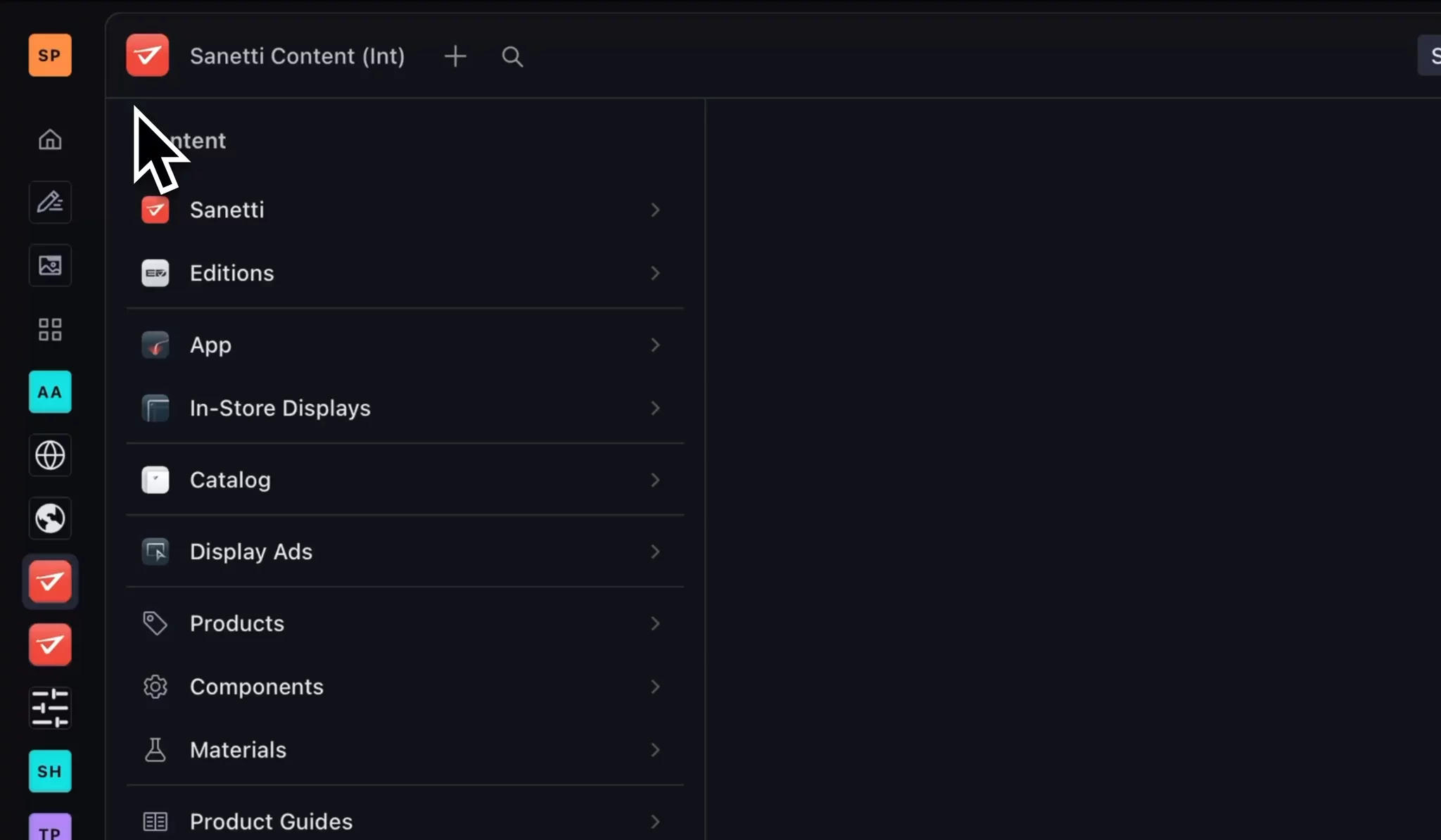
Studios are customizable windows into your data, so why serve these different audiences the same window? Doing so would create a lot of visual noise and might open the doors for the wrong content to be edited (Hola World).
Sanetti uses multiple studios and assigns permissions based on each person's needs. This way, editors can log in and get to where they need to much faster and remove things that aren't for that team altogether.
This is a typical pattern when you want to:
- Give different user roles access to different content types
- Separate concerns (marketing vs admin content)
- Provide region-specific editing experiences
- Limit complexity by showing only relevant document types per workspace
Regardless of the studio, what happens when "Publish" is clicked? Whatever your team needs! Execute automated workflows, enrich content with AI, or start an editorial review workflow. Let's now look at how SKIMS moves products from merchandising to live with Content Releases (we'll look at AI & automation in a later section).
A new product drop is coming soon. It requires a new product collection, a blog post, and promotional content like banners and CTAs. And it all needs to drop at exactly 8:00 am EST.
What do you do?
Answer: Create a new release in Sanity Studio, make all the changes in the latest drop, and set the release to go live at 8:00 EST.

Content Releases lets you bundle related content changes together, preview how they’ll appear as a cohesive unit, and push out the updates simultaneously via a defined time or a manual approval.
When they need to end the promotion, they schedule another release setting it back to the default.
If there are unique promotions every day for a week, then they set a release for each day and sit back as the schedule handles getting everything live and reverted on time.
Sanity Studio is optimized for editing single documents. It works great for most content tasks, but sometimes you need a different view of your content.
What if merchandisers need to bulk-edit badges across an entire seasonal collection? Or view all your promotional content in a calendar to spot scheduling conflicts? Or see store hours for all locations in a table?

Your development team can build specialized apps for these specific workflows using App SDK which provides them buildling blocks to quickly create these apps. Instead of clicking through individual products to update sale badges, you could see all products in a spreadsheet-like table and edit them in bulk. Instead of guessing about content scheduling, you could view and edit everything on a calendar.
These custom apps update in real-time, so changes made by other team members appear instantly without refreshing.
Sanetti built a store hours app as a perfect example. They own four physical locations, and editors need to update hours for holidays and special events. Rather than hunting through individual store documents, managers see all locations in one simple interface. Update holiday hours for all stores at once. No training needed. No thinking in CMS terms.


It's about giving your team the exact tool for the job.
In this section, we'll explore:
- How SKIMS and Tecovas prevent overselling with real-time inventory
- How "publish" can trigger automations, not just a status change
- How Sanetti scales global promotions without duplicating effort
- How translations can be programmatic, not manual
Publishing content isn't the finish line. It's the starting point for orchestration.
Localized banners, inventory-aware PDPs, scheduled product drops, and personalized experiences all require structured content and automation. You can't brute-force that with spreadsheets and Slack.
That's why leading teams don't just "publish." They sync. They trigger. They orchestrate.
Let's look at how Tecovas and SKIMS distribute fresh content to every region and channel without performance issues or requiring ongoing help from developers.
SKIMS and Tecovas were facing two similar issues:
- SKIMS: Would oversell a limited drop because the product would sell out while users were on the PDP
- Tecovas: Would oversell inventory because their cache would show in stock
The problem? Their sites weren't updating fast enough when inventory changed.
The solution was simple. With the Live Content API, their sites now update instantly when inventory changes. The moment a product sells out, the "Add to Cart" button disappears on the website. No more overselling. No more customer disappointment.
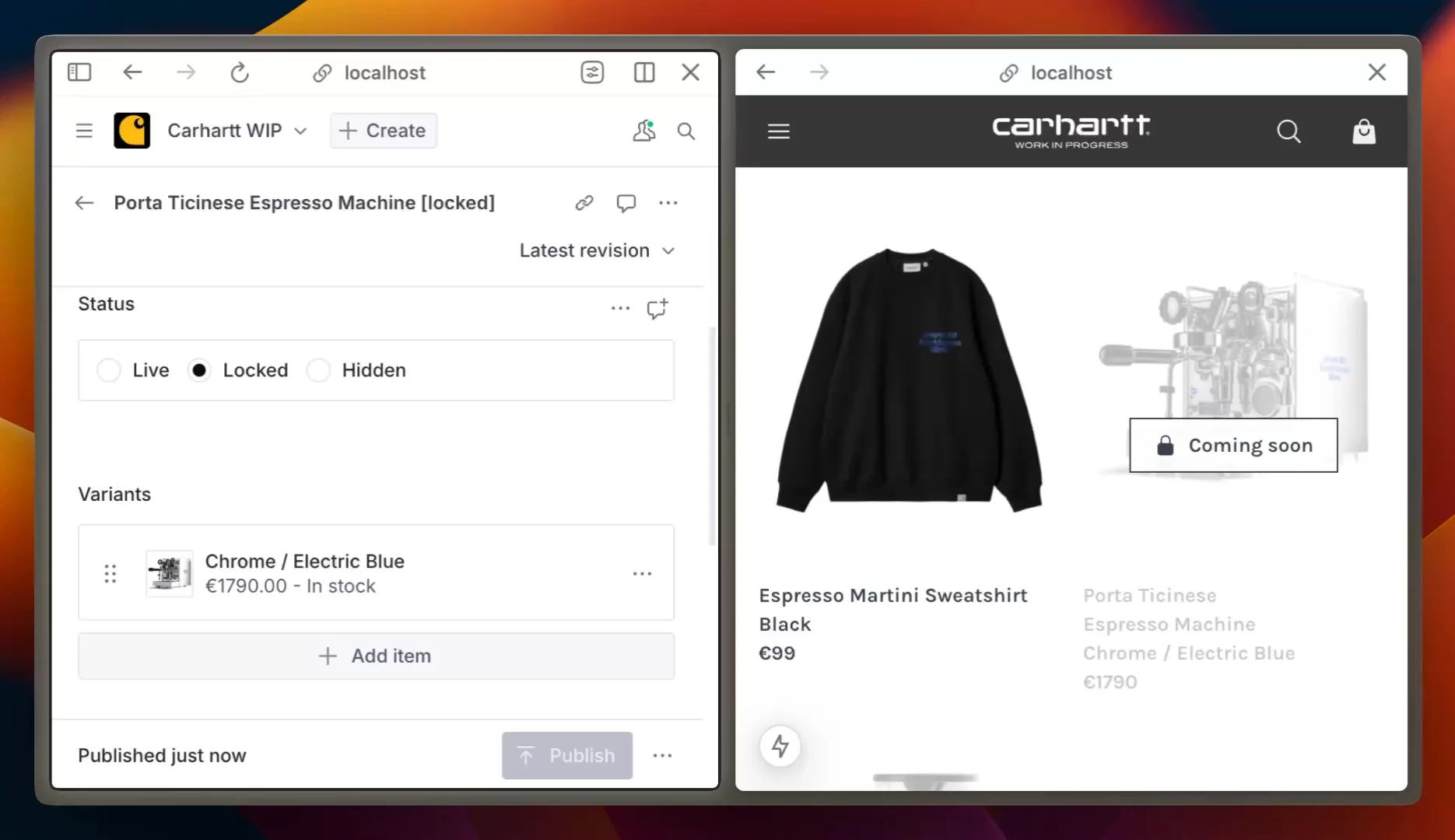
This happens without needing to refresh the page. When that last item sells during a product drop or Black Friday rush, every customer sees the accurate inventory immediately.
For limited drops and high-demand products, this difference between "almost real-time" and "actually real-time" can save thousands in customer service issues and protect your brand reputation.
Overselling can only be a byproduct of high uptime. So, let's take a step back and see how companies like SKIMS ensure issue-free Black Friday sales.
Whether it's Black Friday, Memorial Day, or your biggest product launch of the year, downtime is not an option. For eight and nine-figure e-commerce businesses, even minutes of downtime mean millions in lost sales.
Sanity handles the infrastructure so you can focus on selling. Everything is fully managed with automatic scaling and global delivery built in.
Even in a rare "internet outage" (you know the ones where AWS or GCP have an outage and affect every other service from Netflix to GitHub?), your content keeps serving from backup caches. Your site stays up while others go dark.
How it works for your team:
- Content is stored globally, close to your customers which makes things fast
- Traffic spikes are handled automatically
- No emergency calls to engineering at 3 AM
Beyond the technical safeguards, there's a human layer of support: a team of Sanity engineers and support staff monitoring and ready for any curveballs. Our monthly check-in calls are an excellent opportunity to communicate upcoming drops (among many other things).
When your platform handles the traffic without a hitch, you can focus on delivering the important things.
Remember being told to compress images before uploading? Or resize them to exact dimensions? Or create three different versions for mobile, tablet, and desktop?
Forget all that.
Upload your highest quality product shots, even those massive 26 MB files from your photo shoot. Sanity handles the optimization automatically.
SKIMS has a "best sellers" page with over 100 images, including some 20+ MB GIFs that would normally hurt page load times. But with automatic
But here's the real game-changer: focal points.
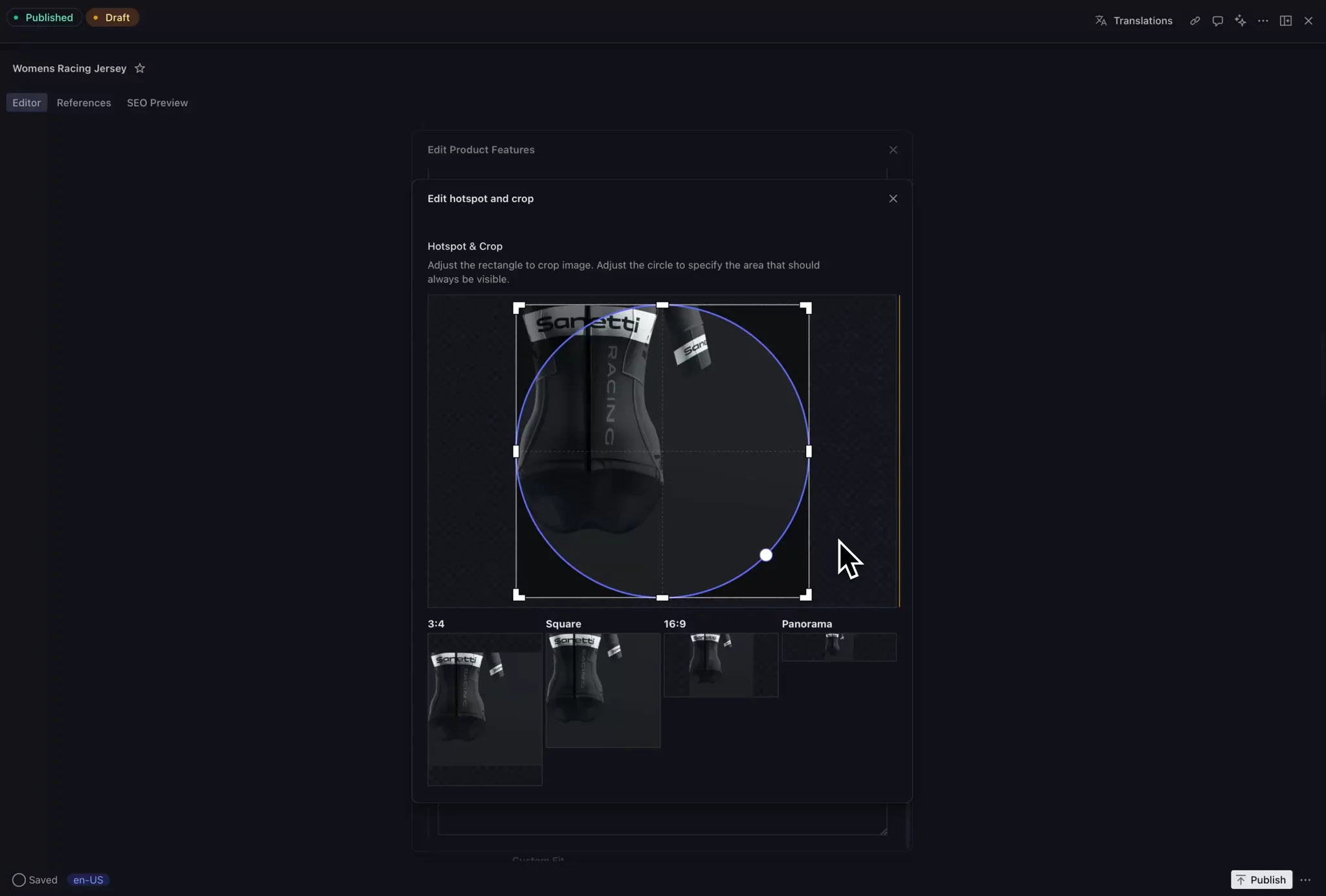
Click once on the most important part of any image, such as the model's face, the or the product detail, and that becomes the center point for all automatic crops. No more headless models in product grids or products cut in half on mobile.
Take this SKIMS example: Without focal point, a cropped product image might show just a random midsection. The buyer can't even tell what they're looking at.

With focal point set, the same crop shows the full product perfectly framed, no matter the screen size.

This single upload works everywhere including product grids, hero banners, mobile carousels, even in-store displays. One image, perfectly formatted for every surface, automatically.
Your photographers shoot. You upload. Sanity handles the rest.
Multilingual is often the Kryptonite of scale, but with AI prompts as data and the LLMs that understand your content structure, translations become a strategic advantage rather than a bottleneck.
There are a few ways to kick off translations in Sanity. If every product or document needs to be available in all languages, you can trigger translations automatically on publish. If your translation needs vary by product, the editor can choose the target languages manually.

Here's how companies develop their translation workflows:
- Determine the languages to translate to. The editor can select these, or it can happen automatically based on your desired business logic.
- Create a style guide. While optional, creating a style guide for the AI to reference is good practice. These can be saved as a document so editors can customize them.
- Execute. They can trigger on publish or other editor actions.
Sanetti didn't guess what content worked. They built a system to prove it. With structured content in Sanity and behavioral data in PostHog, they tied content decisions directly to conversion metrics.
Sanetti needed a scalable way to personalize content. Their merchandisers wanted to tailor product messaging without duplicating effort or hardcoding logic.
They added reusable personalization rules to relevant document types where they can create variants.

Each rule includes conditions (like user attributes) and a priority, turning content variants into queryable data.

Editors could now create multiple variants of a product component, each with different rules. The system queries all potential variants and selects the highest-priority match, so users see personalized content without any flashes or delays.
Sanetti tracks new tests by automatically creating experiments in PostHog on publish. PostHog is a product analytics platform that helps teams capture and analyze user interactions.
The automation:
- Extracts the rules and maps them to PostHog filters
- Creates a feature flag (experiment) in PostHog
- Updates the original Sanity document with experiment metadata
This ensures that every content decision is tracked and measurable. When users interact with personalized content, PostHog captures which variant they saw and whether they converted. This data flows back to Sanity, creating a closed loop between content creation and performance.
Sanetti modified the studio to display the conversion rates next to the content that generated them.

This lets you see what worked and adjust content directly. Testing and iteration became part of daily workflows.
Sanetti made personalization part of their content model. With Sanity, optimization became a content function, not an analytics project.
A recurring theme has been discussed, though it hasn't been explicitly said yet. Sanity provides the building blocks. These include editing interfaces, APIs, workflows, and automation capabilities that enable you to build exactly what your business needs. But unlike most custom solutions, minimal maintenance is involved. Everything runs on Sanity's infrastructure. Your team focuses on using the tools, not maintaining them.
The building blocks ensure you're not locked into rigid workflows or limited by what comes out of the box. Whether you're integrating with your PIM, DAM, ERP, or inventory systems, they ensure your tools fit how your team actually works.
Sanity's building blocks don't just support integration. They let you build systems that fit how your team actually works.
Tecovas wired their ERP (NetSuite), e-commerce platform (Shopify), asset library (Dropbox), and storefront (Hydrogen) into one system. When a product is added in NetSuite, a prefilled document appears in the studio. Merchandisers edit and publish, which triggers an update to Shopify. What used to take days now takes under 20 minutes.
I want to build tools and systems where I never have to say 'no, I can't do that.' The question becomes 'should we do that?' And if yes, we have the stack and the ability to go do it.
Kevin HarwoodCTO
This pattern runs through their stack. Dropbox assets sync directly to the studio. Shopify metafields? Replaced with structured content models. Updating 10,000 SKUs before Black Friday? Done in seconds.
The Sanity approach enabled Tecovas to:
- Move business logic from templates into flexible content models
- Replace spreadsheets with structured workflows
- Automate without owning infrastructure
- Let merchandisers manage every product without dev help
Fewer handoffs. Less maintenance. Faster launches. The system shapes to your business, not the other way around.
Most teams struggle to keep product data and content in sync. Update the price in Shopify, but forget to update the promotional banner. Change inventory levels, but the "limited stock" badge doesn't appear.
Lady Gaga's team solved this with Sanity Connect, which automatically keeps everything synchronized. Product data lives in Shopify (prices, inventory, variants), while rich content lives in Sanity (campaign copy, styling notes, media galleries).
Here's what this means for the merch team:
- When inventory changes in Shopify, it updates instantly on the site. No manual syncing, no delays, no overselling limited edition items.
- The creative team controls how products appear without touching Shopify. They can create immersive product stories, add exclusive behind-the-scenes content, and build Grammy-night shopping experiences.
Everything stays connected. Change a product price in Shopify? It flows through. Add new campaign imagery in Sanity? It appears immediately.
For the Lady Gaga team, this split makes perfect sense:
- Shopify handles what it does best: transactions, inventory, fulfillment
- Sanity handles what it does best: rich content, creative storytelling, editorial control
The customer sees one seamless experience
No more double data entry. No more sync errors. Just two systems working together, each doing what they're built for.
Not because you're more important, but because you can’t help those who rely on you if you’re out of commission.
The idea holds for your content system, too. Ultimately, content teams are the ones working in Sanity, however, in order to set them up for success, the engineers need to have what they need. Sanity enables engineers so they can enable content teams. And because engineers are so well equipped, they can do more with less.
That's exactly what's happening at Tecovas, SKIMS, Lady Gaga, and Sanetti. They scale e-commerce with small engineering teams and minimal maintenance. That bulk editing interface you've been asking for? They can build it. Those automatic translations? Done.
This isn’t about “going headless.” It’s about treating content as data and providing the primitives to customize it because no system will be perfect out of the box.
Structured content. Modular workflows. Real-time orchestration. All under your control.
If you’re still shopping for a CMS, zoom out. What you really need is a Content Operating System. If you’re shopping for an oxygen mask, it is best purchased from a well-modeled PDP.