sanity-plugin-lucide-icon-picker
A fork of the existing lucide icon picker plugin by Contentwrap with updated Sanity/Sanity UI support.
By Kodamera & Henrik Larsson
Install command
npm i @kodamera/sanity-plugin-lucide-icon-pickerSanity Lucide Icon Picker
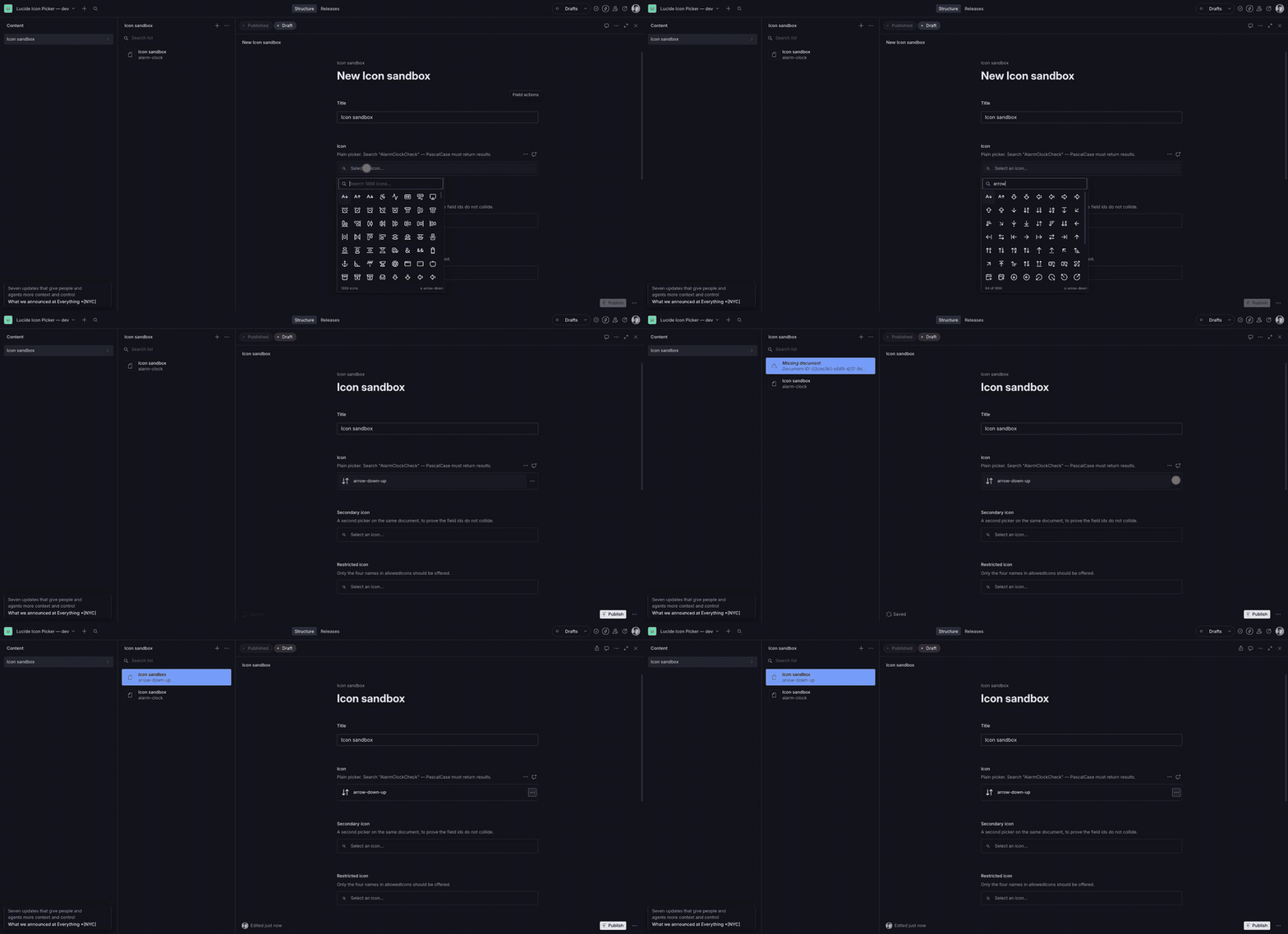
A searchable, virtualized icon picker for Sanity Studio with 1,866 Lucide icons.
Originally created by ContentWrap — this fork is maintained by Kodamera


About this fork
This is a maintained fork of
contentwrap/sanity-plugin-lucide-icon-picker,
published as @kodamera/sanity-plugin-lucide-icon-picker. The original plugin
is the work of ContentWrap; it remains MIT licensed
and their copyright is retained in LICENSE.
Why it exists. Sanity moved from @sanity/ui v3 to v4 in sanity@6.10.0,
and v4 moved Menu, MenuItem, Popover and Autocomplete out of the package
root into subpath exports (@sanity/ui/menu, @sanity/ui/popover,
@sanity/ui/autocomplete). @sanity/icons v5 did the same. The original plugin
imports all of them from the package root, so on Sanity 6.10+ it either fails to
build or silently pulls a second copy of @sanity/ui into the Studio — which
breaks layout in ways that are very hard to trace. Upstream has had no release
since August 2025.
Which version do I want?
| Your Sanity | @sanity/ui | Use |
|---|---|---|
| 3.x – 6.9 | v2 / v3 | the original sanity-plugin-lucide-icon-picker — it works fine there |
| 6.10+ | v4 | this package |
This fork targets @sanity/ui v4 only. The two cannot be supported from one
package: the subpath exports do not exist in v3, and the root exports do not
exist in v4, so no single import statement resolves on both.
Features
- 1,866 icons — the complete Lucide set, plus the 18 brand icons Lucide removed in 1.x, browsable in a virtualized grid
- Real search — matches the canonical name, the PascalCase name, deprecated aliases, and individual words, with no result cap
- Keyboard driven — arrow keys,
Home/EndandEntermove and select without leaving the search field - Accessible — a real combobox and listbox, with the field label bound to the control and unique ids per field
- Configurable — restrict a field to a specific set of icons
Installation
pnpm add @kodamera/sanity-plugin-lucide-icon-picker
# or
yarn add @kodamera/sanity-plugin-lucide-icon-picker
# or
npm install @kodamera/sanity-plugin-lucide-icon-picker
Usage
1. Add the plugin to your Sanity config:
// sanity.config.ts
import {defineConfig} from 'sanity'
import {lucideIconPicker} from '@kodamera/sanity-plugin-lucide-icon-picker'

export default defineConfig({
  // ...
  plugins: [lucideIconPicker()],
})
2. Use the lucide-icon type in your schema:
// schemas/myDocument.ts
import {defineType} from 'sanity'

export default defineType({
  name: 'myDocument',
  title: 'My Document',
  type: 'document',
  fields: [
    {
      name: 'icon',
      title: 'Icon',
      type: 'lucide-icon',
    },
    // ... other fields
  ],
})
Configuration options
Icon filtering
Limit a field to a specific set of icons:
{
  name: 'icon',
  title: 'Status icon',
  type: 'lucide-icon',
  options: {
    allowedIcons: ['circle-alert', 'circle-check', 'info', 'triangle-alert'],
  },
}
allowedIcons takes canonical Lucide names in kebab-case. Names that do not
exist are ignored rather than erroring.
Lucide removed its brand icons (
Upgrading from sanity-plugin-lucide-icon-picker
This is a drop-in replacement. The schema type name (lucide-icon), the
exports, the stored value shape and the allowedIcons option are all unchanged,
so swapping the dependency and the import is the whole migration.
- import {lucideIconPicker} from 'sanity-plugin-lucide-icon-picker'
+ import {lucideIconPicker} from '@kodamera/sanity-plugin-lucide-icon-picker'
No existing data is touched. All 1,837 distinct values the previous version could store still resolve, and the plugin never rewrites a value on read — it only writes when an editor actively picks or clears an icon. There is a test asserting the full 1,837-value coverage, so this cannot silently regress.
Two things are worth knowing:
- Values are stored under Lucide's canonical names from v2 on. If an editor
re-picks an icon whose name changed upstream, the field is rewritten
(
bar-chart2→chart-no-axes-column).DynamicIconaccepts both spellings, so frontends using it are unaffected; a frontend that hardcodes old strings should be checked. - Lucide deleted 18 brand icons in 1.x (
facebook,github,twitter,slack, …). This plugin bundles copies of them, taken from lucide-react 0.532.0 (ISC licensed), so existing documents keep rendering in the Studio and the icons remain pickable. They are frozen — Lucide will not update them — and because they no longer exist upstream,DynamicIconcannot load them. Render those few explicitly on your frontend, or swap them for an icon set that still ships brand marks.
Auditing a dataset
To see exactly what a dataset holds before upgrading:
node scripts/audit-icon-values.mjs --project <projectId> --dataset production \
  --query '*[_type == "page"]{icon, "nested": sections[].icon}'
It reads only, and reports each distinct value as ok, renamed (with what it
would become), brand, or unknown.
Frontend integration
Values are stored as Lucide's own canonical kebab-case names (arrow-right,
axis-3d, chart-no-axes-column), so they can be handed straight to
DynamicIcon:
import {DynamicIcon} from 'lucide-react/dynamic'

// `iconName` comes from your Sanity document
export default function MyComponent({iconName}) {
  return <DynamicIcon name={iconName} size={24} />
}
DynamicIcon loads each icon on demand, so only the icons you actually render
reach the browser.
The 18 brand icons Lucide removed in 1.x are the exception —
DynamicIconcannot resolve them. See Upgrading.
Performance
- Virtualized grid — only the visible rows are mounted, so the full 1,866 icons scroll smoothly and there is no result cap
- Single-pass search — each icon carries a pre-lowercased haystack of its names and aliases, so filtering is one substring test per icon and needs no debounce
- Built once — the icon set is enumerated a single time per module, not once per mounted field
One thing worth knowing: the plugin imports the Lucide set with
import * as LucideIcons and enumerates it at runtime, so the whole icon
library ends up in your Studio bundle and no bundler can tree-shake it. That
is Studio-only code and never reaches your public site. Your frontend is
unaffected — use DynamicIcon as above and it loads icons on demand.
Requirements
- Sanity Studio 6.10 or newer (
@sanity/uiv4,@sanity/iconsv5) - React 19.2 or newer
Development
A local Studio for working on the plugin lives in dev/:
pnpm install
cp dev/.env.example dev/.env   # fill in SANITY_STUDIO_PROJECT_ID
pnpm --dir dev install
pnpm dev
It links the plugin from the repository root, and its Icon sandbox document
exercises every case worth checking: two pickers on one document, allowedIcons,
a read-only field, a legacy stored value, and an unresolvable one.
pnpm lint        # oxlint
pnpm typecheck   # tsc --noEmit
pnpm test        # vitest
pnpm build       # verify-package + pkg-utils
Releasing
Publishing runs from .github/workflows/release.yml when a GitHub release is
published. It authenticates over OIDC as an npm
trusted publisher — there is no
long-lived npm token — and attaches provenance. Bump version in
package.json, tag vX.Y.Z and publish the release; the workflow refuses to
continue if the tag and package.json disagree.
Credits
The original plugin was created and open-sourced by ContentWrap, a digital product agency specializing in Sanity and modern web development. All credit for the original design and implementation is theirs.
This fork is maintained by Kodamera.
License
MIT © ContentWrap. Fork maintenance © Kodamera AB. See LICENSE.